Personally I use the app the approximate amount of 50%, as I’m constantly clicking the icon on my phone throughout the day. LinkedIn’s app makes it too easy to stay connected. I’m not complaining though; I enjoy staying connected with my network, reading articles of interest, etc.
In the aforementioned post I addressed the Home functionality of the mobile app versus the desktop. Obviously the desktop offers more functionality, but the app has become more versatile. We’ll look at the following features:
My Network
Messaging
Announcements
Jobs
Companies
The first noticeable difference between the mobile app and the desktop is that none of the features are titled on the app. But the icons are so intuitive that there’s really no need for titles, and I imagine the desktop is going to do away with the titles in the near future.
My Network
My Network on the mobile app is more difficult to navigate than on the desktop. Clicking on the icon brings you to a view of the number of your connections. You’re given the option to Add contacts, which allows you to send mass invites to your email list. Visible is recent invitations; and below it People you may know.
Note: Clicking on View of connections, you can only sort them by First name, Last name, and Recently added. However, you can’t filter your connections as well as you can with the desktop platform.
To filter your connections, you have to search for people by using the Search feature. This will bring you to a list of your first degree connections. (Inexplicably my number of connections in this view was less than the number I have upon clicking on the icon.)
The tricky part about filtering people using the mobile app is identifying the Filter icon (circled to the left).
You don’t have as much filtering capabilities with the mobile app as you do with the desktop, but you can search for:
Connections (degree of connection)
Location
Current companies
Past companies
Industries
Schools
Messaging
The most noticeable difference between the mobile app and the desktop for messaging is that the app’s version is truncated. Only by clicking on your connection’s message can you read the stream of conversation. On the desktop you can see multiple connections. But this is expected, as the desktop has a larger surface.
Both the mobile app and the desktop allow you to search by Unread, My Connections, InMail, Archived, and Blocked, albeit in a different order. (Are you getting the sense that the desktop platform is becoming more like the mobile app?)
With both mobile app and the desktop, you can respond to Inmails by choosing Interested, Maybe later, or No thanks.
This feature allows you to see what your connections have been doing:
Who’s mentioned you in a post
Liked your post, liked a post that mentions you
Is starting a new position; and
Commented on (someone’s ) post
The differences between this feature on the app and desktop are negligible and hardly worth mentioning. However, there is one major difference: the desktop seems to lag behind the mobile app. In other words, the streaming is slower on the desktop than the app.
Jobs
Perhaps the most difficult mobile app feature to navigate is Jobs.
My suggestion is to forego the suitcase icon and simply use the Search feature.
The Search feature allows you to find jobs, say in Accounting, and then narrowing them down to Location (allow your device to identify your location, if you like), and if you want to take it further, filter by:
Most relevant
Most recent
Determine how many miles you are willing to travel
Only show jobs with which you can apply Easy Apply
Date posted
Company
Experience level
Job type
Industry
Job function
When you’ve chosen the job to investigate, you’ll notice—because of the limited surface—the mobile app is not as robust as the desktop version. Some similarities are:
Number of first degree connections
Number of alumni
Job description
The person who posted the job
Jobs people also viewed
Easy Apply
What you don’t get with the phone app are:
Video of the company
Meet the team
Companies
Like the desktop, you have to use the Search to access your desired companies. The most important reason to use Companies is to locate people who work for your target companies, which is a bit more cumbersome with the mobile app than the desktop.
To do this you must type the company name into Search and choose People, and then use the Filter tool, as shown above. You can filter by:
Connections (degree)
Connections of
Locations
Current companies
Past companies (not shown)
Industries (not shown)
Schools (not shown)
The only benefit the desktop version offers is the ability to search by Keyword. The other filters are superfluous. Such as Profile language and Nonprofit interests.
In my opinion, this is the most important feature LinkedIn provides, whether on the desktop or mobile app. This is where real online networking happens. In fact, a blog post can be dedicated alone to using the Companies feature.
When you open the LinkedIn app on your smart phone, you’ll see the power, albeit limited, it has to offer. You’ll also see that the desktop version closely resembles the mobile app.
One thing I emphasize in my LinkedIn workshops is the importance of being active on LinkedIn. My mantra is, “You can have the best profile in the world, but if you’re not active, it means nothing.” In part one of this two-part article, I listed five steps to make your LinkedIn strategy a success. The conclusion of the article addresses the remaining five steps.
6. Use the Companies feature to network.The Companies feature is one of LinkedIn’s best features, as it allows you to identify valuable people in various companies. Often LinkedIn is the only way job seekers can locate important people at their target companies.
Your goal is to connect with people at desired companies (do you have a company target list?) before a job is advertised, thereby penetrating the Hidden Job Market. Play your cards right and you can set the foundation, so when the job becomes public knowledge you’re already known by the company.
Another scenario is identifying people who work in your target companies who can provide you with additional information, or even deliver you resume to the hiring manager.
Similar to using the Companies feature to network with strategic people is Find Alumni, a feature that helps you connect with people you went to school with based on criteria, such as what they studied, where they live, where they work, etc. The benefit of connecting with your alumni is obvious; people want to help their own.
7. Use the Jobs feature. LinkedIn has made strides to make the Jobs feature a player in the job board arena. It’s not succeeding as well as LinkedIn has hoped—Indeed.com and others still draw many job seekers. But increasingly more companies are using LinkedIn to advertise their jobs.
What’s nice about Jobs is that you can apply directly to a company’s website, as well as use “Easy Apply,” which allows you to send your profile to companies trying to fill positions. As well, the poster of jobs might be listed, allowing you to send an Inmail to said person.
Before you select a job, you can see first degree connections or alumni who work for companies filling positions. This gives you the opportunity to contact said people for better networking opportunities.
Note: if you are a Career premium member, you have access to information basic members don’t. You can see who your competitors are, as well as the major skills you might lack for a particular position. LinkedIn provides you with the average salary of the job for which you’re applying.
8. Endorse your connections’ skills. I never thought I’d write this, but endorsements are here to stay. The argument against endorsement is that skills can be endorsed willy nilly, without people actually seeing a person perform said skills.
Certainly this happens, but my solution to making this more viable is outlined in an article in which I encourage LinkedIn users to rearrange their skills in order to give their connections an idea of which skills they should be endorsed.
One thing we can say about endorsements is that they encourage engagement between connections. If your goal is to accumulate endorsements, you’ll have to endorse people in your network. Do this only if you have a sense for the skills you’re endorsing. Otherwise you’re supporting the argument that endorsements are meaningless.
9.Ask for and write recommendations. Your strategy should include requesting recommendations from your former supervisors and, to some extent, your colleagues. If you find that your supervisors are slow in writing your recommendation, you may want to offer some guidance in terms of what you’d like included in your recommendation, or you may even want to write it yourself.
Write recommendations for your former employees; it’s a great way to brand yourself. This shows your authority, as well as what you value in a good employee. You don’t have to be asked to write the recommendation; simply write one and send it to your former employees. They’ll appreciate your generosity very much.
10. Follow up. Always follow up. Every networking pundit will tell you that following up with new connections can be the most important piece of networking, both after personal meetings and connecting with someone on LinkedIn. Obviously it’s difficult, if not impossible, to follow up with everyone in your LinkedIn network, particularly if you’re a LION.
Keep in constant contact with your connections by responding immediately to direct messages or even responding to their updates. There’s nothing worse than starting a relationship and then dropping it like a lead balloon.
Sometimes we loose sight of our strategy and our LinkedIn campaign becomes disorganized. At this time it’s important to reign it in and adhere to the components I’ve outlined in this two-part article.
In our neighborhood no one knows which side of the street to park onwhen there’s a snowstorm, which prevents the plows from clearing the street properly. The result is a cleared path the width of fish line. My wife and I have deduced that this is because there’s no strategy in place.
What does the dire condition of my neighborhood during a snowstorm have to do with LinkedIn? Simply this, like a neighborhood without a strategy for a nor’easter, your LinkedIn campaign will not succeed.
Do you have a strategy for your LinkedIn campaign, or is it like the street I live on which requires a snowmobile to negotiate? If you lack a strategy you’ll spin your wheels, get frustrated, and possibly give up on a valuable tool that has the potential to create job opportunities. A plan includes the following:
1. Dedication. I’m a bit of a lunatic when it comes to LinkedIn. One of my colleagues once said I need an intervention and he wasn’t joking. I’m on LinkedIn for an average of one hour a day, 365 days a year—yes, this includes holidays. I’m not advising you to spend this much time on LinkedIn.
However, a dedicated strategy is necessary to stay on your connections’ minds. This is why I tell my LinkedIn workshop attendees to dedicate at least four days a week of activity, or for the more dedicated, everyday. Try to share at least two updates a day.
2. Know what you want to do. Are you zeroing in on a specific occupation in a specific industry, or are you willing to take anything? The former is the correct answer. With this in mind, you’ll be able to determine who to best network with. If your goal is to work in public relations at a university, you should connect with people at universities, not retail.
3. Write a great profile. This is a big order and a blog post itself, but having a profile that attracts employers and other visitors to your site will take a strategy. You’ll need a photo that brands you—the days of a suit and tie might be history. Write a branding titlethat immediately describes what you do, as well as your areas of strength.
Your Summaryshould tell a story, your Employment section describe quantified accomplishments, and don’t forget using the Media section to highlight your talents. A major part of your plan should be Search Engine Optimization (SEO) that includes the correct keywords to raise your profile to the top of the first page.
4. Update often. This is how you communicate with your LinkedIn community. I get looks of disbelief when I suggest to my LinkedIn workshop attendees that they update once a week. They ask me what topics they should updates about. First, I tell them, share articles they’ve found on the Internet.
Other topics can include seminars or conferences you’re attending; interviews you’ve had; advice pertinent to your industry; a great book you’re reading; a happy landing; even a good quote or two; and, of course, a reminder you’re looking for a job. Just keep it professional and refrain from negativity.
5. Connect with other LinkedIn members. No two LinkedIn members are alike; some prefer to keep their network intimate by connecting with people they know and trust, while others will connect with anyone who’s willing. My suggestion is to have a strategy and be faithful to it. Connect with those who you can help and who can help you—a lot like personal networking.
Expand your horizon. Include people in your occupation, industry, and various levels of employment. There are like-minded people in different industries, so don’t be afraid to invite them to your network. Who knows, maybe opportunities will arise from the most unlikely people.
Read part two of this article. In it I’ll discuss five other components necessary for your LinkedIn plan. You need a plan to be successful on LinkedIn.
If you enjoyed this post, please share it!
If you want to learn more about LinkedIn, visit this compilation of LinkedIn posts.
This weekend I did something I hate. Painting. I hate painting for a number of reasons, but the major reason is the breakdown of process. For example, I’m cruising along painting my picket fence, taking my time, no spills, not a drop on my person (I’m proud of this), hitting every spot; and then whamo….
Things start to hit the fan. All of the “accomplishments” I achieved for half an hour vanish, including not stepping on the top of the paint can and tracking white paint on the sidewalk. Now paint is on my hands, clothes, even my hair.
I lose focus, get sloppy, make a mess of things. That’s the breakdown of process.
If you ask some people who are starting their LinkedIn profile, they’ll express the same sentiment I have for painting—they just want to get it over with and have a profile that will help people find them. In other words, they don’t give it the attention it requires.
Do you relate to this sentiment? Here’s what you ought to do to prevent the breakdown of the LinkedIn profile process.
1. Take your time. When I set out to paint my fence I said to myself, “Bob, you’re going to take your time and do this right. It’s only a fence.”
LinkedIn is not a fence that needs painting, but there is ample opportunity for the process to break down. Following are some areas to pay attention to.
2. Get your photo done professionally. I had mine done by someone who sells one photo for $40.00. I’ve heard they come much more expensively than that. Having your photo done professionally is far better than having a relative take it with her Iphone.
I’m not saying you have to wear a three-piece suit to your photo shoot. Just make sure your photo is of quality. And no iPhone photos with you and your family on the beach or at a campground.
It’s said that a profile with a photo is at least 14x more like to be opened.
3. Think of a headline that brands you. Many people will settle for something like Marketing Professional which doesn’t do them justice.
Instead, Marketing Director | National Speaker | Author | Revenue Generator | Business Development will do a better job of branding you. Don’t rush and throw any ole Headline up there.
Ask others what they think of your Headline. Does it sell you, show your value to potential employers? This is what you need to consider.
Your Headline is the second element of your profile that brands you; your photo is the first.
4. Write a Summary worth reading. What I’ve seen hundreds of times are LinkedIn Summaries that are a rehash of a person’s résumé Summary. Will this impress anyone? Certainly not.
Instead, take your time and write a kick-ass Summary that tells a compelling story—your philosophy, areas of strength, accomplishments, future plans. This section of your profile is one of the most important ones.
Without an impactful Summary, there’s a breakdown of process.
5. Your Experience section must lower the boom. Have you ever read a résumé that said, “So what? Who cares? Big deal”? Does your LinkedIn profile’s Experience section say the same? Is it a list full of duties and lacking accomplishments?
I suggest an Employment section that states accomplishments only, or strong duty statements and accomplishments. If you’re just starting your LinkedIn profile, copy and paste your résumés Experience section to your profile, but build it from there to be more personal.
6. Show off your writing. For more than three years LinkedIn has offered the a feature which allows you to publish a post on LinkedIn. If you enjoy writing and feel you’re a good writer, show off your expertise and writing style.
To date, I have published over 149 posts on LinkedIn. Obviously I enjoy writing. You can also be featured in Pulse, providing you receive enough “Likes” and views of your posts.
Although, the standards have become tougher to be featured. Don’t be deterred from writing; what counts the most is that you’re sharing relevant information.
7. Have fun with Media. Make use of the Media feature—found in Summary, Experience, and Education—to show off PowerPoint presentations, links to your website or blog, example of your greatest photos of urban blight, or YouTube videos.
LinkedIn is making it easy to showcase your talent to make visitors want to stay on your profile. Take advantage of this. (Watch this video from one of my connections which he places in his Projects section.)
8. List your skills and amass endorsements. Like them or not, endorsements are here to stay; so you might as well list as many skills/expertise for people to click on.
My feelings about endorsements are not all favorable. I believe they are more perceived value and a way for people to engage with each other.
Your skills won’t endorse themselves, just like my wife said about the unpainted fence. But if you endorse your connections’ skills, you’ll get endorsements in return. (Read how to endorse skills properly.)
This is just the beginning. The line from Field of Dreams, “If you build it, they will come.” Is hogwash. You can build the Taj Mahal of all profiles, but if you’re not active, no one will notice.
I’m happy to say my white picket fence is finished and looking great. The process of painting broke down, much to my chagrin, but I learned valuable lessons: take it slow and focus on quality.
The words my wife told me, “It won’t paint itself” are a good lesson for writing your LinkedIn profile and putting it into action. You’re are responsible for your LinkedIn process; you alone.
If you want to learn more about LinkedIn, visit this compilation of LinkedIn posts.
Photo, Flickr, David Alston
Share this: Please share this post if you enjoyed it.
An article on Observe.com post entitled “The death of LinkedIn” caught my eye. This post spoke mostly about how business is being conducted on Facebook and no longer on LinkedIn. But I want to speak about job seekers on LinkedIn.
One claim the author makes in his article is that LinkedIn is now only populated with recruiters trolling for job seekers. Reading this article left me thinking that if LinkedIn is, in fact, where recruiters dwell, it needs to step up its game in order to make it the ultimate platform for job seekers.
1. Many recruiters I see posting on LinkedIn are posting on Facebook at a greater rate. I asked one recruiter why I haven’t seen him on LinkedIn as much, as LinkedIn is my preferred place to hang out, and he told me he sees more candidates on Facebook.
This is true. SilkRoad.com presented an alarming figure stating that more job seekers (64%) are on Facebook, while more recruiters (87%) are using LinkedIn to cull talent. Job seekers should smarten up and hang out where the recruiters are. That would be LinkedIn, by the way.
2. LinkedIn’s groups are not what they used to be. Ever since LinkedIn took away the ability to search for people in groups and communicate directly with all members, regardless of degree, participation has waned. Yes, there was spam and yes, group members complained; as a result we have now is less activity.
Groups are supposed to be platforms for conversations, as well as business transactions. But this is not happening as it was supposed to. The aforementioned article may be correct on this front when the author writes:
“Facebook groups are much more valuable nowadays for business than LinkedIn. There’s so much value and quality in conversations that it’s unbeatable.”
When LinkedIn placed Groups in the Work area—rather than making it prominent on the navigation bar—this sent a message of the unpopularity and, perhaps, death of Groups.
3. LinkedIn giveth and LinkedIn taketh. The feature that hooked me on LinkedIn was one that LinkedIn did away with around a decade ago. I’m speaking of Answers, which created a community that was asking questions and answering them. Granted not all answers were of the highest quality.
Many of the same people are turning to Quora, but the community that was created with Answers was affected by this move. Other features that have disappeared are Events, Reading List (people are still searches for a post I wrote on this feature), to name a couple.
4. You’re on your own with LinkedIn Pulse. No social media platform has the reach LinkedIn has for sharing one’s knowledge. Whether you’re in business or unemployed, you can share articles through Pulse.
LinkedIn hasn’t made efforts to dissuade its members from sharing information, but it has made reaching out to your connections more difficult.
LinkedIn once alerted your connections of every article you wrote, which gave you ultimate reach. This is no longer the case. LinkedIn made it clear that you’re responsible for marketing your own articles.
If what the aforementioned article says is true; only one percent of your connections will see your posts (based on a large network), you better do a great job of marketing your articles.
5. LinkedIn ain’t sexy; Facebook is. Facebook is emotionally charged; people might write stupid things. They post topics on politics, current events, and share photos of their vacation in Italy. There are no secrets on Facebook; people pour out their souls. But it’s all good to Facebook friends.
So why do I find myself spending approximately 50% more time on LinkedIn than I do Facebook? LinkedIn is a great source of gaining knowledge. I learn more about my industry than I do on Facebook. Nonetheless, the unspoken rule is don’t show too much personality in your LinkedIn updates.
6. LinkedIn makes job seekers pay for previous features. I haven’t paid a penny on Facebook and services have remained consistent; whereas LinkedIn requires its members to upgrade to premium accounts to recoup the features they used to have.
Case in point, with the advent of LinkedIn Lite, users must upgrade to Sales Navigator to retain Advanced Search features, tagging, and the full blown profile, among other features. This is an $80 a month investment.
I have suggested that all members pay a flat fee in order to be on the same page, and if they want high level sales or recruiter features, their companies can pay for said features. My suggestion that every LinkedIn user pay $9.99 a month is not popular; however, it would separate the true users from the ones who rarely use LinkedIn.
Good News: you can use Google to find a LinkedIn Trainer on LinkedIn. I wanted to find people in the Boston area, so I used this string:
site:linkedin.com (inurl:in OR inurl:pub) -intitle:directory -inurl:dir -inurl:jobs “greater boston area” “linkedin trainer”
LinkedIn isn’t dead
I stopped bashing Facebook in my LinkedIn workshops exactly one year and five months ago when I joined Facebook. Immediately I fell in love with it. But I also realized Facebook is a platform for a different purpose. It’s like comparing apples and oranges. So I interact differently on the two platforms.
LinkedIn has forced us to do with less, yet many LinkedIn faithful still spend more time using LinkedIn than Facebook. Some aren’t even on Facebook. I continue to use LinkedIn, because I believe it is the best way to network online.
Business to business networking, job seeking, developing relationships, disseminating and gathering information are LinkedIn’s purposes. As long as another product doesn’t come around that can promise these features, LinkedIn will stay alive.
Photo: Flickr, Coletivo Mambembe
Share this: Please share this post if you enjoyed it.
Congratulations, you are one of more than 500 million LinkedIn members. LinkedIn is touted as the most professional online networking platform. Many job seekers have used it to find jobs, while others have had no success. You don’t want to fall into the latter category.
The success of using LinkedIn depends on knowing why you’re using the networking platform and how to better use it. LinkedIn can be beneficial to your job search, but first decide if you should be using it.
You Have No Idea
You went through the easy process of securing your LinkedIn membership. Because you’re in the job hunt, a career expert told it would be the answer to your prayers. I curse the people who told you this.
If you really believe LinkedIn alone will land your next job, stop drinking the Cool Aid. LinkedIn is not the magic elixir that people might have told you it is. This is the hard truth. Now let me tell you what you have to do.
Have you seen the television program, “The Biggest Loser.” This is you. You will work harder than you’ve worked before…not to lose weight, of course. If you think I’m exaggerating, ask people who have succeeded using LinkedIn to find a job.
Here’s what you need to do: create a profile; connect with people you don’t know; and engage with said people. This is a tall order, but you can do it. The most promising thing about you is that you’re open to all advice LinkedIn authorities offer you. The question is if you’re hungry enough to do what it takes.
Please read this sequence of posts for a full explanation onhow to use LinkedIn
You’re Half-Committed
Maybe you’re a tweeny; you have an inkling of an idea of LinkedIn and are knowledgeable enough to be dangerous. You joined the last time you were out of work but neglected LinkedIn after you landed your previous job; now it’s time to get back on the horse. You have promise, though.
First things first; your profile resembles your résumé. That’s because it is. This isn’t necessarily a bad thing. I suggest to my clients that they start with their résumé as a foundation, but from there they need to turn it into more of a networking document.
The solution is to do serious work on your Branding Headline, create a Summary that reflects your passion and value, and beef up your Experience section. This is what I mean by making your profile a networking document, while still maintaining your value to potential employers.
Next, slowly reconnect with with people in your network. Slowly because you don’t want to come across as someone who needs something only when you contact someone. My kids do this. Don’t be like my kids.
Finally, you’ll become more visible by sharing updates on a regular basis. I generally suggest sharing updates two times a day, four days a week…at a minimum. For those who are a little more committed, engaging with your connections every day is your goal.
Read about the next LinkedIn member, The Pro.
You’re a Pro
You know exactly why you’re using LinkedIn. You have a solid strategy that will land you a job. You’re a pro. This post may not enlighten you, other than you are curious to see if you are on track. You are.
I know your’e a pro when I ask you how often you use LinkedIn, and what you use LinkedIn for. The answer to my first question is…you guessed it, every day. How you’re using it is to continue your lifelong networking efforts.
You are making efforts to connect with people at companies for which you want to work, which means you have a target company list. You’re making substantial connections, some of whom you have met for coffee, or at the very least talked with on the phone.
Occasionally you use the Jobs feature to apply for jobs online, but you know this isn’t the most productive way to spend time looking for work. You notice the alumni who work/ed at your target companies, so you reach out to them. You’re stoked if your fraternity brothers work at a few of your target companies. Hey, bro!
Here is a partial list of what you have in place:
A profile that effectively brands you. There’s nothing more that can be done with your profile.
Keywords that put you within the first four pages of profile searches.
More than 1,500 connections, many of whom are recruiters. Yes, it’s cool to connect with recruiters.
Engaging with your connections in a number of ways, such as sharing illuminating industry updates, writing posts on LinkedIn that brand you, asking questions that provoke thought, etc.
In industry groups, where recruiters also hang out, and starting and adding to discussions.
Most importantly, introducing your fellow job seekers to people who can be of assistance.
Coupled with your strong LinkedIn campaign and personal networking, you’re not going to be unemployed too long. Your strategy is straightforward; connect with quality LinkedIn members and create a mutually helpful relationship. As they say, you’re killing it.
Far be it from me to suggest no one joins LinkedIn. The most important thing to discover is why you’re on LinkedIn. Once you’ve determined this, you’ll have to put in the appropriate amount of effort.
You might be a beginner on LinkedInor even well versed with the platform. Either way this compilation of posts can help you use LinkedIn more effectively. Stay current by reading the most recent ones or all of them. I hope these posts help you with your job search.
The problem with public proclamations is that when you make them you have to practice what you preach, lest you be labeled a hypocrite. Case in point, I’ve stated that one should only share three to four posts a week. This means that if I’ve reached four posts by Wednesday, I’m shut off for the week. At least in my mind I am.
You have valuable content to share—be it long posts, articles, videos, or audios—but it’s not being seen and appreciated by your audience. You conclude that your efforts are being wasted. They are if all you’re doing is flooding your connections’ feeds with your content.
One viable form of content not listed in the paragraph above is comments written in response to other LinkedIn members’ posts. While you might be posting like a bandit, you’re losing half the battle if you’re not commenting on what other’s post.
Have you ever had questions about writing a resume and LinkedIn profile, networking, interviewing, or any aspect of the job search? Of course you have. Otherwise you wouldn’t be reading this article on how to find job-search content using LinkedIn.
In this article, I revisit the LinkedIn profile to discuss what was and what is. Creating a profile that brands you is the ultimate purpose of your LinkedIn profile. However, your profile alone won’t effectively accomplish this goal; you also need to create a focused network and engage with your connections.
This article addresses how you should express your greatness with your resume and LinkedIn profile. In terms of your profile, there are at least 6 areas where you an show your greatness. Make use of these areas. Don’t be shy; you have permission.
Metrics in the form of numbers, percentages, and dollars give your resume’s or LinkedIn profile’s accomplish statements power and separate you from the fold. They cause readers to take note. They complete the story. They show proof.
Based on a poll I conducted on LinkedIn, 65% of voters said metrics on your job-search documents are important to have, 25% voted “No,” and 10% stated, “It depends.” The poll is still active with 1,334 people who have voted.
Smart consumers understand the value of their time and getting the job done right. That’s why hiring a professional writer to write your job-search documents (resume and LinkedIn profile) might be the best way to go. Sixty-four percent of voters chose having someone write their documents, even some resume writers.
Most hiring authorities (recruiters, hiring managers, and HR) who read many LinkedIn profiles at a sitting will tell you that the Experience section is where they will go first when reading a LinkedIn profile. Not the About or Education sections.
There’s no debate when it comes to which document hiring authorities turn to first when evaluating you on “paper.” The resume wins this debate. For the time being. But with 78% or more recruiters looking for talent on LinkedIn, the profile comes in at a strong runner up.
Like the resume, hiring authorities (recruiters, hiring managers, and HR) want to see accomplishments on your profile. Additionally, if you don’t have a LinkedIn presence, you might not be considered for the role.
Many of my clients don’t give enough thought to helping hiring authorities find them on LinkedIn. What I mean by this is that they don’t list their contact info on their profile. Essentially, they’re hiding from the very people who could be instrumental in them landing a job.
This is the final article of a three-part series that looks at the most important sections of the LinkedIn profile, the About, Experience, and now the Headline. It’s debatable as to which is the most important of the three profile sections, but according to a poll taken on LinkedIn, the Headline is the most important.
What happens when you get 16 LinkedIn pros together to talk about creating a powerful LinkedIn profile About section? You get an variety of incredible answers. You might think all of the answers would be similar. Not so.
The previous installment of the three most notable LinkedIn profile sections addressed the About section. This installment looks at what some, particularly recruiters, consider to be the most important section, Experience. If some of you protest Experience being the most important, don’t worry. The next installment will look at the Headline.
No matter how you slice it, there are five areas you must nail on your LinkedIn profile. People’s opinions vary on the order of preference, so the best I can do is give you my take on this and why I list them in my order of preference.
In a poll I conducted a year ago, of 1,189 people who voted, 46% chose the Headline over the About and Experience sections. I was in the minority and chose About (24%). The runner up was Experience (30%)
It’s estimated that at least 60% of LinkedIn members use the mobile app. Further, a poll I conducted on LinkedIn showed that 65% of the participants use the the app more than their computer (desktop or laptop).
In this article I dive into eight major LinkedIn features on both platforms. I discuss how some of features differ between the mobile app and computer platform, so you can understand the advantages and disadvantages of using both.
Have you ever had LinkedIn fatigue? I have. It’s the time when you open LinkedIn, look at it on the screen–computer or phone–and think to yourself that now’s not the day or week to be on LinkedIn. You need a break. Read this article to confirm your feeling of LinkedIn fatigue.
LinkedIn’s Companies‘ feature is a treasure trove of information if you’re searching for people with whom to connect. It’s of more value if you have a reason to connect with said people, namely they’re on your company target list (but this is a whole article in itself).
It comes as no surprise to me that most people feel engagement is the most important component of a LinkedIn campaign. A poll conducted on LinkedIn clearly showed that almost half the voters (47%) agree.
The other two components are a branding/optimized profile, which garnered 29% of the votes and a focused network, which was narrowly beat out with 24% of the votes.
Whether you’re networking via video platform or in person, at some point LinkedIn can play a huge role in your success. I’ve witnessed this with my clients who have forged relationships with other job seekers, mentors, coaches, people in their target companies, and hiring authorities.
It’s no secret that the Recommendations section has lost the allure it once had. Why’s that? We would all agree that employers want to know more about you than what you have on your resume. They want to know how others saw your performance and personality. But how will they find your recommendations if they’ve been banished to the basement of your profile? This article will explain how.
I’ve written or critiqued hundreds of LinkedIn profiles in my role as a career coach. Whether this impresses you matters not. I only mention this to let you know I’ve seen brilliant, so-so, and downright terrible profiles. In this article I’m going to address what makes a profile terrible.
Most people have a hard time engaging with the LinkedIn community, according to a poll I’m conducting on LinkedIn. Although the poll’s only on its second day, it reveals that 42% find it difficult to engage and 21% feel it’s somewhat difficult. Only 37% have no difficulty engaging with the LinkedIn community?
When you think about what makes a winning LinkedIn Profile, what comes to mind? Is it the first impression—background image, headshot, and Headline—the About, Experience and Volunteer sections, Skills & Endorsements, or Recommendations?
When I talk with my clients about their LinkedIn profile About section, I tell them it should tell their story. But that’s too vague. There’s more to your About section than this simple statement. Another way to explain this section is that it should encompass your overall value.
I will be the first to admit that networking on LinkedIn is complex; it’s not straightforward. What does networking on LinkedIn involve? The first step is having a strategy, which will take some forethought. You also have to be willing to reach out to LinkedIn members you don’t know. These steps are the tip of the proverbial iceberg.
In a poll that that asked, “Do you have two lives? Do you separate your LinkedIn life from your Facebook life?” nearly 70% of the 7,442 voters answered Yes. What they share on LinkedIn is professional and what they share on Facebook is personal.
Seven percent of the voters said they share the same or similar content between both platforms, and 26% are AWOL from Facebook. They’ve been there, down that
What constitutes success when creating content to share on LinkedIn? One measure of success is getting many people to react and comment on your posts, videos, articles, podcasts, etc.
Some contributors say that educating their audience—e.g. on how to find a job—is the ultimate definition of success. This is an altruistic view and, some would argue, should be the goal of everyone who creates content to share on LinkedIn.
If you think your LinkedIn profile alone will get you an interview, you’re sadly mistaken. I wish it were that easy. Imagine that you could write a great profile and wait for the interview offers to roll in. Sadly, this is not the case; it takes more than just your LinkedIn profile to get to interviews
Anytime a “Top 10” list is created there is some doubt in the minds of the readers if the selection process was fair. This is why I asked a committee of eight people to choose which 10 LinkedIn profile Headlines stand out from a list of the ultimate list of 80+ LinkedIn voices job seekers should follow.
Approximately 65% of LinkedIn members use the LinkedIn mobile app, and some prefer it over the lap/desktop version, which doesn’t surprise me. In some ways I prefer the app because of its convenience and above average functionality. This article looks at other features LinkedIn users appreciate.
In these times, you might be considering a career change or, at least, shifting to another industry. How do you explain this on your #LinkedIn profile?
This guest article is from Hannah Morgan, a LinkedIn Top Voice, job-search strategist, and founder of Career Sherpa.net. Wondering what to post on LinkedIn? Hannah provides great advice on what to share with the LinkedIn community.
You’ve updated your LinkedIn profile for the one-millionth time but nada, nothing, zilch. No one is contacting you. What if I told you that having a dazzling profile is just one small part of getting found on LinkedIn.
How to write an invite to convince someone to join your network is a common topic. But what about accepting a LinkedIn user’s invite? Do you accept the default non-message? How about an invite that includes a personalized message? In this article, based on a poll I conducted, I talk about four types of invites.
I put a friend to the test by having him tell me what I had just changed in my LinkedIn profile Headline. He couldn’t tell me. Which means he didn’t know what I had for a previous Headline. Which also means it wasn’t memorable. This begs the question if the Headline is so important, shouldn’t people remember it?
Guest writer and recruiter Jeff Lipschultz is a 20+ year veteran in management, hiring, and recruiting of all types of business and technical professionals. He has worked in industries ranging from telecom to transportation to dotcom.
This guest post was written by Ed Han, a recruiter known for his excellent job-search advice. It first appeared on Job-Hunt.org. In it he talks about the three main benefits of posts, making and sharing status updates, finding your updates, making appropriate update posts, and how sharing Facebook posts is inappropriate.
If you ever wondered what LinkedIn features you missed in 2020, Kevin D. Turner has laid it out in this article (Originally published here). Kevin is all stats and to the point. To this end, you’ll learn a lot by reading what he has summed up. My favorite addition? Polls, of course. What is your favorite feature?
If you’re a job seeker and you haven’t optimized your LinkedIn profile, you’re missing out on a ton of opportunities. In today’s market, 87% of recruiters use LinkedIn to find and vet new candidates. But not everyone is capitalizing on what the platform has to offer.
In this post, Austin walks you through three highly actionable tactics that will help you appear in more searches, get more profile views, and land more jobs.
So you can’t think of any accomplishments, let alone with quantified results. The next best thing: testimonials. Perhaps using testimonials on your LinkedIn profile would be more impressive.
Like any list one creates, there’s a magic number in mind. It could be 10, 20, 30, etc. Mine was 50 LinkedIn voices job seekers should follow, but then I dug deeper in the proverbial weeds and found more than 50 voices who deserved to be on this list. And I’m sure I’ve forgotten people, so more will be added.
You might have noticed that content on LinkedIn has taken on a more personal touch. While I’ve never been a fan of this, I can understand it and even accept it…to a point. There was a time when I would write in the comments, “Take it to Facebook” when someone shared something personal. Now I simply scroll on down.
It’s never pleasant to remove someone from your LinkedIn network. But sometimes it has to happen. Like the person I mention in this article. I had to go to said person’s profile, click More, and then Remove Connection. I didn’t do it with malice. Like I said, “Sometimes it has to happen.”
There are many reasons why your photo should be more recent than ancient. In the comments of the poll, I shared an article I wrote back in 2016 called 4 ways your LinkedIn photo is an imposter. Trust me, the ways people’s photos are an imposter haven’t changed. Here is a rundown of what makes your photo an imposter:
I had this great idea to ask my students to be the teacher and teach me how to write a better profile, create a more effective network, and how to engage with my network. Some of them wrote that as the instructor, how can my LinkedIn campaign be improved. This article addresses how to have your LinkedIn campaign critiqued.
You’ve heard it before: LinkedIn is the world’s largest professional, online networking application with approximately 700 million worldwide members. And according to many sources, at least 87 percent of recruiters are sourcing for talent on LinkedIn. It makes sense to utilize LinkedIn for your online networking.
From guest writer Adrienne Tom: Earlier this year, LinkedIn rolled out a small change to personal profiles that seemingly went unnoticed: they increased the headline character count from 120 to 220. This increase may not seem significant; however, increased characters afford users (you!) additional real estate to share value and attract readers.
Occasionally I’m asked which I prefer writing or reviewing, a résumé or LinkedIn profile. To use a tired cliché, it’s like comparing apples and oranges. Read this article to discover why the résumé and LinkedIn profile are different.
Guest article from Virginia Franco. Career change is more complex now with online visibility required, particularly on the most important social network for professionals — LinkedIn. LinkedIn for career change is extra tricky because your resume and applications must align with your LinkedIn Profile because most employers and recruiters compare the two.
Like a lopsided political race, this one is a landslide. I’m talking about a LinkedIn poll asking 3,338 voters to chose between keeping either their resume or LinkedIn profile. Which one wins by 72%? Why, the LinkedIn profile, of course. I’m not at all surprised by the result.
I am particularly fond of LinkedIn’s poll feature which has been brought back from the early years. With Create a Poll, you can ask LinkedIn members to vote on certain topics like which three new features They appreciate most–Open to Work, Create a Poll, or Add Name Pronunciation? To my chagrin, Create a Poll didn’t win.
Wouldn’t you know it, the LinkedIn profile Headline is deemed more important than the About and Experience sections. In a recent poll conducted on LinkedIn, in which 1,189 people voted, 46% of the voters chose the Headline over Experience, 30%, and About, 24%.
An optimized profile is important, but it’s not the end all be all. A strong LinkedIn campaign also includes a focused network and engagement. This is clear based on a poll I conducted on LinkedIn. At the end of the poll, 787 people weighed in. I would say this is a legitimate case study.
Working for a One-Stop career center, I’m often confronted by job seekers who haven’t used LinkedIn but know they must in order to shorten their job search. Some of them believe they should begin by writing a compelling profile which makes good sense. But is a profile alone enough?
We’re in the midst of COVID-19 which has forced many of us to stay at home. To make matters worse, unemployment has risen to unprecedented levels. Now is the time to work on your LinkedIn profile, especially if it needs a lot of work.
To land a job in 2020, you will need to have a strong LinkedIn profile. And, that profile needs to clearly brand you. But is a strong, well-branded LinkedIn profile enough? According to four LinkedIn experts it isn’t.
I asked Hannah Morgan, Kevin Turner, Jessica Hernandez, and Andy Foote for their insights for the year ahead and received answers ranging from the importance of search engine optimization (SEO) to building a strong network and engaging with your network.
LinkedIn has launched a new interview-practice feature which leaves me with a sense of ambiguity. On one hand, I think it’s a great attempt to educate job seekers on how to interview for a position. On the other hand, there are limitations to this new feature.
The latest article makes a comparison between your LinkedIn profile and a combination résumé. Your About section is the functional piece of the combination résumé and the Experience section should be written with as much detail on the profile and résumé.
To land a job in 2020, more than ever, you’ll need to be proactive rather than reactive. In other words, stop blasting out job applications 10 per day. If you’ve been doing this for months, by now you know the ROI is very low.
This act of futility demands different approaches. This article explains how to be more proactive in your job search by researching and using LinkedIn.
You’ve heard of the seven deadly sins—Pride, Envy, Gluttony, Lust, Anger, Greed, Sloth. Two years ago I heard a podcast talking about them. Two years later I’m writing an article focusing on the sins you’re committing with your LinkedIn campaign.
They are not the deadly sins discussed in the podcast I listened to, but they can definitely hurt your campaign and, consequently, your job search.
All too often job seekers and business people ignore their Experience section, assuming people will know what their positions entail. Even if you’re a CEO, visitors would like more description of what you and your company have accomplished. Don’t undersell this important section of your profile.
Many people won’t look at your Accomplishments section. Many people don’t even know it exists. How do you draw people to this important area of your profile? You direct them to this area by mentioning it in your About section.
Like many people, I dislike New Year’s resolutions, mainly because we rarely achieve them. But this year I’m going to set some resolutions that are attainable. The resolutions I vow to achieve are ones that relate to LinkedIn. These are ones I can do. I also hope my resolutions will benefit other LinkedIn users, namely job seekers; that they will emulate them. The following are 10 actions I will take in 2020.
It’s safe to say I’ve critiqued or written hundreds of LinkedIn profiles. What’s most important in a profile is that it brands the LinkedIn member; it sends a clear, consistent message of the value the member will deliver to employers. Does your profile brand you?
In a recent LinkedIn Official Blog post, the author suggests you should connect “with people you know and trust.” This seems like sound advice on the surface, but it shouldn’t be followed literally. My suggestion is to take it a step further and connect with like-minded people.
Engaging on LinkedIn can be tough. It requires dedication, stretching your zone and putting yourself out there. But here’s the thing; if you don’t engage, you’ll be forgotten by your connections. In this article I coach you on how to engage on LinkedIn.
No, this is not an article for LinkedIn power users (but there are articles for those in this compilation). This article is for busy people who want to make the most of LinkedIn.
In a recent LinkedIn post, I asked my LinkedIn community to take a quiz consisting of 15 questions. Those who took it were honest about their LinkedIn prowess, or lack thereof. I promised in this post that I would reveal the entire quiz I give my clients. The quiz I give my clients consists of 50 questions. If you decide to take it and don’t score 100%, don’t worry. There is always room for improvement. I’ll be the first to admit, I don’t have a perfect score.
One of the things I like about the LinkedIn profile is the ability to express your written voice. This is particularly important for job seekers, as it gives hiring authorities an idea of their personality. The résumé, on the other hand, doesn’t do this as well as the profile.
I’ve come across thousands of job seekers who believe in the power LinkedIn provides to help them land a job. I haven’t, however, come across as many people who believe in using LinkedIn after they’ve landed. They feel that once LinkedIn has done its job, it’s time to part ways.
Why is that? Do people not see the value of LinkedIn in their work?
Unwanted sales pitches or requests to read an article can be irritating, but is it worth shaming the offender? In this article, people on LinkedIn weigh in. What do they suggest? Read to find out.
You might be in a situation where your company requires you to make your profile more about it than you. If this doesn’t settle with you, try compromising. In other words, dedicate most of your profile to your greatness and the rest to your company’s. Easy Peasy.
When you send an invite to a LinkedIn member to join your network, it’s important that you personalize the message. To do otherwise would show a lack of effort, and your invitation would probably we rejected. So what do you write in the message box when you send the invite off? This article explains how to write a cold invite, use a reference, and ask for an introduction.
If you’re searching for a job, LinkedIn can shorten your search. You’ve probably been told this, but it’s well worth repeating. Will using LinkedIn alone guarantee that you land your next gig? No; LinkedIn is a great supplement to your in-person networking, but you need to engage in both for a strong networking campaign.
LinkedIn can play an important role in your job search. You might be neglecting LinkedIn, thus hurting your chances of landing a job. Read this article to discover 8 common ways people neglect LinkedIn.
Are you wondering if you’re on LinkedIn? This article is meant for you. If you are on LinkedIn, this article will confirm your wise choice. The first thing you need to determine is if your industry is well represented.
This article stands the test of time, as I see negative posts here and there on LinkedIn. Think about how it hurts your personal brand when you show your negativity. In this article I use an analogy of a boyhood friend who was always angry. Eventually we drifted away.
Many people who know me, consider me a LinkedIn connoisseur. They would never imagine that I, in fact, enjoy Facebook. Awhile back, I decided if I were going to bash Facebook, I had to know what I was bashing. In any case, there are times when Facebook is preferable over LinkedIn. This article talks about the strengths of both.
In this popular post, I address the first 50 (approximately) first words of your Summary. Find out why they are important. This post is a good one to read after the previous one.
If you’re a college student, this post is for you. Now is the time to join LinkedIn, but use this platform to its fullest. Hard work? Sure it is. But you can do it.
Many of my clients are unaware of the Contact Info area on their profile. This is a bit disconcerting, especially since it’s an area stock full of information. Make sure you’re utilizing it, as well as checking other LinkedIn members’ Contact Info.
To endorse or not endorse? That is a question many LinkedIn users have. Are endorsements valid? Here are three reasons why you should endorse others on LinkedIn for their skills.
Writing your LinkedIn profile or revising it takes reflection. For example, think about how you want to brand yourself. Your profile is not simply your resume. And consider who your audience is.
When you’re searching for people on LinkedIn, there’s a nifty feature called All Filters. It allows you to narrow your job search to find who you need to connect with or send an Inmail. Read this post to learn about All Filters.
There’s more revealed on your profile than what your Summary, Experience, Education, and other major sections. Read this post to find out what reviewers see when they read your LinkedIn profile.
LinkedIn members can see your activity section. That’s if you have one. If you don’t have this section, you might turn people away, including hiring authorities. Don’t make this mistake. Engage on LinkedIn.
Many of my clients don’t give enough thought to helping hiring authorities find them on LinkedIn. What I mean by this is that they don’t list their contact info on their profile. Essentially, they’re hiding from the very people who could be instrumental in them landing a job.
If you want employers to know you’re unemployed, here are 5 possible ways to do it. I’ll give my opinion on which ways are not preferable and which are. Here’s a hint, leaving your last position open is the least preferable.
Although this post is written for younger LinkedIn users, the idea that you can connect with people you don’t know applies to everyone. Read the story of my daughter and the advice I give her.
I consider myself to be a fair guy. When LinkedIn does things right, I compliment them. When they do wrong, I criticize them. This time LinkedIn made a smart move by joining multiple job titles to fit under one company icon. But in the same fell swoop, LinkedIn truncating each position.
Use this checklist to improve your LinkedIn profile. This is part 1 of a 3-part series. To succeed in your LinkedIn campaign, follow these posts on creating a strong LinkedIn profile, building your network, and engaging on LinkedIn.
After a client asked me if she should send an invite to a recruiter after their first interview, it prompted me to ask recruiters who hang out on Facebook this question. Surprisingly, their answers were a definitive yes. Read what they have to say.
Recommendations were once the rave of the LinkedIn profile; some considered them the profile’s best feature. Recruiters only had to read them to see your excellence. They could make a quick decision on whether to contact you or not. This is no longer the case.
Would you go to an interview or business meeting without shoes? Of course not. So I wonder why people feel that a Summary statement on their LinkedIn profile is unnecessary. Having viewed hundreds profiles, I’ve seen many that simply begin with the Experience section and have no Summary.
I’m often asked by my clients how they can be found by recruiters on LinkedIn. That’s a great question, and contrary to what my job seekers think, optimizing your profile with keywords is not enough.
Many people think having a great LinkedIn profile is enough. Well, think again. You must also develop a targeted and large network, as well as engage with your connections. These are the three pieces to a successful LinkedIn campaign.
If you’re not paying attention to the Dashboard on your LinkedIn profile, you’re missing out on some information. Who’s viewing your profile, how many views does your latest post have, and how many people have searched for you, plus more.
The first rule is your profile background image must match your occupation/industry. Well, not really. But that’s how most people try to do it. There are five other rules you can ignore in 2018.
LinkedIn’s at it again. New changes to the top of your profile; what I call the Snapshot area. These changes are for the most part nice. Learn what they are by reading this post.
There are two rules I abide by when connecting with someone and after being accepted to someone’s network. Learn what they are and why they’re important.
It’s no longer just about completing all the sections on your profile, you need to know where to include the keywords to be better found. Read this post to learn where the keywords matter most.
Now that your profile is optimized for 2018, it’s time to optimize your network. This post helps you get the most out of your network by explaining the 5 types of connections with whom you should engage.
No one knows when LinkedIn will make changes to its functionality. Some changes are good, others make you scratch your head wondering why certain changes were made. This has been LinkedIn’s MO since its inception.
I will be the last person to say “everyone” should be on LinkedIn if they want to land a job. Although LinkedIn is important in the job search, it’s not right for everyone.
How do you connect with people on LinkedIn? And what are the five steps to take to connect properly? Learn about the feature “Connections of” and how it can be a game player when you’re asking for an introduction or making a “cold call” connection.
You’ll need to use LinkedIn when you’re looking for work, working, and while in school. This post is ideal for all LinkedIn users. Are you using LinkedIn the way you should?
In this article I compare building your LinkedIn profile to painting a fence. Great fun writing this one. But seriously, these are the major components to be concerned about.
LinkedIn members need to be aware of the LinkedIn mobile app, as it will soon surpass the use of its computer application. This is one of a three-part series that discusses the LinkedIn profile on the mobile app.
Although the LinkedIn mobile app doesn’t offer as much functionality as the desktop version, it is a powerful platform. Check out the differences between the two.
One gets the feeling that LinkedIn is migrating its desktop platform to its mobile app. Maybe not tomorrow, but gradually. The most obvious hint is the way the desktop’s interface increasingly resembles the app. We noticed this when LinkedIn launched its new, slimmed-down platform almost a year ago.
LinkedIn is not kind to people who commit certain faux pas. Shall we say the LinkedIn police are watching? Be sure not to post irrelevant information, for example. There are six more.
There are some LinkedIn principles I hold which are quite rigid. They guide me in how I interact with people on LinkedIn. You may agree with some of them, and you may think some of them are bunk.
This post highlights 10 of the most important steps you need to take to be successful on LinkedIn. Read part one for the first five steps and then part two for the final five steps.
Sharing what others write is a benefit to not only that person, but a benefit to you as well. You come across as someone who cares about your LinkedIn community. This post includes names of people who are great curators.
This is one of the more popular posts I’ve written. It addresses the way LinkedIn’s profiles have changed. Even as I’m writing this, I’m sure LinkedIn is making more changes.
It’s embarrassing to say how often I used to post on LinkedIn. I don’t post nearly as much as I used to, but I still post often. How many posts are too much?
You can’t move the Experience section on your resume, nor the Education, nor Skills and Endorsements. What effect does this have on you?
About Me
Bob McIntosh, CPRW, is a career trainer who leads more than 20 job search workshops/webinars at an urban career center, as well as critiques LinkedIn profiles and conducts mock interviews.
Job seekers and staff look to him for advice on the job search. In addition, Bob has gained a reputation as a LinkedIn authority in the community.
Recently he was awarded one of LinedIn’s Top Voices for his contributions on LinkedIn.
He started the first LinkedIn program at the Career Center of Lowell and created workshops to support the program. People from across the state attend his LinkedIn workshops.
Bob’s greatest pleasure is helping people find rewarding careers in a competitive job market. For enjoyment, he blogs at Things Career Related. Connect with Bob on LinkedInand follow him on Twitter.
Share this: Please share this post if you enjoyed it.
I estimate that I ignore 90% of invites from LinkedIn members, simply because they don’t include a personalized note. In fact, if I accepted all invites I’d probably have 10,000 connections in my LinkedIn network. This is not to brag; I’m just saying.
Why am I so adamant about people taking the time to personalize their invites? Short and simple, default invites suck.
The default invite on LinkedIn is: I’d like to add you to my professional network on LinkedIn. While it clearly states a hopeful networker’s intent, I need more. Something that tells me why we should connect.
Sending the default invite is akin to going up to someone at a networking event and saying, “Hi. What can you do for me?” It’s insincere and sends the message, “I’m inviting you to be in my network, but I could care less if you join.” Is this the type of message you want to send to a potential networker?
I believe there are three reasons why LinkedIn members don’t personalize their invites.
One, they just don’t get it. Or they haven’t been educated. I can only spread the word to the people who attend my LinkedIn workshops or read my posts. Even then some don’t get it.
Two, they’re using their phone to connect with others on LinkedIn. Although there is a way to send a personalized invite from your phone, most people don’t know how to do it. The process is very simple, so there’s no excuse.
To send an invite from your phone, go to the person’s profile, click the three vertical dots for androids or horizontal dots for iPhones, choose “Personalize invite,” write one, and hit send.
Three, they’re plain lazy. I think this is really the heart of the matter, and I hesitate to say it, especially out loud; but in essence this is what it comes down to. To me, a default invitation is a statement of want without a sign of reciprocation. And this defies the true definition of networking.
I and others, I’m sure, are more likely to accept an invite if a thoughtful note is attached to it. So what should you write if you want someone to join your network?
1. You might have something in common with whom you’re trying to connect. “Hi Susan, I’ve been following your updates and feel that we have a great deal in common. Would you accept an invitation to be in my LinkedIn network?”
2. Maybe you’re the bold type. “Hey, Bob. You and I are in career development. Ain’t that cool? Let’s link up!” I like this confidence, despite the slang.
3. You might want to take the calculated approach. “After reviewing your profile, I’m impressed with its quality and your diverse interests.” A little flattery never hurts.
4. Inviting someone to be part of your LinkedIn network is a perfect way to follow up with that person after a face-to-face meeting. “Sam, it was great meeting with you at the Friends of Kevin networking event. I looked you up on LinkedIn and thought we could stay in touch.”
5. Boost the person’s ego. “Bob, I read one of your posts and thought it was spot on. I’d like to connect with you.” Or “Jason, I saw you speak at the Tsongas Arena and what you said really resonated with me. I’d like to follow up with you.”
These are some suggestions that would entice someone like myself to accept an invite. When I’m sent an invite, I only request a personalized note—it’s not that hard, really. So rather than just hitting the Send Invitation button, take a few seconds to compose something from the heart.
Second, thank people for inviting you to their network
Is there anything worse than sending a “cold,” “lazy,” “uninviting” default message to a potential connection? Yes, it’s not thanking people who invite you to their network. Come on, this goes against what your parents taught you when you were a child.
It just makes common sense. If you receive an invitation to be part of someone’s network, reply to the sender by thanking them for being considered. It’s an honor the sender has chosen you, so show your gratitude.
In effect, this is similar to walking away from a conversation at a social gathering. Would you simply walk away from a conversation without saying, “Thank you for the conversation?” Simply do an about face and make for the door? I would hope not.
What to Write. Your note can begin with, “Thank you for the invite. And thank you for the personalized message.” And if you want to carry on the conversation, you might add, “It would be great to talk about our common interests, as we’re both in (the occupation). I’d be happy to call you at your convenience.”
Also thank your new connection for joining your network. All too often LinkedIn members invite someone to their network and then kill the momentum by not showing their gratitude.
To make professional online networking effective, you must keep the ball in play, keep the lines of communication open. Extend civility and appreciation for someone joining your network.
“Thank you for being part of my network” would suffice. Or you may add, “I invited you to be in my network because we’re both (occupation) or (interested in) and think we can be of assistance to each other.”
Personalizing your invites and saying “Thanks” are two very basic, yet important components of developing a solid relationship with your LinkedIn network. LinkedIn gives you the option to do neither. Don’t let LinkedIn let you get lazy.
It takes but a few minutes to connect with someone on LinkedIn the right way.
I often come across job seekers who need a career change. They’ve had enough of their former career and want something more rewarding. I should know the feeling, as I have changed my career three times.
The LinkedIn profile is designed much like a chronological résumé, andthere’s nothing you can do about it. The order goes: Summary, Experience, and Education. The more extraneous sections follow.
The Experience section is typically the most important one of the big three. The Summary is also important, but LinkedIn’s recent move to truncate it, as well as remove its header, leads one to believe that LinkedIn has demoted it. Wouldn’t you agree?
1. Career changers, listen up!
If you’re changing your career, your friend is not the Experience section. Rather, your friend is the Summary section, which is now truncated in the Snapshot area. It’s in the Summary where you will express your value to potential employers, not the Experience section.
This said, it’s important that the first three lines (outlined above in my Snapshot area) of your Summary entice viewers to read the rest of it. If or when LinkedIn returns to the complete Summary, this may not be as important.
2. Career changers can’t rely on the Experience section alone
Your Experience section will consist of responsibilities and accomplishments that don’t necessarily match those of your new career. You need to showcase the skills and experience that will make your transition almost seamlessly.
A typical chronological format wouldn’t work with your résumé, so why would it work with your LinkedIn profile? Presenting a chronological document would require the employer to search for your relevant skills, like a needle in a haystack.
Therefore your message needs to be delivered before the Experience section, and it needs to be delivered clearly.
3. This is where the Summary comes to the rescue
How do you show your value on LinkedIn? The answer is quite simple; you showcase your value in the Summary section, and you focus mostly on the accomplishment statements that highlight relevant transferable skills.
Take this career-changer scenario: you’ve been a public relations manager in technology for seven years but want to change to a program coordinator in the nonprofit.
The ability to make this change might seem like a leap to some, but with strong transferable skills, e.g., program coordination, communications, leadership, and outreach, you have a great chance of making this happen.
Using this career-change scenario, your Summary will include an introduction, three or more paragraphs describing your strong transferable skills, and a conclusion stating your career goals.
Intro (with strong opening statement)
THE VALUE I DELIVER
I develop programs that consistently increase participation by 80%. My enthusiasm for working with colleagues to produce results for the organization is evident by my willingness to collaborate on multiple projects.
Learn how I’ve demonstrated skills in program coordination, communications, leadership, and outreach.
Value-added body (strong transferable skills in all CAPS)
PROGRAM COORDINATION
I’ve demonstrated strong program coordination, as demonstrated by supervising events and services, including work allocation, training, and problem resolution. Further, I’ve Increased sales leads 150% from Q1 to Q4, 2016, by creating a community outreach event.
COMMUNICATIONS
My president trusted my writing abilities to the point where she stopped proofing the ghost articles I wrote. As well, I wrote press releases and spoke at trade shows with no supervision. Currently I write a blog addressing marketing strategies.
LEADERSHIP
Within two months of becoming the MARCOM writer, I was promoted to public relations manager, where I oversaw a staff of five. I also communicated directly with the director of sales in weekly meetings. I was acknowledged by the VP of marketing as a “natural born leader.”
OUTREACH
Read what the VP of Sales at XYZ, Inc said: “Tom has opened new territories that have resulted in increased sales. He is extremely adept at creating relationships with important partners, VARs, OEMs, the Media, and most importantly our customers.” Jack Jones
Conclude with career goals
CAREER GOALS
With strong transferable skills to bring to your organization, I am excited to contribute as a versatile program coordinator. I have proven experience in program coordination, communications (both written and oral), leadership, and outreach. I can be reached at (email) and (telephone number).
As a career-changer, the Summary is the most important section of your profile. Simply writing a brief Summary and relying on your Experience section will make it more difficult to help employers understand how your previous experience can be transferable to your new career.
If you want to learn more about LinkedIn, visit this compilation of LinkedIn posts.
Share this: Please share this post if you enjoyed it.
Spending as much time on LinkedIn as I do, I notice how often my network contributes. Some are consistent and strike an even balance, others do not. In this post, I’m going to address the five types of Linked contributors.
I’ve always asserted that there are three components of your LinkedIn success:
It’s the third component that can be as important as the other two. By engaging with your connections, it keeps you top of mind. I use the familiar cliche when I explain the importance of engagement by saying, “Out of sight, out of mind.”
The five types of LinkedIn contributors
1.The non-contributor. Some of you might relate to this. You were an accountant until recently laid off. While you were working, one of your colleagues—maybe your colleague—said, “Hey, you should join LinkedIn. I hear it’s important to be on it.”
So you joined, not quite sure why, and let your profile sit. You accumulated 10 connections, because these were the 10 people you knew at work. You would get invitations, which sat in your My Network queue.
Now that you’re looking for work, you have no activity to speak of. In other words you’re nonexistent. You’re not getting any hits from recruiters, have no endorsements, not getting invites, don’t know how to share an update.
2. Enough to be dangerous. If this is you, I want to say it’s almost worse than not contributing. You’re trying to do what you’ve been told by someone who was kind enough to give you advice. Perhaps your heart just isn’t into it.
Your profile is strong. There’s no problem here. In fact, you hired someone to write it for you. You were pumped when it was done. The person who wrote your profile mentioned numerous times that you have to 1) connect with ten quality connections a week and 2) engage with them.
The problem is that you are forgetting the last piece. You’re hoping that optimizing your profile with keywords will draw recruiters to you. However, optimizing your profile with keywords only works if you’re active and well connected.
You have potential, though.
3. Busting your ass to catch up. Someone managed to get it through your head that being a contributor on LinkedIn is crucial to being found. Your profile is strong and your network in good shape.
You’ve been contributing, which includes: sharing articles, mentioning industry trends, giving sage advice, asking questions, sharing news about your colleagues. All good stuff, but it’s gonna take awhile before your getting noticed like you want.
I see you on LinkedIn contributing like a fiend. I see you six times a day. I won’t say your engagement reeks of desperation, but…. Here’s the thing, there is such thing as contributing too much.
It will take time to establish yourself, so be patient.
4. Addicted to LinkedIn. This is a bad thing, but you can’t help yourself. The worst thing you did was install the LinkedIn app on your phone. Just like people who are constantly checking their Instagram or Facebook accounts, you’re opening your LinkedIn app.
In fact, you’re posting updates and answering questions while you’re waiting for your son to get out of school, your wife to get off the train, during family gatherings. Yes, you’re concealing your phone underneath the table.
What’s alarming is the number of times you’re sharing updates. Ten times a day is a possibility. Five times a day is a definite. As well, you’re following your connections on a daily basis. You feel you know them as if you met them in person.
I tell my LinkedIn workshop that at minimum they should be on LinkedIn four days a week. Their jaws drop. After pausing, I tell them that the optimum amount should be every day; yes, this includes Sunday. And I finish by telling them not to be like me.
Perhaps you should seek professional help.
5. Strike a nice balance. I’ve seen people who’ve disappeared for months, if not years, only to return with enthusiasm. This isn’t you. You are on LinkedIn almost every day. You share posts twice or three times a day. They are relevant to your LinkedIn community.
You’re also consistent in contributing on LinkedIn. People know when you will share updates and look forward to your posts. I envy you. Yes, I envy you because I am a member of the fifth type of contributor.
Keep doing what you’re doing.
Now that you’ve learned about the five types of LinkedIn contributors, which one are you? Are you barely on LinkedIn to the point where you shouldn’t bother or are you a LinkedIn addict like me. Or, do you strike a nice balance? I would love to hear your story, and I promise not to judge.
How could I judge?
If you want to learn more about LinkedIn, visit this compilation of LinkedIn posts.
Share this: Please share this post if you enjoyed it.



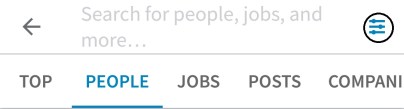

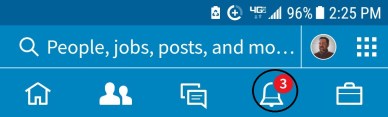 This feature allows you to see what your connections have been doing:
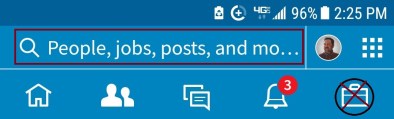 Perhaps the most difficult mobile app feature to navigate is Jobs.
 To do this you must type the company name into Search and choose People, and then use the Filter tool, as shown above. You can filter by:











 Why am I so adamant about people taking the time to personalize their invites? Short and simple, default invites suck.
 I and others, I’m sure, are more likely to accept an invite if a thoughtful note is attached to it. So what should you write if you want someone to join your network?

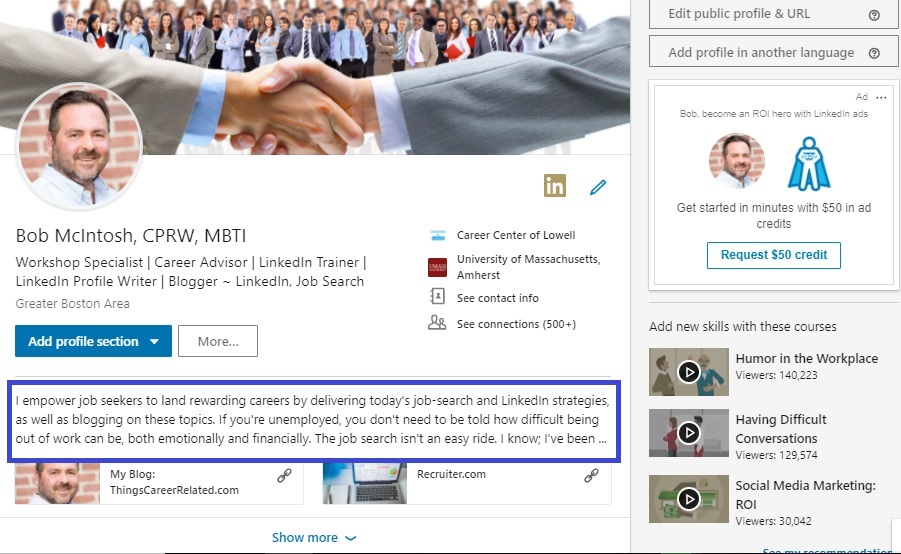



 Things Career Related