Category Archives: Career Search

How to brand yourself by connecting with others on LinkedIn: part 2

So you have a great LinkedIn profile that supports your personal brand. You have a great photo, a keyword-packed descriptive Headline, and Summary and Experience sections that really sell your talents. You’re golden.

linkedin-alone

In this three-part series we will look at the components of a LinkedIn campaign that will brand you, which include:

  1. Creating a powerful profile
  2. Connecting with the right people
  3. Engaging with your connections

Unfortunately, you only have 70 connections. This is not good because first, a paltry number of connections limits your reach and second, your small network is telling hiring authorities that you’re not embracing the purpose of LinkedIn.

In short, your low number of connections is harmful to your personal brand. You come across to others as a nonparticipant on LinkedIn. Equally important, your reach to other LinkedIn members is extremely limited. You’re essentially a nonentity.

In my workshops and during individual counseling sessions, many people ask me with whom they should connect, how they should connect with people they don’t know, and with how many people they should connect.

With Whom to Connect

When people ask this, I explain that they should look at their potential connections as a pyramid. The goal is to connect with as many second- and third-degree connections as you see fit—although third-degree connections should be the last ones with whom you connect.

Picture1

On the bottom level—the most important tier of the pyramid—are people with whom you worked, e.g., former colleagues and supervisors. I say most important because they know you and are entrenched in the industry in which you’ve worked.

The second level contains people who share the same occupation and same industry. These people are like-minded and have similar aspirations to yours.

The third level is people who share the same occupation but in different industries. So, if you’re a marketing specialist, you want to look for other marketing specialists in industries outside of your own.

The fourth level is people in other occupations but the same industry. Connecting with these people will provide you with possible entries into your target companies. Connecting with an accountant, for instance, may give you access to the hiring manager of marketing at a desired company.

The fifth level includes people in other occupations and other industries. This may seem counter-intuitive to some, but consider that the V.P. of a manufacturing company that is on your target employers list may need an accountant. You’re not a V.P., and you don’t work in manufacturing, but you are an accountant.

The last level consists of your alumni, people who are likely to connect with you because you attended the same schools at some point.

How to Connect With LinkedIn Members

There are three ways to connect with LinkedIn members. The first, and simplest way, is to use the search field. Second, you can search companies with the Companies feature. And third, search by your alumni by typing in your alma mater as a company and selecting “See Alumni.”

1. Search by title. In my LinkedIn workshop, I tell my attendees that typing an occupation title in the search field is one step toward finding people. (For example, if you’re looking for marketing specialists, you type: “marketing specialists.”)

In “Filter people by” on the right, you can select second-degree connections; location; and other criteria, such as company. (See below.)
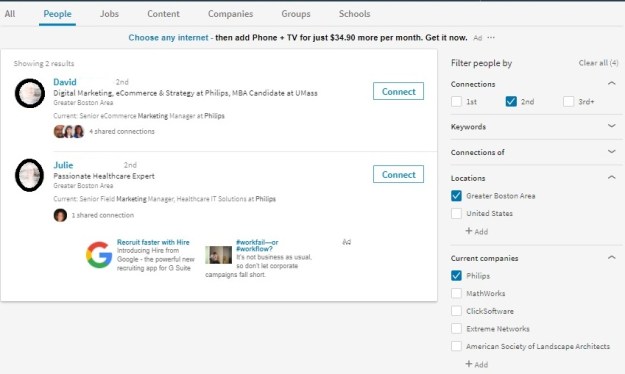
People Search, 2nd, location, company

2. See who you have in common. These are people that are first degree connections of your desired connections. You’ll see their headshots below the people who show up on your search. Click on “(number) shared connections” to see who they are.

Select one of the share connections to either write an introduction for you or mention in a “cold” invite. Read 5 Steps to connecting with LinkedIn connections for more detail.

3. Use Filter people by. LinkedIn has added a great feature since I first wrote this post, called Connections of. In this field you type in a person who has shared connections with your desired occupation. This person is someone who you feel can best provide you with an introduction or a reference in a cold invite. (See below.)
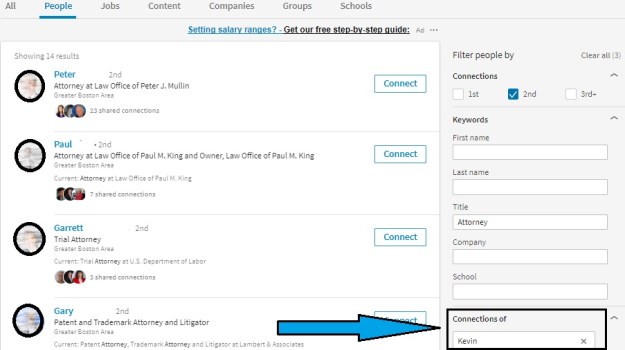
Connections of Kevin

Use See Alumni

Another way to look for valuable connections is by using the “See alumni‘ feature, which is a great way to connect with LinkedIn members who are more likely to accept your requests than mere strangers. After all, you attended the same university or high school.

find-alumni-new-linkedin

Connect with people at companies

One the best way to connect with someone is by selecting a company that you’re targeting and finding an employee at said company. This is a great way to get your foot in the door for an open position – or, better yet, to start building your networks at target companies before jobs are even advertised.

(Search for 2nd degree employees at Tufts University below.)

Company Search

Here’s where Connections of can come into play. If you have a trusted connection who is a first degree of someone with whom you’d like to connect, or send a message, you can rely on your trusted shared connection.

Note: When asking someone to connect with you, make sure your note is personal – not the default message that LinkedIn provides. That said, I’m not a fan of connecting with people by using your smartphone or trolling your email contacts and sending mass invites. I see this as lazy.

How Many People with Whom to Connect 

The answer to the age-old question – quality or quantity? – comes down to personal preference.

I personally aim for a combination of both – that is, 300 or so quality connects with people who share your interests and or goals. If you look back at the “pyramid” above, you’ll see that focusing on connections in the first three levels is a good way to achieve the quality + quantity goal.

When you build connections in this way, you solidify your brand as someone who is focused on a specific audience. You have the chance to build a tight-knit network of individuals.

On the other hand, focusing too much on quality does limit your number of connections, which means you’re limiting your access to other LinkedIn users who could be of assistance.

If you focus on quantity, you’re less selective. You may come across as having little direction and less focus on an audience. In my mind, this is not the best way to brand oneself.

Quantity does have its benefits, though – particularly if you are a business owner and want to advertise your products or services.

Finally there is the extreme strategy: the LinkedIn Open Networker (LION) strategy. LIONs are LinkedIn members who are interested in collecting as many connections as possible. They believe that more people create opportunities.


Recruiters and hiring managers will take notice of your number of connections on LinkedIn, and they’ll look to see what kinds of people you connect with.

They may even go to your connections’ profiles and by chance notice some not-so-savory things. In other words, you could be found guilty by association. Let’s say, for example, one of your connections is affiliated with someone in a controversial group. This could look bad for you.

Because you are responsible for choosing connections that support your image, you must also consider how each and every connection may affect your personal brand.

Next in this three-part series is branding yourself by engaging with your connections. Stay tuned.

If you want to learn more about LinkedIn, visit this compilation of LinkedIn posts.

How to brand yourself with the new LinkedIn profile: part 1

LinkedIn has gone through some recent changes, some of which are welcome, other that are not. Regardless of how you feel about these changes, you will have to adapt in order to be successful in your LinkedIn campaign.

linkedin-alone

In this three-part series I will talk about the components of a LinkedIn campaign that will brand you, which include:

  1. Creating a powerful profile
  2. Connecting with the right people
  3. Engaging with your connections

I will also point out the changes to the former LinkedIn that have led to the new LinkedIn Lite.

In an Entrepreneur article, author Thomas Smale stresses the importance of having an online presence: “Do you have social media profiles? If so, are they fully fleshed out with all of your information? Do they present you in the best light possible, and make you look professional? Are you using high-quality professional photography? Are you interacting with others and sharing their content?”

Change: By now most of you have the new LinkedIn user interface (UI) and have noticed that you cannot move your sections about as you were able to do with the older version. This change is disconcerting because LinkedIn has unilaterally decided how your profile is structured.

Read 5 ways LinkedIn Lite’s anchored sections are hurting its members.

As a professional, your LinkedIn profile is a critical component of your online personal brand. Let’s look at the major sections of your LinkedIn profile and how they can contribute to your brand:

Background Image

The background image is what visitors will see first. It can serve to brand you, let people know about your personality, what type of work you do, and that you actually care about your profile. The option would be using LinkedIn’s default image which is light blue and has dots connected by lines.

Change: LinkedIn used to provide its members with a selection of stock images, albeit a small selection.

Snapshot Area

I call this section the Snapshot because that’s exactly what it is: a snapshot of who you are. The Snapshot section of your LinkedIn profile includes your photo and your Headline. Failure to impress viewers in these areas will hurt your brand.

A photo that is unprofessional is an immediate turnoff. Perhaps more damaging is a non-photo. It’s believed that a profile with a photo is 14 times more likely to be read than one without a photo. Your photo is the first area of your profile that brands you.

Headlines that say things like “Seeking Employment” or “Finance Manager at Company X” are ineffective, as they fail to show value.

Rather, your Headline should be something like this: “Finance Manager at Company X | Financial Planning and Analysis | Auditing | Saving Organizations Millions.” This headline shows your value and brands you. It also adds to your keyword count.

Changes: The photo is no longer square and situated to the right; it is in the center and smaller. Therefore you need to make sure your face and shoulders are captured in your photo.

We only see a person’s current place of employment, instead of current and previous. The relationship section has been taken away; there is no longer the ability to tag your connections, among other features. 

Most notably is that the Summary section is located at the bottom of the Snapshot. More on that below.

Summary

Support your brand with a kick-ass Summary. This is where you tell your story, which can include the passion you have for your occupation, a statement about your expertise, or some talk about how you’re changing your career.

You’ll want to use close to the 2,000 characters allowed in the Summary in order to include the keywords your profile needs to boost your visibility. But your Summary must also be compelling. It should mention accomplishments that will capture the reader’s attention.

Common mistake. Failure to show creativity or your personality are huge mistakes. You should write your Summary in either first or third person point of view. Don’t simply copy the Summary from your resume for this section.

Change: As mentioned above, the Summary is now located in the Snapshot area; it no longer has its own section. Also, only the first two lines (approximately 50 words are revealed); visitors must click See more to see the full-blown Summary. Therefore, these lines must immediately sell you. I suggest a branding statement.

Read The 50 most important words in your LinkedIn Summary.

Your Articles and Activities

Don’t blink when your looking at these sections, because there’s a lot of information packed in. In “Highlights,” visitors can see mutual connections, as shown above. However, in order to see all my connections, one must click on this area and choose “All.”

A great deal of information is located under the “Posts & Activity” heading, including my articles, posts, and all activities. Articles are the ones I’ve written on LinkedIn; this is straightforward. What is not straightforward is the difference between posts and activities. As far as I can tell, they’re one and the same.

Change: Unlike in the older version, only one article is displayed. In the older version, three were displayed, which meant you had to have written at least three articles if you didn’t want to be embarrassed, but I’m sure LinkedIn’s motive here wasn’t to save you from being embarrassed.

Experience


New Expericne section2

I’m often asked by job seekers how they should address the experience section of their profile. I tell them they have two options: They can either write a section that resembles the work history found on their resume, or they can use their experience section to highlight only their most important accomplishments.

I favor the latter approach, but some think their profile might be the only document an employer sees, so they believe showing all is the way to go. What’s most important in building your brand is listing accomplishments with quantified results.

Good: Increased productivity by implementing a customer relations management (CRM) system.

Better: Initiated and implemented – before deadline – a customer relations management (CRM) system that increased productivity by 58%.

It’s a good idea to use bullets to highlight your accomplishments. One of my LinkedIn connections, Donna Serdula, has created a handy list of bullets and symbols you can copy and paste for use on your own profile.

Change: In its effort to truncate the profile, LinkedIn expands only a few of the positions. For the others, visitors must click See More. This is great news, as previously the Experience section showed in full detail only the current or most recent position.

Education

Many people neglect this section, choosing to simply list the institution they attended, the degree they received, and their date of graduation. This might be the norm for resumes, but LinkedIn gives you the opportunity to further support your brand by telling the story of your education.

Take Mary who completed her bachelor’s degree while working full-time – a major accomplishment in itself. If she wants to show off her work ethic and time management skills, she might write a description like this:

University of Massachusetts, Lowell
Mechanical Engineering, Magna Cum Laude

While working full time at Company A, I attended accelerated classes at night for six years (two years less than typically expected). I also participated as an instructor in an online tutoring program, helping first-year students with their engineering classes. I found this to be extremely rewarding.

Volunteer

Build your brand by showing visitors that you are utilizing your skills and developing new ones. It’s fine to volunteer for what I call “a good cause,” but to show people you’re serious about your occupation, you’ll volunteer at a host agency that requires your expertise.

(If you volunteer for a significant amount of time, I feel it’s fine to list this experience in your Experience section, as long as you write “Volunteer Experience” beside your job title.)

What surprises me is that this section comes before Skills and Endorsements. This section hasn’t changed much, save for the fact that visitors must expand each volunteer experience. I wonder what LinkedIn was thinking when they made this decision for me.

Featured Skills and Endorsements

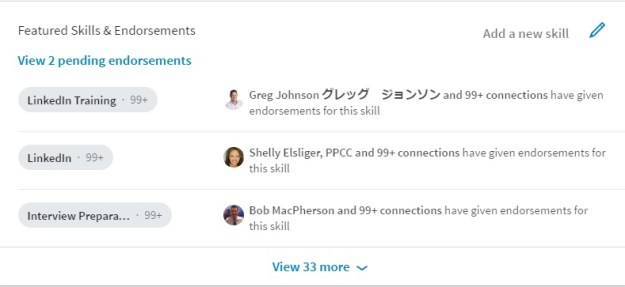
A healthy Skills section consisting of 30-50 skills is another way to strengthen your brand. The skills you decide to list should demonstrate your expertise. Do not list skills you are simply familiar with.

To further enhance your brand, the skills may be endorsed by your first-degree LinkedIn connections. If you’re unsure as to which skills to endorse, here is a previous article of mine that can help you.

Change: Now the Skills section shows only your three top skills and one person who’s endorsed you. Previously it showed your 10 top skills and more than 10 people who endorsed you. Visitors need to click View (the number) more in order to see all yours skills.

endorsements

Recommendations

This is a section I talk about in my LinkedIn workshops, and I always stress how valuable it is to receive recommendations from and write them for others. By receiving recommendations, you show the value you bring to employers. Meanwhile, writing recommendations shows your authority and what you value in workers.

Change: This has to do more with your Experience section, where previously visitors could see two people who endorsed you for a particular job. Now there are no nice miniature photos of the people who endorsed you. There is also no link that brings you directly to your Recommendations section. Oh, this also applies to Education. Bummer.

Accomplishments

Certifications, Organizations, and Projects are listed under Accomplishments. Prior, they had their own real estate, but now they’re buried under this header. And yes, they must be expanded like most sections.

Change: Do you remember painstakingly listing your professional and personal interests under Interests? Well forget it; that section has been retired, as far as I can see. Shame.

Following

This section includes your Influencers, Companies, Groups, and Schools you’re following. These used to be their own sections but have been truncated to save space.

Change: In order to see the above sections, you must click (you guessed it) See more. Unless visitors are aware of where these sections are, they will go missed. 


These are just some sections on your LinkedIn profile that contribute to supporting your strong personal brand. In the next post, I will talk about maintaining strong personal brand via connecting with others on LinkedIn. Stay tuned!

If you want to learn more about LinkedIn, visit this compilation of LinkedIn posts.

Are job seekers welcome on LinkedIn?

This is a question I’ve been asking myself since LinkedIn began to systematically remove features from its basic account and required its members to upgrade to premium accounts in order to get them back. I’m no fool in thinking that LinkedIn is a charity. But I wonder if it is slowly squeezing job seekers out of the overall picture.

dejected-person

One example of LinkedIn taking a valuable feature away from LinkedIn users is Unlimited Search. In order to have access to this valuable feature, members must pay for the Business premium account (for now), which costs $60 if bought on a monthly basis, and is of very little use to job seekers, based on the other features it offers.

But here’s the thing: the people who need this valuable feature are not only sales people who are trying to locate possible leads, or recruiters who are trying to source talent. People who also benefit from this feature are astute job seekers who are trying to locate connections at their desired companies, or optimize their profile.

This said, weekly unemployment benefits range from $235 (Mississippi) to $747 (Massachusetts) . On the minds of people out of work is how to pay important bills like their mortgage, college tuition, groceries, car payments, etc. So once the bills are paid, the likelihood of shelling out $60 a month is nil. In fact, it might put them in debt.

(Even for many people who are gainfully employed, the chances of paying $60 a month for the features, that were once free, is a stretch.)

The least expensive premium account (for now)  is called Career. It costs $30 a month. It doesn’t offer Unlimited Searches, but job seekers can benefit from direct communication with recruiters, access to Lynda.com, and candidate statistics. Oh, let me not forget, people who’ve viewed your profile in the last 90 days is also a feature.

Although half the cost of Business premium, the job seekers with whom I speak say this package is also too expensive for them as they’re struggling to live on their unemployment benefits.

So what are most job seekers left with? The basic plan. And according to my valued colleague, Marc Miller, this free plan is dead or slowly dying. I, like many of my fellow LinkedIn instructors, don’t want to see this happen.

A Possible Solution

Now, I’m not one to raise a complaint without providing a solution. To do that would be unfair to LinkedIn’s decision makers. So here’s my solution.

I’m currently paying $9.99 a month  for a health club membership I’m not using. Although I haven’t ended the membership, I barely feel the cost, unless I look at my expenses online. I would NOT feel the expense if LinkedIn were to charge me the same fee, as long as I get rid of the $9.99 monkey on my back (health club membership fee.

Job seekers would feel the expense of $9.99 a month, but if they are serious about using LinkedIn to find a job would most likely cough it up. They would have to give up two trips to Starbucks.

The first part of my solution is to charge all LinkedIn members $9.99 a month. With millions of loyal LinkedIn members paying $120 a year, that’s some serious cash for LinkedIn. Features that job seekers need, Unlimited Search, job statistics, and a limited number InMails to recruiters would be available to everyone.

Business people could opt to upgrade to the Sales Navigator premium account (currently $80 a month) that offers features required for business success, which include 20 InMails, Sales Insights, Advanced Search with Lead Builder, Who’s Viewed Your Profile, Unlimited People Search, and tagging. In other words, features serious salespeople would benefit from.

Another positive outcome from charging a $9.99 fee would be a lot of dead wood leaving LinkedIn. This might result in 100 million non-users closing their accounts. But the remaining members would be quality users generating leads, partnerships, and ultimately sales. As well, job seekers serious about their search would pay the fee.

I’m not a mathematician, but a rough estimate of the revenue LinkedIn could bring in at 300 million legitimate members is $3 billion a month, $36 billion a year. Throw in what corporations are spending on the Recruiter Lite and Corporation Recruiter premium accounts, LinkedIn is still making serious cash.

LinkedIn’s Response

As one of my connections told me, “LinkedIn is trying to profit from its product. Can we blame them?” Of course not. No business is in it to give money away. Eventually LinkedIn would like to see the majority of its members paying $80 a month for its Sales Navigaror premium account.

Of course many LinkedIn users will remain basic users, some will upgrade to a lesser-priced account, and a select few will opt for the $80 package. Another zinger LinkedIn has delivered is that faithful LinkedIn members must purchase the Sales package to continue to receive a Advanced Searches, a feature they haven’t had to pay for for 14 years.

Job seekers would find the Sales premium account impossible to manage and really have no need for the features the Sales premium provides, except for Unlimited People Searches.

Conclusion

LinkedIn’s goal is to create a unique clientele base that can afford the steep price of $80.00 a month, which leaves job seekers out of the picture. The company may argue that job seekers can still use the basic or Career accounts. But already the all-important Unlimited Searches has been stripped from job seekers, forcing them to upgrade to a $60 premium account they can’t afford.

What it means to people like me, who teach LinkedIn to job seekers in a nonprofit agency, is that we will lose our clientele. We’ll have to adapt and train LinkedIn users who can afford the outrageous price of Sales premium account.

For recruiters it means they’ll lose many job seekers to source for jobs they need to fill. They might be more successful looking on Facebook and Twitter for job seekers.


As mentioned earlier, LinkedIn was developed to help businesses better network with other businesses. LinkedIn’s proud statement that the average member makes over $100k indicates that LinkedIn is not dedicated to help job seekers.

However, LinkedIn doesn’t have to give up its vision of having the majority of its members purchase the Sales Navigator premium account. I’ve heard from many people in the business sectors who are pumped to use the benefits of this account, even though it costs $80.00 a month.

Photo, Flickr, Peter Grifoni

9 facts about LinkedIn lite profile vs. the LinkedIn profile we knew

At this point I count roughly 10 posts and a few videos explaining the differences between the old (or for some, current) user interface (UI) and the new and improved one. I hope this isn’t the 11th post you’ve seen on this topic.

change2

Having played with the new UI—no I don’t have it—there are some very nice features and some disappointments. For this post, I’m going to focus on the profile.

My first thought is, be careful what you wish for. One nice thing about the new profile is it is slimmed down and more visual. However, it will take a learning curve for some to find the various sections of the new profile. Let’s start at the top.

1. The Summary

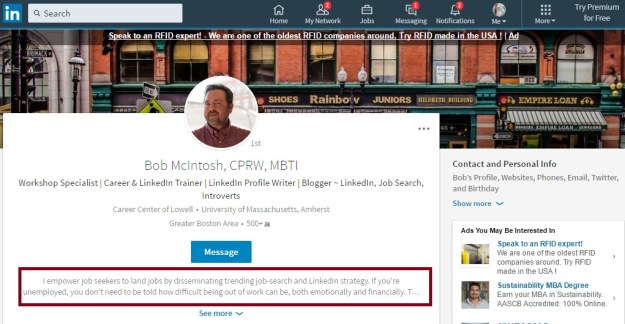
new-snapshot-areaI was warned ahead of time that the Summary section of the new profile is no longer titled Summary. In fact it’s not in the body of the profile; rather it’s in the Snapshot area (photo above, boxed in red), and…a visitor can only see the first two lines of it. Therefore, it’s important that you utilize these two lines to grab the reader’s interest.

Read The 39 most important words in your LinkedIn Summary*

My only concern here is that visitors won’t realize that they need to click “See more” in order to…see more. Get used to clicking “see more,” as LinkedIn has done its best to condense the profile as much as it could.

I heard there was talk about removing the Rich Media areas (under Summary, in Experience and Education), but LinkedIn held off on that silly idea. Rich Media is still there.

2. What About Those Three Dots and Contact and Personal Information?

new-information

The Three Dots. The placement of actions like removing connections, unfollowing, requesting and writing recommendations will take some time for recipients of the new UI to get used to, but the information is nicely placed.

Note: your profile only shows the top two commands. To remove a connection, request a recommendation, etc. you must go to that person’s profile.

The same applies to the Contact and Personal Info section which drops down to reveal the information visitors would see if they choose the Info tab on the older version. Unfortunately the public URL for someone is located in this area, instead of in plain view just below one’s photo.

3. Highlights and Posts and Activities

new-highlights-and-activities

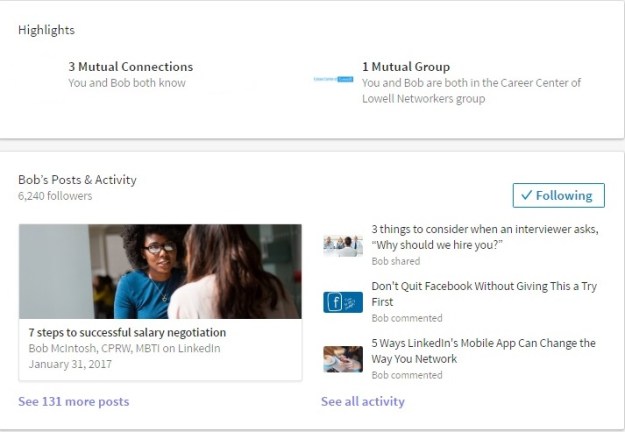
Don’t blink when you near these sections because there’s a lot of information packed into these sections. In Highlights visitors can see our mutual connections, as shown. However, in order to see all my connections, one must click on this area and choose “All.”

Bob’s Posts & Activities. This is where a great deal of information is located, including my articles, posts, and all activities. Articles are ones I’ve written on LinkedIn; this is straight forward. What is not straight forward is the difference between posts and activities. As far as I can tell, they’re one in the same.

Note: Unlike the older version, only one article is displayed. In the older version, three were displayed, which meant you had to have at least three written on order not to be embarrassed, but I’m sure LinkedIn’s motive behind this wasn’t to save you from embarrassment.

4. The Experience Section

UPDATE

How often does LinkedIn reverse its decisions? Not often is the answer.

The good news is that LinkedIn has reversed it’s decision of showing only the first position in its entirety and truncating the previous ones. On May 26th, 2017, I noticed that LinkedIn corrected this faux pad. Now we can see most of the positions expanded.

This is great news, as visitors to your profile might not have known that they had to click “See More” in order to see your other positions.

Read this article to see my approval of this “change-back.”

5. Pause

Have you noticed that I’m talking about the new profile in a specific order, e.g. Summary followed by Experience. With the new profile, you cannot move the sections around.

This is a problem for me, because I prefer to follow my Summary with my Skills and Endorsements. I also have a problem with authority, and this is a total power play by LinkedIn, in my opinion.

Note: When I asked LinkedIn why it prevents its members from moving their profile sections, they said the way it’s structured is the way recruiters prefer it.

6. Education

Not much to report here. Because this section can’t be moved, this may cause a problem for students and recent grads.

7. Volunteer Experience

What surprises me is that this section comes before Skills and Endorsements. This section hasn’t changed much, save for the fact that visitors must expand each volunteer experience. I wonder what LinkedIn was thinking when they made this decision for me.

8. Featured Skills and Endorsements & Recommendations

new-skills-and-recommendations-section

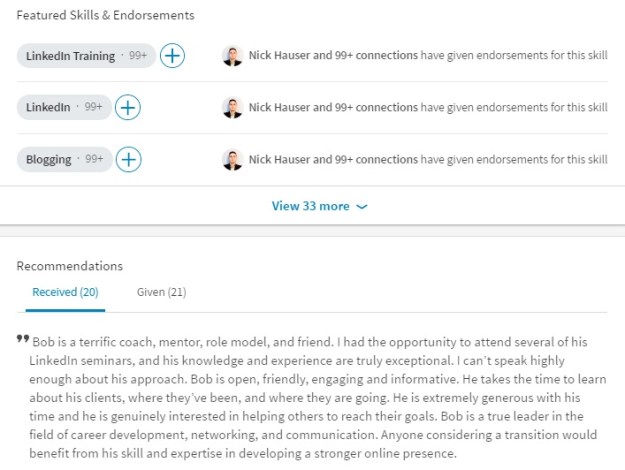
Finally we see the skills and recommendations. First, visitors notice that only the top three skills are displayed. Secondly, only one endorser is displayed, whereas with the older UI, at least ten endorsers were displayed. This is not detrimental. In fact it can be seen as a positive when we’re talking about slimming down the profile.

What I find very promising is that Recommendations are just below Featured Skills and Endorsements. This is significant because in the older version, Recommendations was anchored at the bottom of the profile, giving me and others the feeling that perhaps this section was on its way out. At the very least, it was given less prestige; much like skills are given now.

One of my valued LinkedIn connections, Rich Grant, points out that in the older UI we were able to see from which companies the recommendations came. Further, in the Experience section recommendation givers were displayed with a link to the recommendation section for said people.

9. The Rest

Certifications, Organizations, and Projects are listed under Accomplishments. Prior, they had their own real estate, but now they’re buried under this header. And yes, they must be expanded like most sections.

Do you remember painstakingly listing your professional and personal interests under Interests? Well forget it; that section has been retired, as far as I can see. Shame.

Following includes my activities and interests. This is redundant information because visitors will see the section called Bob’s Posts & Activity directly below my Highlights section.

It makes sense that LinkedIn shows the influencers, companies, groups, and schools I’m following, all of which visitors must expand in order to see more of each.


Is Less Better?

I think you’ll agree when you receive the new UI that in some cases less is better. However, the inability to move sections around as you once had the ability to do; and making you have to expand most sections, including the Summary–you might find the older version more to your liking. Or you might appreciate the lighter version of your new profile. The jury is still out for me.

If you want to learn more about LinkedIn, visit this compilation of LinkedIn posts.
Photo: Flickr, Eva Woo

3 things to consider when an interviewer asks, “Why should we hire you?”

For many job seekers, “Why should we hire you?” is one of the most difficult interview questions to answer. Don’t take it from me – take it from my clients, who list this as one of the hardest questions presented by interviewers.

group-interview-2

I understand their concerns. To answer this question, you have to articulate what the interviewer is trying to ascertain. In addition, you have to make your answer relevant to the job at hand and demonstrate the value you’ll bring to the company.

In other words, you can’t use a canned answer for every employer with whom you interview.

The secret to answering this question is that you must address the three things employers look for in their employees. The first is that you can do the job, the second is that you will do the job, and the third is that you will fit in.

1. You Can Do the Job

Having the technical know-how is essential to performing the job and advancing in your career. That includes software and hardware proficiency, specialized knowledge, etc. However, transferable skills can be just as important, if not more important.

It’s imperative that you understand the job extremely well and can address the technical and transferable skills. You do not have to address every single skill in your answer, as that will take too long. Begin your answer with something similar to the following:

“I have a thorough understanding of the role and am confident I can meet the challenges it presents. For example, you require excellent leadership abilities, which I’ve demonstrated in every position I’ve had. You also need someone who can improve the visibility of your organization …”

You can cite additional examples. Just don’t belabor the point.

2. You Will Do the Job

The interview will also want to know if you’re in love with the responsibilities of the role and the mission of the organization. Will you work until the job is finished? Will you overcome obstacles?

Why you want to work for the company is another concern they’ll have. I tell my clients that no company wants someone who’s just looking for any job they can get.

Here’s an example of how you might address your motivation to do the job:

“This position presents an exciting opportunity to take on new challenges that I will embrace. I’ve always stood up to obstacles and worked to overcome them. In addition, I’ve researched this organization and am truly impressed with the product you produce and your mission of helping special groups.”

3. You Will Fit In

Whether or not you’ll be a good fit is a major concern many employers have, and it’s also a tough thing for you to prove. It’s all about your personality. A company doesn’t want to hire someone it will have to let go because the hire couldn’t get along with their coworkers.

Of the three components employers look for in their employees, this might be the most important. There are plenty of talented people out there who can hit the ground running, but not everyone can play well with their colleagues.

Your fit is difficult to prove without data or good recommendations from your references, but try to provide as much hard proof as possible:

“In my performance reviews, I’ve always scored high on interpersonal skills. I know the clients you serve; it will require excellent teamwork in order to serve them effectively. If you ask my former colleagues and supervisors, I’m sure they’ll tell you how I’ve pitched in when needed and without being asked.”


Tying It All Together

Explain how you’ll exceed the employer’s needs based not only on being able to meet the three major components, but also by emphasizing how you will be integral to the success of the company. Going into the interview, know how important your role to the organization is:

“The next marketing specialist you hire will be crucial in creating a strong presence in the direct community and beyond. I can assure you, based on my experience with doing this, I am your person. This is ultimately why you should hire me.”

Learn how to answer other tough questions like:

“What is your greatest weakness?”
“Tell me about yourself.”

This post originally appeared in recruiter.com.

Photo: Flickr, Enri Endrian

5 ways a successful job search counts on how you treat people

I tell my daughter, who is often late for appointments, that life is about minutes. The first time I told her this was when she missed a train into Boston by a few minutes. Not just when catching a train, I went on to explain; but when you have an appointment of any kind.

SONY DSC

The message I delivered to my daughter particularly applies to the job search. Here are five notable examples of how a successful job search counts on how you treat people :

1. Be punctual. When I think about the conversation with my daughter about how minutes matter in life, I think that not only is it important to be punctual when you need to make a train. Punctuality is also important when you’ve made arrangements to meet fellow networkers or potential decision makers.

Especially when you’re scheduled for an interview that will determine whether you get the job or not. Or if you’re meeting someone at a coffee shop for a networking meeting. You don’t want to keep people waiting.

2. First impressions count. You might be rolling your eyes at this well-known fact, but I’m talking about internalizing and embracing this. Yes, you can practice how to shake hands, maintain eye contact, dress for the occasion; but this is something you must do every day.

Think beyond the interview if you want to conduct a successful job search. Your first impressions must be outstanding during networking events, while you’re connecting in your community, even at family gatherings.  If practicing your first impressions is what you have to do, then practice them every day.

3. The way you communicate matters in all forms. Of course your written and verbal communications—which includes your resume, networking, and the interview—are important. But communicating effectively also includes listening and not over-talking.

Over-talking you wonder. Is it even a word? Treating someone with respect means allowing them to do some of the talking, at least. I’ve been to too many networking events where someone feels the need to dominate the conversation. Telling me what they do doesn’t require them to talk without coming up for air.

4. Think of others in your network. One of my favorite posts I wrote is 5 ways to give when you’re networking for a job. This isn’t one of my favorite posts because it garnered many views; it’s a favorite because it talks about the importance of giving back in the job search.

True networkers don’t think only of themselves; they think of others as well. Treat others well by reciprocating when someone does a favor for you. But you don’t need to wait for someone to help you first. Turn the table by doing something helpful to other job seekers. Offer advice on their resume or LinkedIn profile or provide a lead, of offer great advice.

5. Meet your stakeholder’s expectations. This raises the question, who are your stakeholders? The most obvious one is a potential employer. Meet their expectations by networking yourself into becoming a referral. Submit a resume that speaks to the their needs and backs up your claims with accomplishment statements. Go to the interview prepared by having done your research.

Other stakeholders include your network. Related to the previous way to treat others well in your job search, consider ways to reach out to various stakeholders like the community in which you live. For example, when you have time, shovel your neighbors driveway, or help them move furniture. Help them help you by giving them a clear understanding of what you do and what your goals are.

Consider volunteering at a nonprofit that can use your talent. One example would be developing a website for your son’s preschool.Take over the bookkeeping for a start-up. Offering your marketing assistance to a restaurant that is suffering.


The success of your job search will depend on how you treat other people, whether they’re other job seekers; your neighbors; and, of course, potential employers. It comes down to more than just being punctual, you must heed your first impressions, communicate properly, treat your network well, and satisfy your stakeholders. When all of this comes into place, your chances of landing a job will be greater.

4 things to keep in mind when answering “What is your greatest weakness?”

A conversation I had in the past with my daughter aroused in me emotions of both concern and relief. Yes, two conflicting emotions, but the feeling that stays with me is the feeling of relief.

Job interview

Relief because she was truthful about her faux pas, her display of bad judgement. All was forgiven, although not forgotten.

“This is what the truth accomplishes,” I told her.

This is what you get when you ask your kids to be honest, regardless of the response. But is the truth always the best policy?

That depends.

What Is Your Greatest Weaknesses?

What interviewers get from candidates in response to this interview question aren’t always honest answers. Candidates are guarded, weighing every word they say; because they feel one wrong answer can blow the deal.

For this reason, I think this is the dumbest interview question ever. Nonetheless, I ask my workshop attendees this dumb question, because I know they will be asked it in an interview.

So when I spring the question on my workshop attendees, I often get a moment of silence. Their minds are working like crazy to come up with the correct answer. They think the best answer is one that demonstrates a strength disguised as a weakness.

So they come up with answers like, “I work too hard,” or worse yet, “I’m a perfectionist.” I tell them these answers rank high on the B.S. scale, at which they laugh. But it’s true. These answers are predictable. They’re throwaway answers, wasted breath.

Instead, I advise my workshop attendees to follow these simple steps.

1. Keep It Very Short: I can’t tell you how many people talk on and on when their answer should be no longer than 20-30 seconds.

2. State a Legitimate Weakness: Interviewers want transparency. They also want to see self-awareness – that you’re aware of your mistakes. People who think they’re flawless are unable to see their mistakes, learn from them, and correct them.

3. Be Smart, Though: I asked at the beginning if honesty is always the best policy. The real question is, how honest should you be? In other words, don’t mention a weakness that is vital to the position at hand.

For example, bringing up your fear of public speaking when you’re applying for a training position would be a major problem and probably eliminate you from consideration.

4. Talk About What You’re Doing to Address Your WeaknessThis is of great interest to the interviewer, and something people tend to leave out of their answers.

shadowReturning to the training position example: If you were to say that you tend to talk too much during your presentations, but that you have learned to ask more questions to generate engagement, that would be an answer that is honest and shows your efforts to correct your weakness.

People Make Mistakes

Smart interviewers understand that candidates make mistakes. No one is flawless. They don’t want to hear you dance around this question. It’s a waste of their time and just makes you look silly.

Furthermore, interviewers want to hear self-awareness. They want to be sure that you know what your weaknesses are and are doing something to correct them. Self-awareness speaks to your emotional intelligence (EQ), which is necessary if you want to succeed in the workplace.

Lynda Spiegel, a job coach who has interviewed hundreds of candidates, believes transparency is the best policy:

“There’s nothing to be gained by candidates trying to bluff their weaknesses. To act as though a strength is a weakness (“I can’t seem to turn off my work email when on vacation”) is disingenuous, and to claim that there are no weaknesses lacks credibility. The best way for candidates to approach questions about their weaknesses is to acknowledge one or two, explain what they’ve done to address them, and then move on to their strengths.”

The weakness question is one I consider to be … well, dumb. It lacks creativity and doesn’t address the requirements of the position. But it’s also a question everyone should be able to answer before they get to the interview.

To Review:

  1. Keep your answer short.
  2. Be honest, but not too honest.
  3. Explain what you’ve learned from your weakness and the measures you’re taking to correct it.
  4. Practice your answer before arriving at the interview.

Back to My Daughter

I appreciated my daughter’s transparency and, as a result, I now trust her more than I would have if she hadn’t told the truth. In addition, I understand she’ll make mistakes in the future.

This is not too different from the reaction an interviewer will have when a job candidate shows transparency. Interviewers trust candidates more when those candidates are honest (to a point).


Now read how to answer other tough questions:

“Why should we hire you?”
“Tell me about yourself.”

4 facts about introverts at parties

Recently I went to an acquaintance’s birthday party. When my wife and I agreed to go, I was psyched to have an evening out without kids. It would also be nice to catch up with people I hadn’t seen for a long time. This was two weeks before the night of the party.

party

But as the night approached, I became anxious, thinking about how uncomfortable it would be to be surrounded by 30 or so people, most of whom I didn’t know. This feeling persisted throughout the day and I seriously considered telling my wife I wasn’t going to attend.

But the day of the party, my wife told me she didn’t want to stay too long because she wasn’t feeling too well. Ah excellent; an exit plan. This is one fact about introverts at parties.

1. Entering a room full of strangers and having to introduce themselves to these people makes introverts uncomfortable. They would rather enter a room with people they know well.

It was no different for me when my wife and I found ourselves in a room full of strangers. So immediately I looked for people I knew. None were present for the first, long ten minutes. here did the host say the beer was we wondered out loud.

At this point If I had the option to leave, I would have. But my wife, who is an extravert, is not the leaving kind; so I scanned the room looking for a familiar face, any familiar face. Alas a good friend entered the room. We made eye contact and she headed our way.

two people talking2. Finding allies will make acclimating to the party more bearable for introverts. Once they’re comfortable, they see promise in the party.

Soon after our friend arrived and I was more relaxed, I noticed another person I recognized and someone with whom I had somethings in common. I excused myself and made my way over to this person.

I had found an ally to associate with; not a large group to join and exchange stories or one-up each other with witty remarks. We settled comfortably on a couch to talk about my trip to Wisconsin and his work.

3. Deeper conversations, is the introvert’s preference while their counterpart prefers broader, more varied discussions. It’s how we roll.

The conversation with my ally turned into something philosophical about the economical ramifications soccer has on the world. We talked on and on for what seemed like hours.

My wife freed herself to check on me (her introvert) to see if I was having a good time. The look of reflection and concentration on my face—and the fact that my ally and I weren’t talking at the moment—must have worried her, but I assured her things were great. (Introverts are comfortable with moments of silence.)

4. Leaving when it’s time is important to introverts. They don’t like to close the bar…unless they’re having a great time. Generally introverts prefer leaving earlier than others. It’s a matter of energy level.

So when my wife asked me if I was ready to leave, I feigned disappointment before telling her I was ready. At the moment I was engaged in a superficial conversation. Time had escaped me—it was now 11:30 pm—and I was happy that I didn’t get the 10:00 pm itch.

In the car my wife remarked that she and I hadn’t seen each other all night, which to me was fine. She could fill me in on all the gossip. We both agreed that the party was a success. She was able to catch up with her many friends, and I enjoyed the solitary, in-depth conversations I engaged in.


Not all parties go as smashingly as this one had. Perhaps the stars were aligned, but I was simply happy that I left the party more energized than when I had arrived. Plus, I had a few great conversations. And that’s all I really needed.

My 9 LinkedIn failures for 2017

Some of my colleagues and I are participating in The Biggest Loser contest. You know the concept; the person who loses the most weight wins. I’m gonna lose. I’m still eating cereal at night and large roast beef subs, instead of small ones.

new-year-resolutionAccording to an article in U.S. News Health, 80% of New Years resolutions will fail. So resolving to lose weight, spend less time in front of your television, giving up smoking, and other vices will most likely result in failure. Why? This is the reason the article states:

Whether you’re feeling anxious, depressed, frustrated, fatigued, weak and out of control, or simply bored, emotional friction (stress) becomes the high-octane fuel of failure.

As the posts on 2017 resolutions are starting to roll out, I have decided to be realistic and not write about my successful resolution; rather I am going to write about how I plan to fail in 2017, particularly when it comes to LinkedIn. This, I reason, will make me feel successful…by failing

So here are my 2017 LinkedIn failures.

1. Being on LinkedIn every day of the week, every week of the year. This includes holidays. At this writing  I’m already failing. I’ve failed at staying off LinkedIn every day for at least seven years. So far so good. Read my post on running the LinkedIn marathon.

2. Criticizing LinkedIn when it pulls a bonehead move. There are ass-kissers who love everything LinkedIn does.There are trolls who bash LI for every little blunder. I consider myself a realist. Nonetheless, I’ll be honest about LI’s mistakes and adequate customer relations.

3. Shamelessly sharing my posts on LinkedIn from Things Career Related, Recruiter.com, LinkedIn Publisher.  However I will try my best to share my connection’s posts more often. Read to Share is golden.

4. Letting go of one of my stringent principles of NOT accepting default invites from LinkedIn members who don’t send personal invites. I apologize, Mom, but you didn’t send a personalized invite.

5. Offering LinkedIn etiquette advice. The hypocrite I am, I’ll still tell people how to act on LinkedIn, including how often to share updates. Don’t do what I do, do what I say. Note: I’ve been called by some a “LinkedIn Etiquette Police.”

6. Staying within the limited commercial searches LinkedIn has imposed. Although I use this feature in my LinkedIn workshops at a nonprofit career center, I don’t make it to the last workshop of the month without seeing, “Bob, you’ve reached the commercial use limit on search.”

7. Participating in Groups as much as I should. I’m sorry, I can’t get excited about the changes LinkedIn made approximately a year ago to this feature. Furthermore, the people I ask if they’ve been using groups mostly respond with a negative.

8. Reaching out to more people after connecting with them on LinkedIn. If you’re supposed to reach out to every LinkedIn connection, I guess this will be an epic failure for me. I’ll try to schedule times to talk with people after I get out of work, but I don’t see this improving at a great rate. An introversion-type thing?

9. Persuading my LinkedIn clients to use the platform four days a week. They think this is overdoing it, but I tell them it will help them immensely in their job search. I also tell them being on LinkedIn once a week is even better, while also warning them against becoming obsessed like me. (Related to #1.) But LinkedIn isn’t for everyone.


If resolutions are 80% likely to fail, I’ve decided that I will not fail…at least when it comes to LinkedIn. Other resolutions I’ve made, which will fail, are to lose weight by joining the Biggest Loser competition at work, getting rid of clothes I no longer wear, and start new projects at home.

I’m interested in knowing if there are some LinkedIn resolutions you know you’ll fail. I’d like to add them to this list.

Photo, Flickr, Carrie

3 things to keep in mind when answering, “Tell me about yourself”

The directive from the interviewer, “Tell me about yourself,” strikes fear in the hearts of even the most confident job candidates. That’s because they haven’t given serious consideration to how they’ll answer this directive.

elevatorpitch

It’s also because they haven’t taken time to construct a persuasive elevator pitch, which is one of the most important tools in your job search toolbox. There are three components necessary to answer, “Tell me about yourself.”

1. Keep it relevant. You must be aware of what the employer wants from their employees, which requires from you not only researching the job but also the company.

Let’s say, as a trainer, you’re aware of the employer’s need for satisfying people of cultural differences. You’ll begin your elevator speech by addressing this need.

You’ll begin your elevator pitch with something on the lines of:

Along with my highly rated presentation skills, I’ve had particular success with designing presentations that meet the needs of diverse populations.

Then you’ll follow it with an accomplishment, as accomplishments are memorable.

For example, the company for which I last worked employed Khmer and Spanish-speaking people. I translated our presentations into both languages so that my colleagues could deliver their presentations with ease and effectiveness. This was work I did on my own time, but I realized how important it was to the company. I received accolades from the CEO of the company; and I enjoyed the process very much.

Finally, you’ll close your elevator pitch with some of the strong personality skills for which you’ve been acknowledge. In this case, your innovation, assertiveness, and commitment to the company would be appropriate to mention. But don’t simply list your personality skills. Show them.

My managers have often told me that I’m innovative, which I understand you’re looking for in your next trainer. If I’m hired for this position, I’ll be committed to helping you meet your goals, whatever they may be.

2. Be on your toes. Being prepared is essential to job seekers who need to say the right thing at the right time to a prospective employer. This is where your research on the company comes into play—the more you know about said company, the better you can recite your elevator pitch.

One way to answer, “Why should we hire you?” is by using your elevator pitch. Throughout the interview, you’ve paid careful attention to what the employer has been saying regarding the challenges the company is facing.

They need a manager who can develop excellent rapport with a younger staff, while also enforcing rules that have been broken. Based on your new-found knowledge, you realize you’ll have to answer this question with a variation on your rehearsed pitch. You’ll open instead with:

I am a manager who understands the need to maintain an easy-going, professional approach as well as to discipline my employees when necessary. As this is one of your concerns, I can assure you that I will deliver on my promise, as well as exceed other expectations you have for this position.

Then you’ll follow with an example of what you asserted.

If I may give you a specific example of my claim, on many occasions I had to apply the right amount of discipline in various ways. There was one employee who was always late for work and would often return from break or lunch late, as well.

I realized that she required a gentler touch than the others, so I called her to my office and explained the effect she had on the rest of the team when she wasn’t where she was supposed to be. I then explained to her the consequences her tardiness would have on her. (Slight smile.) I don’t think she had been spoken to in such a straightforward manner by her other managers. I treated her with respect.

From that day forward, she was never late. In fact, she earned a dependability award. There are other examples. Would you like to hear them?

3. The purpose of your elevator speech. When employers listen to your elevator pitch, they should recognize skills and accomplishments that set you apart from the rest of the candidates.

Tell your elevator pitch in a concise manner that illustrates these skills; don’t simply provide a list of skills you think are required for the position. Remember that accomplishments are memorable and show your value added, especially if they’re relevant to your audience, e.g., an employer.

Above All Else, Your Elevator Pitch Must Show Value! The value you bring to the employer. As in the example above in which the candidate understands the needs of the employer to be building rapport with young workers, while also enforcing rules; you must know the employers pain points.

Once you’ve got a full grasp on the employer’s pain points, you’ll know which content to include in your elevator pitch and how to deliver. it.

Whether you use your elevator pitch to answer the directive, “Tell me about yourself,” or the question, “Why should I hire you?” there are enough reasons to develop one that is relevant and shows you can think on your feet.


Now read how to answer other tough questions:

“Why should we hire you?”
“What is your greatest weakness?”