3 vital areas where extraverts can improve their job search

With the plethora of job-search advice for introverts (Is) and approximately zero for extraverts (Es), it must make the Es feel…unloved. I’d like to give some love to the Es, because that’s the kind of nice guy I am. In this post I’ll advise the Es on mistakes they can avoid.

woman-at-computer

There are three components of a job seeker’s marketing campaign, written documents, networking, and interviews, where Es can use some help.

1. Written communications. For most, the job search begins with submitting a résumé and posting a LinkedIn profile. The act of writing their marketing documents can sometimes be problematic for the Es, who prefer speaking over writing.

Is, on the other hand, prefer writing than conversing and, as a rule, excel in this area. The Is are more reflective and take their time to write their marketing materials. They prepare by researching the position and company—almost to a fault.

Es must resist the urge to hastily write a résumé and LinkedIn profile that fails to accomplish: addressing the job requirements in order of priority, highlighting relevant accomplishments, and promoting branding.

One excuse I hear from my extraverted customers for faltering in this area is that they’ll nail the interview. At this point I tell them they “ain’t” getting to the interview without a powerful résumé.

Where the Es can shine in this area of the job search is the distribution of their written material. They are natural networkers who understand the importance of getting the résumé into the hands of decision makers and, as such, should resist simply posting their résumé to every job board out there.

This is where the Is can take a lesson from their counterpart, the ability to network with ease.

2. Speaking of networking; Es are generally more comfortable than Is when it comes to attending formal networking events. But not all Es are master networkers.

The main faux pas of poor networkers is loquaciousness, which is a fancy word for talking too much. While Is are often accused of not talking enough, Es have to know when to shut the motor—a tall order for some Es.

Networking isn’t about who can say the most in a three-hour time period. Proper networking requires a give and take mentality. Take a lesson from the Is who listen to what others have to say, as well as ask probing questions. People appreciate being listened to.

Many of my extraverted customers tell me they talk too much, and some have admitted they annoy people. These folks feel the need to explain every little detail or their search or their past work. Others might just like the sound of their voice.

I would be remiss in not stating that I know plenty Es who are great listeners and are truly interested in what others have to say.

3. Es are known to be very confident at interviews, which is a good thing. But they can also be over confident which leads them to ignore the tenets of good interviewing. That’s a bad thing.

At interviews the Es must keep in mind that it’s not a time to control the conversation. The interviewer/s have a certain number of questions they need to ask the candidates, so it’s best to answer them succinctly while also supplying the proper amount of information.

Lou Adler writes in an article about answers that are too long:

The best answers are 1-2 minutes long….Interviewees who talk too much are considered self-absorbed, boring and imprecise. Worse, after two minutes the interviewer tunes you out and doesn’t hear a thing you’ve said.

One more area the Es must work on is conducting the proper research before an interview. They are confident oral communicators and may see no need to research the job, company, and competition; thus going in unprepared. Winging it is not going to win the job; the person with the right answers will.

The Is, on the hand, could take a lesson from the Es’ playbook in terms of confidence during the interview. They need to speak more freely and quicker; rather then reflecting and appearing to reflect too much. This is where the Is preparation comes in handy.

There has to be a middle ground, referred to by folks like Daniel Pink as ambiverts, when it comes to reaching the right amount of talking and listening at networking events and interviews. Accordingly, the Es who “score” slight in clarity on the continuum (11-13) are more likely to be better listeners, as well as comfortable with small talk. This is likely true for Is who also score in the slight range.

When it comes to written and oral communications in the job search, Es have to be cognizant of taking their time constructing their résumés and knowing when it’s time to listen as opposed to talking too much. Without understanding the importance of effective written and verbal communications, the job search for the Es can be a long haul.

Photo, Flickr, Source One Network Solutions

6 reasons why you must be persistent in your job search

I recently received an email from a former job seeker who said she landed a job after three years. I’ve also heard from other job seekers who landed jobs after more than a year into their job search. What was the secret to their success? In one word, persistence.

Biking

One definition of persistence is a “firm or obstinate continuance in a course of action in spite of difficulty or opposition.” A simple definition would be, “not giving up.”

What we know about the job search is that there are new obstacles that make it difficult. I say this based on my experience in the job search when certain requirements were not expected of me.

Having witnessed many job seekers struggle with their job search, I can say it is harder now than when I was unemployed. Here are six reasons why:

1. The applicant tracking system (ATS) is more prevalent. One source says 127 people apply for entry-level positions and 89 apply for professional level positions. What this means is employers would have to read many résumés without the aid of an ATS. Instead, they rely on a “robot” that reads resumes and chooses the ones that are, theoretically, the best ones.

The ATS relieves employers from reading more than 75% of résumés for a position. That’s the good news. The bad news is that job candidates must write keyword-rich résumés that get them past the ATS. And many qualified job seekers are unaware of this requirement.

Writing tailored résumés for each job requires persistence. It’s easy to put together a generic résumé and send it to every position for which you apply. To modify your Summary, or re-write it entirely, and prioritize relevant accomplishments is entirely different. Only by doing this will you get past the ATS.

Read 10 tips for writing a professional resume.

2. Employers rely heavily on social media. Two years after I had to look for work LinkedIn came on the scene, and a year later Facebook arrived. I didn’t have to contend with either. LinkedIn, originally developed for business but largely used by job seekers for their search, takes diligence, knowledge of the platform, and realizing its significance.

Jobvite.com recently revealed that 87 percent of hiring authorities use LinkedIn to cull talent, so it makes common sense to be on LinkedIn. Job seekers are using LI to find people at companies they’re targeting, networking with people who might provide opportunities, and using the Jobs feature. To be effective, job seekers must use LinkedIn daily. This takes persistence.

Read If you join LinkedIn be prepared to work hard.

Although not used as much as LinkedIn, Facebook has a job-search purpose. Recruiters are on Facebook, and they’re reaching out to job seekers. Jobvite.com also revealed that more job seekers are using Facebook (67 percent) for their search than LinkedIn.

A serious consideration is keeping your Facebook account professional, because hiring authorities are looking on Facebook to see if you’re behaving. I was asked by one of my managers to look at job candidates on Facebook. One particular candidate didn’t come across as a girl scout. Enough said.

3. Employers are pickier. The average time to find employment is approximately 26 weeks, based on a position paying $60,000. In addition, many employers have extended the number of interviews from two to four, or even five. And given that they’re busy, the time between interviews can be as long as two weeks.

Why are employers pickier than they were when I was looking for work? The simple answer is to reduce mistakes. Besides getting egg on their face, hiring the wrong person can be extremely expensive. (A Forbes.com article states a “bad” hire can cost more than 30 percent of a person’s first year salary.)

You must be persistent when the job search is taking so long. Don’t give up on employers who are taking their time. Understand that they want to avoid mistakes. Stay in contact with your recruiters to see how the process is going (believe me, they’re just as anxious).

Read 7 thoughts on the mind of a recruiter.

4. Ageism is a reality. Unfortunately, employers discriminate against age. I tell my workshop attendees that a few employers, not all, will practice ageism. Nonetheless, it’s wrong and can’t be defeated easily.

Older workers must be especially persistent and think about ways to get to the interview, one of which is writing résumés that don’t reveal their age. Then during the interview sell themselves as a benefit to the employer, not a disadvantage.

Smart employers will see that older workers want to work as much, or more, than people younger than them. Employers will realize that older workers are more mature and dependable, have extensive job experience, as well as life experience.

Your job is to dispel the stereotypes that exist for older workers, such as they expect too much money, are not as quick to learn, are set in their ways, will be sick more often, and will leave sooner than younger workers. These are all untrue.

Read 5 strength of the older worker.

5. Networking is necessary more than ever. Regardless of age, networking will be the key to your success. The old saying, “It’s not what you know or who you know, it’s who knows you” is truer than ever.

One of my favorite job seekers wrote to me about another job seeker’s Happy Landing. She wrote: “[Landing her job] was completely through networking; she has not even met her hiring manager yet. One person’s word and recommendation was enough!

Of course networking involves more than relying on your reputation to land a job. You need to be more persistent than I was during my unemployment. To say networking is the name of the game is an understatement.

It’s believed that your chances of landing a job are 60%-80% by employing networking. Of course other methods of job seeking must be used to supplement your networking. And networking doesn’t have to be confined to networking events; you must persistently network on a daily basis, throughout the community.

Read 5 steps to uncovering career opportunities.

6. Don’t forget to following up. Perhaps the biggest failure in the job search is not following up with potential valuable contacts. I hear it all the time; someone meets a potential contact at a networking event, or in the community, and doesn’t follow-up; thereby loosing out on a huge opportunity.

You must be persistent in following up. I say to my workshop attendees, “Why waste all the hard work you do while networking, submitting your written communications, and networking by not following up?” It doesn’t make sense.

Remember that your job isn’t done after the first or even second contact. It’s done when you get a number of yeses. Yes, the person you met at a networking event will meet you for coffee. Yes, after coffee they will agree to deliver your résumé to the hiring manager. Yes, it leads to an interview. And yes, you’ve been accepted for the position after five interviews. These yeses only come by following up.

If this isn’t persistence, what is?


The saying that anything worth having takes hard work is about being persistent. It’s about not giving up. It’s about getting to yes. I can think of other words which begin with “P” that are important to the job search, but persistence always comes to mind.

It goes without saying that in 2020 the economy has taken a huge whack with more than 16 million workers losing their jobs, according to the Department of Labor. This has become the number one reason for persistence in the job search. This article was written three years ago when there were 7.2 million US people out of work, so the economy wasn’t a huge consideration. Now it is.

5 LinkedIn Profile Sections That Are Anchored and How This Is Hurting Its Members

The inability to move LinkedIn profile sections around may cause consternation for some members. Although the new LinkedIn profile is condensed, slim, and uncluttered; members are prohibited from strategically rearranging sections to highlight what’s most important.

Read How to brand yourself with the new LinkedIn profile: part 1.

anchor2

Did LinkedIn have its members’ best interest in mind when they made this decision? Will the profile revert to the former version when one could move sections about the better brand them? Below are reasons why LinkedIn members are hurt by the sections being anchored.

Education first comes to mind 

One night I volunteered to critique current students’ and recent grads’ LinkedIn profiles for my alumni association. One thing that’s become clear from critiquing their profiles is how the inability to rearrange the profile’s section is a disadvantage to them.

One recent grad, with whom I spoke, had virtually no work experience or internships to tout. She had focused on completing her double major in business management and mathematics. She did extremely well, earning above a 3.5/4.0. However, her dual major put a toll on her, making it virtually impossible for her to secure internships.

Because LinkedIn has arranged the profile in the following order: Summary, Experience, Education, and less significant sections; this woman could not highlight her greatest accomplishment, her education.

What about teachers? The anchored sections isn’t a problem only for the recent grad; it also affects teachers, who benefit from placing their Education section below the About section, rather than below the Experience section of their profile.

Generally speaking, teachers must immediately show their teaching certification, school transcript, and GPA. School systems would like to see this early on. Like their resumes, teachers should be allowed to highlight this information.

Even IT job candidates might want their Educations section near the top. Not only teachers place their Education at the top of their profile; other job seekers have been known to do this.

When I asked one of my workshop attendees—an IT specialist—why he placed his education at the top of his profile, he said it was a major requirement for a job he last applied for. He was going to keep it near the top for future jobs.

Other sections could be moved to strengthen a profile

Volunteer Experience

LinkedIn members who want to display their Volunteerism near the top of their profile will be frustrated. I had a private client who wanted to highlight his volunteer experience over his employment. With the old LinkedIn, this was an easy fix.

Some pundits believe volunteerism can be listed under Experience. I feel that if it is related to your work, or you perform extensive volunteerism (20 hours a week), go for it. Keep in mind that everything you write on your profile needs to brand you.

Skills (and Endorsements)

I had this section placed under my About section (which was expanded in the old LinkedIn), because this format closely matched a resume.

As an added insult, this section has been truncated to show only the top three skills. If visitors want to see additional skills, they must click “View more.” I fear people will only endorse their connections’ top three skills, because they will not think to…view more.

Recommendations

This section was anchored at the bottom of the old LinkedIn profile, which caused consternation for some business owners, I’m sure. Recommendations are testimonials for members who rely on them to grow their business. To me this was a lack of respect for this section.

Now Recommendations are given the same amount of respect as Skills…well, almost. Let’s say they’re given more respect now, prompting me to request and write them more than before.

Note: recommendations are listed in order in which they’re written. As well, the people who write your recommendations are not shown in the Experience or Education sections.

Accomplishments

LinkedIn has done such a great job of truncating the profile that sections some would like to relocated are hidden from the common observer. Within Accomplishments are subsections that used to be separate and rearrange-able:

  1. Certifications
  2. Projects
  3. Organizations
  4. Patents
  5. Publications
  6. Courses
  7. Honors
  8. Awards
  9. Test Scores

I know a LinkedIn member who uses Projects for highlighting a mini documentary filmed by Aljazeera America. In the video he is depicted as a New York City photographer who films models and the homeless. He used to have this section at the top of his profile; now it’s buried in Accomplishments.

Patents might be another section members would like to rearrange. Maybe not closest to the top, but within the first three-quarters. Engineers, scientists, and inventors could see these as some of their greatest accomplishment, and therefore place them below their Summary.

Courses, Honors, Test Scores all might benefit college students or recent grads. Yet, like all the sections contained withing Accomplishments, they must be discovered and chosen in order to view.

The goal of your LinkedIn profile is to highlight the most important aspects of your career. If you can’t rearrange your sections to do this, what’s the solution?

Two ways to solve the anchored section’s conundrum 

The fist solution would be making better use of your Branding Headline. Let’s return to Education. Begin by showing your value in the Branding Headline by stating that you’re a student from your university, include your major, and what you’ll offer employers.

Wrong: many college students will simply write in their Branding Headline, as an example, Student at the University of Connecticut. This uses 40 of the 120 characters you’re allowed in your Branding Headline.

Better, show your accomplishments and goals: High Honors Student at UConn | Major: Business Management | Minor: Mathematics | Aspiring Business Analyst

The second way to mitigate the problem of anchored sections is directing visitors to areas of your profile in the About section. Despite the Summary section being condensed and showing only the first three lines, it’s more important than ever to tell your story. Moreover, it’s essential that you use those two lines to highlight your greatest accomplishment.

You might indicate within the two opening lines that you worked extremely hard completing a Chemistry major while also completing four internships.

While at Tufts, I majored in Biology and completed internships in all four semesters. As a testament to my time management skills and ability to stay focused, I maintained a 3.8/4.0 GPA.

This falls well within the characters allotted for the opening two lines of your Summary statement. You will continue to tell your outstanding story about your college years, including participating in extra curriculum activities.

For professionals, you can add a line at the bottom of your About section that effectively directs visitors to a section that you want them to see. For example, I have a line in my About that reads:
⬇️ 𝗜𝗻𝘁𝗲𝗿𝗲𝘀𝘁𝗲𝗱 𝗶𝗻 𝘀𝗲𝗲𝗶𝗻𝗴 𝗺𝘆 𝗿𝗲𝗰𝗼𝗺𝗺𝗲𝗻𝗱𝗮𝘁𝗶𝗼𝗻𝘀? 𝗦𝗰𝗿𝗼𝗹𝗹 𝘁𝗼 𝗺𝘆 𝗥𝗲𝗰𝗼𝗺𝗺𝗲𝗻𝗱𝗮𝘁𝗶𝗼𝗻𝘀 𝘀𝗲𝗰𝘁𝗶𝗼𝗻 ⬇️


While the anchored sections might be a deterrent to showing the skills and accomplishments you want to closest to the top of your profile, LinkedIn has done a fine job of streamlining the profile.

No longer do we have people abusing the ability to overload their profiles with pages upon pages of extraneous information. Touche for that, LinkedIn.

If you want to learn more about LinkedIn, visit this compilation of LinkedIn posts.

What fun is that? 5 reason why you should contribute on LinkedIn

thinking

Recently I spoke to a person who uses LinkedIn on a fairly regular basis, at least four times a week he said.

When I asked him how often he updates, contributes to discussions in groups, or shares his thoughts in general; he told me never.

So naturally I asked him what he does on LinkedIn, to which he said he reads what others have to say.

So I’m trying to figure out why someone would just read what others write or would share articles written by others. What fun is that?

I’ll be the first to admit that I over contribute. I joke with my workshop attendees that I am probably the most hidden person on LinkedIn. In fact, I probably am.

Which isn’t to say I don’t read other’s updates and share articles written by others. A great deal of what I know comes from reading articles about the job search, LinkedIn, and introversion.

I am constantly trying to increase my knowledge so I can share it with my customers and colleagues. Call me an equal opportunity contributor.

Back to the person who told me he doesn’t update, contribute to groups, or share his thoughts in general. Here’s the thing: LinkedIn is a platform that encourages its members to share information.

Thus its creation of the publishing feature—yes, I’ve contributed posts on LinkedIn—which gives anyone the ability to share their words of wisdom and thoughts.

For those of you who are on the verge of contributing to LinkedIn but can’t take the plunge, here are five reasons I hope will urge you to make that leap.

It gives us a voice. Whereas some people are verbal communicators, others prefer to communicate via writing. They find comfort in being able to express their thoughts without interruption.

Updating and contributing to discussions in groups follows Parliamentary Procedure which allows one to speak, receive feedback, respond to feedback, and so forth.

LinkedIn is educational. When you write an update, contribute to a discussion, or post an article; you challenge yourself to present viable information, which means it’s best if you do a little research to back up your assertions.

Similarly you can be assured that what others write is well thought out and educational. Challenge yourself to produce updates, contribute to group discussions, and post on LinkedIn information that others will find interesting.

What you contribute isn’t done with impunity, though. On occasion I’ve been told my blog posts are utter shite, so I have to brace myself for this possibility.

When this happens my first instinct is to feel hurt, but then I think, “Hey, people are paying attention.” And that’s a good feeling.

You may want to be fairly conservative if you don’t want to be criticized harshly for your thoughts.

Contributing to LinkedIn can brand you as a thought leader. Not everything one writes is worthy of a Pulitzer. But when you contribute to a group discussion with well thought out content, or write a post that adds value; you’re positioning yourself as a thought leader.

I encourage job seekers to write articles on their area of expertise, even if they feel deflated from being out of work. They are, after all, professionals in their field.

Even asking an interesting question can demonstrate your expertise. Some of my most viewed writing are questions I pose to my connections. Make it simple, yet relative.

It’s fun. This is a matter of opinion. I find writing on LinkedIn extremely fun. For the four reasons listed above, plus an escape from the demands of daily life, as well as not having to watch mindless television.

My family doesn’t understand it until I ask my girls why they spend endless hours taking photos for Instagram. Enough said.


These are my five reasons for contributing to LinkedIn. To simply read what others write and not write stuff of my own is not my idea of fun.

I guess if I were a more understanding of people who feel shy about writing, I’d come up with five reasons why it’s cool not to update and contribute to discussions. Hey, there’s a topic for my next post.

7 ways to brand yourself on LinkedIn by being active: part 3

Now that you have a profile that brands you and you’ve started connecting with the right people, you’re two-thirds of the way to your LinkedIn goal. To wrap up your LinkedIn campaign and solidify your powerful brand, all you need to do is engage with your connections.

linkedin-alone

In this three-part series we have been looking at the components of a LinkedIn campaign that will brand you, which include:

  1. Creating a powerful profile
  2. Connecting with the right people
  3. Engaging with your connections

I’m often asked by my clients how regularly they should use LinkedIn. My inclination is to tell them, like me, use it at least two hours every day—but I know that is unreasonable for them. In fact, it borders on insanity.

So I suggest at least half an hour, four days a week. Still, their eyes glaze over and I hear some groans of protests. But I stay firm on this requirement.

Why is it important to be on LinkedIn often? Because if you want to be top of mind, you need to be present. In other words, you must consistently communicate with your connections to brand yourself successfully.

Here are six very simple ways to communicate with your connections.

1. Share Updates

Sharing Updates

This is the easiest way to communicate with your connections and brand yourself as a thought leader in the LinkedIn community. However, what you write must be carefully thought out and must add value to people’s lives.

I’m not talking about tweet-like updates (although you can share updates to Twitter) every day stating you’re looking for work. I’m talking about illuminating updates that prompt participation.

I recently shared an update about how nine out of 10 people prefer extraversion over introversion. The response was tremendous, and I continued to brand myself as an authority on introverts.

Your updates might be about what’s going on in your industry. You can provide important tips (remember, you’re still an expert in your occupation). Maybe inspirational quotes are your thing.

The new LinkedIn profile combines articles, photos, and updates into one field (see below). This is in line with LinkedIn efforts to streamline its user interface (UI) as much as possible.

2. Publish Posts (Write an article)

Writing an article

By using LinkedIn’s “Write an article” feature to share your writing with the appropriate audience, you are gaining visibility and, therefore, enhancing your brand.

Again, it’s important that your writing adds value to your connections. If it doesn’t, you’re wasting your connections’ time.

Another great way to educate your connections is by acting as a curator. A curator is a selfless LinkedIn member who shares the writing of other LinkedIn members. In addition to educating others, you are building strong relationships with your fellow writers by sharing their work.

Don’t forget to “like,” “comment,” or “share” your connections’ updates. This shows you appreciate the efforts they’ve made to contribute on LinkedIn. In my mind, it is far better to provide an intelligent comment; rather than only “liking” an article.

Even if you’re unemployed, you should take advantage of this feature. You can demonstrate your expertise of your occupation/industry, thus strengthening your brand.

3. Participate in Groups

Groups went through an overhaul more than a year ago. Some believe that this feature may have suffered from LinkedIn’s attempts to enhance it. (Not sure what I’m talking about? Read this article for an explanation of the enhancements.)

Nonetheless, it’s important to participate in conversations that are going on in your particular groups. When you participate in a group discussion, your connections will see your input streaming on their home pages.

To brand yourself effectively, be certain that the conversations you start or contribute to add value. Don’t indulge in the silly arguments that can pop up in groups.

Many recruiters are members of groups that you may also be in. They may read your contributions to the group, so make certain you write intelligent, non-negative comments. Remember, it’s about branding yourself as a capable, positive job candidate.

4. Send Direct Messages to Your Connections

LinkedIn recently made another change in the way you communicate with your connections. Now, instead of sending individual InMails, all your correspondences are grouped together in an endless stream. It takes some getting used to, but it has proven to be an effective change.

Every once in a while, you should ping your connections, letting them know how you’re doing in your job search. This is another way to stay top of mind.

Keep in mind that your messages don’t have to always be about the job search. Sometimes, it’s nice to send an informal message, commenting on something like your connection’s daughter’s soccer game, or sending a link to an article you think your connection might appreciate.

Doing the aforementioned  will brand you as a concerned connection, not one who thinks only of themselves.

5. Endorse Your Connections for Their Skills

endorsements (1)

You’ve probably read many opinions from people on the topic of endorsements – here we go again! Add me to the list of people who prefer receiving or writing thoughtful recommendations to simply clicking a button. And I’m not alone.

But in all fairness, endorsements have a purpose greater than simply showing appreciation for someone’s skills; they act as a way to touch base. In other words, they’re another way to communicate with your connections.

Don’t get click-happy when endorsing your connections. This will make you appear disingenuous and damage your brand.

6. Use the ‘Companies’ Feature

Search Groups

I saved one of the best features for last. The “companies” feature epitomizes networking on LinkedIn. It allows you to find people who are in a position to help you. It encourages you to be proactive.

In my LinkedIn, workshop I explain that the attendees should have a list of companies for which they’d like to work. It’s important to set foundations before applying for jobs at these companies. This means building a network of valuable people.

Once you’ve located the person with whom you’d like to connect, you manually connect with said person by going to their profile, clicking “connect,” and writing a personalized invite. Failing to send a personalized invite will hurt your brand; you’ll be seen as lazy.

7. Use the Jobs feature to network

Using LinkedIn’s Jobs feature to apply for jobs exclusively is not your best way to land a job because, after all, it’s a job board. (A very low percentage of job seekers are successful using job boards.) But I wouldn’t discount LinkedIn Jobs. Use it in conjunction with your networking efforts.

In many cases the person who posted the position is revealed, providing you with the option of contacting said person. You can also “meet the team,” whom you might want to reach out to. Perhaps my favorite feature of Jobs is the ability to see which of your alumni work at the companies of interest.


Engaging with your connections is the only way to stay top of mind on LinkedIn. You may have the best profile ever and 5,000 connections, but if you are not active on LinkedIn, your results will not be rewarding.

If you want to learn more about LinkedIn, visit this compilation of LinkedIn posts.

How to brand yourself by connecting with others on LinkedIn: part 2

So you have a great LinkedIn profile that supports your personal brand. You have a great photo, a keyword-packed descriptive Headline, and Summary and Experience sections that really sell your talents. You’re golden.

linkedin-alone

In this three-part series we will look at the components of a LinkedIn campaign that will brand you, which include:

  1. Creating a powerful profile
  2. Connecting with the right people
  3. Engaging with your connections

Unfortunately, you only have 70 connections. This is not good because first, a paltry number of connections limits your reach and second, your small network is telling hiring authorities that you’re not embracing the purpose of LinkedIn.

In short, your low number of connections is harmful to your personal brand. You come across to others as a nonparticipant on LinkedIn. Equally important, your reach to other LinkedIn members is extremely limited. You’re essentially a nonentity.

In my workshops and during individual counseling sessions, many people ask me with whom they should connect, how they should connect with people they don’t know, and with how many people they should connect.

With Whom to Connect

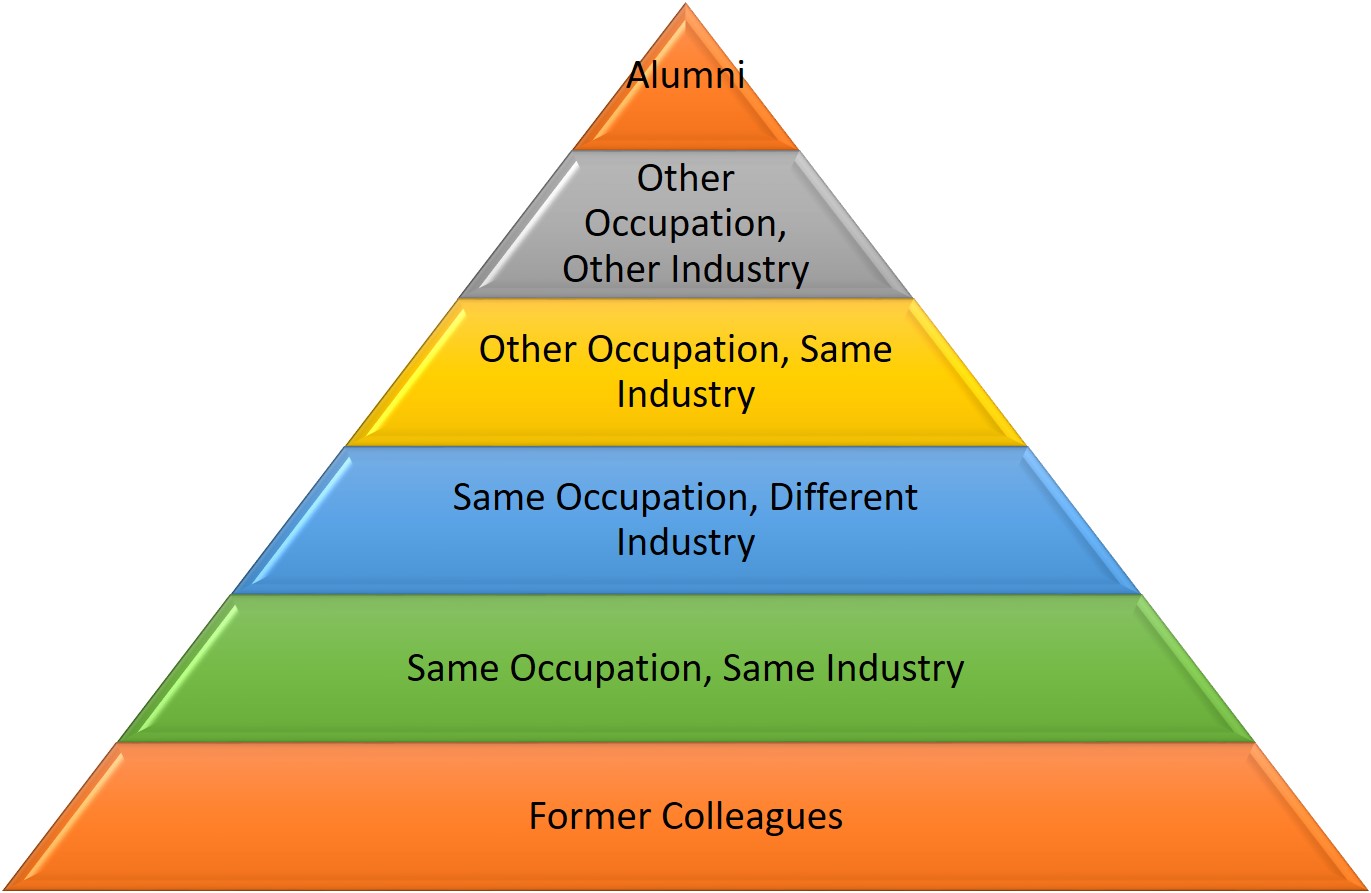
When people ask this, I explain that they should look at their potential connections as a pyramid. The goal is to connect with as many second- and third-degree connections as you see fit—although third-degree connections should be the last ones with whom you connect.

Picture1

On the bottom level—the most important tier of the pyramid—are people with whom you worked, e.g., former colleagues and supervisors. I say most important because they know you and are entrenched in the industry in which you’ve worked.

The second level contains people who share the same occupation and same industry. These people are like-minded and have similar aspirations to yours.

The third level is people who share the same occupation but in different industries. So, if you’re a marketing specialist, you want to look for other marketing specialists in industries outside of your own.

The fourth level is people in other occupations but the same industry. Connecting with these people will provide you with possible entries into your target companies. Connecting with an accountant, for instance, may give you access to the hiring manager of marketing at a desired company.

The fifth level includes people in other occupations and other industries. This may seem counter-intuitive to some, but consider that the V.P. of a manufacturing company that is on your target employers list may need an accountant. You’re not a V.P., and you don’t work in manufacturing, but you are an accountant.

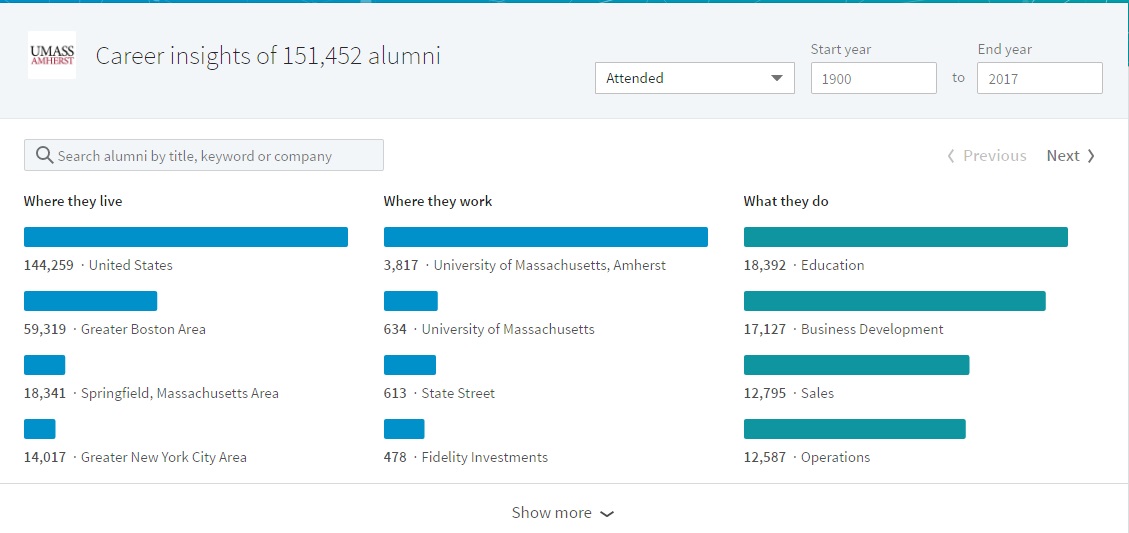
The last level consists of your alumni, people who are likely to connect with you because you attended the same schools at some point.

How to Connect With LinkedIn Members

There are three ways to connect with LinkedIn members. The first, and simplest way, is to use the search field. Second, you can search companies with the Companies feature. And third, search by your alumni by typing in your alma mater as a company and selecting “See Alumni.”

1. Search by title. In my LinkedIn workshop, I tell my attendees that typing an occupation title in the search field is one step toward finding people. (For example, if you’re looking for marketing specialists, you type: “marketing specialists.”)

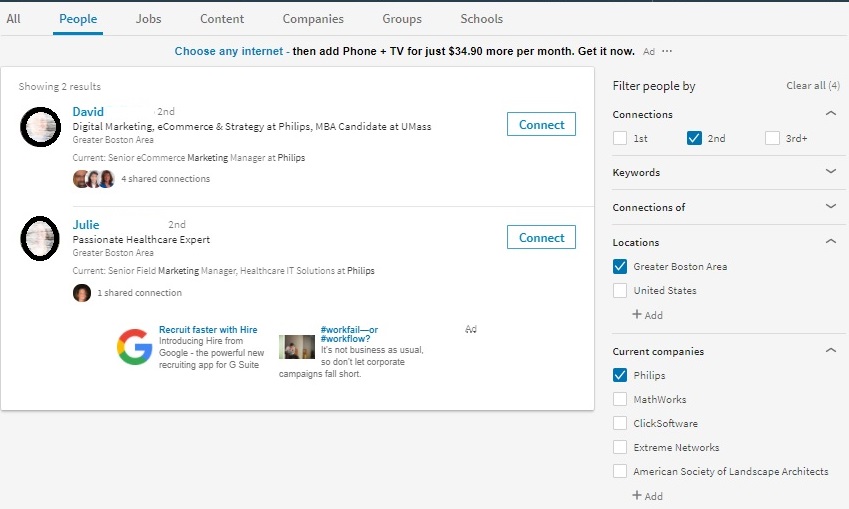
In “Filter people by” on the right, you can select second-degree connections; location; and other criteria, such as company. (See below.)

People Search, 2nd, location, company

2. See who you have in common. These are people that are first degree connections of your desired connections. You’ll see their headshots below the people who show up on your search. Click on “(number) shared connections” to see who they are.

Select one of the share connections to either write an introduction for you or mention in a “cold” invite. Read 5 Steps to connecting with LinkedIn connections for more detail.

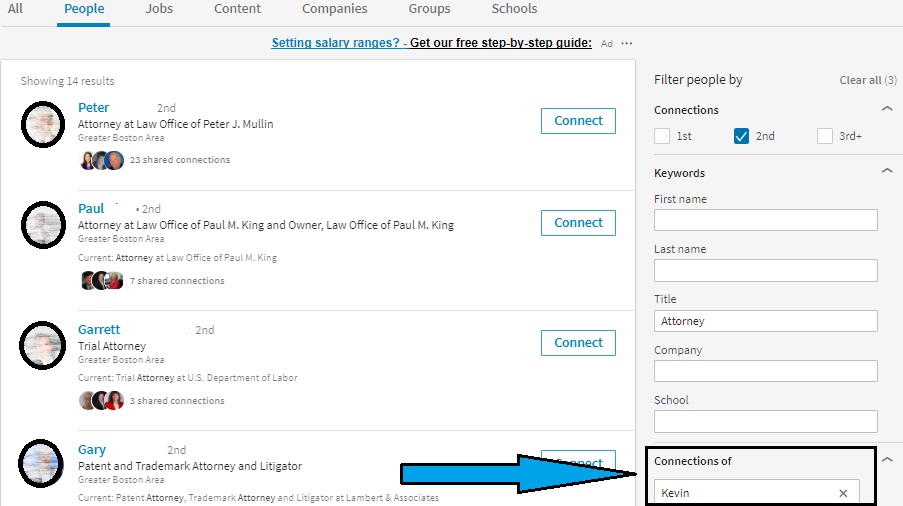
3. Use Filter people by. LinkedIn has added a great feature since I first wrote this post, called Connections of. In this field you type in a person who has shared connections with your desired occupation. This person is someone who you feel can best provide you with an introduction or a reference in a cold invite. (See below.)

Connections of Kevin

Use See Alumni

Another way to look for valuable connections is by using the “See alumni‘ feature, which is a great way to connect with LinkedIn members who are more likely to accept your requests than mere strangers. After all, you attended the same university or high school.

find-alumni-new-linkedin

Connect with people at companies

One the best way to connect with someone is by selecting a company that you’re targeting and finding an employee at said company. This is a great way to get your foot in the door for an open position – or, better yet, to start building your networks at target companies before jobs are even advertised.

(Search for 2nd degree employees at Tufts University below.)

Company Search

Here’s where Connections of can come into play. If you have a trusted connection who is a first degree of someone with whom you’d like to connect, or send a message, you can rely on your trusted shared connection.

Note: When asking someone to connect with you, make sure your note is personal – not the default message that LinkedIn provides. That said, I’m not a fan of connecting with people by using your smartphone or trolling your email contacts and sending mass invites. I see this as lazy.

How Many People with Whom to Connect 

The answer to the age-old question – quality or quantity? – comes down to personal preference.

I personally aim for a combination of both – that is, 300 or so quality connects with people who share your interests and or goals. If you look back at the “pyramid” above, you’ll see that focusing on connections in the first three levels is a good way to achieve the quality + quantity goal.

When you build connections in this way, you solidify your brand as someone who is focused on a specific audience. You have the chance to build a tight-knit network of individuals.

On the other hand, focusing too much on quality does limit your number of connections, which means you’re limiting your access to other LinkedIn users who could be of assistance.

If you focus on quantity, you’re less selective. You may come across as having little direction and less focus on an audience. In my mind, this is not the best way to brand oneself.

Quantity does have its benefits, though – particularly if you are a business owner and want to advertise your products or services.

Finally there is the extreme strategy: the LinkedIn Open Networker (LION) strategy. LIONs are LinkedIn members who are interested in collecting as many connections as possible. They believe that more people create opportunities.


Recruiters and hiring managers will take notice of your number of connections on LinkedIn, and they’ll look to see what kinds of people you connect with.

They may even go to your connections’ profiles and by chance notice some not-so-savory things. In other words, you could be found guilty by association. Let’s say, for example, one of your connections is affiliated with someone in a controversial group. This could look bad for you.

Because you are responsible for choosing connections that support your image, you must also consider how each and every connection may affect your personal brand.

Next in this three-part series is branding yourself by engaging with your connections. Stay tuned.

If you want to learn more about LinkedIn, visit this compilation of LinkedIn posts.

How to brand yourself with the new LinkedIn profile: part 1

LinkedIn has gone through some recent changes, some of which are welcome, other that are not. Regardless of how you feel about these changes, you will have to adapt in order to be successful in your LinkedIn campaign.
linkedin-alone

In this three-part series I will talk about the components of a LinkedIn campaign that will brand you, which include:

  1. Creating a powerful profile
  2. Connecting with the right people
  3. Engaging with your connections

I will also point out the changes to the former LinkedIn that have led to the new LinkedIn Lite.

In an Entrepreneur article, author Thomas Smale stresses the importance of having an online presence: “Do you have social media profiles? If so, are they fully fleshed out with all of your information? Do they present you in the best light possible, and make you look professional? Are you using high-quality professional photography? Are you interacting with others and sharing their content?”

Change: By now most of you have the new LinkedIn user interface (UI) and have noticed that you cannot move your sections about as you were able to do with the older version. This change is disconcerting because LinkedIn has unilaterally decided how your profile is structured.

Read 5 ways LinkedIn Lite’s anchored sections are hurting its members.

As a professional, your LinkedIn profile is a critical component of your online personal brand. Let’s look at the major sections of your LinkedIn profile and how they can contribute to your brand:

Background Image

The background image is what visitors will see first. It can serve to brand you, let people know about your personality, what type of work you do, and that you actually care about your profile. The option would be using LinkedIn’s default image which is light blue and has dots connected by lines.

Change: LinkedIn used to provide its members with a selection of stock images, albeit a small selection.

Snapshot Area

I call this section the Snapshot because that’s exactly what it is: a snapshot of who you are. The Snapshot section of your LinkedIn profile includes your photo and your Headline. Failure to impress viewers in these areas will hurt your brand.

A photo that is unprofessional is an immediate turnoff. Perhaps more damaging is a non-photo. It’s believed that a profile with a photo is 14 times more likely to be read than one without a photo. Your photo is the first area of your profile that brands you.

Headlines that say things like “Seeking Employment” or “Finance Manager at Company X” are ineffective, as they fail to show value.

Rather, your Headline should be something like this: “Finance Manager at Company X | Financial Planning and Analysis | Auditing | Saving Organizations Millions.” This headline shows your value and brands you. It also adds to your keyword count.

Changes: The photo is no longer square and situated to the right; it is in the center and smaller. Therefore you need to make sure your face and shoulders are captured in your photo.

We only see a person’s current place of employment, instead of current and previous. The relationship section has been taken away; there is no longer the ability to tag your connections, among other features. 

Most notably is that the Summary section is located at the bottom of the Snapshot. More on that below.

Summary

Support your brand with a kick-ass Summary. This is where you tell your story, which can include the passion you have for your occupation, a statement about your expertise, or some talk about how you’re changing your career.

You’ll want to use close to the 2,000 characters allowed in the Summary in order to include the keywords your profile needs to boost your visibility. But your Summary must also be compelling. It should mention accomplishments that will capture the reader’s attention.

Common mistake. Failure to show creativity or your personality are huge mistakes. You should write your Summary in either first or third person point of view. Don’t simply copy the Summary from your resume for this section.

Change: As mentioned above, the Summary is now located in the Snapshot area; it no longer has its own section. Also, only the first two lines (approximately 50 words are revealed); visitors must click See more to see the full-blown Summary. Therefore, these lines must immediately sell you. I suggest a branding statement.

Read The 50 most important words in your LinkedIn Summary.

Your Articles and Activities

Don’t blink when your looking at these sections, because there’s a lot of information packed in. In “Highlights,” visitors can see mutual connections, as shown above. However, in order to see all my connections, one must click on this area and choose “All.”

A great deal of information is located under the “Posts & Activity” heading, including my articles, posts, and all activities. Articles are the ones I’ve written on LinkedIn; this is straightforward. What is not straightforward is the difference between posts and activities. As far as I can tell, they’re one and the same.

Change: Unlike in the older version, only one article is displayed. In the older version, three were displayed, which meant you had to have written at least three articles if you didn’t want to be embarrassed, but I’m sure LinkedIn’s motive here wasn’t to save you from being embarrassed.

Experience
 

New Expericne section2

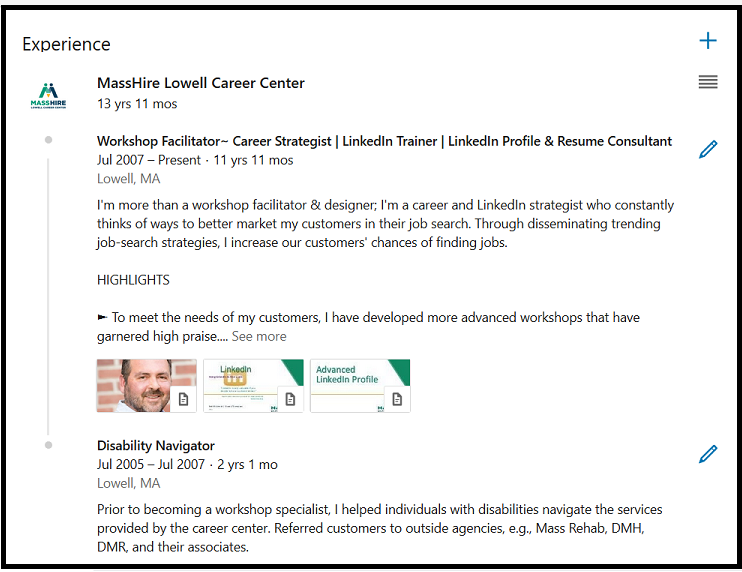
I’m often asked by job seekers how they should address the experience section of their profile. I tell them they have two options: They can either write a section that resembles the work history found on their resume, or they can use their experience section to highlight only their most important accomplishments.

I favor the latter approach, but some think their profile might be the only document an employer sees, so they believe showing all is the way to go. What’s most important in building your brand is listing accomplishments with quantified results.

Good: Increased productivity by implementing a customer relations management (CRM) system.

Better: Initiated and implemented – before deadline – a customer relations management (CRM) system that increased productivity by 58%.

It’s a good idea to use bullets to highlight your accomplishments. One of my LinkedIn connections, Donna Serdula, has created a handy list of bullets and symbols you can copy and paste for use on your own profile.

Change: In its effort to truncate the profile, LinkedIn expands only a few of the positions. For the others, visitors must click See More. This is great news, as previously the Experience section showed in full detail only the current or most recent position.

Education

Many people neglect this section, choosing to simply list the institution they attended, the degree they received, and their date of graduation. This might be the norm for resumes, but LinkedIn gives you the opportunity to further support your brand by telling the story of your education.

Take Mary who completed her bachelor’s degree while working full-time – a major accomplishment in itself. If she wants to show off her work ethic and time management skills, she might write a description like this:

University of Massachusetts, Lowell
Mechanical Engineering, Magna Cum Laude

While working full time at Company A, I attended accelerated classes at night for six years (two years less than typically expected). I also participated as an instructor in an online tutoring program, helping first-year students with their engineering classes. I found this to be extremely rewarding.

Volunteer

Build your brand by showing visitors that you are utilizing your skills and developing new ones. It’s fine to volunteer for what I call “a good cause,” but to show people you’re serious about your occupation, you’ll volunteer at a host agency that requires your expertise.

(If you volunteer for a significant amount of time, I feel it’s fine to list this experience in your Experience section, as long as you write “Volunteer Experience” beside your job title.)

What surprises me is that this section comes before Skills and Endorsements. This section hasn’t changed much, save for the fact that visitors must expand each volunteer experience. I wonder what LinkedIn was thinking when they made this decision for me.

Featured Skills and Endorsements

A healthy Skills section consisting of 30-50 skills is another way to strengthen your brand. The skills you decide to list should demonstrate your expertise. Do not list skills you are simply familiar with.

To further enhance your brand, the skills may be endorsed by your first-degree LinkedIn connections. If you’re unsure as to which skills to endorse, here is a previous article of mine that can help you.

Change: Now the Skills section shows only your three top skills and one person who’s endorsed you. Previously it showed your 10 top skills and more than 10 people who endorsed you. Visitors need to click View (the number) more in order to see all yours skills.
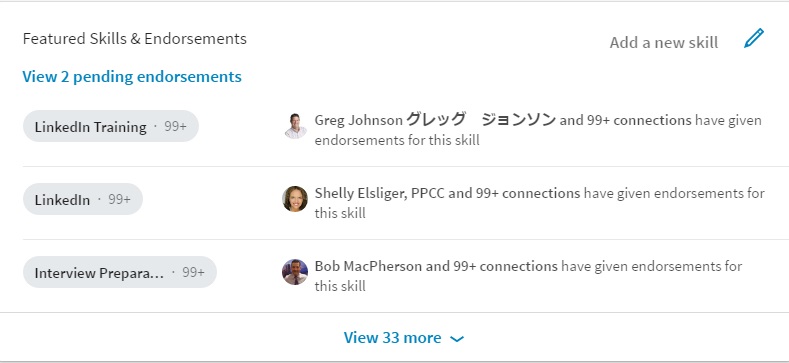
endorsements

Recommendations

This is a section I talk about in my LinkedIn workshops, and I always stress how valuable it is to receive recommendations from and write them for others. By receiving recommendations, you show the value you bring to employers. Meanwhile, writing recommendations shows your authority and what you value in workers.

Change: This has to do more with your Experience section, where previously visitors could see two people who endorsed you for a particular job. Now there are no nice miniature photos of the people who endorsed you. There is also no link that brings you directly to your Recommendations section. Oh, this also applies to Education. Bummer.

Accomplishments

Certifications, Organizations, and Projects are listed under Accomplishments. Prior, they had their own real estate, but now they’re buried under this header. And yes, they must be expanded like most sections.

Change: Do you remember painstakingly listing your professional and personal interests under Interests? Well forget it; that section has been retired, as far as I can see. Shame.

Following

This section includes your Influencers, Companies, Groups, and Schools you’re following. These used to be their own sections but have been truncated to save space.

Change: In order to see the above sections, you must click (you guessed it) See more. Unless visitors are aware of where these sections are, they will go missed. 


These are just some sections on your LinkedIn profile that contribute to supporting your strong personal brand. In the next post, I will talk about maintaining strong personal brand via connecting with others on LinkedIn. Stay tuned!

If you want to learn more about LinkedIn, visit this compilation of LinkedIn posts.

My love/hate relationship with LinkedIn endorsments

Lovehaterelationship

Perceived value or real?

Ask anyone who knows me how I feel about LinkedIn endorsements and they’ll tell you I love them also hate them. My ambivalent feelings have something to do with their value, which other LinkedIn members also question. Are endorsements perceived value or real? This is the question.

Perceived value. I love that term and it has stuck with me. It’s like buying a grapefruit at an expensive grocery store believing it has more value than a grapefruit at a less expensive grocery store.

In the end, the grapefruit from the less expensive store is tastier, juicier, and more delectable. Still the more expensive grapefruit’s perceived value tricks our minds into thinking it tastes better.

LinkedIn endorsements’ perceived value

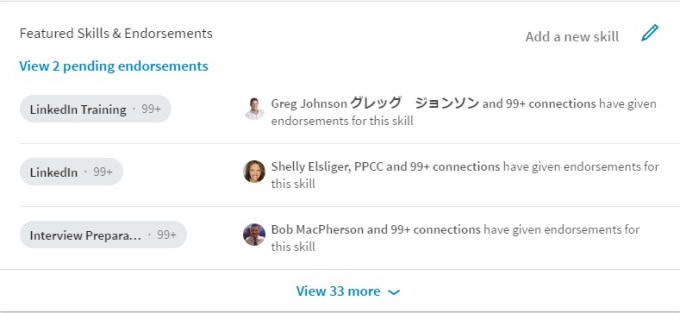
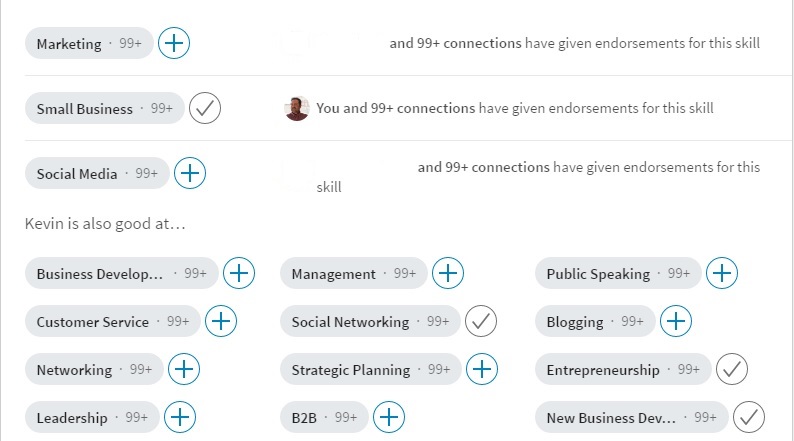
Someone who has many endorsements is perceived as being strong in those skills. For example, I visit one of my valued connection’s profile during my LinkedIn workshop and show the attendees that every bleeping skill he has has 99+ endorsements. (Partial list below.)

kevins-endorsements


I asked him one day how he had accumulated so many endorsements. With a smirk on his face he told me it was because he has a lot of friends. He also said that he hates endorsements. “Bro,” I told him, “give me some of your endorsements.”

Endorsements were introduced by LinkedIn to increase engagement, plain and simple. With a click of the mouse you can endorse someone for a skill you’ve never witnessed them perform.

While some argue that what their connections write on their profile is proof enough, you and I both know that words can be embellished all for the sake of marketing oneself. So this reasoning for me is faulty.

LinkedIn is screwing with people’s minds by suggesting which of your connections’ skills you should endorse. LinkedIn does this occasionally when you visit someone’s profile and also offers suggestions of skills to endorse on your profile.

I once asked one of my colleagues why he endorsed me for some skills I didn’t want endorsed, and he told me, “Because LinkedIn told me to.” This is LinkedIn screwing with people’s minds. LinkedIn is turning us into lemmings who are running off the proverbial cliff.

LinkedIn endorsements’ real value

But wait, you’re thinking, if you’re opposed to endorsements, why are you making such a fuss over them? This is a fair question. It’s because endorsements can have real value if they’re awarded the proper ways.

The first of two ways is by seeing your connections actually perform the skills they have listed on their profile. Remember my valued connection who joked that he was endorsed for his skills because he has a lot of friends? Truth be told, I’ve seen him perform a number of those skills and he deserves to be endorsed for them.

The second proper way to endorse someone is by trusting them. Based on how the recipient lists their skills, this is giving you a clue as how to proceed. The skills I have listed on my profile, for instance, have been carefully selected to reflect my value, not perceived value. (Read my post on how to help people endorse you.)


In closing, LinkedIn endorsements will only provide value when they are dealt out accurately. This can be accomplished if visitors have seen recipients demonstrate the skills for which they’re endorsed or, as I’ve said, trust them to arrange their skills to truly represent their strengths.

When this happens, I will have faith in LinkedIn endorsements. But if endorsers continue to follow LinkedIn’s suggestions, or endorse people by the highest number of endorsements, I see them as perceived value.

Photo: Flickr, Mauricio Sarfati

9 reasons why LinkedIn probably isn’t for you

For a long time I’ve considered it my mission to recruit people to join LinkedIn, like a college recruiter goes after blue chip basketball players. But after having a discussion a few days ago with someone in my workshop, it finally dawned on me that my persuasive style of exciting people to join LinkedIn might be too strong for some people.

Curious

After a workshop, where I spoke about LinkedIn like it’s the solution to finding a job, a very nice woman approached me and said she just wasn’t ready for LinkedIn. She cited many reasons for this, including not understanding a word I said (not my fault, she assured me), not sure if she can master the mechanics of LinkedIn, being more of an oral communicator, etc.

As she spoke, nearly in tears, I remembered some of the statements I made, “To increase your chances of getting a job, you must be on LinkedIn.”

Oh my gosh, I thought, as this woman was pouring out her soul to me, I created despair in her. It occurred to me that a few people like her are not ready to be on LinkedIn, never will be. Because I am active—to a fault—on LinkedIn, doesn’t mean everyone must be active or even a member.

I can’t tell people they must be on LinkedIn. In fact, in a moment of honesty, I have told my customers in other workshops that, “LinkedIn isn’t for everyone. If you’re not ready for LinkedIn, you will only be frustrated.” Perhaps I need to lay off the hard sell, because LinkedIn isn’t for everyone for the following reasons:

1. You’re afraid of being on the Internet

End of the discussion right here. If you’re afraid of being on the Internet, concerned your personal identity will be violated, your financial information will be at risk; there’s no convincing you that you’re safe on LinkedIn. No one is completely safe.

As long as I’ve been on LinkedIn, I’ve known of one breach. It was minor, required me to change my password. LinkedIn even suggests you provide your telephone number for added security. Still, if you’re afraid of being on the Internet. This is a moot point.

2. You want to socialize with friends

Guess what I’m going to say. That’s right, take your socializing to Facebook. Earlier I said I had no time for Facebook and no interest. Well recently I joined Facebook, and I love it. Facebook is where I can post photos of a snowstorm in April. Proudly post photos of my family and bobbleheads.

Bobbleheads2

LinkedIn is no place for politics, religion, or women clad in bikinis. There have been many shared updates that were inappropriate for LinkedIn, and they continue to come. If you feel the need to post garbage like this, open Facebook or Twitter accounts.

3. You’re  satisfied with a poor profile

The one and done attitude just ain’t gonna cut it. It’s not enough to simply copy and paste your résumé to your profile and leave it at that. People who are content doing this will hurt themselves not only by displaying a poor profile that fails to brand them, but also reducing the number of keywords necessary to be found.

Your LinkedIn profile is a networking document; it is proactive. Your résumé is a document you send in response to an job posting. Your résumé is reactive.

4. You don’t want to connect with others

This is a show stopper. If you’re unwilling to connect with people you don’t know on LinkedIn, this is akin to going to a networking event and not speaking to a single soul. “Oh, but I connect to the people I know, like my former supervisor.”

That’s a pretty limited list of connections. Very carefully chose quality connections. If you’re not embracing meeting and learning about new people on LinkedIn, you are wasting your time  For a better understanding of who you should connect with, read my article.

5. You’re not willing to put in the time

My advice to LinkedIn members is that they have to dedicate at least four days (4) a week to LinkedIn; and spend half an hour a day posting updates, commenting on updates, and, if willing, write LinkedIn long posts.

lazypaintint

Ideally one will spend an average of once a day a week. If you’re not willing to put in the time, your excellent profile and healthy number of connections will all be for naught. Many of my workshop attendees balk at this, but I tell them this is the time to show your grit.

6. You don’t understand its purpose

For those of you who are thinking, Bob, aren’t you being a little judgmental? Aren’t you being a little harsh? I don’t think I am. Too many people have opened accounts many years ago, simply to have never visited them until they need it…when they’re unemployed.

LinkedIn is a networking application for when you’re employed and unemployed. In other words, it was developed to help businesses create partnerships, developed soft leads, reach a broader channel. These are the people who are using it correctly.

Job seekers who use it only when they need a job are missing the boat. Their opportunity to network is when they’re working. It’s a full-time endeavor until you retire, or until something better comes along. What more can be said?

7. You’re not embracing change

LinkedIn is going through constant change. It’s akin to keeping up with the plot of Game of Thrones. With the new user interface (UI), people are at their wits end understanding the new look and finding features which were once easily found.

If you take the time to play with LinkedIn’s UI, you’ll find it’s not too difficult to understand. LI’s goal was to streamline the platform, make it lighter and quicker to use. Yes, it has done away with features that were once on the basic plan. Yes, we now have to pay for advance search and tagging and unlimited searches, but so be it.

You must also download the LinkedIn phone app to better understand it. This will help you to better understand the new UI; as they are almost identical. Embrace change, people. If you’re not willing to embrace all this change, LinkedIn isn’t for you.

8. You’re not looking for a job

I presented how to use LinkedIn for business to a local credit union. When I asked my opening question, “Why would you want to use LinkedIn?” someone said, “To find a job.” Laughter ensued. But this is how many people think, they only need LinkedIn when they’re out of work.

That’s a misconception people have; when they’re working, they no longer have to use LinkedIn. In this post, 10 reasons why you should use LinkedIn after you’ve landed a job, I give as one reason which is you never know when you’ll have to contact the people in your network. LinkedIn is insurance.

Did you know that LinkedIn was originally developed as a sales tool, not a job search application. Sales, marketing, and business development continue to use LinkedIn to build relationships. If you’re in a role similar to these, or any role for that matter, it’s important to represent you company with a strong profile.

9. One more

Another reason I hear from people who resist LinkedIn is their lack of desire to be an exhibitionist. While I find this a bit silly, I also wonder if by exposing my thoughts and feelings, I’m a bit of an exhibitionist.

Perhaps the word, “exhibitionist” is a strong word, but I sometimes wonder why I spend so much time on LinkedIn. Why do I share updates so often? Why do I distribute my and others’ posts? Why do I read posts to gather information. Shall we call it networking?

Photo: Flickr, Murel Merivee

Photo: Flickr, Brenda Valmont

Are job seekers welcome on LinkedIn?

This is a question I’ve been asking myself since LinkedIn began to systematically remove features from its basic account and required its members to upgrade to premium accounts in order to get them back. I’m no fool in thinking that LinkedIn is a charity. But I wonder if it is slowly squeezing job seekers out of the overall picture.

dejected-person

One example of LinkedIn taking a valuable feature away from LinkedIn users is Unlimited Search. In order to have access to this valuable feature, members must pay for the Business premium account (for now), which costs $60 if bought on a monthly basis, and is of very little use to job seekers, based on the other features it offers.

But here’s the thing: the people who need this valuable feature are not only sales people who are trying to locate possible leads, or recruiters who are trying to source talent. People who also benefit from this feature are astute job seekers who are trying to locate connections at their desired companies, or optimize their profile.

This said, weekly unemployment benefits range from $235 (Mississippi) to $747 (Massachusetts) . On the minds of people out of work is how to pay important bills like their mortgage, college tuition, groceries, car payments, etc. So once the bills are paid, the likelihood of shelling out $60 a month is nil. In fact, it might put them in debt.

(Even for many people who are gainfully employed, the chances of paying $60 a month for the features, that were once free, is a stretch.)

The least expensive premium account (for now)  is called Career. It costs $30 a month. It doesn’t offer Unlimited Searches, but job seekers can benefit from direct communication with recruiters, access to Lynda.com, and candidate statistics. Oh, let me not forget, people who’ve viewed your profile in the last 90 days is also a feature.

Although half the cost of Business premium, the job seekers with whom I speak say this package is also too expensive for them as they’re struggling to live on their unemployment benefits.

So what are most job seekers left with? The basic plan. And according to my valued colleague, Marc Miller, this free plan is dead or slowly dying. I, like many of my fellow LinkedIn instructors, don’t want to see this happen.

A Possible Solution

Now, I’m not one to raise a complaint without providing a solution. To do that would be unfair to LinkedIn’s decision makers. So here’s my solution.

I’m currently paying $9.99 a month  for a health club membership I’m not using. Although I haven’t ended the membership, I barely feel the cost, unless I look at my expenses online. I would NOT feel the expense if LinkedIn were to charge me the same fee, as long as I get rid of the $9.99 monkey on my back (health club membership fee.

Job seekers would feel the expense of $9.99 a month, but if they are serious about using LinkedIn to find a job would most likely cough it up. They would have to give up two trips to Starbucks.

The first part of my solution is to charge all LinkedIn members $9.99 a month. With millions of loyal LinkedIn members paying $120 a year, that’s some serious cash for LinkedIn. Features that job seekers need, Unlimited Search, job statistics, and a limited number InMails to recruiters would be available to everyone.

Business people could opt to upgrade to the Sales Navigator premium account (currently $80 a month) that offers features required for business success, which include 20 InMails, Sales Insights, Advanced Search with Lead Builder, Who’s Viewed Your Profile, Unlimited People Search, and tagging. In other words, features serious salespeople would benefit from.

Another positive outcome from charging a $9.99 fee would be a lot of dead wood leaving LinkedIn. This might result in 100 million non-users closing their accounts. But the remaining members would be quality users generating leads, partnerships, and ultimately sales. As well, job seekers serious about their search would pay the fee.

I’m not a mathematician, but a rough estimate of the revenue LinkedIn could bring in at 300 million legitimate members is $3 billion a month, $36 billion a year. Throw in what corporations are spending on the Recruiter Lite and Corporation Recruiter premium accounts, LinkedIn is still making serious cash.

LinkedIn’s Response

As one of my connections told me, “LinkedIn is trying to profit from its product. Can we blame them?” Of course not. No business is in it to give money away. Eventually LinkedIn would like to see the majority of its members paying $80 a month for its Sales Navigaror premium account.

Of course many LinkedIn users will remain basic users, some will upgrade to a lesser-priced account, and a select few will opt for the $80 package. Another zinger LinkedIn has delivered is that faithful LinkedIn members must purchase the Sales package to continue to receive a Advanced Searches, a feature they haven’t had to pay for for 14 years.

Job seekers would find the Sales premium account impossible to manage and really have no need for the features the Sales premium provides, except for Unlimited People Searches.

Conclusion

LinkedIn’s goal is to create a unique clientele base that can afford the steep price of $80.00 a month, which leaves job seekers out of the picture. The company may argue that job seekers can still use the basic or Career accounts. But already the all-important Unlimited Searches has been stripped from job seekers, forcing them to upgrade to a $60 premium account they can’t afford.

What it means to people like me, who teach LinkedIn to job seekers in a nonprofit agency, is that we will lose our clientele. We’ll have to adapt and train LinkedIn users who can afford the outrageous price of Sales premium account.

For recruiters it means they’ll lose many job seekers to source for jobs they need to fill. They might be more successful looking on Facebook and Twitter for job seekers.


As mentioned earlier, LinkedIn was developed to help businesses better network with other businesses. LinkedIn’s proud statement that the average member makes over $100k indicates that LinkedIn is not dedicated to help job seekers.

However, LinkedIn doesn’t have to give up its vision of having the majority of its members purchase the Sales Navigator premium account. I’ve heard from many people in the business sectors who are pumped to use the benefits of this account, even though it costs $80.00 a month.

Photo, Flickr, Peter Grifoni