3 features your LinkedIn profile Dashboard provides: part 2

In 3 areas of information your LinkedIn profile Dashboard provides: part 1, I talked about information you can use to gauge your status, such as: Who viewed your profile, Post views, and Search appearances. In part2 of this two part series, I’ll talk about the features you’ll find in your Dashboard.

dashboard2

Again, the Dashboard on your profile is for your eyes only. So only you can see how many people viewed your profile, unless you are leading a workshop and displaying your profile; at which point you’ll have to say, “Look, I’ve been at this a while. So don’t feel insecure.”

Career Advice

For job seekers who need help with their job search, LinkedIn offers a feature for career advice. I thought I’d check it out to get a better understanding about the process of asking for career advice. The first step is to get started by clicking on Career Advice. You’re told you’ll complete the following steps:

  1. “Tell us what kind of advice you want.”
  2. “Review potential matches” Here you’ll see LinkedIn users who are experienced leaders in their field. I wonder what makes them “experienced” and if I’m experienced.
  3. “Get in touch” You’ll have the opportunity to have a 1:1 conversation with the experienced leaders.

After you click “Get Started,” you’re given the option of choosing from someone “In my 1st or 2nd degree network, in my region, from my school, or I don’t have a preference.” Next you click “Continue.”

Now you’ll have a limited list of job function from which to choose. I choose Community & Social Services.You’ll also have to choose an Industry Sector. I went with Nonprofit.

Step 3 of 3 is typing in text explaining what kind of help you need. LinkedIn gives you examples, one of which is: “I’d like advice for career pivot strategies from consulting into a marketing, strategy or business development job in the tech industry. What do you see as the pros and cons? And what are some challenges I might face?”

Finally you choose, “Agree & finish,” which I didn’t click. I didn’t want to be put in the system.

Career Interests

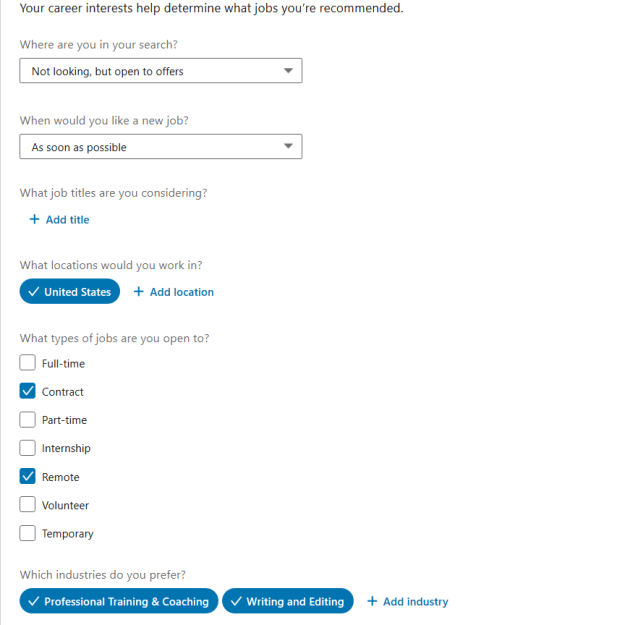
This is a feature I recommend to all of my clients. It allows recruiters to see if you are currently seeking employment and what kind. For instance, you might be interested in full-time, part-time, freelance, etc. LinkedIn explains this feature:

Among the many Recruiter spotlights we provide, the Open to New Opportunities feature allows LinkedIn members to privately share their career interests with Recruiter users who aren’t affiliated with their current or related companies.

Once a candidate opts to privately share their career goals with recruiters, users of LinkedIn’s Recruiter product will be able to see that candidate as “open to new opportunities” when running a search that aligns with their background.

If an open candidate starts a new position, they’ll be prompted to turn off their signal if they’re no longer open to new opportunities. They’ll also receive a reminder to respond to InMail messages from recruiters if they haven’t responded to two consecutive InMail messages.

Below is how Career interests looks:
career interests

Note that you don’t have to be looking for full-time work to use this feature. You might only be looking for contract, part-time, internship, etc. One of my former clients benefited from this feature. I’m sure others have, as well.

Salary Insights

Salary1

This feature is the last one listed on your desktop/laptop. It is available to basic members. It provides information you can probably find on Salary.com, Payscale.com, or Glassdoor.com; nonetheless, it’s interesting information. You’ll discover that LinkedIn sends you to a separate site. And if you click “View Jobs,” it returns you to LinkedIn’s Jobs feature.

I decided to look up the salary for a Financial Analyst in the Greater Boston area. LinkedIn provides the following information on the position and location I chose:

Median salary ($65,000) and range ($51,000-$88,000), as well as total compensation ($67,000) and range ($53,000-$90,000).

You can get more specific and choose an industry and years of experience. I chose manufacturing with 6-14 years of experience. Below are the results:

Financial Analyst

You’ll notice that only 7 people responded to LinkedIn’s request for salary information. This doesn’t give one confidence in the accuracy of the numbers.

Like Glassdoor.com, you can get the salary range for your criteria for various companies. You can also get more insight based on size of company, industry, educational level, and field of study.

Finally, LinkedIn provides the median base salaries and salary ranges for ten selected cities. At the top for financial analyst in San Fransisco is median salary of $77,500 and salary range of $60,000-$100,000. Rounding out at the bottom is Dallas with $63,000 and $50,000-$84,000 respectively. I guess this is information you’d consider if you’re considering moving from Dallas to San Fransisco.

Bottom line: As I tell my clients, no two companies are the same. This is clearly illustrated when you see the differences between Mutual Liberty Insurance $79,000 and Waters Corporation $71,400.


So there you have the features in the Dashboard of your profile. Is all of it valuable? No. But there are definitely aspects that you should consider in your job search, most notably Career interests.

3 areas of information your LinkedIn profile Dashboard provides: part 1

The Dashboard on your LinkedIn profile is a source of information, to which only you are privy. It provides you with information on three main areas: Who viewed your profile, Post views, and Search appearances. When I discuss the LinkedIn profile in my workshop, many people are unaware of the Dashboard. This area of your profile should be visited often.

dashboard2

Below the aforementioned information, you can also benefit from three features: Career Advice, Career Interests, and Salary insights. I will address these features next week.

Who viewed your profile

The information you’ll see first when you click on Who viewed your profile is the trend of visits you’ve had in the past 90 days. As you can see, my percentage of visitors has dropped 9 percent in the past week.

You can also see that the number of visits was highest in March and hasn’t reached that number since. I’m also on a disturbing downward slope. Must do something about this.

views2


Below this graphic you’ll see LinkedIn members’ head shot, name, and a partial view of their headline. For basic members, such as myself, you’ll see the most recent five people who’ve visited your profile. (Incidentally, four of mine are named “LinkedIn Members.”)

LinkedIn kindly gives you the option to upgrade to a premium account (of course they do) so you can see beyond the most recent five visitors. You’ll see everyone who viewed your profile in the past 90 days.

Well, this is partly true. You will not be able to discern the identity of visitors who select “private profile characteristics” or “private mode” in their settings to view your and other profiles. If you hoped to break through these two privacy settings, you’re out of luck.

Post views

LinkedIn shows you how many people viewed your latest post. This gives you a good sense of how many people are paying attention to what you posted. If the number is high, it’s time to rejoice. On the other hand if it’s low it means that the content is not what your audience is interested in. Below is a screenshot of one of my latest post which was one day ago.


Posts

Posts can include anything from an article you shared; a question you asked; some great advice you gave; a photo with a caption; a video you created for LinkedIn; a quote you appreciated; and, in my case, an announcement of what’s going on in your organization.

Search appearances

This is the most interesting information, in my opinion. Here is were you’ll see who’s searched for you based on companies, what your searchers do, and the keywords they used to find you.

Where your searchers work

Demographics of Jobboard

I find it intriguing that LinkedIn employees are searching for me. Could it be that I’ve offended them? Might they be looking to hire me? It’s most likely the former. For job seekers this can be exciting news if the companies looking at you are the ones you’ve targeted or have applied to.

Also of interest is that authors and online marketing managers round out the top two occupations interested in me. Again, you will strive for people in your industry and at higher levels. Recruiters might show up as people who viewed your profile, which is a good thing.

In terms of keywords, I get every one of them except for Edit.com. Could someone explain this to me? What’s important is that hiring authorities are searching for words that are in your branding strategy. LinkedIn is obviously a word I want people to use when searching for me.

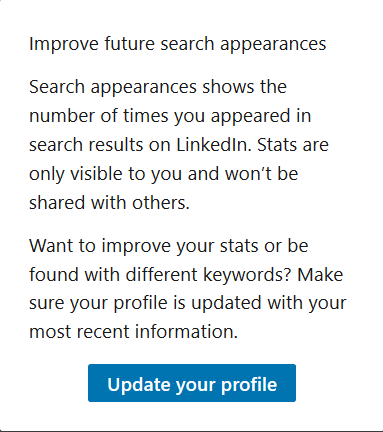
Lastly, I appreciate LinkedIn’s advice on how to improve my profile, but keywords alone won’t increase your visibility. You must also develop a focused network, as well as engage with your connections on a daily basis.

Improve Your profile

These are three areas of information your dashboard provides. Next week I’ll go over  three features your dashboard provides.


Knowing your work values is important

I recall when Wes Welker, then a wide receiver for the New England Patriots, declared that the 2011 walkout of NFL players “is pretty sad.” He further told reporters that he was happy to be playing and never imagined he’d be making the money he is. It was obvious he loved football.

Values

This made me think of two things: one, there are professional players who want to play the season and two, money isn’t everything to some of them. Surely pro athletes make more money than most of us could imagine, but for a pro athlete to imply that he makes more money than he should is remarkable and refreshing.

Perhaps the lesson we can take away from Wes Welker’s statement is that money doesn’t define the success of one’s career. What defines the success of one’s career is how rewarding it is. Yes, some would say that money is their most desired value; but it’s a known fact that the majority of employees hold other values closer to their heart.

In a workshop I delivered at our career center, I conducted an exercise on work values. This exercise made my clients think about which values would make their jobs more rewarding. Many of the workshop attendees list values such as:

  • Achievement: being able to meet their goals.
  • Balance: having time for family, work and play.
  • Independence/Autonomy: control of their own destiny.
  • Influence: able to have an impact on others.
  • Integrity: stand up for their beliefs, as well as others who showed strong character..
  • Honesty: telling the truth and knowing that others are telling the truth.
  • Power: control over others.
  • Respect: care and trust of self and others.
  • Spirituality: believing in their core beliefs.
  • Creativity: able to express their personality in your work.

Over the years our values may change. Some of my clients saw health as their number one value, and this came as no surprise, as they were older workers and their bodies were changing. Personally, I valued balance, creativity, and autonomy. I desire the same values, but autonomy is at the top of my list.

My workshop attendees agreed that unless their values were met, they’d be unhappy with their perspective jobs. Some openly admit that they were unhappy at their last job because their values weren’t being met.

Job seekers need to determine if their values jive with the company’s

Now the question is how do job seekers know if a perspective company supports their values? The simple answer might be to simply ask during their questioning phase. “What are the values your company supports?” Fair enough question, right.

Another approach would be to ask someone who works for the company you’re considering. This might result in a more honest answer. “Their number one value is increasing revenue no matter what it takes” is not a value for job seekers who want balance, as it implies working long hours.

Some job seekers might feel more comfortable researching a company by going to http://www.glassdoor.com, where they can read reviews others have written on said company. My feeling about these reviews is that the people who write them might be disgruntled, so you’d never know if the reviews are accurate or written out of spite.

I’m curious to know what your three most important values are. Especially if they’re not on the list.

LinkedIn’s Career Interest function worked for one of my clients

Following is an email I received from a client of mine.

Hi Bob,

I Thought I’d share my latest LinkedIn story. I have the experience to be more than entry level, but due to my life situation (single mom) I choose to make my child my priority, not money and work responsibility.

I have been working [part-time] in an entry level position for about [two] years. Ready to go [full-time], the company [for which I work] was not interested in increasing my hours, so I updated my LinkedIn profile and made it available for recruiters [using Career Interests]; that’s all.

A week later I was contacted by a recruiter in Chicago stating they had a position I was perfect for. Reluctantly, I arranged a telephone conversation with the recruiter who sent me the job description and advised that she was hiring for a Cambridge, MA, company.

It was like the description was written from my resume. So I forwarded my resume over thinking, can’t hurt. Two days later the phone rang, the company wanted to bypass the telephone interview and meet me face to face. So I did.

Yesterday I accepted the position of contracts manager for a 30k-person company based in Japan. I will work in Cambridge. After travel and parking expenses I will be making almost three-times my current salary. LinkedIn works well!!! At least for me! And you showed me how.

All my best, Kelly


LinkedIn explains how “Career Interests” works

Among the many Recruiter spotlights we provide, the Open to New Opportunities feature allows LinkedIn members to privately share their career interests with Recruiter users who aren’t affiliated with their current or related companies.

Once a candidate opts to privately share their career goals with recruiters, users of LinkedIn’s Recruiter product will be able to see that candidate as “open to new opportunities” when running a search that aligns with their background.

If an open candidate starts a new position, they’ll be prompted to turn off their signal if they’re no longer open to new opportunities. They’ll also receive a reminder to respond to InMail messages from recruiters if they haven’t responded to two consecutive InMail messages.


I was excited to hear about Kelly’s success, especially given that her new job got her out of a jam. She is making three-times more than she previously made. I would call this a success story.

6 LinkedIn profile rules to ignore in 2019

There are numerous articles on how to properly write your LinkedIn profile. With all the advice that is floating out there, it’s no wonder that LinkedIn members might be confused.

Dennis Background

I am guilty of writing some of these articles, so I would like to provide relief for the confused people trying to write their LinkedIn profile for the first time, or revise the one they already have. What follows are some rules you can ignore for six important areas of your profile.

1. Your background image must reflect what you do

I’m sure some people are freaking out because they don’t have a background image that illustrates what they do, such as a medical lab for a tech, a row of million dollar houses for a realtor, etc. I get it. You want your background image to reflect what you do.

Don’t worry. People who visit your profile also want to know what motivates you, describes your personality, shows what you love. Take the image below that shows one of my clients enjoying the view of a mountain range she was hiking. And the image above which is…just colorful.

laura-background-image

2. Dress to the Nines for Your LinkedIn Photo

I’ve said it myself and regret it. “Your photo should be professional.” So what is the definition of professional? Over the years the idea of a professional photo has changed, and so has my opinion.

Anton

Maybe you men were told that you had to dress in a three-piece suit, and you women were told you had to wear a dress suit with a white blouse. In addition, you were told you had to have a blank, boring background.

I used to advise my clients to do exactly this.

Now your photo can be more casual. Or you might prefer a theme-based photo that describes what you do, such as the one on the right. Can you guess what he does?

3. Your Headline Must Only List Your Professional Title and Employer

Whether you decide to go with a keyword-rich or branding statement Headline is your choice. Please don’t leave it as “Project Manager at IBM.” This doesn’t say anything about your value; it simply tells viewers what you do and where you work.

Instead, be creative and add areas of expertise that show your value, as well as contain keywords employers are looking for in, say, a project manager. For example:

Project Manager, ABC Company ~ Business Development | Lean Six Sigma | Projects On-Time, Under Budget

4. Make Your Summary Short

There are those who believe your LinkedIn profile Summary should be short because it will make it easier for recruiters to read. While I agree this applies to your resume, it doesn’t apply to your profile. Here’s why:

1) Don’t expect your visitors to read your whole Summary. They will be attracted to certain areas of expertise (written in all CAPs) and read that content.

2) With a short Summary you rob yourself of including keywords that help hiring authorities find you.

3) This is where you tell your story, so don’t leave out important details.

Here is an excerpt of what I consider to be a strong Summary, which uses all but 44 characters out of the 2,000 allotted. Visitors might read some of it, or they might read all of it.


Advanced materials and processes can form the basis for a product portfolio that will generate repeat revenues for years to come – if a company is able to leverage those innovations. I have been fortunate to participate in several technology firms where I’ve led teams that did exactly that. Here are a few keys to our success:

► BUILDING TALENTED TEAMS – of professionals who are leaders in their respective areas. Then, encouraging and rewarding them for their collective success.

► ENGINEERING CREATIVE SOLUTIONS – that solve the customer’s problem, but also create manufacturing differentiators that will lead to follow-on production.

Here’s what I offer:

► PROVEN TRACK RECORD – At growing engineering R&D firms into repeat manufacturing businesses with broad portfolios of products (including MSI, which was recently acquired for its manufacturing operations and product pipeline).

5. Only List Your Company and Job Title

Who says you have to stick to the “official title” of where you work or worked? I haven’t been told I need to list my official title of Workshop Facilitator first. (Not yet, at least.) My current title is:

Career Strategist ~ LinkedIn Trainer | Workshop Facilitator | LinkedIn Profile & Resume Consultant.

Another consideration is that your title might not make sense to people reading your profile. One of my client’s title was “Director of Innovation.” When I asked him what his title meant, he told me he was a Project Manager.

6. Don’t Personalize Your Experience Content

This is a tough one to comprehend. I see many profiles that are meager at best when it comes to their Experience section. People have been told, “Don’t regurgitate your resume.” Yes, don’t regurgitate your resume, but do include the meat of what you do/did where you work/ed.

I suggest beginning with a job summary that acts as a mission statement. For example:

When the power’s out and you can’t see two feet in front of you, your television isn’t working, the Internet is down; I’m the one who gets your power up and running. I love the feeling of fixing a generator that powers hundreds of houses. This is what makes being a Power Line Tech so rewarding.

From there you personalize your accomplish statements, as well.

► I’m often called upon to climb the highest towers during inclement weather, when others won’t. I thrive on this.

► On average, I repair damage generators faster than most Power Line Techs. My Supervisor has named me “The Magician.”


These are six important areas on you LinkedIn profile where the rules you’ve learned can be ignored. Don’t treat your profile like your resume; they are special in their own ways. Have fun constructing your profile.


3 proper ways for job seekers to send invites on LinkedIn

I recently led a webinar in which I talked about the ways LinkedIn members can build their networks by connecting with others properly. I stressed the importance of sending a personalized invite as opposed to sending the default message LinkedIn provides.

Businesswoman working on laptop computer

Before we dive into writing personalized invites, it’s important to know the fundamentals of finding LinkedIn members. Here’s how I search for Career Advisors:

  1. Type “Career Advisor” in the search field,
  2. choose “People in Career Advisor” in the dropdown,
  3. select “All filters” and am brought to “Filter people by,”
  4. check the “2nd” box for second-degrende connections, and
  5. finally check the box for the “Greater Boston Area.”

All people filter Recruiterdotcom

Once you’ve landed on a profile that speaks to you, you can choose “Connect” and write one of three personalized invitations:

1. Connecting Directly: The Cold Invite

Of the three options, this is the least successful way to connect on LinkedIn. It is better than indiscriminately clicking the “Send Now” button on a potential connection’s profile, but it is still a cold invite.

In your invitation, you can mention where you and your desired connection met, similar to the message below:

Hello Susan,

We met at the Westford networking event. You delivered an excellent presentation. The way you talked about interviewing resonated with me. As promised, I’m inviting you to my LinkedIn network.

Bob

Note: you only have 300 characters with which to work, so your invite needs to be brief.

2. Using a Reference to Connect

If you’re going to connect directly, you’re more likely to see success by mentioning a reference in your invite. This would be a shared connection, someone who is connected with you and the LinkedIn member with whom you’d like to connect.

I did a search for second-degree connections who reside in the Greater Boston Area and work for Philips. Below is an image of four results for this search. You will notice the faces of the shared connections. Click on “(number) of shared connections” to see who is connected directly with your desired LinkedIn member.

Philips shared connections for Recruiterdotcom

Once you have chosen a person who could be a reference for you, email the person asking if you could use their name in an invite. Don’t assume your shared connection will allow you to use their name.

Once you have your reference’s permission, your message to a new connection might look like this:

Hi Dave,

You and I are both connected with Sharon Beane. She and I work for the Career Center of Lowell as workshop facilitators. She strongly encouraged me to connect with you and would be willing to talk with you about me. I believe we can be of mutual assistance.

Sincerely,

Bob

3. Asking for an Introduction

This is the most proper way to connect with new people, albeit slower. This method requires asking a trusted connection to send a message to the person with whom you’d like to connect.

Note: It’s best to ask for an introduction through email, because people are more likely to reply to email than to LinkedIn messages.

Here is a sample introduction sent via email:

Hi Karen,

I see that you’re connected with Mark L. Brown, the director of finance at ABC Company. I’m currently in transition and am very interested in a senior financial analyst role.

Although there is no advertised position at ABC, I’d like to speak with Mark about the responsibilities of a senior financial analyst role in ABC’s finance department. It is early on in the process, so I’m also scoping out the companies on my bucket list.

I’ve attached my resume for you to distribute to Mark and anyone you know who is looking for a senior financial analyst.

Sincerely,

Bob

PS – It was great seeing our girls duke it out in last weekend’s soccer match. I hope the two teams meet in the finals.


To optimize the way you connect with people on LinkedIn, it’s important to develop a network of valuable connections. The core of your network should be people who work in your industry and share the same occupation. You should also connect with people who work in other industries but in the same occupation.

Regardless of who you connect with, always use the proper approaches to invite them to your network.

Photo: Flickr, Thought Catalog

This post originally appeared in recruiter.com.

5 ways the new LinkedIn profile has changed for the good and bad

LinkedIn is at it again.

I guess when it comes down to it, I can be adverse to change. (I wrote a post claiming that LinkedIn made changes to its people filter feature just for the sake of making changes. ) But now that I think of it, the changes that LinkedIn made to All Filters aren’t that bad. In fact, some of them are quite nice.

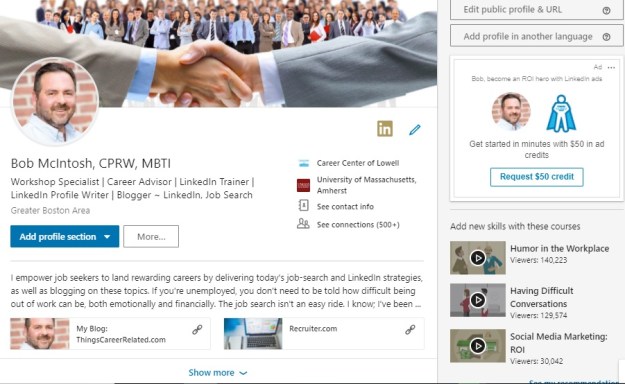
So I’m going to go at the new changes LinkedIn made with an open mind and not be too judgmental. LinkedIn didn’t overhaul its members’ whole profile; just the top of it, which I call the Snapshot area. Nonetheless, this is important real estate.

For the purpose of this post, I’m displaying my new profile followed by my previous one.

The New

New Snapshot2

The Old

New Snapshot Area

Full disclosure: I’m not the first one to write on this topic; I just recently received these changes. So, without further adieu….

Background image

You’ll notice that the new version of my LinkedIn profile’s background image is smaller than the previous one. This is not a drastic change; however, I liked how the background image used to covered the whole screen.

What’s taking up the rest of the background image? Ads that are specific to you and only you can see. With every profile you visit there will be a different ad. On my profile today there’s an ad telling me, “Picture yourself  at General Motors.” It’s a position for which I’m not at all qualified.

Photo

The photo (purported to be 20% larger), along with the information below it, has shifted to the left. Again, nothing drastic about this. Because our eyes read from left to right, I’m assuming this is LinkedIn’s purpose for moving the photo to the left.

One problem with the new placement of the photo is it might block something important in your background image, such as a logo or a piece of your background image you value. Some LinkedIn members will be struggling to re-position their image or replace it with a new one.

Name and Headline

Nothing new here, other than moving these two areas to the left. This was done to make room for the information mentioned below. Some say it’s easier to read text that is left-justified. I concur. However, center-justified text is more appealing to the eye.

This change is not enough to cause an uproar. I hope eventually LinkedIn will extend the number of characters (currently 120) for its members Headline. Some have benefited from it by using the mobile app to utilize the extra characters. I was not given that privilege, though.

Summary

This is the best change LinkedIn has made. The previous profile only displayed two lines, or approximately 40 words, on the desktop version. The new one displays a whopping three lines of text, approximately 50 words, which means that you have more space to write an impactful opening for your Summary.

Missing from the new profile is the Summary header. I hope LinkedIn will come back with it, as some visitors don’t know it’s the Summary they’re looking at in the Snapshot area.

Along with expanding the opening text from two lines to three is the display of your Rich Media area, where you can show off videos, audio, documents, and PowerPoint presentations. Previously visitors had to open the entire Summary to see your media. This is a pleasant change. Kudo’s LinkedIn.

Note: you can display your rich media in your Experience and Educations sections. My valued connection, Donna Serdula, works her rich media areas.

“Place of employment, education, See contact info, See connections” area

I love this change, as it not only highlights this information; but each icon is a live link to your current or previous place of employment, alma mater, contact information, and connections (if you allow your connections to see them).

The older version showed us this information, but it wasn’t placed it in one central location. Notice on my previous profile that the contact information is situated to the right. Many of my workshop attendees aren’t aware of this important area, until I point it out. Well done, LinkedIn!


Final analysis

Overall, I think LinkedIn has made nice changes. Are they earth shattering? No. Do they improve functionality? No. But they are an improvement to the top part of your profile. I look forward to what LinkedIn does to the Experience area, even if it doesn’t need enhancement.


3 more reasons why job seekers should blog

Part two of a two-part series.

I wrote, in an earlier blog, three reason why job seekers should blog. They are: it demonstrates their ability to write, it helps brand them, and it’s a great way to network.

blogging3

My idea for writing part one of this series came from my recollection of my two daughters’ penchant for writing; the older one preferred academic essays and the youngest preferred fiction.

Here are three more reasons why you as a job seeker should blog.

1. You’ll feel more productive and learn from writing

Writing about what you know requires processing your knowledge to put it to paper—or in most cases your computer screen. When I write about the job search, it makes me think about what is important to my audience, as well as how to express it.

You will learn more about your industry by blogging, as you’ll have to conduct research in order for your posts to be accurate. One benefit of blogging for me is that I often use what I write as fodder for my career-search workshops. Essentially, I leverage my writing.

It’s believed that one must blog on a consistent basis. You may want to start by blogging once a month, then twice a month, and maybe weekly. Hitting these goals will further give you a sense of productivity. I generally try to blog once a week.

2. More people will witness your expertise

Whether you’re blogging about your industry or job search, you can publish it on your own blog or a third-party blog. LinkedIn is a common third-party platform for blogging. The expertise you share with your audience will be there for as long as the blog sites exist. Personally, I use WordPress, Recruiter.Com, and LinkedIn. I don’t foresee either of them disappearing soon.

There are many platforms on which you can publish your posts. The top three are LinkedIn, Twitter, and Facebook. Others include Tumblr, Google+, Reddit, and many more. Your audience can then share what you’ve written with their connections, followers, friends, etc. The information you share can go viral, as they say.

Hopefully you’ll continue to blog after you land your next job. I know people who begin writing great content but then suddenly stop. Documenting your expertise is great, but doing it on a regular basis keeps it topical.

3. It educates your readers

Related to number one, you can help other job seekers learn more about your and their industry. I educate my readers on the job search and LinkedIn. I’ve been contacted by people who are in the job search, as well as job-search educators, who tell me that they’ve learned a great deal from me. This is a good feeling.

One of the goals of networking is sharing what you know with other job seekers. Your shared knowledge can be a gift; it might be the reason why job seekers land their next gig.

One reason I gave for blogging in the previous post is branding yourself. If you blog consistently and for a long period of time, you could become known as an authority on your industry, whether it’s High Tech, Social Media, Finance, Medical, etc.


This post, along with the first one I wrote, marks six reasons why job seekers should blog while searching for a job. It’s not only important to keep the momentum going while you’re hunting for work; it’s also important to continue sharing your knowledge while you’re working.

7 posts that can help you interview better

Interviewing for a job is not easy, especially if you take them too lightly. But if you put all the pieces in place, you’ll be successful. In this compilation there are seven posts that provide advice to follow before interviewing for positions.

Group Interview 2

Part 1: be mentally prepared

Sometimes the most difficult part of the interview process is being mentally prepared. Often easier said than done, this post offers some suggestions on how to achieve this.

Part 2: know thyself 

It’s  important that you know yourself before you prepare for interviews. This posts suggest ways to do this. One key to knowing yourself is doing a SWOT analysis. This exercise is well worth doing.

Part 3: research, research, research

Many people fail to research a position, the company, and other important components. This post talks about what to research and how to go about doing it.

Part 4: practice, practice, practice

Would you play a sport, participate in an orchestra, or take a test without practicing? It only makes sense to practice answering questions before the big show.

Part 5: making a good first impression

Oh yes the first impression you make matters. Some interviewers will base their hiring decision on your first impression. Eye contact and a firm handshake are only part of the first impression you make in the interview.

Part 6: answer the difficult questions

Which questions will be asked and how do you successfully answer them. This post talks about the proper way to answer the types of questions you’ll be asked.

Part 7: following up

After all the hard work you’ve done, now you have to seal the deal. Come across as professional and grateful for the opportunity to be interviewed for positions. But there’s more to it.


10 ways to optimize your LinkedIn engagement in 2019

Having a strong LinkedIn profile is essential to being found by other LinkedIn members and employers, but your job isn’t complete unless you’re communicating with your LinkedIn community on a consistent basis. This will contribute to optimizing your LinkedIn engagement.

linkedin-alone

I tell my LinkedIn workshop attendees that I spend approximately an hour a day (it’s probably more) on LinkedIn. Their faces register surprise, and I’m sure some of them wonder if I have a life.

But networking is about communication. If you’re going to use LinkedIn to its full potential as a networking tool, you need to communicate with your connections on a more consistent basis. So far you have optimized your profile and network of connections. Now it’s time to complete the circle; optimize your whole LinkedIn campaign.

Here are 10 ways to do just that:

1. Direct messages

The most obvious way to optimize your LinkedIn engagement is to communicate with your connections directly. LinkedIn’s “Messaging” feature allows you to have running chats with all your first-degree connections. At first this was disconcerting, however; LinkedIn members got used to it.

In addition, the “Messaging” feature follows you around the site. You can read and send messages no matter what page you’re on — an obvious sign that LinkedIn wants you to communicate with your connections.

2. Share updates often

Another great way to optimize your engagement with your connections is by is posting updates. How many you post is up to you, but I suggest at least one a day. Some people tell me they don’t even have time to update once a week. I tell these people that they need to stay top of mind. When you’re not seen, you’re forgotten.

You’ll notice that LinkedIn has given its members the ability to create and post video updates. It’s a nice feature, but few people are using it. This could be an option to consider in order to make your updates stand out.

3. Like and comment on your connections’ updates

Another way to communicate with your connections is to “like” their updates. Simply liking their updates is not enough, in my opinion. I would go as far as saying that this is lazy.

To optimize your LinkedIn engagement, you should get a little more creative by commenting on the update. This shows that you read and thought about what they wrote. Additionally this can generate valuable discussion.

Note: Let people know you commented on their post by tagging them. Use the @ symbol before they name, such as @Adrienne Tom, Executive Resumes. They’ll see you tagged them by going to Notifications on LinkedIn, as well as choosing to be notified via email.

4. Don’t hide yourself when you visit your connections’ profiles

Some people adjust their privacy settings so that they only show up as “Anonymous LinkedIn User” or “Someone from the (particular) Industry” when they visit other people’s profiles. Not me! I visit my connections’ profiles — with full disclosure — many times a day. My connections will visit my profile many times as well.

When people visit my profile under the veil of secrecy, I do nothing. When people drop in announced, however, I’ll show my appreciation by writing to them, “Thanks for visiting my profile.” This will also lead to a discussion.

5. Endorse your connections

You’ve probably read many opinions from people on the topic of endorsements. Add me to the list of people who prefer both receiving and writing thoughtful recommendations to simply clicking the “Endorse” button.

In fairness, endorsements do have a greater purpose than showing appreciation for someone’s skills and expertise: They are a way to touch base with connections. This is another way to optimize your engagement. As they say, “Spread the love.”

6. Participate in discussions regularly

This is a great way to share ideas with established and potential connections. I have gained many new connections by actively participating in discussions on LinkedIn.

Believe it or not, I don’t find groups to be the best places for discussions. Instead, it’s better to start them via updates you post from your homepage. There are people who do a great job of optimizing their engagement because they add comments that generate more communication.

7. Be a curator 

If your connections blog, take the effort to read their posts and comment on their writing. This is an effective way to create synergy in the blogging community, and also a great way to get material for your daily updates.

One of the easiest ways to optimize your engagement is to share posts from other sources you read on a regular basis. There are plenty of online publications which provide relevant information for your network. Sharing knowledge is part of your networking campaign.


Take It a Step Further

An online connections will not become a fully thriving relationships until you’ve communicated with them in a more personal way. While LinkedIn offers many powerful ways to communicate with your network, there will come a time when you’ll need to move off LinkedIn in order to take your networking relationships to the next level.

8. Send an Email

Email doesn’t require a lot of effort, but it’s an important step in developing a more personal relationship with a connection. You should have access to the email addresses of all your first-degree connections on LinkedIn, so use that information when you’re ready.

9. Call Your Connections

This is a daunting step to many, but it’s a necessary one.

That said, don’t just call your connection out of the blue. Email them first to let them know you’d like to call. Write the reason for your call; if it’s your first call, you’ll probably want to talk about who you are and what your professional goals are. You don’t want to put your connection in an awkward situation or catch them off guard, so be clear about the purpose of your call.

10. Meet Your Connections Over Coffee

Finally comes the face-to-face meeting at a place that is convenient for both of you. If your connection lives in a distant location, you may suggest getting together when you’ll be in their city or town.

When you meet in person with a connection, that person becomes a bona fide member of your personal professional network. This is the ultimate way to communicate with a LinkedIn connection. It may not happen often, particularly if a connection lives far from you, but when such meetings do occur, they present great possibilities.


Having a great LinkedIn profile is only the start. To really make the most of the site, you must communicate with your connections. It’s your activity on LinkedIn that makes the difference between standing still in your career and realizing professional success.

If you want to learn more about LinkedIn, visit this compilation of LinkedIn posts.