Tag Archives: LinkedIn

10 ways to optimize your LinkedIn engagement in 2019

Having a strong LinkedIn profile is essential to being found by other LinkedIn members and employers, but your job isn’t complete unless you’re communicating with your LinkedIn community on a consistent basis. This will contribute to optimizing your LinkedIn engagement.
linkedin-alone

I tell my LinkedIn workshop attendees that I spend approximately an hour a day (it’s probably more) on LinkedIn. Their faces register surprise, and I’m sure some of them wonder if I have a life.

But networking is about communication. If you’re going to use LinkedIn to its full potential as a networking tool, you need to communicate with your connections on a more consistent basis. So far you have optimized your profile and network of connections. Now it’s time to complete the circle; optimize your whole LinkedIn campaign.

Here are 10 ways to do just that:

1. Direct messages

The most obvious way to optimize your LinkedIn engagement is to communicate with your connections directly. LinkedIn’s “Messaging” feature allows you to have running chats with all your first-degree connections. At first this was disconcerting, however; LinkedIn members got used to it.

In addition, the “Messaging” feature follows you around the site. You can read and send messages no matter what page you’re on — an obvious sign that LinkedIn wants you to communicate with your connections.

2. Share updates often

Another great way to optimize your engagement with your connections is by is posting updates. How many you post is up to you, but I suggest at least one a day. Some people tell me they don’t even have time to update once a week. I tell these people that they need to stay top of mind. When you’re not seen, you’re forgotten.

You’ll notice that LinkedIn has given its members the ability to create and post video updates. It’s a nice feature, but few people are using it. This could be an option to consider in order to make your updates stand out.

3. Like and comment on your connections’ updates

Another way to communicate with your connections is to “like” their updates. Simply liking their updates is not enough, in my opinion. I would go as far as saying that this is lazy.

To optimize your LinkedIn engagement, you should get a little more creative by commenting on the update. This shows that you read and thought about what they wrote. Additionally this can generate valuable discussion.

Note: Let people know you commented on their post by tagging them. Use the @ symbol before they name, such as @Adrienne Tom, Executive Resumes. They’ll see you tagged them by going to Notifications on LinkedIn, as well as choosing to be notified via email.

4. Don’t hide yourself when you visit your connections’ profiles

Some people adjust their privacy settings so that they only show up as “Anonymous LinkedIn User” or “Someone from the (particular) Industry” when they visit other people’s profiles. Not me! I visit my connections’ profiles — with full disclosure — many times a day. My connections will visit my profile many times as well.

When people visit my profile under the veil of secrecy, I do nothing. When people drop in announced, however, I’ll show my appreciation by writing to them, “Thanks for visiting my profile.” This will also lead to a discussion.

5. Endorse your connections

You’ve probably read many opinions from people on the topic of endorsements. Add me to the list of people who prefer both receiving and writing thoughtful recommendations to simply clicking the “Endorse” button.

In fairness, endorsements do have a greater purpose than showing appreciation for someone’s skills and expertise: They are a way to touch base with connections. This is another way to optimize your engagement. As they say, “Spread the love.”

6. Participate in discussions regularly

This is a great way to share ideas with established and potential connections. I have gained many new connections by actively participating in discussions on LinkedIn.

Believe it or not, I don’t find groups to be the best places for discussions. Instead, it’s better to start them via updates you post from your homepage. There are people who do a great job of optimizing their engagement because they add comments that generate more communication.

7. Be a curator 

If your connections blog, take the effort to read their posts and comment on their writing. This is an effective way to create synergy in the blogging community, and also a great way to get material for your daily updates.

One of the easiest ways to optimize your engagement is to share posts from other sources you read on a regular basis. There are plenty of online publications which provide relevant information for your network. Sharing knowledge is part of your networking campaign.


Take It a Step Further

An online connections will not become a fully thriving relationships until you’ve communicated with them in a more personal way. While LinkedIn offers many powerful ways to communicate with your network, there will come a time when you’ll need to move off LinkedIn in order to take your networking relationships to the next level.

8. Send an Email

Email doesn’t require a lot of effort, but it’s an important step in developing a more personal relationship with a connection. You should have access to the email addresses of all your first-degree connections on LinkedIn, so use that information when you’re ready.

9. Call Your Connections

This is a daunting step to many, but it’s a necessary one.

That said, don’t just call your connection out of the blue. Email them first to let them know you’d like to call. Write the reason for your call; if it’s your first call, you’ll probably want to talk about who you are and what your professional goals are. You don’t want to put your connection in an awkward situation or catch them off guard, so be clear about the purpose of your call.

10. Meet Your Connections Over Coffee

Finally comes the face-to-face meeting at a place that is convenient for both of you. If your connection lives in a distant location, you may suggest getting together when you’ll be in their city or town.

When you meet in person with a connection, that person becomes a bona fide member of your personal professional network. This is the ultimate way to communicate with a LinkedIn connection. It may not happen often, particularly if a connection lives far from you, but when such meetings do occur, they present great possibilities.


Having a great LinkedIn profile is only the start. To really make the most of the site, you must communicate with your connections. It’s your activity on LinkedIn that makes the difference between standing still in your career and realizing professional success.

If you want to learn more about LinkedIn, visit this compilation of LinkedIn posts.

4 Reasons Why Your LinkedIn Background Image Shouldn’t Be Ignored

The director of the career center for which I work sat in on one of my LinkedIn workshops. In it I talked about how your whole LinkedIn profile should brand you. I thought I did well and afterward asked her for her thoughts.

Lake2b

She told me, that in fact, I did well but forgot to point out that the background image (which sits behind your headshot) is another area that brands you. I should have known this, but honestly it didn’t occur to me until she mentioned it. Boy, did I feel like an idiot.

The background image of the LinkedIn profile seems to get a pass from many LinkedIn members. Instead, they use the light-blue background decorated with dots and lines (below).

Bad background

To take a pass on this area is a mistake, as this is the first image people see when they visit your profile. Therefore it should reflect who you are, what you do, your brand, and that you care about your professional image.

It matters

This is prime real estate on your LinkedIn profile. If done well, your image will be properly sized at 1,584 by 396 pixels. Any image larger than that will be cropped, so you might not be able to include that great portrait photo of you standing before Mt. Kilimanjaro.

So why don’t LinkedIn members put more thought into their background photo, and what does your background image say about you?

Your brand

Shelly background

This is perhaps the best reason to have a background image on your LinkedIn profile. One of my most valued connections, Shelly Elsliger, PPCC, is all about branding. She takes it to a higher level than most people when it comes to developing a unique professional identity and coherent message that sets her apart from others. This is truly reflected in her background image above.

Ask yourself, “What does my background say about me?” If the answer is, “The same ole tired background many LinkedIn members are using, it’s time to think about how you can create a unique identity, as Shelly has. Obviously she has gone through the effort of creating her own personalized background. You might not have ability to go that far.

Who you are

One of my client’s background image is of her hiking in the Appalachian Mountains. It works because she loves hiking and wants her connections to know this. Her photo is also work-related, so it is relevant. Double whammy.

You may have a background image of the New York skyline, a tranquil lake, a field where horses are grazing, or anything else that describes you as a person. I recently asked a facetious question of my LinkedIn connections about including family members and pets in your profile background. The answer was a resounding “NO.”

What you do

Yoga

The photo above is of a woman doing yoga. If you’re a yoga instructor, this might be an appropriate background image for your LinkedIn profile. It sends a clear message about what you do.

As, a surgeon, you might not have a background that shows you in action operating on a patient. But perhaps you can find a photo of a hospital you can use as your background. You may have to get permission to use this photo.

That you care

Lowell Factories

When you use a background image on your LinkedIn profile, it shows you care about how you present yourself. I was critiquing one of my clients’ profile when I noticed, as his background image, a black and white photo of Lowell, MA.

Does it represent what he does as program manager? No. Is it branding him? Not really. But it shows he cares about his professional image. He didn’t want to leave the default image, because doing that would show that he didn’t care about his professional image.


I’m grateful that my director mentioned my faux pas of not mentioning the LinkedIn background image as an important part of the profile. What hurt the most was not realizing how important the background image is to the profile.

If after reading this post, you feel you need to upgrade your background image, no worries. You can get free images from https://stocksnap.io/. I get many of my images from http://www.flickr.com, which allows you to use their photos as long as you credit the photographer. No problem.

Is there anyone I’ve missed? If you know someone (including you) who as a great background image, I’d love to add them to the list. Please tag the @person, as well.

If you want to learn more about LinkedIn, visit this compilation of LinkedIn posts.

Photo of yoga woman is from https://stocksnap.io.
Other photos were provided with permission.

6 Areas on your LinkedIn profile you should optimize in 2019

If you’re wondering how an optimized LinkedIn profile will help you in your job search, the answer is simple: Your profile needs to be found by hiring authorities (recruiters, hiring managers, and human resources reps). These people can’t find your profile unless you utilize search engine optimization.

linkedin-alone

Hiring authorities approach LinkedIn similarly to the way they approach their applicant tracking systems (ATSs). They search the site for certain keywords denoting titles and areas of expertise. To be found, you must show up in the first 4-6 pages of search results, lest you be overlooked.

Let’s consider the following scenario: A hiring authority is searching for a finance manager with expertise in data analysis; advising senior managers on how to maximize profits; business analysis; forecasting; supervising employees responsible for financial reporting; and legal compliance. A Masters of Business Administration (MBA) is preferred, although not required.

If a given finance manager wants to be found by the hiring authority in this scenario, their LinkedIn profile must contain their title and area of expertise. Furthermore, this information must be listed in all areas of the finance manager’s profile in order to maximize their chance of being found. This information can be worked into the finance manager’s profile through the use of keywords.

Areas on Your Profile Where Keywords Count

1. Your Name

This area is valuable real estate, as it is weighed heavily in searches. Any certifications or degrees you hold should be included alongside your name, as they will indicate your experience and expertise. So, our finance manager would list their education, “MBA,” after their name.

2. The Headline

This area should be rich with keywords, and it should brand you for your occupation and industry.

Using our financial manager as an example, their headline would read as:

Finance Manager ~ Data Analysis | Business Analysis | Forecasting | Legal Compliance | Maximizing Profits | MBA

Note that you only have 120 characters – including spaces – to work with in your headline. The above example uses 113 characters.

3. The Summary

Your summary should not be brief. Writing a brief summary prevents you from including all the important keywords we’ve identified. In the case of our finance manager, they would want to repeat “finance manager” and the areas of expertise mentioned in the headline above as often as possible.

Note that you have 2,000 characters with which to work in your summary. Something to keep in mind is that visitors only see the first two lines of your summary, unless they select “See more. Read: The 39 most important in your LinkedIn profile summary

4. Experience

The experience section is often overlooked, which is a huge mistake. Each entry in the experience section contains two factors that need to be considered: the job title and the position description.

Our finance manager’s official title is “finance manager” at ABC Company. While this is an accurate title, it doesn’t show their full value. The finance manager should instead list a title similar to their headline. However, you only have 100 characters here, so you have to be more selective. Our finance manager’s title might read:

Finance Manager ~ Data Analysis | Business Analysis | Forecasting | Legal Compliance | MBA

Here, the phrase, “maximizing profits” was removed. “MBA” could be removed instead, but the designation is more important for our finance manager’s purposes.

While the position description must above all else show the candidate’s value by listing accomplishment statements with quantified results, it is also an area on your LinkedIn profile where you can utilize a great deal of space. You have 2,000 characters here to repeat your title and areas of expertise. Don’t squander them.

5. Education / other sections

The education and other sections are also in play. What many people fail to realize is that they can add narratives to their education section. Yes, you’ll list your institution of learning and location (no dates of graduation), but you can also provide some background information.

Our finance manager might tell a story like this: “I fell in love with accounting and other areas of finance on my way to earning my MBA. Of particular interest to me were data and business analysis. I was given the opportunity to learn these skills during an internship at ABC company, which is where I am now employed.” Notice how this narrative employs the right keywords!

You can also benefit from keywords in the featured skills and endorsements sections. Your skills are counted, and some say the number of times you’re endorsed for them increases your ability to be found.

Other considerations when optimizing your LinkedIn profile

Loading your profile with keywords isn’t going to be enough on its own. Being found by hiring authorities also depends on how many people you’re connected with, as well as who your connections are. In addition, engaging with your connections will increase your chances of being found. Read 3 reasons for your LinkedIn success.

Outside your LinkedIn profile

Highlighting your LinkedIn profile on business cards, resumes, links from other social media can further optimize your profile.


Next week, we’ll explore LinkedIn profile optimization further by looking at how to properly connect with other LinkedIn members.

This post originally appeared on recruiter.com.

If you want to learn more about LinkedIn, visit this compilation of LinkedIn posts.

LinkedIn makes changes to People search: smart, or for the sake of changes?

The old saying, “If it ain’t broke, don’t fix it” falls on deaf ears with LinkedIn. For reasons beyond me and others, the new changes LinkedIn has made to Search make little sense and certainly don’t improve a feature that was just fine as was.

Change

I didn’t learn of these changes until a few days ago, but by then I had thoroughly confused someone who was trying to edit one of my articles for his publication. I was explaining to him how to use Filter people by, but he was seeing the new All people filters. I must apologize to him again.

In this post, I’m going to break down the old and the new Search for people and in doing so, figure out why LinkedIn decided to take something that was fairly strong and make changes that make no sense.

The old

Old Search

People Search2

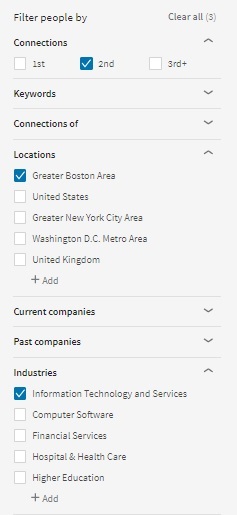
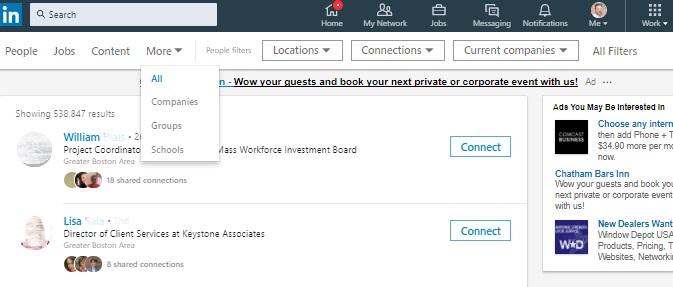
Above we see a the old Search people toolbar, and to the right a partial view of Filter people by. To me this was a straight forward way to narrow a people search.

In the former toolbar we had All, People, Jobs, Content, Companies, Groups, and Schools. (You’re probably wondering, “Why is Bob typing everything I can see?” For prosperity, kind reader.)

You see in the Filter people by box to the right that I’ve chosen my 2nd degree connections who reside in the Greater Boston area and are in the Information Technology and Services area.

I could expand Keywords to type a first name, last name, title, and school.

I could also expand Connections of to view mutual connections of the person I choose. If I chose my close connection, Kevin Willett, I saw all 932 mutual connections. Holly crap.

As well, I could expand Current companies, Past companies, and Industries, which I mentioned above. Pretty self explanatory. Not shown in this screen capture are Profile language, Nonprofit interests, and Schools.

This was the old setup. It was simple and effective. What you’ll see below is what my  friend saw as I was explaining the old view. (I have to admit I was loosing my patience with him.) Essentially the functionality of the new way to search for people is no different.


The New…

New Search

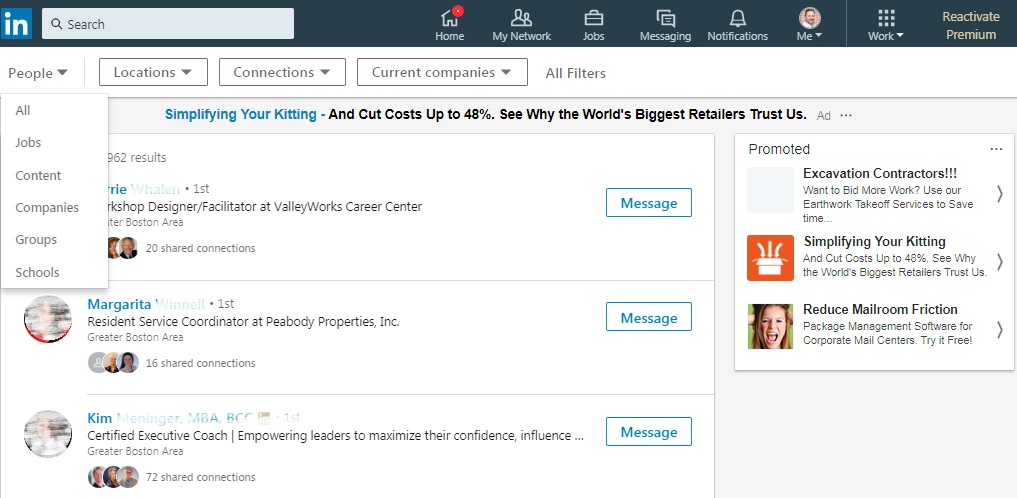
I’m not going to spend an hour going through the changes to the new toolbar, other than to say 1) the font seems to be lighter and 2) everything that was under More above, save for Jobs and Content, can also be found under People (below) when you hit the down button.

New People Search2

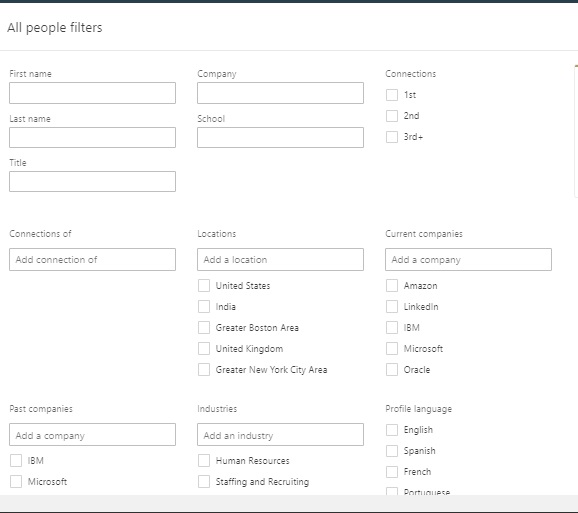
Filter people by has become All Filters

This appears to be the revelation; instead of the nice, neat box shown above, we now have a drop-down from All Filters which is now called All people filters that contains the same filtering components as the older version. Why did LinkedIn make this change? This message, which appears below All Filters, tells us why:

All your filters

Granted all the filters are expanded, which must be the reason LinkedIn made the changes. I never had a problem with Filter people by. Perhaps others did. I’m curious to know from LinkedIn why they made these changes to the toolbar and Filter people by.

New All Feature filters

What’s nice about these changes: the new toolbar allows quick access to Locations, Connections, Current Companies.

If my tone sounds frustrated it’s because I am. The major reasons for my frustration is because I don’t see a major improvement to what I considered to be a strong feature. Is this new look more aesthetically appealing? No.

If you like the changes LinkedIn made to People Search, let me know why.

If you want to learn more about LinkedIn, visit this compilation of LinkedIn posts.

 

6 interesting ways you can find your alumni using LinkedIn’s “See Alumni”

I’ve been working with a gentleman who is interested in enhancing his LinkedIn strategy. One questions he had for me was with whom should he connect.  I suggested that he connect with those in his occupation and industry, as well as people in companies for which he’d like to work, and then I pointed him to See Alumni.

Home_UMassAlumniInAction_1400_636505033912274809


Alumni? you may wonder. Yes, alumni. It makes perfect sense. Think about the bond you have with the people you went to school with, even if you never met them. There are things you probably experienced during the four years of your education, such as frequenting the same sports bar, getting chased by the white swans from the campus pond, cheering for your school’s basketball team, surviving the blizzard of ’87.

If you haven’t taken a look at See Alumni, which you accesse by typing your school’s name in the Search field, you should see what kind of information you can gather and the potential of connecting with your alumni. I’ve gathered some telling information about my alumni. I’m focusing on my 2nd degree connections.

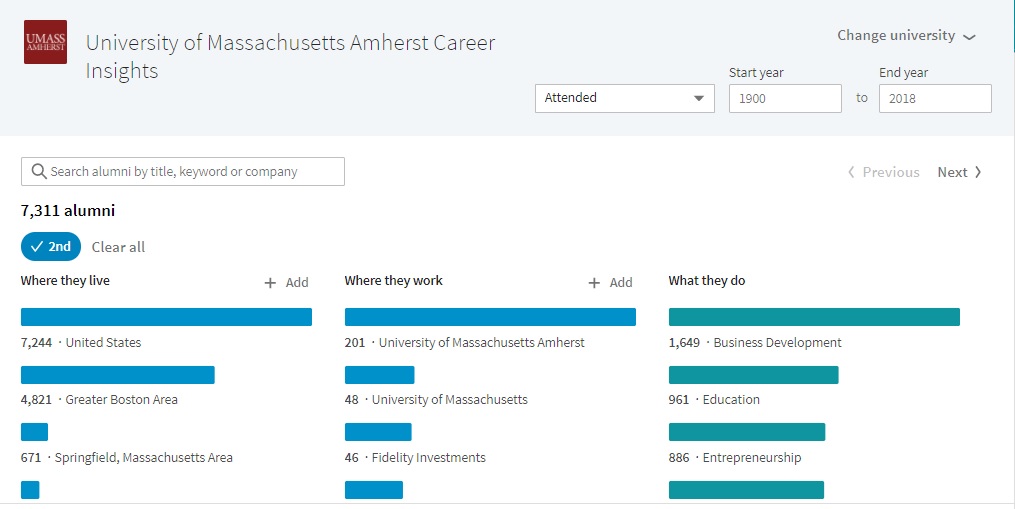
LinkedIn allows me to filter my alumni by six categories. Below is the first of two pages of See Alumni:

See Alumni 1

1. Where they live

In the United States the majority of my alumni live in the Greater Boston area (4,821), which makes sense. I also live in the Greater Boston area and choose to connect with people who are local. Only 671 of my alumni live in the Springfield, Massachusetts area. This also tells me there’s more industry in eastern Massachusetts.

2. Where they work

If I’m wondering where my alumni work, I see that 201 of them haven’t strayed far from home. Most of them work at my alma mater, while the 46 work at Fidelity. I pointed out to my client that if he clicks “See More,” he’ll see many more companies, along with other filters.

I also tell him that this filter is a great source of information, especially if he has some companies in mind. His alumni can be allies in his job search.   

3. What they do

Of my alumni connections 1,649 are in business development. And at the bottom of the truncated view are 886 people in Entrepreneurship. I recall looking through my See Alumni feature and noticing that I’m connected to many engineers, even if they’re 2nd degrees. This filter can be a good indication of the relevance of your network.

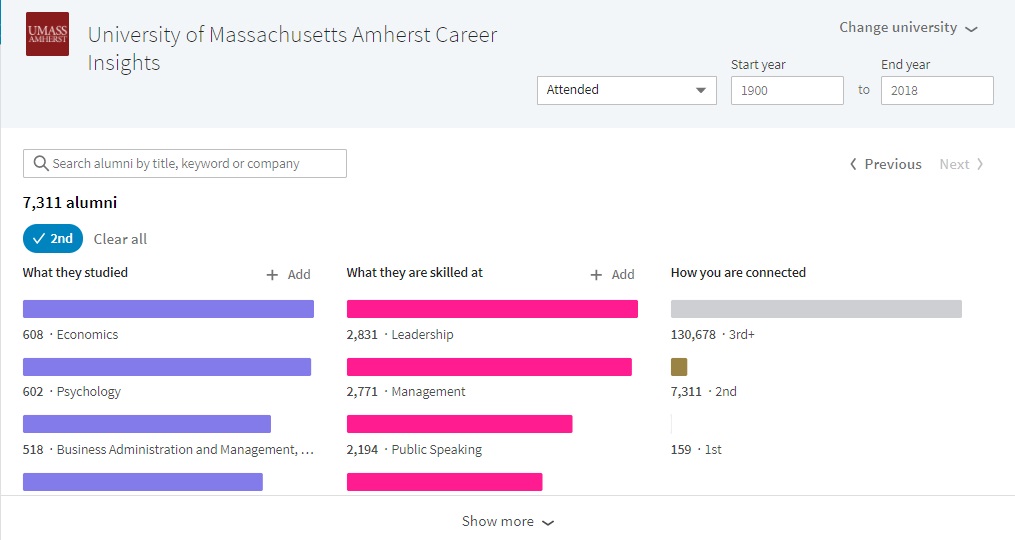
The second page of See Alumni provides the following information.

See Alumni 2

4. What they studied

Economics, Psychology, and Business Administration seem to be the choices of majors of my 2nd degree connections at my alma mater. My discipline, English Languages, is seventh on the list. Mechanical Engineering is seventh. Dad always told me not to be an engineer. Not because it’s a lousy occupation; but because I’d make a lousy engineer.

5. What they’re skilled at

My alumni are more skilled at leadership (2,831) than business development, which is hidden, (1,342). If I fashion myself skilled at public speaking, I’m in the company of 2,194 others who share this skill.  Social Media stands at 1,902. Four years ago it was at the bottom at the list at 556. This is an indicator that social media is exploding.

6. How you’re connected

Four years ago my 1st degree connections stood at a mere 32. Now I have 159. My second degrees have grown from 4,521 to 7,311 in that time frame.

What does this all mean?

This has been a fun exercise for me in terms of discovering where my alma mater live and work, what they do, etc; but the power of this feature lies in identifying specific people with whom you’d like to connect. No matter what your age is, this is a feature you should be using.

If you enjoyed this post, please share it.

Photo: UMass.edu Almuni

5 steps to connect with LinkedIn members

But first the proper ways to connect.

LinkedIn Flag

Let’s start with a quiz:

How do you connect with people on LinkedIn? Do you:

  1. indiscriminately click the button that says “Send now”;
  2. take the time to add a note;
  3. ask for an introduction to your desired contact, or;
  4. first send an email to your desired contact before sending an invite?

For many years I’ve been advising people to always add a note when connecting because…it’s the right thing to do. However, after talking with a valued connection, Bobbie Foedisch, I learned a great deal about connecting etiquette. More on that later.

Currently employed, or not, you should build up your network with connections who are like-minded and can be of mutual assistance. Let’s look at three ways to connect with others on LinkedIn.

Connecting directly

For example, if you’re going for the direct connection, your invite message might read like this:

Hello Susan.

When I saw your profile on LinkedIn, I thought it would be great to connect. You and I have a great deal in common, namely that we are in the business of helping people find employment. It would be great to connect.

Bob

Note: you only have 300 characters to work with.

Using a reference to connect

If you’re going to connect directly, you’re more likely to gain success by using a reference. This would be a shared connection—someone who is connected with you and the LinkedIn member with whom you’d like to connect.

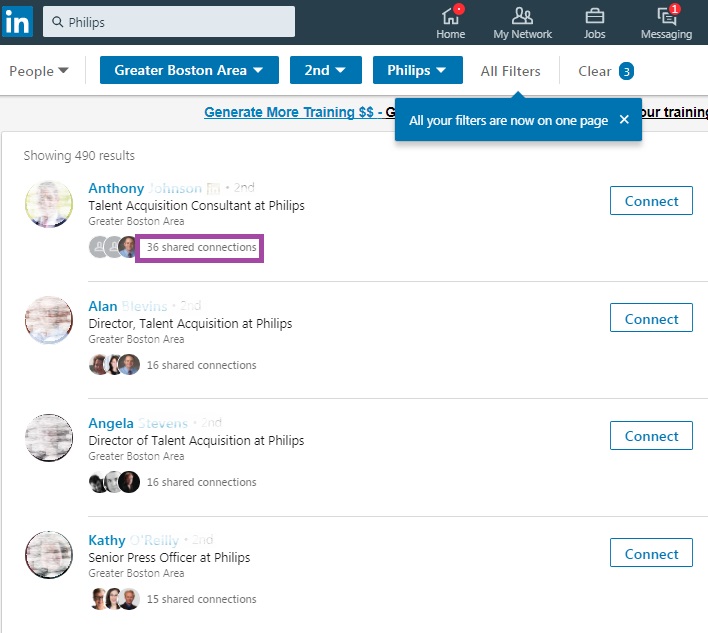
Doing a search for a 2nd degree who resides in the Greater Boston Area and works for Philips produces the result below. Below the four people in this image you notice the faces of the shared connections. Click on (number) of shared connections to see who is connected directly with your desired LinkedIn member.

Philips shared connections for Recruiterdotcom

Once you have chosen a person who could be a reference for you, email the person asking if you could use her name in an invite. Your message might be:

Hi Dave.

You and I are both connected with Sharon Beane. She and I work for the Career Center of Lowell as workshop facilitators. We have the utmost respect for each other. When asked if I could mention her in an invite to you, she enthusiastically agreed. I see we do similar work, that of helping others. I would like to join your network in hopes of being of mutual assistance.

Sincerely, Bob.

Asking for an introduction

Bobbie suggests that one should use an introduction when they want someone to join their network. This requires asking a trusted connection to send a message to the person with whom you’d like to connect.

Note: email is Bobbie’s preferred means of asking for an introduction because it is more commonly used than LinkedIn Messaging. Great point.

Here is a sample introduction sent via email.

Hi Karen.

I see that you’re connected with the director of HR, Mark L Brown at (town).

I’m trying to fill a director of DPW position and would like to get some advice from Mark. I read on LinkedIn that they’re trying to fill an accountant position. I like the way he wrote the job description, pointing out their diverse environment.

Thank you in advance for introducing me to Mark. If there’s anything I can do for you, don’t hesitate to ask.

Andy Smith, Human Resources Generalist, 978.935.5555

PS. It was great seeing our girls duke it out in last weekend’s soccer match. I hope the two teams meet in the playoffs.

Now let’s look at the five steps to finding people with whom to connect.

1. Search by people. Just click the magnifying glass in the Search field and then click People. In my case, I came up with a little less than 7,500,000 first, second, and third degree connections.

2. In “All people filters,” select 2nd in Connections for an obvious reason; you cannot connect with your first degrees, as you are already connected. This brings me to more than 124,000

3. Now select the type of person you’re seeking in Keywords. I typed “Career” in the Keywords area in the Title field because I wanted LinkedIn to do a pretty general search for people in the career development/advisor/counselor/coach occupations. This brings my number of connections to slightly more than 7,000.

4. You probably don’t want to look for career related people worldwide. Perhaps you’re focusing on people closer to home. I am, so I got to Locations and select Greater Boston Area. I’m at 825 second degree connections now. Note: sometimes you have to type in the location.

5. Here’s where you want to narrow your search to people who are mutually connected as first degrees with one of your valued connections. In the image above, you see the first person, Anthony, at the top of my list shares 36 degree connections with me.

Next, I will click on one of the circular photos below Anthony who I know well and can  mention as a reference in a cold invite.

2nd degree connection

5. The person I’ve chosen is one who can help facilitate an introduction to the person above. The reason I know this is because she and I have had numerous conversations, and we respect each other’s expertise. In other words, I trust her.


You might think how my friend, Bobbie Foedisch, goes about connecting with people on LinkedIn as time consuming, but she has been successful using LinkedIn for social selling, and she teaches job seekers how to use LinkedIn. She has the right idea about making long-term connections on LinkedIn.

I, on the other hand, am less exact; I connect with like-minded people without reaching out to them beforehand. Whether you connect directly with a LinkedIn user or ask for an introduction, using “Connections of” can effectively facilitate the connection.

If you want to learn more about LinkedIn, visit this compilation of LinkedIn posts.

.


4 ways for HR to hire a diverse workplace

As a human resources leader for a municipality, are you directed to hire people of diversity? Have you given it much thought? Further, how would you use LinkedIn to accomplish this? In this post, I’ll address the challenges human resources might face using LinkedIn to achieve the goal of creating a diverse workplace, and suggestions to make this possible.

Diversity2

But first it’s worth looking at the definition of “diversity” from the Mirriam-Webster Dictionary:

Definition: the condition of having or being composed of differing elements variety; especially the inclusion of different types of people (such as people of different races or cultures) in a group or organization. Mirriam-Webster Dictionary 

Just who make up groups of diversity and why is it important to create a workplace of diversity? People of color, different religious belief, disability, gender affiliation, younger and older worker, nationality, ethnicity, and more. A diverse workplace is important for a number of reasons, most namely employment opportunities, unique ideas, and community.

The major problem

As someone in human resources, you know that the best way to fill a position is through referrals. Many times there are no qualified people who can fill positions, so you need to advertise said position.

What you get are a ton of resumes you have to sift through or send directly to the directors of the departments in your municipalities. You’re being reactive. Wouldn’t it be better to be proactive by reaching out to people you find on LinkedIn? Wouldn’t you like to present a social media presence that attracts quality candidates? I’ll answer both of these questions.

1. Performing a direct search, but narrow with focus

The first thing you must realize is that no job seeker will type anywhere on their profile, “I’m a person of diversity.” Or, “I have a disability.” Or, “I’m a woman of color.” You’re going to have to do some sleuthing to find people of diversity.

You should narrow your search by applying certain criteria. If you’re looking for someone in Information Technology Services; using the Filter people by feature (to right) will make your search more manageable. Here are three ways to do it.

1. For example, I searched for IT and came up with more than 18 million people. Where as using Filter people by feature to specify: 2nd degree, Greater Boston Area, and Information technology and Services. This produced 19 results. Much more manageable.

2. In the Filter people by area, you can also select people who are/have been on boards or possess strong volunteer experience.

3. Yet another way to narrow the search is by typing in the Search field the title sought and “nonprofit” or “town” and “city” next to the title. A search for “IT manager, town, city” produces 12 results.

2. Rely on your network

Providing you have a strong network that consist not only of other HR professionals, but also people in other industries; you have an opportunity to uncover some great talent. Perhaps you’re in pursuit of a director of finance. You should develop connections with many of the larger companies in your local area.

It’s plausible that a finance manager in a fortune 100 company would be a cultural fit in your municipality’s Finance department. There are regulations and laws that candidates would need to learn, but someone who is talented and a quick learner, can get up to speed.

The challenge: Good ole networking will take awhile, but if you can build up a network of people who are a possible fit for the positions you need to fill immediately or down the road; you’ll be in better shape.

3. Every employee must have a strong profile

Neal Schaffer, the author of The Business of Influence and other books that address using social media for business and marketing, says everyone in an organization must have a strong profile, as each employee is the face to the organization.

Your executive team should also be the digital face for your organization. When your management engage socially, you build trust with the community. You also send a strong and encouraging message to your employees that it’s OK for them to be active on social media, which undoubtedly will bring about greater employee advocacy for your organization.

Essentially each person working for a town or city should have a statement on their profile that they are engaged in a workplace that encourages and is open to diversity. Job seekers who desire working for organizations that encourage diversity in the workplace will be encouraged to see individual profiles that support this message.

Another benefit of an individual profile that demonstrates a diversity-friendly workplace will strengthen their town’s or city’s LinkedIn company page search engine optimization (SEO). This is assuming that the municipality has a LinkedIn company page. Below is an example of an employee’s profile supporting the goal of supporting people of diversity:

One of the nice things about working for The Town of (name) is the diversity of its employees. I enjoy working alongside people who are divers in age, ethnicity, gender, disability, religion, and other diverse populations. In my role as municipal engineer, I…

4. Create a LinkedIn company page with a strong statement

The next step municipalities need to take is create a company page that delivers the message of supporting and hiring people of diversity. Below is a good start of a company page description:

(City Name) was first incorporated as a town in 1630, and later as a city in 1822. Although City Government played a major role in (city’s name) development, the real spirit lies in the diverse and vibrant neighborhoods of the City. Today, the City is governed by the Mayor and the City Council with the assistance of various departments, agencies and commissions.

The company descriptions claims to have “diverse and vibrant neighborhoods,” but we’d like to see stronger verbiage explicitly talking about how the city has a policy of hiring people of diversity.

Job descriptions on LinkedIn company pages need to deliver a strong message of support for a diverse workplace

If the city or town is hiring and posts its positions on LinkedIn’ company page, this would also be a great place to state their policy for hiring people of diversity. This should be stated at the beginning of the job descriptions. Below is a description for a Sr. Librarian position that fails to do this.

….library assistants working in the branch libraries whose duties involve the following: greeting and directing patrons, registration of borrowers, charging and discharging of books and other materials, maintaining the book and other materials collections, maintaining/troubleshooting equipment, typing/word processing and filing.

What if instead, the beginning of the job description were to read:

(Name of city) supports a diverse workplace and encourages people of different races, religions, ethnicity, age, and disability to apply for the following position?

This would make an immediate statement about the municipality’s policy of supporting diverse populations.


The final step is a link to the municipality’s website, which would repeat its policy of hiring people of diversity. This would send a strong message to people who are looking for a diverse workplace.

Photo: Flickr, mdennes

4 steps to take—at minimum—to ask for a favor on LinkedIn

Very recently I received an invitation from someone to be in their network. At first I was pleased to see “See more” below the person’s Headline. This was promising, as it means the person had taken the time to personalize the invite.

Being Polite

In some cases the personalized invites are flattering, telling me how much they enjoyed reading a post I had written. In other cases the requester tells me how we know each other; maybe he attended one of my workshops. In a few cases the person might elaborate on how we met, using all the 300 characters allotted for an invite.

At the end of the invite, the good ones write, “Please let me know if I can be of assistance.”

Almost never do I get a request in the first invite to have me review her LinkedIn profile, which begins with, “Can you review my profile?” That’s it. No flattery, no explaining how we know each other. But this one said exactly that.

What I did

The first thing I did was to click ignore without a second thought. No regret or guilt. After all, I do the same when there is no personalized invite, indicating no effort and plain laziness.

Then I shared on LinkedIn my experience with some of my valued connections. The post was not meant to be a complaint as much to as to be a learning moment. However, the conversation took off and and is still brewing.

The comments mostly support my thoughts on the rude way the individual asked me to review his profile. Some write I was being a bit harsh and should have understood some people don’t understand LinkedIn etiquette.

None say I was completely out of line with my action. As I said, the conversation is still brewing, so I’m bound to get “You’re being the LinkedIn police, Bob.” I hope it doesn’t come to this, but I firmly believe that one shouldn’t ask for a favor in their first invitation.

When should one ask for a favor, deliver the ask?

At minimum there are four steps you should take before delivering the “ask.” Whether you’re asking for services or trying to sell a product, you need to develop a relationship with the person from whom you need a favor.

1. The initial introduction: Most of us are on LinkedIn to help each other; this is our community. However, there is etiquette one must follow. First, a proper invite is required.

“Bob, I’ve followed your posts on LinkedIn and many of them resonate with me. I’d like to connect with you so I can have direct access to your articles. Please let me know if I can be of assistance.”

Your invitation is accepted and you are now first degree connections, so your next step is to thank your new connection for accepting you to their network. This is still not the time to make the “ask.”

2. Get noticed by your new connection. There should be at least one more correspondence or interaction, perhaps a comment on a shared idea or post. Even a like would count as an interaction; although not as significant as a comment. You are on your new connection’s radar.

3. You should comment on one or more shares from your new connection. It’s not hard to discover what your connection shares; simply go to their profile and click “See all activity” under the person’s Activities and Articles section.

4. You’re established. After the second or third interaction is your chance to make the “ask.” You still want to be diplomatic, not blunt, in your request. Send a direct message from your connection’s profile. Go ahead; don’t be afraid to hit the message button (seen below).
message button

“Hi Bob. I’ve enjoyed being in your network. I’ve learned more about what you do, and I’ve read your profile. On your profile you say you will briefly review your connections’ profile. Would you kindly review mine at your convenience. I appreciate your expertise. Again, let me know if I can help you.”

At this time your connection should be willing to do a favor for you. I know I would. The most important thing is feeling out your new connection to see if they’re open to doing a favor for you. These are the four minimum steps you should take before asking for a favor from a new connection.


Now go to the comment I shared with my connections. BUILD A RELATIONSHIP FIRST. Leave your comment there, good, bad, or ugly.

Photo: Flickr, Jon Fravel


3 times when LinkedIn is essential for your professional career

I am fortunate to lead career-search workshops and counsel job seekers individually. While some of my clients fully embrace the power of  LinkedIn to land a job, others don’t make great use of it. Some outright reject it.

LinkedIn Flag

As an example of the latter, one of my clients came to me, with tears in her eyes, after a LinkedIn workshop telling me that she appreciated what I taught her, but that she wouldn’t use it. I told her that it is alright, LinkedIn isn’t for everyone.

I’m feeling optimistic today and am addressing LinkedIn members who embrace the power of this professional networking platform. There are three times when LinkedIn is essential for your professional development.

When you’re looking for a job

If you are a job seeker, your journey with LinkedIn will be challenging. You will have to develop a profile that, like your résumé, will express your value and brand you. Unlike your résumé, it should depict you on a more personal level.

Yes, you’ll include your accomplishments and maybe some of your outstanding duties; but you’ll also elaborate on your volunteerism, create an extensive list of your skills, ask and write recommendations, and more. This is your online brand, so put a great deal of effort into it.

You’ll also have to get to work on building your network. To many people this is a hard thing to fathom. Reach out to people I barely know, you may wonder? Absolutely…but only the people who will be of mutual benefit. This isn’t Facebook, so you need to develop a professional network.

But reaching out on LinkedIn to unknown people isn’t enough, you’ll need to “touch” them in a personal way. Call them on the phone. Meet them for coffee. At the very least, communicate via email.

The third piece of your LinkedIn campaign is engaging with your new connections. Now that you have a stellar profile and have developed a network consisting of quality connections, it’s time to engage with your first degree connections. The old saying, “Out of sight, out of mind” holds true.

Direct messages are the best way to engage with one or a few of your first degree connections, but if you want to reach more of your first degree connections (and their connections); you can share articles, ask questions, answer updates others have started, and Like and comment on shared updates.

When you’re working

ResearchMany people make the mistake of discontinuing their engagement on LinkedIn. Saying that you don’t have the time or energy is an excuse. Sparing even 10 minutes a day is better than nothing. I still encourage people who are working to use LinkedIn every day.

First, announce your new job, if you haven’t already. Let people in your network know; they will see your Happy Landing in their homepage timeline. You will be congratulated on your new employment.

As well, be willing to alert your networking buddies to available jobs at your new company. Many of my clients have alerted their buddies to positions that are opened, and not necessarily advertised. This is the true definition of “paying it forward.”

Update your profile. Whenever you achieve an accomplishment, add it to your new position. If you don’t do this shortly after you’ve achieved an accomplishment, you may forget about it. Another reason to keep your profile updated is that you’ll be more desirable to potential suitors.

My valuable LinkedIn connection, Laura Smith-Proulx warns that you may not want to be too present on LinkedIn. You’ll want to update your profile slowly, as to not draw attention from your new employer to your profile.

This doesn’t mean you can’t stop learning while you’re working. You can read posts written by your connections or your favorite online publishers. Do this during lunch, or when you get in early in the morning, or at home. This could be your 10-minutes a day of using LinkedIn.

LinkedIn is not only a great tool for finding a job, it’s highly effective for generating business. If your role is in sales, business development, or any other position which requires networking; use LinkedIn to reach out to potential business contacts. This, after all, is why LinkedIn was created in 2003.

The best of LinkedIn’s premium accounts for sales is Sales Navigator, which provides salespeople with the ability to identify potential buyers and tag them to keep their CRM manageable. As well, you get unlimited searches. This is a premium account that your company will most likely pay for if they value generating sales leads.

Read 6 reasons to use LinkedIn after you’ve landed a job.

When you’re in school/post grad

Elevator Your FutureRecently I conducted a webinar for college students and grads, addressing the importance of creating a powerful profile and connecting with LinkedIn members.

Although as a college student your profile may not be as developed and your work history not as extensive as people in the workforce for many years, you can still use LinkedIn to find employment or internships.

This is a great time for you to get on LinkedIn, while you have the opportunity to build your LinkedIn campaign. I call this getting on the elevator on the bottom floor. You have the opportunity to build up your network with quality connections.

Valuable connections can be alumni of the school you’re attending or have graduated from. These are people who have an affinity for their alma mater and, as an extension, an affinity for you. Think networking meetings when reaching out to them.

However, as someone who could provide you with great advice or even solid leads, they will only do so if you come across as a mature, dependable person. They will want to help but don’t want to waste their time.

How do you find your alumni? The answer is simple; use LinkedIn’s Find Alumni feature, which is done by typing your university in the Search feature, choosing School or Company, and then clicking See Alumni. You can search “alumni by title, keyword or company.”

One disadvantage you’ll have to deal with is the inability to rearrange your profile sections. As of now, your sections are arranged as such: Summary, Experience, Education, and others. Many students and post grads can benefit from showing their Education section below their Summary, as it is their most recent accomplishment.

The solution to showing your value is to pack your Experience section with industry-related employment or internships. The smartest students secure as many internships as possible during the school year or summers.

When describing your internship or industry-related employment, be as descriptive as possible. At your age, you may not have the outstanding accomplishments that older workers can tout. But most employers will understand your lack of work experience as long as you’re a quick learner and work hard to get up to speed.


Whether you’re a job seeker, employed, or a college student; LinkedIn can be extremely helpful for your career development. The way you use it will vary, but many of the principles are the same.

If you want to learn more about LinkedIn, visit this compilation of LinkedIn posts.

10 ways that test your courage in the job search

Although I understand my workshop attendees’ reluctance to speak in front of their peers, I also think when given the opportunity, they should take it. They should, for example, deliver their elevator pitch without warning. “Tell me about yourself” is a directive they will most likely get in an interview.

courage

They should also not pass on answering interview questions I spring on them. Can they take the fifth during an interview? Hell no.

“Tell me about a time when you solved a problem at work,” I’ll ask. “I’d rather not,” they say. Okay, see how well that goes over at an interview.

Some of you might disagree with my insistence that they deliver their unrehearsed commercial or answering an interview question when they least expect it.

You might think it’s putting them on the spot, making them feel uncomfortable, testing their courage. Darn tooting it’s testing their courage. Despite what anyone says, the job search requires courage.

1. Being put on the spot in front of other job seekers by having to deliver your personal commercial or answer difficult interview questions on the spot, are some ways that test your courage. There are nine other difficult ways your courage will be tested in the job search:

2. Telling people you’re out of work. I know this seems like a no-brainer, but how can people help you if they don’t know you’re out of work? People tell me they’re embarrassed because they lost their job, even if the company was suffering and had to release employees.

I encourage them to let as many people as possible know they’re looking for a job, even if it means they’ll be embarrassed. It takes courage to do this, but it’s counterproductive to try to go it alone.

3. Attending organized networking events. You’ve read that “no one likes networking events.” This may be true for you, for others, for most. But networking events offer the opportunity to engage in conversation with other job seekers who are at these events to seek leads, as well as provide leads and advice to you.

4. Having others read your résumé or cover letter. Although you think you’ve written a great cover letter, you may be surprised by what others think about it. Like the time my wife told me she thought cover letter was “verbose.”

I’m not sure she used that word, but I got the picture that someone reading it would think it intimidating or laborious. Asking her to read my cover letter took courage and prompted me to edit it.

5. Participate in mock interviews. This may be the closest you’ll get to an actual interview. Mock interviews are a valuable teaching tool and any organization that offers them is providing a great service.

But they don’t have to be conducted by a professional job coach/advisor; a friend of yours can conduct them. Having a camera to record your answers and body language is a big plus. I remember being asked to participate in a mock interview years ago. I flatly refused. I lacked courage then.

6. Reaching out to your LinkedIn connections. Introverts may understand this act of courage more than their counterpart. Your LinkedIn connections are not bona fide connections until you reach out to them in a personal way, as in a phone call or meeting them for coffee.

Some of the connections I’ve reached out to have proven to be great networking partners, while others had little in common with me. Oh well. Doing this takes courage.

7. Approaching former supervisors for LinkedIn recommendations. My workshop attendees often ask me if they should reach out to their former supervisors for a recommendation. My answer is a resounding “Yes.”

This may take courage for some, but having recommendations on your LinkedIn profile is a must. What your supervisor feels about your performance weighs heavier than how you describe yourself. What’s the worst your supervisor could say? Yep, “No.”

8. Getting off the Internet. Not completely, but use it seldom and in different ways. Instead of defaulting to your comfort zone like Monster.com and other job boards, use LinkedIn to find relevant connections through its Companies feature, and visit your target companies’ websites to conduct research on the labor market.

Contact those companies with a networking email  to ask for networking meetings. This takes courage but will yield better results than using the job boards alone.

9. Speaking of networking meetings. Otherwise known as informational interviews, networking meetings have been the reason for many of my job seekers’ success in landing jobs. But they don’t come easy, as many people are busy, so it takes courage to ask for them.

Once you’ve secured a networking meeting, remember you’re the one asking questions about a position and the company, so make the questions intelligent ones. You’re not there asking for a job; you’re there to gather information and get advice.

10. Going to the interview. You’ve prepared for the interview by doing your research and practicing the tough interview questions, both traditional- and behavioral-based. You’re prepared, but still you don’t know what to expect.

How will the interviewers react to you? Will they ask you questions you’re not prepared for, ones you didn’t predict? Job interviews will require the most courage you can muster…even you veteran interviewees.


Readers, what I’ve described as courage may seem like logical  and comfortable job search activities. You may thrive on networking, feel comfortable showing others your résumé, and, above all else, attending interviews.

To you I say “touché. Many others may understand exactly what I’m talking about. To them I say embrace the challenges presented to you in the job search. Show courage. Show courage. Show courage.