Category Archives: Career Search

How to answer, “Tell us about a time when you had to deal with pressure” in 5 easy steps

You’re in a group interview and it’s been going smoothly. You’ve answered the questions you prepared for. To your credit, you read the job description and identified the most important requirements for the job, Marketing Manager.

Mock Interview

The interview is going so well that you’re wondering when the hammer will fall. When will the killer question be asked? That question would be, “Tell us about a time when you had to deal with pressure.”

In the job description, one sentence read, “You will be working in a fun, fast-paced, pressure packed environments. If you like challenges, this is the job for you.”

Sure enough one of the interviewers asks the question you were dreading. “Jane, tell us about a time when you had to deal with pressure. How did you approach it, and what was the result?”

Great, a behavioral-based question. You never considered what you did at your last job as having to deal with pressure. Pressure wasn’t in your vocabulary. Coming to the interview, you ran a scenario over and over in your mind.

The interviewer is waiting for your answer. How are you going to respond? You decide that you’ll ask for some clarification first. “This is a great question but one I’m having trouble with,” you say. “Would you give me an example?”

“I’m referring to a time when you had to meet a deadline as a Marketing Manager. There will be deadlines to meet here,” one of the interviewer says calmly.

All of the sudden it occurs to you that you had many deadlines to meet, and that you met almost all of them, 95% at least. You will have no problem answering the question honestly. It’s just a matter of recalling the specifics of a story that comes to mind.

“Thank you Ms. Jones. This helps a lot.”

Remembering the S.T.A.R formula a career coach told you to use, you begin your story.

Situation

Three years ago I was hired by my previous organization to manage the marketing department. One major problem the company had was a lack of social media presence. I mentioned this in my interview with them.

Task

Shortly after I was hired, I was given the task of creating a more robust social media presence. The VP of the organization came into my office and gave me the exciting news; and as he was leaving, he told me I had a month to pull it off.

Actions

  • The first thing I did after hearing the news was evaluate the situation. We had a Facebook page that was barely getting hits. Some of our employees had LinkedIn accounts, and that was about it.
  • I approached one of my employees whose LinkedIn profile was strong and asked if she would be willing to create a LinkedIn company page. I was strong with LinkedIn, but knew very little about a company page. She was excited to take this on.
  • As I left her cubicle, she told me she would also take on the Facebook page. I joked with her about taking on Twitter. She told me it would be too much work, in addition to her other responsibilities. I agreed.
  • From looking at our competitors’ social media campaigns, I realized our strongest competitor had the top three I mentioned, as well as Instagram and Pinterest. I didn’t have the staff to implement these two platforms. I would need to hire a person to take these on.
  • My VP agreed to letting me hire a person to take on Instagram and Pinterest, but told me I had a budget of 20K. I was able to negotiate 5K more, plus an additional month on the deadline.
  • The person I hired was looking for part-time work, 25 hours a week, and knew Instagram and Pinterest very well, having taught it at a local community college. He agreed upon 22K for salary.
  • The last step was letting our clients and partners know about our new campaign. Once the campaign was a few weeks off the ground, I had one of the staff send out a mass mailing through ConstantContact, letting them know about our campaign.

Result

At first the reaction I was hoping for from our audience was sluggish, but after a month our visits to Facebook increased by 300%. LinkedIn visits increased by 50%, and Twitter gained 50% more followers. Instagram also did well with 4 visits a day. It was agreed that Pinterest would be dropped after a month since its inception.

Even with the extended due date I negotiated, my staff were able to complete the task by a month and a half. In addition, my VP decided that our new hire would be offered a full-time position monitoring all of the platforms.


There’s one more component of your story to make it complete: what you learned. This will close the loop.

Learn

What I took away from this experience is that when the pressure’s on, I react with decisiveness. I’m more than confident I will do the same for you.


This behavioral-based question is a common one asked in interviews. Be prepared to answer it and make sure you use the S.T.A.R formula. This is the best way to tell your story.

Reflect before slapping your LinkedIn profile together

I’m sure you’ve read many articles on writing your LinkedIn profile. And I’m sure you know how important your profile is to your LinkedIn campaign. This is why it’s important to not simply slap our profile together and hope for the best.

linkedin-alone

Your profile is important but it’s not the only piece of the proverbial puzzle. Read the series beginning with The ultimate LinkedIn guide, part 1: how to optimize your LinkedIn profile to learn how to create and effective LinkedIn campaign.

This post focuses on the profile alone, and more specifically how you need to reflect before you begin writing it, or even if you’ve already written it. Here are some important considerations:

How do you want to brand yourself?

The first consideration, how you want to brand yourself, requires a great deal of reflection in itself. First you have to decide if what you’re doing is what you want to continue doing, or if you want to go in a different direction.

If you want to continue on the same path, you’ll have to think about how you can strengthen your message. While it may be strong on your résumé, the LinkedIn profile gives you more leeway for expressing the value you will provide to the employer. Think Headline and Summary as the most obvious places where you can accomplish this.

But also consider other sections on your profile that aren’t typically on your résumé, namely Skills & Endorsements, Volunteer, expanded Experience, and Recommendations.

Some of my clients want to change their career and ask me if they should create two profiles. First of all, I tell them, this violates LinkedIn’s policy. But more to the point, it would be a royal pain in the ass.

My advice is to express their transferable areas of expertise in their Headline, tell their story in the Summary, and prioritize statements throughout their profile.

reflecting

Your LinkedIn profile is not your résumé

I tell my clients that initially they can copy and paste their résumé content to their profile, but then they need to personalize their profile. Make it a personal résumé, an online marketing document. This will take a great deal of reflection.

However, your profile shouldn’t confuse hiring authorities as to what you do. For example, you don’t want to brand yourself—on your résumé—as a marketing specialist, but emphasize to a greater extent—on your profile—your expertise as a web designer. This will definitely confuse hiring authorities.

If you’re in job-search mode, you want the two to be similar, yet not identical. In other words don’t regurgitate what you have on your résumé. However, if you’re gainfully employed and want to convey the message that you are promoting a side hustle, you have more flexibility.

Which parts of your profile will brand you?

The answer is every part of your LinkedIn profile brands you, beginning with your background image and ending with your interests. Yes, even your background image can brand you. Didn’t think about this, did you? Again, this will require reflection.

Here are some of the profile sections that you also need to reflect upon:

  1. Headline
  2. Photo
  3. Summary
  4. Articles/activities
  5. Experience
  6. Education
  7. Volunteer experience
  8. Skills & endorsements

Speaking to your Summary, reflect on how you want to tell your story. Of all the major sections on your profile, this is blatantly different from your résumé. You’ll write it in first-person point of view, talk about your passion or knowledge of your industry, include some accomplishments, and a call to action, e.g., your email address.

Who is your audience?

Your audience is your intended industry. You will deliver a different message if you’re changing careers; but if you want to continue doing what you’ve done, you’re speaking to the same audience. Therefore, you must optimize your profile with industry keywords.

The narrative you use to address your audience will take some reflection. I’ve mentioned your Summary as a great section to speak to your audience, to tell your story. Your job scope in your Experience section is another area where you can express your message. Here’s how I talk to my audience:

I’m more than a workshop facilitator & designer; I’m a career and LinkedIn strategist who constantly thinks of ways to better market my customers in their job search. Through disseminating trending job-search strategies, I increase our customers’ chances of finding jobs.

Knowing your audience takes a great deal of reflection. Obviously, from my example, I’m addressing job seekers in a personal manner.


Reflecting on your LinkedIn profile is no easy task. I see the cogs working in my clients head when I ask them to consider the aforementioned aspect of their LinkedIn profile. Whether you are starting your LinkedIn profile or revising an existing one, it definitely will require reflection.

Photo: Flickr, daysmoveeasy

4 ways to learn about workplace values before you’re hired

Think about the job you disliked the most. Perhaps it was because the work environment was toxic. Maybe you weren’t able to see your children’s events because of the commute home. You weren’t given the autonomy you craved. Or you were working at a dead-end position. The company for which you worked lacked integrity. There are many reasons why employees are dissatisfied with companies for which they work.

Stressed young businessman

The above are examples of how workplace core values are not met. How important are workplace core values? Statistics show that work values are more important than salary, unless earning a high salary is your main core value.

A Harvard Business Review article supports this statement:

“One of the most striking results we’ve found is that, across all income levels, the top predictor of workplace satisfaction is not pay: It is the culture and values of the organization, followed closely by the quality of senior leadership and the career opportunities at the company. Among the six workplace factors we examined, compensation and benefits were consistently rated among the least important factors of workplace happiness.”

This brings to question how you ensure that you take a job which meets your core values. Here are four ways to discover the core values employers support, from worse to best.

4. Ask in the interview

This is the worst way to determine the company’s core values, as it may be too late. (It’s always best going into an interview with your eyes wide open.) You can ask the recruiter during the telephone interview.

However, he might not know much about the company’s values, especially if he’s an agency recruiter (not on site). A corporate recruiter would have a better idea of the company’s values; although, not as accurate as a hiring manager’s.

You may be able to ask the question, “Can you tell me a little bit about the company’s core values?” during the interview. But more likely you’d ask this question at the last phase of the interview when they ask if you have any questions for them.

If this is your only opportunity, ask the questions as such: “What are (Company X’s) top three core values?” This is a question that will challenge the interviewers and indicate that you’re serious about working for the company.

3. Comb through company reviews on a site like glassdoor.com

I’m skeptical of a site like Glassdoor. My thought is that disgruntled current or former employees won’t speak objectively about their present or past companies. And, reportedly, some employers have launched paid campaigns to encourage positive reviews.

However, there could be value in this site’s reviews if the they are consistent; if most of them are positive or negative. I looked at two companies, one a nationally known monolith and the other a largish company local to Boston. They were consistently positive in their reviews.

Dell EMC had a whopping 4.3K reviews and a 76% “Recommend to a friend” rating. In terms of pros and cons, work-life balance was the top value mentioned: 507 applauded the work-life balance, whereas 107 trashed the work/life balance.

The other company, Kronos, also did consistently well. Of the 1.3K employees who posted a review, 81% would recommend this company to a friend. Not surprisingly work-life balance was the number one value: 239 favored it; 45 employees saw it as a con.

2. Find someone on LinkedIn who can speak about the company

LinkedIn can be a great tool for finding people who work for your target companies; or better yet, worked for your target companies. It’s important to know how to locate people at said companies. You’re going to get very familiar with LinkedIn’s All Filters feature.

How to use LinkedIn’s All Filters

  1. First click in the Search bar at the top of most pages.
  2. Choose People.
  3. Click on All Filters.
  4. Type in the company name.
  5. Select second degree connection.
  6. Select Current or Past companies.
  7. Choose location.
  8. Scroll down to enter the title of the person you would like to approach.

Second degree connection who works for your target company

If you are a Premium account member (most likely Career), use one of your five Inmails to message someone who shares a common connection with you. You may mention in the first line:

“Hello Susan, you and I are connected with John Schmidt, who encouraged me to reach out to you….”

What if you don’t have a premium account? Go to the person’s Contact Info box on her profile and send her an email. Or, send an invite for quick action. My suggestion is to proceed like you would if you have a premium account in terms of the message you send. Indicate you share a common connection who will vouch for you.

Read this post to learn more about how to properly communicate with a possible connection.

Second degree connection who USED to work for your target company

Job seekers often don’t think of reaching out to someone on LinkedIn who used to work for their target companies. I tell my workshop attendees that these people can be their best online source of information, as they will most likely provide the truth. They have nothing to lose.

Again, if you don’t have a premium account and have to send an invite, it’s best to mention a common connection. Be sure the common connection you mention is amenable to vouching for you. There are many connections who will vouch for me, but there are some who (I hate to admit) I hardly know.

1. Have a mole in the company who will tell you about the company’s values

This is the best way to discover the values your potential employer supports. The person/people you ask, via LinkedIn or in person, are onsite and experience the company’s core values on a daily basis. They can provide intricate details, whereas glassdoor.com and current and former employees on LinkedIn might not be as willing to go into details.

I recall applying for a job that was posted by an employer I was considering working for. I knew someone within the organization who was very open about the company’s culture. She described an environment where management was so abusive toward their employees that people were quitting. Needless to say, I didn’t apply for the job.


Your workplace core values are not to be ignored when applying for positions. They can make the difference between being happy or unhappy. An exercise I have my workshop attendees do is write down their top five values, not an easy task for many. Then I have them narrow it down to three and finally one. Can you identify your top value? I bet it’s not salary.

This post originally appeared in www.job-hunt.org

Photo: Flickr, Reputation Tempe

3 times when ghosting is wrong

Ghosting is not in the Webster Dictionary, but we know it as when someone who says he’ll call you but never does. This happens to job seekers, recruiters, and business people. And it’s just plain wrong.

ghost hand

Last night I waited for a phone call from a person who wanted to talk with me about a possible business endeavor. He had asked to connect to see if we could be of assistance: “share blogs and investigate a join (he meant joint) venture relationship.” He didn’t call.

Essentially he had ghosted me and it left a bad taste in my mouth. It made me think of when people get ghosted like I had. There are three obvious times that come to mind.

When job seekers are ghosted

Too many of my clients talk about how they were supposed to get a call from a recruiter or hiring manager. They set time aside waiting for the much-anticipated call, canceled their plans of attending their child’s event, missed a networking meeting they had set up, or had to pass on a seminar they were looking forward to.

They prepared for the call; had their documents ready, prepared their talking points, cleared the house so there would be silence. This job was a perfect match for them. They met all the requirements and had heard great things about the company.

The call never came.  Why, they ask me later? I don’t know what to say other than tell them to call the recruiter or send an email, reminding him of the phone call they were supposed to have. After weeks of waiting the only thing they can do is move on. The job seekers have been ghosted.

I hesitated to connect with the ghoster, fearing this might be a bait and switch. Nonetheless, I accepted his invite. In his reply, he explained his business model and asked if I’d like to have a phone conversation with him. The next day I reply telling him of my limited time. He said he wanted to go forward with a phone conversation.

When recruiters are ghosted

Ghosting is a two-way street. I’ve spoken with and read of recruiters who have been ghosted by job seekers. They were supposed to have a phone conversation with a promising candidate, but the job seeker didn’t call or answer their phone at the agreed time.

The recruiters most likely set some time aside on their schedule to have the phone calls. They were excited at the prospect of presenting a blue-chip software engineer to their client.

The recruiters waited and even called the candidates to remind them of their conversation. “My client likes what I told them about you,” the recruiters wrote in a text. “Please call me as soon as you can.”

Much to the recruiters’ chagrin, the candidates never called or even had the decency to return their text. In some cases candidates don’t show up for work after they were offered the job. The recruiters were ghosted. The employers were also ghosted.

One recruiter shared a post on LinkedIn in which she said that 13 out of 15 candidates she set up for interviews didn’t even show for them. Read the post here. Imagine that. They didn’t show without explanation.

Jump forward to last night, I’m waiting for this person’s phone call. I have my laptop open to his profile, to get a sense of who he is and his business. The time of our call comes and goes. I send him a LinkedIn message reminding him of our call.

Shortly later I receive his reply verbatim: “I apologize for a client call came up. I had a chance to think about our pre-holiday conversation. I don’t see a lot of synergies in our business for referrals….

When business people are ghosted

The problem with ghosting potential business partners is that you lose credibility. Your reputation is on the line; and as they say, “It’s a small world.” If you decide there’s no “synergy in our business” days before a scheduled call, do the proper thing; call that person.

A good friend of mine who is in sales told me that he’s been ghosted a couple of times. He said when this happens, it’s the other person’s loss. Yes, my friend’s time is valuable. Yes, he might have other plans. Yes, waiting by the phone and seeing time pass sucks. My friend has a good memory.


Whether you’re a job seeker, recruiter, or business person; don’t ghost people with whom you want to engage with. It’s not the right thing to do.

Photo: Flickr, صالح المقيبل

4 ways networking is a waste of time: 6 ways networking works

Networking can be a waste of time? Coming from someone who co-facilitates a networking group and runs a job club at a career center, this statement seems like a contradiction. I believe in the power of networking, but how it’s done makes all the difference.

uncomfortable lady

At times networking for job seekers is painfully unsuccessful. Maybe you’ve experienced a time like this: You enter a large room in a church or library or anywhere that will host the networking group. You don’t know a soul if it’s your first go-around.

You are shy in social situations. Introducing yourself and launching into small talk scares the hell out of you. Everyone else is engaged in conversation, save for a few people standing in the corners of this room which seems to be growing in size.

You’re remembering everything you’ve been told in job-search workshops. Have your elevator speech prepared is what you’ve been told. Deliver it naturally. Ask for and give your personal business card to anyone who will take and give theirs.

Networking doesn’t work for the following reasons

The scenario described above is one that is common to many job seekers. It’s reason enough for job seekers to swear to never network again. Here are reasons why networking can be a waste of time.

1. You expect immediate gratification

At one point you were told that fellow networkers are going to help you land your next job, which can be true. But if you expect them to have a pocketful of valuable connections with whom you can speak or opportunities at the ready; you’re in for disappointment.

Networking is a process that is invaluable, but it takes more time than one visit.

2. You’re not mentally prepared for a formal networking setting

Remember the scenario I painted above? For many people, a large room full of people is not an ideal setting for networking. Generally speaking extraverts are more comfortable in larger groups than introverts, but this isn’t always the case.

Extraverts may be as uncomfortable as introverts. The message here is be prepared.

3. You left your personal business cards at home

Worse yet, you don’t have personal business cards. Personal business cards are necessary for a formal networking event. At least 95% of the attendees will have their own personal business cards, which are ideal marketing literature that are meant specifically for networking events.

Read my popular post to learn more about personal business cards.

4. You’re only there for the show

Do you go to a networking event to see the guest speaker and then leave? If this is the case, you have no intention to communicate with others. This is acceptable for one event, but if this is your MO, you’re taking up a seat. Read below to learn about what works.

What works

What works is communicating with people who have the same goal in mind, landing a job. Isn’t that what one does when they network, you wonder? Not necessarily. Some people don’t get the concept. Communicating should consist of an exchange of words from which both parties can benefit.

8621406461_b4b89046d1_o (1)

1. Go to networking events with the goal of conversation in mind

I feel most comfortable at a business networking event if there are no expectations of immediate gratification. For example, I could have multiple conversations with a person until we know each other well enough to help each other.

I don’t feel comfortable talking with someone who thinks talking at people is communicating. Do you see the difference? If you find yourself in a one-way conversation, disengage with said person.

2. Go with the mindset that you’re going to help each other

You’ve heard, “Help others before asking for help.” I personally think this attitude is a good one to adopt. Don’t go to a networking event only expecting help. However, have conversations with people who can be of mutual assistance.

In other words, if you get the sense that the people with whom you’re talking only want help and have no interest in giving it, dump them like a bad habit.

3. Meet in smaller groups

Until now I’ve been painting a picture of large networking events. This type of setting may not be for you. Smaller networking groups may be the secret sauce. In smaller groups, you have a better chance of talking with more people and understanding their needs and how you can be of mutual assistance to each other.

Read my article on the pros and cons of buddy groups.

4. You’ve got nothing to prove

You don’t have to leave a networking event with 10 personal business cards. You don’t have to leave a networking group with three business cards. In fact, if you leave a networking group without making connections, that’s all right. Just keep in mind that this doesn’t mean you’ve failed.

5. Success happens anywhere

Superficial networkers are the people you meet when you’re out and about. They are the people in your community—your neighbors, friends, relatives, convenience store owner, hairstylist, dentist, soccer mom at a game, etc. These are people who may have heard of an opportunity.

However, they can’t be of assistance unless you let them know you’re out of work. One suggestion is to always carry your personal business cards wherever you go.

6. Create your own networking events

I often suggest books for my clients to read. One of them is Keith Ferrazzi’s Never Eat Alone. One of the ideas behind this book is to create your own networking opportunities. Invite anyone you want to a hiking outing or dinner party (for instance) and…network.

They can be job seekers or business contacts. It’s a great idea.


Networking can work as long as you avoid the four don’ts of networking and, instead, focus on the six dos. The suggestion I emphasize the most is not to give up on networking after one or two attempts. If you’re unsure of what to do, shadow another job seeker to learn best practices.

7 tools employers are using to hire job candidates

Many of the high-level job seekers I encounter at an urban career center for which I work haven’t had to look for a job in 10, 20, 30 years, or more. For them, their advanced job search might feel like landing on Mars, as the job-search terrain has drastically changed. If you’re in this boat, this post will help you understand what you’ll encounter as you go forward.

Hands on Keyboard

Even if it’s been five years since you’ve had to look for work, you might not be aware of all the tools employers are using to find the best candidates. Employers are being more creative with their hiring efforts, while making it more difficult for job seekers to land a job. Let’s begin with the first and most well-known tool.

1. The applicant tracking system (ATS)

The ATS is one tool of an advanced job search that has many job seekers scratching their heads. When I describe it to my clients, most of them haven’t heard about this software which companies use to make life bearable for their HR staff and corporate recruiters. The bottom line is that the ATS eliminates approximately 75% of résumés that must be read for each job.

However, it’s a different matter for you. If you’re applying online for jobs where an ATS is used by companies, your résumé must have the required keywords, e.g., skills, job title, and even predicted skills to have it read by human eyes. Failure to include the required keywords on your résumé will most likely result in your résumé stored in the company’s database containing thousands of résumés that have been rejected.

Jon Shields of Jobscan.co makes it his business to know about the ATS. There are hundreds of ATSs out there. He claims 98% of large companies use an ATS. It’s also estimated that close to 65% of midsize companies employ one. Even smaller companies will outsource this technology.

2. LinkedIn’s mobile app continues to grow in popularity

LinkedIn is the go-to platform for recruiters. To engage in the advanced job search, you must realize that using only your desktop is not enough. You also need to install the LinkedIn app on your smart phone and access its features. Although the app’s features aren’t as robust as the desktop’s, they’re good enough to help you with your job search.

You can develop and nurture your network, access recruiters through Messaging, brand yourself with a video feature (not available on the desktop), and apply for jobs with LinkedIn’s separate Jobs app. You can do all of this practically anywhere in the world, even while you’re on vacation.

3. Live video interviews

Skype, Zoom, Google Hangout, even Facetime have been a staple of the advanced job search. They’ve been a larger part of the hiring process, as they preclude the need for candidates to come to the company, thus saving time and money. However, these applications can cause some challenges for you if you’re not familiar with the technology.

Saving time and money are not the only reason employers conduct online interviews; they want to see you. Yes, they want to see your facial expressions and body language, and perhaps your age.

On your end of an online interview, you need to make sure you’ve covered all the technical requirements (proper lighting, clear sound, and tasteful background). Believe it or not, these technical requirements can be challenging for job seekers who don’t have the proper space for video interviews.

4. Pre-recorded video interviews

These are like live video interviews, save for the fact that you don’t see anyone on your computer screen. Instead, you’re looking at a screen that has questions written on it. Your answers to these questions will be timed and recorded. The final step is sending your recording to the employer.

Like an online interview, make sure you have the technical requirements covered and that you’re looking directly at the webcam to make it appear that you’re making eye contact with the people who aren’t there. That’s right; there’s no engagement required from the employer. They will simply gather your recorded answer and review them at their leisure.

5. Online pre-employment software

Hire Vue describes pre-employment software as: “… any tool or method used to evaluate job candidates with consistency. They range from hard skills tests (such as typing and math skills tests) to ‘softer’ tests, like personality batteries.” Many companies believe these tools are an accurate way to narrow the candidate pool.

Online evaluations get even more interesting. My valued connection, Mark Anthony Dyson, writes in his post on 14 Easy Modern Job Search Tips: ” With the arrival of AI, some companies are even implementing facial recognition technology to read candidates’ body language. Don’t get caught off guard by any of those cutting-edge technologies.”

6. Now it’s about your voice and image

If you’re comfortable with video, you’re in luck. Recruiters are looking at FaceTime Live and LinkedIn video features to assess candidates’ personality and technical abilities, both in the quality of your video and how you sell yourself. This advanced job-search tool isn’t a requirement for every occupation.

For example, if you’re a digital marketer and you produce a video that has multiple camera angles, effective lighting with a little music thrown in, and you let your personality shine; your video will impress the most critical hiring authorities. However, if you produce a poor-quality video, it may hurt your chances, rather than help.

7. It’s not only our kids who text

Recruiters are texting job candidates because of its convenience. Forget formalities. If they want your résumé “yesterday,” don’t be surprised to receive a text saying, “John from Company X wants to see your résumé today. Can you get it to me in an hour?”

Imagine you’re on vacation in Maine and away from your computer, but luck would have it that you’ve stored your résumé on your phone in Dropbox, Google Drive, or your iPhone Cloud. No problem just return it in a text. LinkedIn reports that employers and employees alike are using text, so get on board.

Sarah Johnson was a corporate recruiter. She explains: “When I was recruiting, my last hospital found that busy professionals were MORE likely to respond to a text vs. a phone call or email. I used TextRecruit to help me source for a few hard to fill physician specialties….”


These seven tools of an advanced job search that are not too difficult to take on. But you may have to take a few practice runs before you, for instance, send your video to recruiters. They may seem like a hindrance, but keep in mind that the job search has changed to make it easier and less costly for employers. It’s time to get with the program. You can do it.

This post originally appeared in Job-Hunt.org


6 additional ways to improve your job search for the New Year

The first of this series, 10 ways to improve your job search in the New Year, was written almost a year ago. After reading this post, please read the prequel.

As the New Year approaches, job seekers are anticipating employers to increase their payroll. This is an accurate assessment. However, until job seekers receive the acceptance letter, they have to continue to improve their job search.

job seekers in line

Described below are some of the softer job-search steps. They are what job seekers sometimes ignore or think are not important. They are very important and often the first steps you must take to conduct a successful job search.

1. Forgive yourself

If you haven’t already forgiven yourself for being laid off, let go, or forced to quit, it’s not too late. You may be experiencing guilt, self-doubt, anger, and despondency to name a few. When I was laid off from marketing, I remember going through all of the aforementioned feelings. Now I think it was all wasted energy.

On the other hand, own the past. If you were to blame for losing your job, learn from your mistakes and don’t repeat them in your next job. One member of a job club I operate suggested this as a part of our mission statement. I think she was right on track.

If you are having a difficult time forgiving yourself, considering seeing a therapist, especially if these destructive feelings are hindering your job search. Most health insurance policies cover mental health. Look into the health insurance you or your spouse are purchasing.

2. Take a short break

I advise a week off after you’ve lost your job. You need time to get your head straight. Your emotions will be frazzled. And there’s also taking care of your finances, e.g., applying for unemployment.

However, if you’re newly unemployed, now is not the time to take the three-month vacation you’ve accumulated during the tenure of your previous job. This will put you behind the eight-ball in terms of getting into the job search and showing a gap on your resume.

3. Dive into your job search with gusto

Now that your break is over, it’s time to put a concerted effort into your job search. Determine how you’re going to conduct your job search. Make a plan or have someone help you create a sound plan for your search. Many job seekers make the mistake of searching for work online as their only means.

The methods of searching for work that are most successful from best to worst are: face-to-face networking, attending professional affiliations, utilizing a recruiter or staffing agency, combining LinkedIn with face-to-face networking, and using job boards. You don’t have to use all of these methods, as you don’t want to spread yourself thin.

4. Let others know you’re out of work

As simple as this sounds, plenty of job seekers are reluctant to tell their friends, neighbors, relative, former colleagues, etc., that they’re out of work. Not only should you not feel embarrassed, you are missing opportunities to network. (This is discussed in the prequel.)

Most people understand that people sometimes lose their job. It’s likely they have also lost their job. It’s a known fact that people want to help you, so let them.

5. Be good to yourself

You’ve heard of work/life balance. I believe there’s also job-search/life balance. In other words, don’t burn out during your job search. In a recent job club meeting, I asked the members what they did during the Christmas holiday. Many of them talked about making connections with valuable recruiters.

But the ones who also impressed me were the ones who said they took some time off to decompress, sprinkled in with some job searching activities. You must remember that your unemployment is temporary, and during this time there are other important aspects of your life.

6. Don’t play the numbers game

At times I have to remind job seekers of this destructive practice, where they will say, “In a month I’ll have been out of work for more than a year.” Obsessing over the time you’ve been out of work will hurt your morale and, therefore, your job search.

You may reach the point where you’ve been out of work longer than six months, so you’ll need the assistance of people more and more. Some people you’ve relied on for help may have fallen of the face of the earth. Reconnect with them in a casual way, while also reminding them you’re still looking for work.


Now read the the prequel to this post.

7 steps to take to find the right person using LinkedIn’s All Filters

Some estimates say there are more than 650 million LinkedIn users. To find and connect with the person or people who can help you land your next job might seem like a daunting task, but don’t fear.

linkedin-alone

Perhaps you’re looking for the hiring manager at one of your target companies, or an alumnus who can provide sage advice, or a corporate recruiter. Finding the person with whom you need to connect requires a focused search.

A great tool to narrow your search is All Filters. To use this tool, you must have a plan of attack. Following are the steps I would take to look for recruiters, using the following criteria:

  1. Must be an employee of the companies below:
    • IBM
    • Kronos
    • Oracle, and
    • seven other companies.
  2. A second degree connection, so I can utilize our common connections. (More on this later.)
  3. Must serve the Boston, MA, area.
  4. Graduated from the University of Massachusetts.

1. I type in Search the words: (recruiter OR “talent acquisition.) The result is approximately 3,200,000 LinkedIn recruiters. Way too many.

Recruiter step 1

2. So I jump right to All Filters; no sense in wasting time. Note: in All Filters, there’s an option to choose Industry. A practical choice would be “Staffing & Recruiting,” but the string I typed in Search gives me more options with which to begin.

3. I Hone in on my first company, IBM, which is one of the companies listed under Current Companies (see diagram below). I have 5,317 2nd and third degree connections at IBM.

4. If I want to connect with a recruiter at IBM, I should narrow the list down to 2nd degrees (see diagram below), as they will have other LinkedIn members who are connected to people in my direct network. This is important because I’ll want to mention our common connections in a personal invite. This brings the number to 348.

All Filters

5. One of my criteria is Location (see diagram above). The Greater Boston Area is one of the choices LinkedIn gives me. Other choices include India, the Greater New York City Area, and the Dallas/Fort Worth Area. I choose Greater Boston Area, which brings the number to 42 recruiters. Note: you might have to type in your desired location.

All Filters2

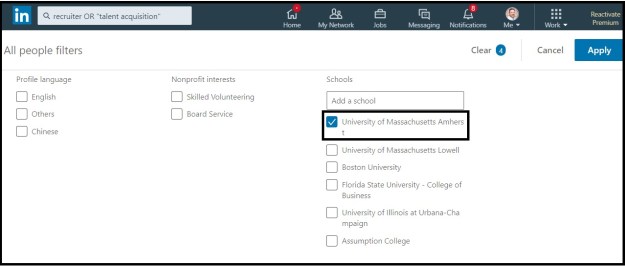
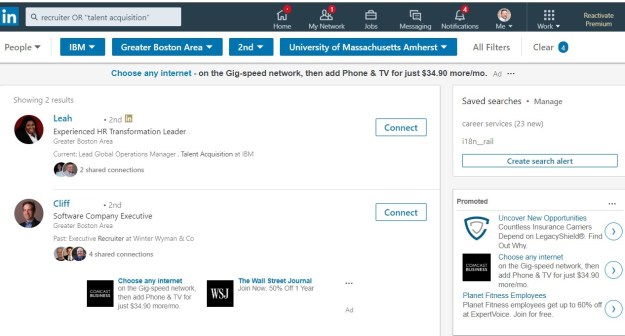
6. I’m almost there. I have to find recruiters who attended the same college I did. I have to scroll down in All Filters and write in my alma mater, the University of Massachusetts (diagram above.) I am left with only two recruiters that have met all my criteria (below).

Recruiter step 5

7. Finally, I need to choose a common connection who will either introduce me to one of the recruiters or allow me to use their name in an invite I send. I know just the person I would like to ask. He was a former customer of mine and a real stand up guy.

Common Connections


Repeat the process

You now get the idea of how to locate people on LinkedIn by using All Filters. It isn’t difficult as long as you know who you’re looking for. By the way, my search for Oracle and Kronos yield one result and no result respectively. I guess I need to connect with more recruiters.

12 Telltale Signs Your LinkedIn Profile Reveals

There are times when I come across a LinkedIn profile that is strong and doesn’t need much revision. In some cases people had their profile written for them by pros. They have the major sections covered, such as: Background image; Photo; Headline About; Experience; and Education.

linkedin-alone

At times like this, I focus on their overall LinkedIn campaign as revealed by their profile. Because when it comes down to it, their success hinges on more than just the content in their major sections.

Following is a discussion I would have with a client who has a strong LinkedIn profile, but needs help in other areas.

My client logs onto their LinkedIn account on my computer, so I have access to information visitors don’t. This way we’re not violating any LinkedIn rules. We’ll look at the typical profile sections, but I’m more interested in the telltale signs. Following is how a conversation would go.

1. Photo properties

Before our session I noticed that I couldn’t see your photo. It’s an easy fix. On your profile you will click on your photo to enlarge it. Then click on Visibility at the bottom-right.

Earlier you had selected “Your Connections” as the people who could see your photo. You’ll switch it to “the Public,” so even someone who is not on LinkedIn can see your your photo.

This reveals that you’re guarded about your photo. And some people might think you’re hiding something. With your photo, you have nothing to hide.

2. Open to work

I see you’re not using this feature. There are no stats telling us how useful this feature is, but you should take advantage of any edge you can. Here you can indicate to everyone on LinkedIn, (not just people using LinkedIn Recruiter) that you’re open to work by work title, work places, location, start dates, and start date.

Select at least two work titles, e.g, Project Manager, Program Manager; decide whether you want to work on-sight, hybrid, or remote; among job types you can select full-time, part-time, contract, and more.

3. Low connection number

Your number of connections is low. Even someone who’s not signed onto LinkedIn, or a member of LinkedIn, can see public profiles. They can see the information you want to share on your public profile. You show 289 connections. This is not good. You started your LinkedIn campaign three months ago when you got laid off.

A low number of connections reveals that you’re reluctant to connect with others. Visitors will question your ability to connect with other people, especially if your job will require it. It also shows that you don’t understand the purpose of online networking—developing and nurturing relationships.

4. Focused network

Your network should be focused, not comprised of people from multiple industries. By going to My Network and then All Filters, I can see the prevalent industries among your network, as well as the companies where you have the most connections.

This is encouraging, as it reveals a focused network. You need to keep building your focused network by connecting with people at your desired companies. I suggest you devise a personal invite template to keep on track.

5. Contact Info

On to Contact Info. Many people don’t know to look here, but for those who do, give them the information they need. Include your email address at the very least. Go to Privacy and Settings choose whether to make it visible to “Only Me,” 1st degree and 2nd degree connections, or anyone on LinkedIn.

By not making your email address public, reveals that you don’t want to be contacted. Big mistake. I suggest you also list your email address in your Summary at the end or even in the first line.

6. Analytics

Your Analytics section is only visible to you, and it shows you a lot of information. It shows that you only have 289 connections. Don’t be shocked to see only 300 Profile Views in the past 90 days, 10 Post Views on your most recent update, and 2 Search Appearances.

This reveals that, again, you’re not making enough effort to connect with others, and you’re not engaging with your network. Visitors will think you’re waiting for people to come to you.

7. Articles & Activity

This area of your profile is perhaps the most revealing. I don’t expect you to have any published posts; most job seekers don’t publish posts on LinkedIn, which I think is a shame. What’s more shameful is a low engagement. You have “Liked” a number of posts, as well as shared some articles without commenting on them.

This reveals a passive approach to engaging with your network. Commenting shows you’re interested in joining conversations.

8. Education section

Your Education section is strong. Many people fail to make use of the extras they can include in their Education section. Not you. You have all the basics: university, degree, field of study, and honorary designation. This is the information that impresses me:

  • Activities and Societies, Division 1A Swimming and editor of newspaper; and
  • Description: “For four semesters, I worked two jobs, totaling 15 hours, while taking an average of six classes per semester. In the summers between my Sophomore and Junior years, interned at Ernst and Young and Fidelity.”

The extras reveal your willingness to personalize your Education section, which many people don’t.

9. Volunteer experience

You volunteer developing and designing your child’s school’s website. You’re using new skills to do this. You’re using JavaScript, HTML/CSS, Photoshop, and bushing up on SEO. Additionally, you’re dedicating 20 hours a week to your child’s school.

This reveals a good thing. You can add this experience to your Experience section–because you’re working 20 hours a week–which will bring your profile to All Star status.

10. Skills (and endorsements)

You’re allowed to list up to 50 skills, but you’ve only listed 20. When recruiters look at your profile, they want to see you have most of the top 10 skills they’re looking for. Listing only 20 skills reveals a lack of effort in promoting yourself.

As well, at least your top 15 skills should be endorsed. How do you do this? By endorsing others. One more fact, most people will endorse you for your top three skills; they don’t think to “See all 32 skills.” Move the three skills you want endorsed most. It’s easy to do.

11. Recommendations

You have one professional recommendation from each position you held. You have also written recommendations; almost twice as many as you’ve received. Although recommendations used to hold more value, some recruiters will read what your supervisors have written about you. They’ll also read what you’ve written about others.

This reveals that you’re not shy about asking for recommendations. More importantly, you are a giver, as evident by writing recommendations for others.

12. Publications, projects, patents, and more

It’s too bad that these sections are anchored in the basement, because they contain some great information. You’ve made good use of this section by listing your Projects, Publications, Certifications, and Honors & Awards. In your Summary you are wise to direct visitors to this section.

What this reveals is that you’ve completed your profile to the best of your ability. You described three major projects you worked on as the CFO of your previous company. Hopefully visitors will follow your instructions in your Summary to scroll down to this section.


There’s a lot that’s revealed by your profile alone. Even if you had it written by a pro, you need to get to work on developing your network and engaging with your connections.

6 reasons to use Facebook; 6 reasons to use LinkedIn

I recently changed my Facebook photo from a casual shot of me sitting alone to one of me with my ankle-biting dog sitting on a rock (below). It’s temporary, but I like it. I have my temporary photo set to go back to my original one in a week..

bob with maisie

This is a cool feature that Facebook offers, automatically changing your photo back to the original one. It’s also cool that I can share a personal post like this, and…receive likes and comments on it.

There are other neat Facebook features which don’t apply to LinkedIn.

2. You can express your opinions with impunity.

I’m not one to express my political views, even though I’m gainfully employed, nor do I talk about religion. But I know I could on Facebook if I wanted.

Many of my Facebook friends are not shy about their political views, and that’s okay. If I don’t agree with their opinions, I scroll past them.

3. You can share photos of food and other stuff

Then there are wonderful photos of delicious food that one of my friends posts on a regular basis. They make me want to write to her and say, “When should I be over for dinner?”

Many people share photos of their kids–mixed feelings about the younger ones–playing lacrosse or football, attending proms, celebrating birthdays, and other sentimental situations

4. You can play games and other neat features

Occasionally I’ll participate in games or apps that tell you what famous character in history your personality resembles. Or what you will look like in fifty years. Pretty cool.

5. Groups on Facebook are livelier than LinkedIn groups

This is a sad testament to LinkedIn’s declining group participation. One Facebook group I like is Recruiters Online. Another is one that addresses issues in my home city. Be aware that Facebook members tend to speak their mind and don’t hold back on insulting others in the group.

6. You can get more personal with Message

I’ll reach more people through Messages on Facebook than I will on LinkedIn’s Messaging, which curiously copied Facebook’s form of one-on-one communication method. 

This is do in fact because I have intimate relationships with more people on Facebook than LinkedIn. Better put, I know people will respond quickly to my messages. I am not assured that my LinkedIn connections will check their accounts as much as Facebook members do.


People who know me would wonder, “Is this the Bob I know? He hates Facebook. He’s crazy about LinkedIn.” This is true; I dig LinkedIn, more so than Facebook. But it’s not true that I hate Facebook.


When LinkedIn is favorable

What I tell my workshop attendees is that Facebook allows me to let my hair down for the aforementioned reasons. I love making comments about my family and sharing their pictures. The only people I have to worry about is my oldest daughter and my wife, who literally critique my every post.

Facebook is not my professional arena. In fact, I refuse to allow myself to be professional on Facebook. For example, the photo you see below is one I have on my LinkedIn profile. I wouldn’t dream of using the photo above for LinkedIn. My connections would send me nasty comments if I did.

Bob Cropped

Below are times when LinkedIn is preferable over Facebook.

1. If you want to brand yourself, LinkedIn is the place to do it

Let’s be real, you can’t brand yourself on Facebook as a job seeker or business person as well as you can on LinkedIn. LinkedIn gives you a built-in audience for your branding. Most people on this platform understand its intended purpose. 

Your profile is the first opportunity to brand yourself, followed by developing a professional network, and engaging in an appropriate manner. To this point, your posts, shared articles, insightful advice is businesslike, not personal. 

2. Content on LinkedIn is more professional, and we like it

Some people on LinkedIn don’t get it; I don’t think they ever will. LinkedIn is for professional networking and curating relevant information. Occasionally the LinkedIn police will tell you, “More suited for Facebook” or “Send it to Facebook” or what I like to say, “I thought I was on LinkedIn, not Facebook.”

3. If you like to blog, LinkedIn has a platform for it

To a point, LinkedIn has a blogging feature that allows you to share your posts. The reach is greater than most blog platforms as long as you market your posts. The downside is if you don’t tag a hundred LinkedIn members when you post it, or write to them individually, your articles won’t see the light of day.

4. LinkedIn’s real value is its immense professional network

Even though Facebook is at least twice as large as LinkedIn, its members are more concerned about sharing photos of the food they’re eating, showing off their new grandchildren, bragging about their vacation in France. You get the idea.  

Those same people can use LinkedIn as a professional networking platform to generate leads for business and their job search. It’s all business, and LinkedIn’s members understand this…for the most part. The LinkedIn police are real.

5. Recruiters hang out on LinkedIn to cull talent

Again, due to Facebook’s immensity, there are probably more recruiters on its platform than LinkedIn. However, the recruiters on LinkedIn are more serious about finding talent. They expect to find qualified talent on LinkedIn.

Job seekers on LinkedIn understand the value this platform offers. They are focused on networking with other job seekers, recruiters, and employees in companies for which they’d like to work.

6. LinkedIn is doing its best to catch up with Facebook

Facebook has more bells and whistles than LinkedIn, and that’s okay. For example, I’m fine with not having Facebook live. I have dabbled with sharing videos on LinkedIn, but this feature is a little clunky. 

LinkedIn is focusing on features that professionals require; those that don’t succeed are eliminated. Two features on the phone app which will probably be abandoned: one that allows you to find people who can be located in your area, another that allows you to dictate your messages. Both of these features aren’t taking hold. 


If you’re not on Facebook, join it

I used to bash Facebook in my LinkedIn workshops and blog posts. That’s until I joined Facebook. What I realized is that Facebook is great for us middle-age people (sadly true, younger folks are shunning Facebook). 

I hypothesize that people who get too personal on LinkedIn, aren’t on Facebook or haven’t embraced its purpose. If you are one of these people, I ask you to visualize this overstated analogy: being on LinkedIn is akin to attending a professional networking event; whereas being on Facebook is similar to going to a party. 


  •