Category Archives: LinkedIn

12 egregious mistakes you don’t want to make with your LinkedIn profile

linkedin-sumary1

I’ve reviewed many profiles as a workshop facilitator and LinkedIn trainer. Many profiles are well constructed, while others are not indicative of future success.

Is it easy to create a compelling profile that gets noticed in a positive way? Not for all LinkedIn users. It takes hard work  and commitment.

The mistakes I’ve seen on LinkedIn profiles range from a poorly done photo to typos and spelling mistakes. However, when I think about 12 egregious mistakes you don’t want to make, the following ones for jobseekers come to mind.

  1. Posting a poor photo. The advice to post a great photo hasn’t reached enough ears, as there are still those who have inappropriate photos. Think about what a photo of you skiing on the slopes of Killington says about your value as an employee? It says you’re a helluva skier but not much about your brand.
  2. Writing, “Unemployed” in the headline. Even, “Looking for next great opportunity” doesn’t say much about your talent and potential to help future employers. This is prime real estate for branding yourself and including some keywords. (As far as I know, not many employers consider seeking unemployment as a key selling point.)
  3. Bragging in your Summary statement that you’re the solution to every problem will get you nowhere, save for an immediate click on the back arrow. Though you may think bragging is acceptable because you’re supposed to “sell” yourself, it comes across as dishonest. Proof, such as quantified results, goes a lot further than words like, “outstanding,” “excellent,” “awesome”….
  4. Being dishonest. Forbes advises against lying and 9 other mistakes. Don’t be dishonest in your Employment section. Employers can smell a liar like a bloodhound can smell a man on the run. Don’t write that you achieved 100% customer satisfaction because it sounds good. A “near perfect” rating is more acceptable and easier to defend at an interview.
  5. Not elaborating on your experience and accomplishments. Some people will write a stunning Summary but only provide the bare minimum in their Experience section. This is a crime. Visitors, especially employers, want to know about your most relevant duties and accomplishments—the more quantified accomplishments the better. A poll was taken on LinkedIn awhile ago (but it’s still relevant) asking which section people thought was most important. Can you guess what the majority chose?
  6. Copying and pasting your résumé to your profile and leaving it at that. I advise those starting out to make this first step, but then you have to modify it to fit its purpose, which is a vehicle for networking. A professional photo and personal Summary that tells your story are a must for networking. A good thought to keep in mind is that your profile  is an extension of your résumé; employers aren’t expecting to see an exact copy of it.
  7. Neglecting LinkedIn’s tools which are meant to enhance your networking. Use the tools LinkedIn gives you, such as the Skills and Endorsements section, Additional Information, Publish a Post, Media capabilities, Certifications, and Awards are just a few of the tools that can give employers and networkers a sense of your accomplishments.
  8. Not letting people in your network know about significant changes. You should update your connections when you’ve made major changes, e.g., a career change, a new photo, etc. Of course your network doesn’t want to know when you added a comma to your Summary.
  9. Love it and leave it. Although your profile is fairly static—you don’t change it often—revisit it from time to time to make sure all the information is current. The other day I sat with a customer who told me he hadn’t touched his profile in over a year—didn’t even know his password.
  10. Failing to ask for and write Recommendations. Even though I think this feature is growing out of favor—due to the increase in the popularity of Endorsements—Recommendations are a great way to increase your branding by describing you as a great worker (receiving them) and as an authority (writing them).
  11. Not customizing your LinkedIn profile’s URL. This advice comes from Joseph Catrino, who wouldn’t appreciate me plagiarizing him, so I give him credit. Yes, often we see business cards, résumés, and other marketing documents with the default URL listed on them. This shows a lack of savvy; whereas the contrary shows awareness of LinkedIn.
  12. Neglecting to include keywords. To be found on LinkedIn, your profile must include the skills and areas of expertise employers are looking for. If you’re not sure which keywords to include, take a sample of six or so job descriptions and identify the common keywords for your occupation. Hint: use http://www.wordle.net to accumulate them into a word cloud.

Your profile is your online presence. Potential employers might judge you based on what you say and show on your profile. If they like what they see, your chances of success will be greater. If they don’t like what they see, it’s on to the next profile. So be sure not to make the six mistakes listed above.

Be smart; say, “thank you” when you’re invited to someone’s LinkedIn network

Thank YousIt’s well worth repeating the importance of showing your gratitude for being inviting to someone’s network, especially if you’ve received a thoughtful, personalized note–not the default message LinkedIn provides.

In a previous entry I ranted about how sending a thoughtful invite on LinkedIn, instead of the “cold,” “lazy,” “uninviting” default message, is necessary to make a good impression on the potential connection. Now I’d like to remind those who have received the proper invite to say, “Thank you.”

If you receive an invitation to be part of someone’s network, reply to the sender by thanking him/her for being considered. It’s an honor the sender has chosen you, so show your gratitude. Don’t let the momentum end.

In effect, this is similar to walking away from a conversation at a social gathering. Would you simply walk away from a conversation without saying, “Thank you for the conversation?” Our parents taught us better than that.

What to Write. If I know the person who sends me the invite, I will thank the person and then add to my note of appreciation. My note will begin with, “Thank you for the invite. And thank you for the personalized message.”

And if I want to carry on the conversation, I will add, “It would be great to talk about our common interests, as we’re both in (the occupation). I’d be happy to call you at your convenience.”  You may write a script and paste it into the note, unless you want to personalize your acceptance.

All too often some LinkedIn members invite someone to be in their network, receive an affirmative, and break the link by not showing their gratitude. The sender is notified of the acceptance, and leaves it at that.

This sends the wrong message to the new connection and essentially stops networking in its tracks.

What to Write. To make professional online networking effective, you must keep the ball in play, keep the lines of communication open. This is made easier by extending civility and appreciation for someone accepting your invitation to be in your online network.

“Thank you for being part of my network” would suffice. Or you may add, “I invited you to be in my network because we’re both (occupation) or (interested in) and think we can be of assistance to each other.”

Invites can be one of our best reasons to communicate via LinkedIn. It’s important to do the right thing, and that is to say, “Thank you for inviting me to be in your network” and “Thank you for accepting my invite.”

Photo: Johnna Phillips, Flickr

The most important 120 characters on your LinkedIn profile

We’ve hit a dead end. My customer is over the limit by two characters. “What if we use an ampersand instead of ‘and’?” I suggest. No, she doesn’t like this idea. Doesn’t look aesthetically pleasing. Doesn’t match the flow. She’s exasperated…I’m getting exasperated.

120-characters

We’re running on 10 minutes just trying to figure out how to stay within 120 characters that are so important to her LinkedIn profile, so important to everyone’s LinkedIn profile. I’m talking about the Professional Headline, or what I call the Branding Headline (BH), as it’s an important part of your branding.

My customer and I are limited on time, and I can sense her impatience. “Is this really important?” she asks. Oh yes, extremely.

The Branding Headline can only be 120 characters (including spaces) long. Less characters than a tweet. It’s prime real estate. Basically it’s where you state what you do and how well you do it.

You may choose to go with a branding statement or your title/s and areas of expertise. It’s the first verbiage visitors will see, and it contains keywords that help you get found through a commercial search—it can make the difference of you being on the first of second page.

A poll taken awhile ago on LinkedIn deemed the BH more valuable than the Summary section but less than the Experience section. More valuable than the Summary?! Needless to say, your words must be well chosen.

Visibility: Where does the Branding Headline appear? Part of it appears on your connections’ homepage when you share an update, such as an article or quote or bit of advice. A quick glance at my homepage reveals that the majority of my connections are not posting original content; therefore, they’re not selling their skills in their BH.

Your Branding Headline doesn’t only appear when you 1) respond to an update, 2) “Like” an update 3), connect with someone, 4) start a group discussion, etc. In a commercial search your BH will always appear in its entirety, and the title and skills the person seeks should be highlighted in your BH.

Importance: For me if I don’t know a person who is asking me to join his network, I will make my decision based on 1) if he has a photo and 2) what his BH says. No photo and a weak BH, I won’t accept that person. Like the photo, the BH tells me quickly who the person is. I don’t have time to view every profile to see if the person is worth connecting with. In short, the BH should accomplish:

  • Along with your photo, your BH first brands you; it is a value statement, an attention grabber.
  • It sets the tone for the rest of your profile, a mini Summary statement. Another poll taken awhile back on LinkedIn says the important sections of the profile, in order, are Experience, Branding Headline, and Summary.
  • It contains important keywords that help employers, potential business parties, customers, and visitors in general find you.

Below are LinkedIn members’ Branding Headlines.

Change your Game and Make More Sales. My clients increase sales 30% or more. A mere 76 words, this Branding Headline captures my attention because of its value statement.

This BH is more impactful because of the accomplishment in it: Sales & Leadership Coach & Consultant; Award Winning Sales Consultant & Director; Wine Consultant/ Wine Judge/ Crafter. It uses 118 characters.

My BH consists of my title and areas of strength. I created it to optimize my profile for “LinkedIn” searches. I’ve used 111 characters. LinkedIn and Career Search Strategist | LinkedIn Profiles | Author | Blogger ~ Job Search, LinkedIn, Introverts

Another BH that sells this LinkedIn member: Online Branding Coach ✮ LinkedIn Trainer ✮ Social Media BootCamp Instructor ✮ Career Specialist ✮ INfluential Speaker!

There are other Branding Headlines that impress, but the time the LinkedIn members put into crafting them was probably significant. I’ve lamented over how I can utilize the remaining nine characters in my BH.


My customer eventually settled on the ampersand, but only after 15 minutes of deliberation. We’ve got another 15 minutes left on the clock. When I tell her this, she sighs and laments that we still haven’t gotten to her Summary.

Photo: BethAnn Ragen, Flickr

7 ways to drop the ball in the job search

mistakegirl

I’m not known for my etiquette. For instance, I often forget to send birthday cards to family members,; or I forget their birthdays entirely. When I’ve forgotten birthdays, I’ve essentially “dropped the ball.”

There are a number of ways jobseekers “drop the ball” in their search. They may not be aware of the mistakes they’re making, or they simply may not care. But it only takes dropping the ball once to lose out on an opportunity. Here are seven mistakes that come to mind.

1. Don’t update their résumés to reflect the job requirements. Some of my customers admit to sending a cookie cutter résumé, or one-fits-all, to a prospective employer because it’s the easy thing to do.

Not recommended. It’s sort of like giving someone a Valentine’s Day card that you’ve given your loved one the year before…and the year before that…and the year before that. In other words, you’re not showing any love.

Employers hate receiving résumés that aren’t written to them, ones that don’t address their needs and concerns. So make the extra effort when writing the most important document you’ll write until you land a job.

2. Don’t send a targeted cover letter. Again, like the résumé, the cover letter must reflect the skills and experience that are needed for the particular job. Your cover letter is a great way to tell your story and point the reader to the key accomplishments on your résumé.

One customer of mine sheepishly admitted that she once sent a cover letter with someone else’s name on it. That’s just plain embarrassing but goes to show you that care goes into writing and addressing the requirements of the job.

3. Fail to follow up after sending the documentation. Unless the employer strictly says, “No phone calls, please,” follow up to see if she has received your material. Employers aren’t dumb; they know why you’re calling. You’re calling to put a voice to the résumé and cover letter. In that case, make sure it’s a good voice.

Be prepared to talk about your interest in the job and company, but most importantly be prepared to state what makes you better than the hundreds of other applicants for the job. Have your personal commercial ready to deliver, a commercial that’s tailored to that particular job.

4. Avoid networking. Even though you’ve heard over and over again that networking is the most successful way to land a job, you would rather apply for jobs online. Guess what, the majority of jobseekers are applying for jobs online, and these jobs represent 20% of all jobs available in the job market.

The best way to land a job is to penetrate the Hidden Job Market by networking. Employers would prefer promoting their own employees, but if that isn’t possible, they’ll turn to referrals. The only way to be referred is by knowing someone at the company or knowing someone who knows someone at the company.

Networking doesn’t come easy to everyone, nor do some people like it; however, it must be done. You don’t necessarily have to attend networking groups, but you should make it part of your daily routine. Network wherever you go, whether it’s at a sporting event, your religious affiliation, your dentist’s office, a social gathering.

5. Aren’t taking LinkedIn seriously. I know this is tough for those qualified jobseekers who don’t know what LinkedIn is and don’t understand why it’s important in the job search. I see the dear-in-the-headlights look on my LinkedIn workshop attendees when I ask them how their profile matches up.

These are people who are curious about the application—how it can help in their job search. Well, it can’t help if your LI profile isn’t up to snuff. Rather it can hurt. Here are a few ways it can hurt: 1) it’s identical to your résumé in that it doesn’t provide any new information; 2) it isn’t fully developed; 3) you only have a few contacts or recommendations. There are many more mistakes you can make with your profile.

As a side note, the other night I was talking to a recruiter from RSA who said he spends every day on LinkedIn looking for people to fill his software engineer positions. One point of interest: he told me Monster.com is dead to him. This is how important LinkedIn has become.

6. Don’t prepare for the interview. At the very least you should research the job and the company so you can answer the difficult questions. Take it a step further by gathering insider information on the job and company. Some of my customers have been savvy enough to use LinkedIn to contact people in the company.

However, the night before you can’t locate your interview outfit. You haven’t taken a drive by the company to see where it’s located and how long it will take you to get there. How many times were you told to practice answering some of the predictable questions you may be asked? Again, can you answer questions like, “Why should I hire you” or “Can you tell me something about yourself”?

7. Don’t send a follow-up note. This one kills me. After all the hard work, you don’t follow through with a Thank-You note that shows your appreciation for being interviewed, mentions important topics that were discussed at the interview, or redeem yourself by elaborating on a question you failed to answer. I tell my workshop attendees that the interview isn’t over until they’ve sent the Thank You note.

Don’t drop the ball for any of the aforementioned reasons; instead keep focused on one of the most important times in your life. My not sending birthday cards to my relatives, or even forgetting them all together, is minor in comparison to losing out on an opportunity.

To share is golden: 8 reasons to share others’ posts

Since publishing this post, I’ve added more great curators and will continue doing this until I’ve exhausted the number of people who share the most relevant information.  

Sharing

Raise your hand if you share your blog posts and other bloggers’ posts on LinkedIn, Twitter, Facebook, and other platforms.

Now raise you hand if you only share your posts. If this is you, you’re missing out on at least 8 pluses of sharing other’s posts. Not to mention you’re secluding yourself from, LinkedIn, Twitter, Facebook, and other communities.

Those of you who share others’ posts understand the value of sharing.

  1. It creates reciprocity. I, for one, am more likely to share what others write if they share my posts. It’s just plain right. Blogging pundits say that your posts will be shared more often if you reciprocate.
  2. It demonstrates great personality skills. Sharing posts of other bloggers shows you as someone who thinks of others, not only of yourself, thus portraying you as a team player. You read others’ articles, see value in them, and share them with your connections; demonstrating your awareness and desire to educate your audience (your team).
  3. You are secure in your established expertise. I understand the desire to establish oneself as a thought leader in the industry. But this can also be accomplished by sharing posts of others. Some of my valued connections, who are experts in their field, aren’t afraid that sharing the writing of others will affect their reputation.
  4. You know sharing won’t hurt your brand. “If I promote others’ material, readers will get confused by my message,” you think. Hog wash. If you are so insecure that you feel your message isn’t strong, your voice isn’t poignant, your style isn’t unique; maybe you shouldn’t be sharing your posts on LinkedIn and other platforms.
  5. You don’t come across as narcissistic. Ouch. I know this one hurts. At times I believe I’m guilty of this, so I try to be the best curator of information as possible. But if you only share your posts, you come across as “all that.” The true blogger will acknowledge the efforts of others, not act as though he’s standing in front of the mirror primping himself.
  6. You become known as a curator of great information*. LinkedIn is known as the most professional online networking platform. One reasons why LinkedIn has this reputation is because its members provide information capital. I know, for example, that I can find a plethora of articles on the job search, LinkedIn, and introversion—my preferred topics—on LinkedIn.
  7. Sharing is a great way to educate yourself. The posts you share are the ones that teach you something; so impressed with them that you want to comment on the lessons you learned. I learn more about the job search or LinkedIn when I read others’ posts; and, as such, I want to educate my connections.
  8. You add value to LinkedIn’s community. Related to number 6, LinkedIn offers its members more value when they can read a well-written, thoughtful post and learn somethings from them. It makes visiting LinkedIn worthwhile. Conversely, if one were to only post his/her articles, the content would be limited and LinkedIn wouldn’t be the valuable platform it is.

*My (partial) personal  list of LinkedIn curators include, in no particular order, Hank Boyer; Hannah Morgan; Pat Weber; Sabrina Woods; Rich Grant; Jack Mulcahy; Greg Johnson; Randy Block; Lynda SpiegelDoug AlesJeff SheehanSultan CampMark BabbitEdythe RichardsJohn White, MBAPaul DruryMarietta CrawfordMaria FafardPaul CroubalianIngrid Goldbloom BlochGeorge ArmesKurt Foedisch; Bobbie FoedischTrent Selbrede; Susan Joyce; Sarah Elkins and Shelly Elsigler

I could be better about sharing; I know this. I search for job posts that are relevant to my connections, posts they will appreciate. I fear that my posts outnumber the ones I share from others, but I’m trying to be better. For those of you who don’t share other bloggers post, perhaps you should try.

If you enjoyed this post, please Like or Share it.

Photo: Nanagyei, Sharing

14 traits of a winning LinkedIn group

Your GroupsI’ve talked to my workshop attendees about the importance of participating in groups until my advice sounds like a mantra. “You’ll only benefit from a group if you participate,” I tell them. “Start discussions, contribute to discussions, network within your groups…blah, blah, blah.”

But here’s the thing: why should we participate in our groups if they don’t add value? If we’re the Top Contributor for weeks running, doesn’t it mean no one else is pulling their weight? Further, does this say no one cares enough to be part of the community?

As the owner of the group, you are responsible for its growth and productivity. And if it gets to the point where you run short of time and can’t monitor or contribute to every discussion, assign people who are dedicated and will keep your group vibrant.

Recently I inherited a group, and I reflect on the responsibilities that go with owning a group (I already own a group). Can I handle taking on another group? Will I make the members happy to be part of the group? Can I find people who will manage it when I run out of time? To run a winning group:

  1. Big doesn’t necessarily mean better. I’m talking about the number of members, of course. Many people think joining a group with hundreds of thousands of members is the way to go. It’s quality of members that matters, not quantity. A winning group has the best minds in the industry.
  2. Great discussions. This is a mark of a winning group. Discussion should be relevant but it doesn’t mean members can’t go off track and raise new issues. Thirty-nine comments are always a good thing; it indicates involvement. Let people feel comfortable introducing new thoughts, ideas, and advice.
  3. Conducive to networking. Winning groups promote virtual networking among its members, as well as direct communication. Groups are where members can communicate, even if they’re not first degree connections.
  4. Appropriate shared information. The group’s mission should be upheld, and group members should post discussions that are relevant. I left a group because even its members wondered if the information was appropriate.
  5. Attracting thought leaders and keeping them in your group. They’re the ones who keep it going with interesting discussions. Thought leaders add value to the group when they contribute to discussions—everyone listens. As a group owner or manager, add your two cents when a great curator provides newsworthy articles.
  6. Members feel welcome. A winning group makes its members feel welcome. The owner or managers should welcome new members by introducing them and encouraging introductions from them. It’s about creating a community.
  7. Hold members accountable for contribution. I write this with a huge grin on my face. Years ago I was removed from a group because I wasn’t participating at the rate at which I was expected. I had great respect for the owner for doing this and removed myself from eight groups.
  8. No SPAM. Spam is considered anything hinting of sales or self-promotion. This may be the breaking point where members start dropping like flies. The owner or managers can delete or move content to Promotions if the entry is spam.
  9. Group rules, but not stifling. Every winning group should have rules, but not rules that make members walk on eggshells. Rules, for example, on how to pose questions or start discussions are a bit Machiavellian. One group I’m in poses such rules. Maybe it’s time I exit this group.
  10. No pending submissions. I’m sorry, but if I submit a question, contribute to a conversation, mention a job, or post an article; I don’t want my submission to be reviewed. Trust those who contribute to the group…unless they break rule #2. In addition, some owners aren’t diligent about checking submissions, leaving people waiting for their discussion to show.
  11. Act quickly on people who want to join groups. Some owners and managers don’t clean house as quickly as possible. (Guilty as charged.) Winning groups act quickly on people who want to join the groups, not making them wait in limbo.
  12. Variety of contributors. In my group I love to see other contributors. I don’t want to be the only person whose face is covering the page—the top contributor. Winning groups have many people participating, contributing to its community.
  13. Jobs tab. Not common to all groups, but having a jobs section is nice for those who are looking for employment. It’s great when members contribute jobs that aren’t advertised, so group members are the first to hear about them.
  14. The articles shared must add value. Whether an article is one you read and enjoyed or one of your own, it must be well written and provide information of value. Include a question or statement with the article you’re sharing with a group.
  15. Get rid of the Promotions tab. Let’s face it, no one goes to the Promotions tab. It’ a wasteland where some legitimate contributions are banished to. If contributions are too promotional, they can always be banned. In some cases I want people to promote their upcoming job-search events.

Groups is perhaps the best feature LinkedIn offers. Some members encourage you to join the maximum number of groups allowed, 50, while others suggest joining only groups in which you can participate on a regular basis—I’m in this camp. Regardless of the number of groups you join, make sure the winning characteristics outweigh the losing traits.

If you think of any other attributes that make a winning group, let us know.

If you enjoyed this post, please share it on LinkedIn and Twitter.

Dear College Students, please read the following 10 LinkedIn tips

Increasingly more college students are joining LinkedIn, and that’s a good thing. I only ask that they keep these ten tips in mind. 

happy african american college student leaning against campus wa

Dear College Students,

If I could offer you some advice, it would be this: take a serious look at an application called LinkedIn. I suggest this because your demographic is still unrepresented on this platform. Facebook? You are well represented on this social medium. Twitter seems to be on the rise with you, as well as with younger folks. Heck, even my teenage kids are on Twitter.

I sincerely believe that LinkedIn will help you in the future. And if you think about it, there’s no time better than now to prepare yourself for the future. Isn’t that what you’re being taught in school, prepare for the future? If it were up to me, LinkedIn would be a required course. Maybe it will become part of the curriculum, but probably not for a while. Until then here are some strong suggestions:

  1. Get on LinkedIn immediately. Don’t think immediate gratification and forget about accumulating tons of “friends” and “followers.” It’s about making connections. LinkedIn ain’t sexy.
  2. Make an immediate impact with your branding title. “Seeking Employment” or “College Student at X college” is not going to do it. At least “Finance Major at X College | Aspiring CFO | Captain of Lacrosse Team | Dorm Advisor” would foreshadow greatness.
  3. Perception is half the battle, which means you will be judged on your photo. You’ll want a photo that will elicit confidence from potential networkers and employers; not one of you taken at Arizona State during a fraternity initiation with beer bong in plain sight.
  4. Some college-age profiles I’ve seen fail to tell a compelling story in the Summary section; rather they talk about enjoying their socialization process before going “Big Time,” not their aspirations of learning lean procedures or their philosophy of management.
  5. It’s hard to support a work history when students haven’t interned at Ernst and Young or Raytheon, but even working summers for the DPW demonstrates the hard work of toiling under the oppressive sun, removing roadkill from the road, and installing sewage pipes. Bottom line, show some type of work history in your Employment section.
  6. There’s no rule stating that you need to stick to the default setting of the profile sections. You might want to move the Education section to the top, below the Summary. There you can highlight Activities and Societies and Additional notes.
  7. This goes without saying; the world will be unforgiving of sloppiness. I recently saw a profile from a grad student who had approximately 10 spelling errors or typos in his Summary. I brought this to his attention and haven’t heard from him since. Oh well.
  8. Your LinkedIn profile now complete, it’s time to connect with quality people. Friends are nice, as are family members, but think future. Alumni, college professors (if they will), people who are currently working in your desired industry/ies, career professionals like me, etc. Check out the Find Alumni feature.
  9. Create a presence. I know many college students who are blogging on their topic of study and, hence, their future occupations. If you have great PowerPoint, Prezi, or YouTube presentations, post them on your Profile. Remember that it’s all about professionalism.
  10. This is my last bit of advice: be professional in everything you do with LinkedIn. No one on this application wants to know about your partying habits or fashion statements or see your photos of Spring Break. Sorry, it’s not about that.

My oldest daughter is off to college next year, so I hope she heeds my advice. Pinterest is fine, I tell her, communicating on Twitter is even better, but it’s LinkedIn that will help her network online. I haven’t seen LinkedIn offered as a core course at her school, but maybe I’ll make a strong suggestion.

Now read the follow-up to this article.

Photo: Flickr, Spanish Virtually

5 ways (each) to brand yourself with your résumé and LinkedIn profile

Resume2

Now what? You have a personal brand that is great; it clearly shows your value to employers, so now you have to show it to the world. You’ve heard it over and over that you’re a product to be sold to employers, the buyers.

However, if your brand isn’t consistent, you’re not an established product. Consider how you’ll brand yourself with your résumé and LinkedIn profile.

Résumé

Your résumé is most likely the first document the employers will see, so your personal brand must have an immediate impact. If not, your chances of getting an interview are very slim.

Purpose of your résumé. You will send a tailored résumé in response to a specific job. Your résumé employs push technology, as you are reacting to an advertised job. The following components of your résumé will contribute to your personal brand:

  1. A branding headline tells potential employers exactly who you are, as well as what you’re capable of doing. It should consist of approximately 10 words that describe what you do, perhaps the industry/ies in which you work, and some strong areas of expertise.
  2. Performance Profile is a section on a résumé that sometimes gets overlooked in a reviewer’s rush to get to the Work History. However, if you throw in phrases that immediately expresses your value, such as a bolded  accomplishment statement, your Performance Profile will not be overlooked. Example: Operations manager who increases companies’ revenue in excess of 60% annually through shrewd business acumen.
  3. Key skills for the positions you’re pursuing are listed in your Core Competency section. These are skills that are specific to the position for which you’re applying. Don’t highlight skills that are irrelevant for a particular position, e.g., strong written communication skills when verbal communication skills are essential.
  4. Job-specific accomplishments will effectively send a consistent branding message. While a show of your former/current responsibilities might seem impressive, accomplishments speak volumes. Provide quantified results in the form of numbers, dollars, and percentages.
  5. Keywords and phrases common to each position are not only necessary to be located by Applicant Tracking Systems (ATS); they’ll rouse attention from employers in a Core Competency section.

LinkedIn profile

Purpose of you LinkedIn profile. Your profile is NOT focused on a specific job; it is static and more general. It uses push technology, as recruiters and hiring managers will find you by entering your title and areas of expertise.

Your consistent message demonstrated through your résumé carries over to your LinkedIn profile. While your profile and résumé are different, they are similar in how you deliver your branding message.

  1. Like on your résumé, a branding headline will tell potential employers exactly who you are, as well as what you’re capable of doing. However, it is general and includes more areas of expertise. Your branding headline and photo are what visitors to your profile will see first. Together they must make a great first impression.
  2. Your profile Summary will be different from your résumé’s Performance Profile; it is written in first- or third-person, but it must brand you as someone who demonstrates direction and potential greatness. You may use content from your commercial in your Summary. To some this is considered the most important section of your profile. You’re allowed 2,000 characters.
  3. List your outstanding technical and transferable skill in the Skills section. This section on your profile is similar to the Core Competency section on your résumé. The skills you list must show your proficiency, as opposed to your familiarity. You will be endorsed for your skills, which arguably demonstrate your expertise.
  4. Your Employment section will be briefer than your résumé’s, highlighting just the outstanding accomplishments from each job. Accomplishments that are quantified with numbers, dollars, and percentages speak louder than simple duty statements and are the most effective way to brand yourself.
  5. Keywords are just as important to have on your profile as they are on your résumé. Employers will only find you if your profile contains the keywords they enter into Advanced People Search. LinkedIn has a new Skill feature that analyzes your technical and transferable skills, indicating their projections and offering more suggestions, among other cool features.

Some additional components of your LinkedIn profile which will cement your consistent branding are ones not found on your résumé. The most obvious is a highly professional or business casual photo. Another useful area of your profile is Media which allows you to share PowerPoint or Prezi presentations, copies of your résumés, videos, and various other files.

Combining both documents, your brand with be more powerful than if you use a résumé alone. The résumé to respond to job ads and your LinkedIn profile to pull employers to you will be the powerful punch you need in your job search.

Photo: Flickr, Ploymint HQ

7 interesting facts about LinkedIn Groups you should know

LinkedIn Groups3Which LinkedIn feature is your favorite for the job search? Is it Companies which allows you to locate and connect with people who can open doors for you? How about Jobs which, according to some, has become the second most effective job board, two notches above Monster.com. Or Who’s Viewed Your Profile, Find Alumni, Pulse?

There’s one I’ve not mentioned yet. It’s a feature that provides you with an arena to express your views, ask questions, share articles, connect or communicate with people who are outside your first degree connections, and more. Groups is high on the list of my favorite features, quite possibly my number one.

That said, I’m going to give you a rundown of Groups functions, some of which are very useful, others not very, and others a waste of time.

Your Groups’ Feed

Goups

1. Your Groups at a glance. When you first choose Groups in the Interests drop-down (silly that one of LinkedIn’s best features doesn’t have its own link), you’ll see a page that allows you to take immediate action. Rather than having to open a group, you can do the following:

Keep up with discussions. This is an easy way to see what’s going on in each of your groups (providing there are discussions happening) and contributing to said discussions. Depending on how much time you have on your hands, you can scroll and scroll down your screen to see if there is anything of interests.

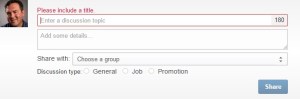
start a discussion in GroupsStart a conversation (New). How easy can LinkedIn make starting a discussion in a particular group. Begin your discussion by selecting a title (LinkedIn provides some suggestions) and adding details, choosing a group (only one group. Sorry), and post it.

Manage your groups’ settings. This function allows you to rearrange your groups in the order you want them to appear. You can also adjust Member Settings, e.g., Visibility, Contact Settings, Update Settings, and Leave the Group. In terms of visibility, I tell my jobseekers to not show their Job Search groups on their profile. Rather the groups that are related to their occupation.

Open One of Your Groups and Go to Town

2. Discussions. Probably the best feature Groups has to offer, as it allows you to show your expertise through intelligent questions, thoughtful answers, relevant shares. One of my valued connections, Hank Boyer, constantly shows up on my Groups feed posting articles that are relevant to his connections.

3. Promotions. No man’s land. Promotions are ignored in most groups because any type of information posted and deemed as self-promotional end up here. One of my valued connections informed me that when he posts anything in a group I started, it is automatically placed in Promotions. I removed this page from my group.

4. Jobs. This is feature that is sometimes ignored by group members and, therefore, they don’t learn about jobs posted by their fellow members. I’ve sent messages to the members of my group informing them to look in Jobs, but this isn’t something that I can do on a constant basis.

5. Members. A valuable feature if you’re looking for someone whose occupation is closely related to yours. Type in “Project Manager” in the search field and you will be able to access the full profiles of group members who have “Project Manager” on their profile. Better yet, you can:

  1. Follow
  2. See activity
  3. Send message
  4. Connect

with any member in your group, even if he/she is a 3rd degree. I tell my workshop attendees that if they want to communicate directly with someone who’s not in their direct network, they can join a group of which the person is a member. The same goes for connecting with 2nd and 3rd degree connections.

6. Search. This is where you can search for discussions from the group’s members. When I want to search for a discussion started by one of my fellow group members, or when he’s been mentioned in a discussion; I type in his name in the field and am granted this information. There are other items you can search:

  1. Latest Activity
  2. All Discussions
  3. Manager’s Choice
  4. Discussions You’ve Started
  5. Discussions You’re Following
  6. Pending Submissions

7. Number of groups to join. I tell my LinkedIn workshop attendees that LinkedIn allows them to join up to 50 groups, but I advise them to join groups only if they will be active participants. This leads me to conclude that a good rate of participation should be at least once a week—whether you ask an illuminating question or answer one.

This further leads me to confess that I was once banished from a group because of lack of activity–yes, it’s possible. Thus, I made it my mission to participate in more groups or quit them. Should I get my hand slapped again, I will gladly apologize to the owner or manager who banishes me from that group.

My advice to you is shed the groups you’re ignoring. Treat it like spring cleaning; purge your proverbial LinkedIn house of those groups you’ve stopped visiting. Trust me, it will feel great.


If you know of other functionality of Groups not mentioned here, let us know.

As always, if this post helped you, please share it with others.

Need help with your LinkedIn profile, try stealing…not literally

stealing In Three Secrets to Writing Better, Erik Deckers, shares three bits of advice on how to become a better writer. They are: write everyday, read the newspaper, and my favorite steal from other writers’ styles. (I think what he really means is to learn from the best.)

If I could steal from a contemporary writer, it would be Joel Stein from Time magazineJoel writes with impunity (sometimes bashes Time), employs sarcasm and self-deprecation, and often mentions his family. He also wrote a book (Man Made: A Stupid Quest for Masculinity) on how he attempted to become more manly and, as you might guess, failed at his attempt.

While I wish to steal from Joel, Erik suggests writers like Earnest Hemmingway, Hunter S. Thompson, and Mike Royko, Chicago Daily News columnist from the 1980s. If I were to get all literary, I’d go with JD Salinger and Harper Lee.

What does stealing from great writers have to do with writing a LinkedIn profile? For those of you who are having a hard time writing your LinkedIn profile, allow me to suggest following Erik’s advice. Of course I don’t mean to literally steal from others’ profiles. I mean take a little journey on LinkedIn, targeting people who do what you do, and find profiles you admire.

Then emulate the styles of various profiles without plagiarizing–one of my connections was a victim of this.  This will take a little work, but it’s well worth it.

Summary section. When I started my LinkedIn profile, I used a connection’s Summary as an example. She is a professional résumé and LinkedIn profile writer and one of my valued connections. I liked the way she began her Summary with a general statement, followed by five areas of expertise, and concluding with her prediction of online résumés.

I have since changed my Summary to show more accomplishments in bullet format but still use paragraphs here and there. But I am grateful to my connection who started me on my way to writing a profile that speaks to my personality and accomplishments.

Employment section. This part of the profile can be a challenge for some. Again, look at what others in your occupation and industry have written in this section. Do they have a job summary followed by duties and accomplishments? Do they include only accomplishments? You might be in the dark about what content to include in your Employment section.

If you have no idea which duties to include for each job, I to begin by totally plagiarizing by doing the following: type http://www.onetcenter.org/, enter your occupation, copy and paste it to your profile, and edit from there using your own words.

Education section. And when it comes to Education? Do others list numerous Activities and Societies or Descriptions of what they did at their school/s? You might find this appealing, or if you want to keep it simple by stating the name of your school/s, that’s fine as well. (For activities, don’t write your were the beer bong champion of your fraternity.)

Branding Headline. I couldn’t neglect talking about stealing a Branding Headline. Again, pay attention to Headlines as you scroll down your Home Page, including content and nifty symbols (I’m fond of the vertical bar |, while others might prefer ►, ★, ✔, or other symbols ). Emulate the nature of the content you see, without blatantly stealing.

I know I’ll never reach the type of fame Joel Stein has gained–if not in my mind only–but I’ll continue to read his columns, laugh at his wit, and attempt a little farcical writing of my own. I think Erik is onto something here. Having read his book, Branding Yourself: How to Use Social Media to Invent or Reinvent Yourself , coauthored by Kyle Lacy, I know he’s a funny and talented writer.