Tag Archives: LinkedIn

2 important hints about LinkedIn endorsements

endorsemments2When you endorse your connections’ skills and expertise, do you simply click Endorse next to the skills with the highest number of endorsements? You may not be doing your connections a favor by doing this; but it’s not entirely your fault.

Your valued connections should be guiding you through the process, and you should follow their wishes.

Hint 1: guide your connections

Endorsees, you may be unaware that you can move specific skills and expertise toward the top of your list as a way to highlight their importance. Without doing this, your skills will be listed in highest to lowest number of endorsements. Which works out fine if your highest number of endorsements properly brand you.

But in some cases your skills are not being endorsed in a manner that tells others how you want to build your brand. One of my connections aptly illustrates which skills he wants endorsed to better brand him. He lists Social Selling ( a mere 13 endorsements) listed above LinkedIn (98), LinkedIn Training (74), and so forth. He’s obviously sending a message to his connections.

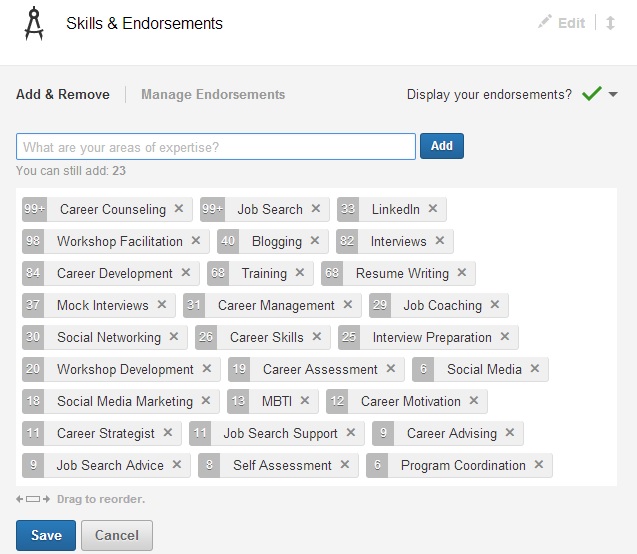
How do you rearrange your skills in the order you desire? In Edit Profile select Edit Skills and Endorsements. You’ll see a field like this:
skills

Now simply move the skills in the order you’d like them to appear. I’ve moved LinkedIn (33 endorsements) ahead of Workshop Facilitation (98+) and Blogging (41) ahead of Interviews (82), as I want these two skills highlighted.

Hint 2: those of you endorsing your connections, take the hint

So if you’re endorsing your connections, take the hint. The skills your savvy connections want endorsed first are the top five to 10, not the bottom 10. Endorse them for those skills first and then endorse them for the others.

People often ask me if I see value in endorsements. I tell them only if the endorsers are aware or have witnessed the endorsees perform the skills for which they’re being endorsed. However, if LinkedIn wants us to endorse our connections–even those we haven’t seen perform–we can only trust their word on their proficient skills.

That said, I feel it’s perfectly fine to ask a connection which skills she wants endorsed–in other words, respect your connections’ order of skills. (Don’t get me wrong, I don’t think eliciting endorsements from others is ethical.)

I asked one of my connections which of his skills he wanted endorsed. His simple response was the top five because those are the skills he is strongest at. I wouldn’t know without asking him because he lives in California, and I’ve never seen him in action. Nonetheless, like Lin Sanity, I was caught up in endorsing people.

Take the hint if you’d like to endorse me by clicking Endorse next to my top five skills, because I’ve arranged them in order of preference. I’m pretty sure I perform those skills very well. I’d do the same for you.

If you liked this post, please share it.

Your handshake matters more than you might think: 10 different ways to shake one’s hand

I wrote this article a year ago, but it’s worth reiterating how important a handshake is in your job search, business, and life.

I’m a firm believer that you can tell a lot about person’s character by his handshake. In a recent interview workshop, I told my attendees about my obsession with a good handshake and, as a result, a half  hour conversation ensued.

At the moment I’m talking about the the importance of making a great  first impression. I tell them, “Someone’s handshake tells me many things about a person. If it is firm, the person is trustworthy, open to engagement, warm spirited, confident, and basically someone who I’d allow my daughter to date.” They all laugh.

I get sidetracked and tell them about how my daughter dated a boy who shook my hand for the first time with a limp handshake. I told her soon afterward that her boyfriend better learn how to shake hands if he wants to get anywhere in life. She told me I was being ridiculous.

“If it’s limp,” an attendee speaks out, “the person is suspicious, anti-social; someone I wouldn’t want my granddaughter to date.” Laughter erupts. He has stolen my thunder.

An article on CareerBuilder.com states that a proper handshake makes employers overlook some deficiencies in jobseekers: “Prospective employers said they’re more likely to overlook visible body piercings and tattoos than an ineffective handshake, according to a 2001 survey of human resources professionals.” Though this article is dated, I think a good handshake is still a vital component of the first impression.

About.com, under an article about social disorders, talks about 10 “Bad Handshakes.” They are:

  1. “I am dominant”
  2. “Bone Crusher”
  3. “Limp Fish”
  4. “Just Fingers”
  5. “Cold, Clammy, or Sweaty”
  6. “The Double-Hander”
  7. “The Long Handshake”
  8. “Without Eye Contact”
  9. “The Miss”
  10. “Too Close”

I can relate most to the “Bone Crusher” because I’m an occasional bone crusher. I once shook a woman’s hand with such force that I thought I heard her bones being crushed, or at least shifting. She winced in pain. The handshakes that drive me mad and make me want to take a hot shower are the “Limp Fish” and “Cold, Clammy, or Sweaty.”

I reached out to my LinkedIn family and posted a question about the significance of handshakes, and there were some pretty good responses. One person, wrote, “The handshake is part of the first impression. Not so firm as to cut off my blood circulation and not limp like holding a slice of calf’s liver. And God help us, not sweaty either. So make sure your hands are dry before you extend a handshake.” I love the image of a “slice of calf’s liver.”

On the other hand, a respondent to my question wrote: “I’m interested in the information the person [has] to communicate to me, not peripheral customs like a handshake.” I appreciate his opinion; not everyone places so much stock in a handshake as I do. But I don’t buy it. The “Limp Fish” would send anyone over the edge, regardless of the information.

Wiki.answers.com writes extensively on the subject of the handshake, including the proper position. “Your body should be approximately two cubits (distance from fingertips to elbow) away from the other party. Your shaking arm should be bent so that the elbow forms a 135-degree angle, and the forearm is level with the floor. Your hand should neither be on top, nor underneath the other person’s hand. Both parties’ hands should be straight up-and-down, even with each other. The web of your hand (skin running between the forefinger and the thumb) should meet the web of theirs.”

Okay, some pundits go a bit far with their explanation of a proper handshake. I definitely feel that a person should maintain eye contact while shaking an employer’s or business person’s hand, but keeping her elbow at a 135 degree angle is a bit extreme.

My customers attend my interview workshop to learn the tricks of mastering the interview, but it’s important for them to master the first impression before the interviewer starts asking the difficult question. When I meet someone for the first time, I size them up immediately based on their handshake; but that might just be me.

Dear College Students, here are 3 steps to take when connecting with your alumni on LinkedIn

This is a follow-up of a post called Dear College Students, please the following 10 LinkedIn tips.

college student2Dear College Students,

Now that your profile is in tip top shape, it’s time to think about how, as a new college student, to connect with other LinkedIn members. It’s time to develop your online network.

To help you do this, LinkedIn has a neat feature called Find Alumni, which is located in the Connections drop-down menu

Why is it important that you’ve created a profile and must now develop your network? Because the sooner you start your network, the more useful it will be when you graduate and have to look for a job. An old adage is: in the working world, the best time to network is when you’re working. So it stands to reason the best time to network is while you’re in school.

Finding alumni with whom to connect

Assuming you haven’t made any connections with your alumni, which also include those who attended your alma mater before you arrived, you’ll want to connect with them because they’re probably currently working and may know of opportunities or, at least, people with whom you can connect.

First go to How You’re Connected to the far right of the second screen. Most likely you have very few, if any, 1st degree connections. That’s alright. Focus on your second degrees. Select your 2nd degrees by clicking on that bar. You’ll see the other categories shift, the numbers decrease. This narrows your search for potential alumni contacts.

If you’re a communications major, you’ll focus on people who are connected with you under What They Do, e.g., Media and Communication. Look at where they work, what they studied, what they’re skilled at. This will give you a sense of your commonalities, as well as some talking points when you connect with them.

Connecting with your alumni

The largest advantage you have is your common bond with people who are going to school with you or who have attended years before. When you attempt to connect with them through their profile, the option Classmate has already been chosen for you.

This is where, as an aspiring LinkedIn professional, you need to carefully craft your invite messages. Under no circumstances will you send the default LinkedIn invite; that’s plain laziness. Instead, you’ll write a personalized note, which will show the professionalism LinkedIn members expect from each other.

Note: Even though you can hit Connect under the person’s photo, it’s still best to open their profile and choose to connect after reading it thoroughly.

Here’s what you might write after reading your potential connection’s profile:

Dear Mr. Schmidt,

As you’re an alumnus at the University of Virginia and are in the field of Marketing Communications, I’d like to take this time to reach out and invite you to my network. I will contact you to see if we can be of assistance to each other.

Completing the process

Your new invite accepts your personalized invitation because both of you share an interest in Communications and, most importantly are alumni. In your invitation you mentioned being of assistance to Mr. Schmidt. Where many people fall down in the process is not following through.

Be true to your word by contacting him via e-mail when he accepts your invite. Also write down some questions you’d like to ask Mr. Schmidt regarding the line of work he does. Make them intelligent questions; don’t waste his time. Ask him if he might know of anyone who you could also speak with. Finally, tell him you’re at his disposal should he need assistance.

The process of building relationships can be  a long one, but because you’ve just begun your education, you have plenty of time developing long-lasting relationships. These are connections that can be of great help to you once you’ve graduated college.

900 ways I got to the top of LinkedIn’s expertise list

Keywords3Over time I’ve enviously watched my LinkedIn connections rise toward the top of LinkedIn in their respective areas of expertise on LinkedIn.

When I’ve entered in Search words like LinkedIn, LinkedIn Strategist, Career Strategist, hoping to find myself, I’m no higher than the second page.

And every so often I check out their profiles to see how they’re using these keywords to get to the top of the list. I wonder if they’re gaming the system.  You know, loading their profiles with the aforementioned words. I’m happy to say I haven’t found one instance of this unethical practice; all my connections have integrity.

But I couldn’t help wonder where I would end up on the list of LinkedIn Strategist (currently I’m 13th on the list*) if I were to dump keywords onto my profile. I’ve seen it done…not by my connections, mind you. I came across one web designer who was so intent on being numero uno on LinkedIn’s ranking that he repeated the words “web design” over and over…like 400 bloody times.

It’s not only a matter of lost pride being on the second page of my fellow LinkedIn Strategists; I also wonder if I’ll go missed by someone who is looking for a person who can help him/her with their LinkedIn strategy and profile, something I’ve been doing for quite awhile now.

I reached out to one of my recruiter connections to see how many LinkedIn pages she goes through before giving up on her search for talent. She said she will read through three or four pages to find the right people to contact. And according to my recruiter friend, the second page–near the top of the second page–is nothing to sneeze at. Nonetheless, I so desperately want to be on at least the first page.

To see what it feels like to be on the first page, I created a company called LinkedIn Strategist, a title called LinkedIn Strategist, and I copied and pasted “LinkedIn Strategist” into the description 900 times. Wouldn’t you know, I shot immediately to the top of the LinkedIn Strategist list, above many of the deserving LinkedIn Strategists. And for a moment I felt pretty damn good. But only for a moment.

__________________________________________________________________________________________

* After writing this post–acting on the advice of a friend–I added a job I’ve been doing for awhile. I call it LinkedIn Strategy and give myself the title LinkedIn Strategist. I’ve also written a description of what services I offer–all legit. Well darn tooting if I’m now ranked on the first page, near the top as a LinkedIn Strategists.

__________________________________________________________________________________________

If you enjoyed this post, please share it.

Online networking; a matter of introversion preference?

If you’re spending all your time networking online instead of getting out there and meeting with fellow jobseekers and business people, you’re doing yourself a disservice. More than 60% of jobs are gained through personal networking, according to the DOL.

There are no statistics on the success rate for obtaining employment using online networking; although, I’m willing to bet it’s much lower than personal networking.

Through deductive reasoning, people who are extremely active on social networking sites, e.g., LinkedIn, Twitter, and Facebook, are most likely less active in their personal networking activities.

Is this a result of one’s personality type, namely introversion. In an article on Career-Intelligence.com, Jennifer B. Kahnweiler, Ph.D., author of The Introverted Leader: Building on Your Quiet Strength, writes about the introverts’ aversion to talking and preference for writing.

“Introverts prefer writing to talking. On the job, they opt for e-mail over the telephone and stop by only when necessary. Averse to excessive conversation, many gravitate toward social networking Web sites such as LinkedIn, Facebook, and Twitter.”

I’ll cite myself as an example. Here I sit typing away when I could be talking on the phone, at a social gathering, or in the next room with my children watching their mind-numbing TV programs. I freely admit that I spend too much time writing blog articles or answering questions and reading responses on LinkedIn.

I’m an introvert, and spending time online suits my personality type more than social interaction, especially after a day of leading workshops to numerous people. It’s my downtime and opportunity to recharge my batteries. More to the point, I thoroughly enjoy writing articles and answering questions and reading answers posted by others on LinkedIn.

Other introverts have told me that they enjoy the non-personal interaction that LinkedIn and the others offer. These happen to be my jobseekers who are hoping to secure jobs through the job boards or LinkedIn. They tell me they’re more comfortable looking for work this way. That said, it’s a mistake to think that doing all your networking online will aid you in your job search.

I’m not implying that all introverts conduct their job search this way, nor do I believe that extraverts avoid online networking sites. Introverts also have the capacity to personally interact with other jobseekers; it just requires more energy to sustain a whole day of being around people.

What is your best way to approach networking? A combination of personal and online networking is a great strategy, because you’ll combine the most effective method to look for work (personal networking) with a growing and proven form of gathering contacts and opportunities to reach out to them (online networking). Read my colleague Wendy Gelberg’s article on online networking to learn more about the importance of online networking; but keep in mind not to neglect personal networking.

Checklist for 26 job-search topics for the New Year

For Christmas my wife sent me to the grocery store for various ingredients for our holiday dinner. I knew trying to remember all the ingredients was going to challenge my waning memory, so I asked her to write a list of said ingredients.

She rolled her eyes but understood how important it was for me to return with the proper ingredients–so important that her list numbered in the area of 25.

The lesson I learned from my shopping spree–by the way, I got all ingredients–was that it was akin to the list of must do’s in the job search.

In reading the list of must do’s below, ask yourself if you’re doing each one in your job search. For example, do you have an elevator speech? Have you attended informational meetings? Consider this the checklist below a partial list of your “ingredients” for the job search.

  1. Understand your workplace values.
  2. Determine what you want to do…what you really want to do. The Myers-Briggs Type Indicator is a great tool.
  3. Hannah Morgan, Career Sherpa, suggests, “a personal marketing plan. It ensures better information gathering during networking meetings and more proactive rather than reactive job search actions.”
  4. Ask for an informational meeting to talk to someone to make sure you’re on the right track, or to introduce yourself to a company.
  5. Assess your skills and accomplishments. Make a list for both.
  6. Learn how to write your résumé. Attend workshops offered by your college or local career center.
  7. Write a targeted résumé with highlighted experience and accomplishments.
  8. Write a cover letter template, which will later be targeted for particular positions.
  9. Create a personal commercial or elevator speech which explains your value to the employer.
  10. Determine how you’ll approach the job search, making networking your primary method.
  11. Join LinkedIn with full intention of engaging, not using it as a place mat on the Internet.
  12. Copy and paste the contents of your new résumé to your LinkedIn profile, which you’ll modify to be a better networking tool.
  13. Develop a networking list that includes past colleagues and managers, as well as others who we’ll call your superficial connections.
  14. Formally let people know you’re out of work. How can they help you if they don’t know you’re looking?
  15. Develop business cards for your business—the product you’re selling is you.
  16. Attend networking events. Make sure you bring your business cards.
  17. Follow up with everyone with whom you’ve conversed and exchanged business cards.
  18. Send approach letters/e-mails to companies for which you’d like to work.
  19. Organize your job search by keeping track of your inquiries, contacts, résumés sent out, etc.
  20. Prepare for telephone interviews. Make sure all of the above written communications are in place.
  21. Ask for mock interviews which should be recorded and critiqued by a professional career consultant.
  22. Do your research on the jobs and the companies to which you apply.
  23. Double check your first impression, including attire, body language, small talk, and portfolio.
  24. Be prepared to answer the difficult questions concerning job-related, transferable, and personality skills.
  25. Have your stories ready using the STAR formula.
  26. Write thank you notes via e-mail or hard copy.

Have you been doing everything on this list, or the majority of them? If you are missing any of the above, make sure to nail them this year. Let me know of others I’m missing. Perhaps we can double this list. And yes, the meal was excellent.

5 ways to connect with LinkedIn members; the good, bad, and the ugly

connect on linkedin

I was speaking with someone who asked me how he should connect with people on LinkedIn. Together we looked at what I consider the best way to connect with someone (through someone’s profile), but there are four other ways I showed him how to connect with others on LinkedIn.

So how might one connect, you wonder.

Through someone’s profile–the best way

This is the best way to connect with someone. Why? Because you actually take the time to read the person’s profile to see if you want this person in your network. I happened upon someone who does very similar work and is a career-advice blogger. I had to connect with him.

You find someone’s profile by searching for him/her using LinkedIn’s awesome search engine or selecting that person from “People You May Know,” found at the top right-hand corner of your homepage. You’ll see the box below, where you’ll indicate how you know your potential connection.

LinkedIn asks you how you know this person. Of the seven criteria, David and I are in the same LinkedIn group. Great luck. As I don’t qualify for any of the other criteria. What I dislike is when someone I don’t know tries to connect with me as a “Friend” when they don’t know me. Claiming to be a “Colleague,” “Classmate,” or “We’ve done business together,” Also ruffles my feathers when none of it’s true. But being in the same group/s means we’re like-minded.

Important note: always write a personal note similar to the one you see in the box below. To send the default message is poor laziness.Direct connect

Through an introduction–proper but slow

This is considered proper etiquette when you want to connect with one of your first degree’s connections. You ask your first degree to introduce you to the person with whom you’d like to connect. A LinkedIn purist may believe this is the only way to connect, but I think this policy is a bit extreme, as well as taking a long time to accomplish.

Go to the desired person’s profile and choose Get introduced next to the Send Inmail button. This will bring you to a command that asks you who should make the introduction.

Craft a professional message, understanding that the person making the introduction might send your message straight through, along with a message of his own. If your intention is to ask to connect, your wish may be granted, but this method usually takes longer than it would to simply try to connect.

The person I chose as an example is not in any of my groups; thus I would not feel good about trying to connect directly…unless, of course, I indicate he’s a “Friend” and in the not beg his forgiveness.

get introduced

Who’s visited your profile–getting around the default message

Everyone I know is curious about who’s visited their profile. Aren’t you? You can, with impunity, connect with anyone who visits your profile and discloses their identity.  What I mean by this is you don’t have to state how you are related to said person…and you can still write a personal note.

I’m a bit conflicted with this method of connecting. While I don’t believe one should have to request an introduction every time he/she wants to connect with someone, I do believe there should be some relationship, such as belonging to the same group.

Who's visited your profile

Mass mailing-invite–for beginners

Like a tooth ache, you’re reminded on every page that you can send an invite through your e-mail contact list. Simply click on the icon to the immediate left of your photo to see a command like the one to the right. Select your e-mail provider, follow the prompts, and connect to your heart’s desire.

This is one of the least effective way to connect, as it doesn’t allow you to send a personal note. I’ve complained bitterly about people who just connect willy-nilly.

However, if you’re just starting out, you may want to use this way to connect.

connect 1

From your phone–the ugly

If you’re on the fly, you can connect from your mobile device. The LinkedIn app makes connecting on your phone as easy as clicking a button…literally. This is the epitome of laziness–here I go again–as there is no option to write a personal note.

I tell my LinkedIn workshop attendees to avoid using this method and, rather, wait until they’re sitting at their computer so they can connect using the first or even second method. I also tell them if they want to connect with me, they’ll need to include a personal note, which most of them neglect to do. Oh well.

The good, bad, and the ugly

There you have five ways to connect with people on LinkedIn. You may call me old fashion for choosing the first method, visiting a person’s profile, to connect. Or asking for an introduction. At the very least connecting with people who’ve visited your profile. But to connect with someone through a mass e-mail or by phone is pure blasphemy.

7 easy ways to learn about your LinkedIn connections’ updates

I’ve written numerous times about the importance of sharing an update as a way to communicate with your connections. My LinkedIn workshop attendees will tell you I mention it a bazillion times during the workshop, and they question my suggestion that they update at least once a day.

One of the things I love about LinkedIn is the ability to learn about the connections in my community. By going to my homepage every morning and numerous times during the day, I can see with whom they’re connecting, articles they’re sharing, groups they’ve joined, jobs they’ve landed, and more. This can be time-consuming, so I narrow my search by type (see list below).

If you’re interested, like me, in focusing on certain types of updates, here’s how to do it. Click on “All Updates” just below the “Share an update” box. A drop-down menu will appear giving you many options for various types of updates to look at. For instance, if you’d like to know what changes are made to your connections’ profiles, simply choose “Profiles.” Let’s look at the various types of updates.

  1. HomepageAll Updates. This is the default update setting but preferred by those who like variety…or don’t know about the “All Update” feature. Below are more specific update types.
  2. Shares. If it’s blog posts/photos/videos and more you’re interested in, select this type of update to discover what your connections have been sharing.
  3. Connections. Important for those of you who are interested in who your connections are connecting with. I find this useful if I recognize a second degree with whom I’d like to connect. Now I can get an introduction to my connection’s new contact.
  4. Groups. Who in your network has joined a group? Who’s started or contributed to a discussion? Because groups are so huge, you should stay on top of what your connections are doing in their groups.
  5. Profiles. Your connections might have landed a new job, made updates to their skills and specialties, recommended someone, posted a new photo (big these days), or celebrated a birthday. By they way, you can hide this activity and changes to your profile by going to Privacy & Settings > Turn on/off broadcast activity.
  6. News. This brings me to the channels I’m following and the comments people have made, whether they’re first or third degree connections. Oh, there’s an interesting article on emotional intelligence. I’ll be back, I’m going to read it.
  7. Companies. Curious about which companies your connections are following? This could be good fodder for discussion. “So, what’s the interest in BAE?” This is another activity you can hide if you don’t want certain connections (your boss) to know.

Your Updates. This type of update is not about your connections, but it is one of my favorite features under All Updates, as I’m very forgetful. This allows me to see if or when I’ve shared a post of mine or some of my connections’. Perhaps I’ve made a statement of advice, or listed a quote. I would like to know this lest I share an identical post.

Hidden. This is a category I hope I don’t end up in, but let’s be realistic. With all the updating I do a day, I’m sure plenty of people have hidden me from their homepage. No worries. LinkedIn is kind enough to not notify you if you’ve been hidden. And you can ask yourself, “Is it better to be hidden or removed?”

My final comment on updates is the ability to customize what you want to see when you’re perusing your homepage or using the “All Updates” feature. Perhaps I’m not all that interested in what companies people are following. I can simply eliminate that update type from the list.

Beginners’ guide to using LinkedIn effectively

linkedinThis is a guest post from Rich Grant, a valued LinkedIn connection and college Career Advisor. He has a great way of explaining how to teach LinkedIn to beginners. 

When I meet with students – two to four each day – in my college’s career center I almost always ask, do you use LinkedIn? Most students say “yes’” but the real question we start exploring is, are you using LinkedIn effectively?

I’m pleased that almost every college junior or senior I meet with has a LinkedIn profile. Very few students, however, have taken full advantage of the networking power of LinkedIn. This is where I come in. I love showing students the nooks and crannies of LinkedIn.

I typically have about 10 – 15 minutes within a 30-minute appointment to provide students with an overview of LinkedIn. That’s just about enough time to cover the basics. So, here is my 10-minute tutorial on using LinkedIn to make connections and as a resource in a job or internship search.

Defining LinkedIn. For students who have not seen LinkedIn, I tell them about the similarities to Facebook (connecting with people, posting a status and / or links, joining groups, etc) and then quickly add, But it’s NOT Facebook! I also explain that social media networking (LinkedIn, Google+, Twitter, Pinterest, and others) does not replace traditional face-to-face networking, but it complements your overall networking efforts.

About the profile. I talk briefly about how to beef up your profile. Don’t set up a bare-bones profile and think you’re done. Change / expand your headline, create a summary, and describe each job with appropriate key words. Add skills and highlight projects. I talk with students about posting a professional profile photo and customizing their URL, both of which are easily found when you’re in “edit profile” mode.

Making connections. With whom should you connect? Initially, I tell new LinkedIn users to connect only with people they know and trust who also know them reasonably well. I explain the concept of 2nd degree and 3rd degree connections, that is, your connections’ connections and so on. If you connect with people who know you well, you will have better success in getting referred to your 2nd degree connections. I tell students to avoid the “LinkedIn Open Networkers” known by their acronym LION (a better description might be “Spread-thin LinkedIn Unselective Trolls”)

Participating in groups. Find your college’s alumni group and seek groups within your professional interests. Don’t just join groups, participate in them. Post discussion topics, comment on discussions. Engage with people within groups… you know, be “social” on “social media.”

Using “advanced” search. Click “advanced” to the right of the search bar. On the left side, you’ll see several fields. You can search on one variable or multiple variables. I usually show students how to search on keywords, company, college (filling in the name of our college), and zip code. You can also search by industry. I run through a couple of searches to show how easy it is to identify relevant 2nd degree connections.

Now what? Once you find a 2nd degree connection that you’d like to contact, you can see who your common connections are. You can get in touch with your connection or connections to facilitate getting through to the person you don’t know. In my job searches, I would typically contact my connections by phone or email. You can also message people on LinkedIn, or from the 2nd degree connection’s profile, click on the down arrow by the “In Mail” button and use the “get introduced” feature. It’s worth repeating a key point: connect only with people you know and who know you. If you identify a 2nd degree connection, it’s no use to you if your common connection is a LION in another country.

Basics of networking. I would be remiss if I just showed the technical aspects of LinkedIn, so I talk with students about proper networking etiquette. As you start reaching out to your 2nddegree connections, you need to follow the same guidelines / protocol as you would if you were meeting someone at a networking event… or meeting someone new on campus. You wouldn’t meet someone for the first time, and say, nice to meet you; let’s rent an apartment together. Don’t come on strong. Build a rapport before you ask for anything. Get to know people first, and don’t put them on the spot.

As you connect with new people on LinkedIn, it’s important to build your relationship with an information-seeking perspective rather than jumping in and asking about job openings. That’s a conversation killer. Most students I meet with truly can benefit from exploring career options by having conversations with people who work in those career fields (aka “informational interviewing”). Most professionals are willing to help college students who are looking into potential career fields. And by using LinkedIn properly and effectively, your connections most likely will be willing and able to help you get in touch with their connections, provided they are also connecting with people whom they know and trust.

This has been my quick tour of LinkedIn that I provide to new users of LinkedIn. I rarely talk about job postings on LinkedIn; to me, LinkedIn is about networking. I have started to show students “University Pages” found under the “Interests” pull-down menu (look for “Education”)

What do you show new LinkedIn users in your overview?

Rich Grant ● http://www.richcareer.net

Photo C. 2013 by Fred Fieldfredfield.comRich Grant has a background in business planning, freelance writing and higher education. Rich was recently the director of career services at a small four-year college in Maine and is currently filling an interim role as a career adviser and internship coordinator at a private college. He serves as the president of two professional associations. Find Rich on LinkedIn and Twitter, and become a regular visitor to his blog where he imparts his words of wisdom once or twice a week.

10 reasons why your résumé may be a zombie

zombie boyLast Halloween my son (at right) was talking about being a soccer-player zombie at least two months prior to this much-anticipated night. He explained he would paint his face white; outline his eyes with black; and, most importantly; apply fake blood to the sides of his mouth. The way he described it got me stoked for Halloween.

I shouldn’t have been surprised when his friend from up the street showed up as a zombie. Nor should I have been surprised when our adult neighbor walked over dressed as, you guessed it, a zombie. She was pregnant and had doll baby legs extruding from her large belly. I asked her what her husband was going to dress as, and she told me…a farmer zombie. Further, they dressed their one-year-old son as a zombie.

At least five zombie kids came to my door, and we were only one hour into a night of candy-crazed kids roaming the streets. I felt like I was in an episode of the Walking Dead.

What does last year’s Halloween have to do with the job search? It brings to mind how employers feel about the slew of résumés they receive that lack originality. Like nearly every kid (and adult) I saw dressed as zombies, employers are getting résumés that don’t speak to their needs; they are zombie résumés. Your résumé is a zombie if it has the following characteristics:

  1. A cookie cutter résumé. Written and done, is how some feel about their résumé. No thought about what employers need, therefore no mention of the skills and experience highlighting those needs. Like the zombies that arrived at my door, this résumé doesn’t make an impact.
  2. Failure to capitalize on your accomplishments. Quantified accomplishments are what immediately grab employers’ attention at first glance. Duty-based résumés don’t separate you from many other candidates.
  3. Contact information that lacks your LinkedIn URL. David Perry and Kevin Donlin, Co-Creators of The Guerrilla Job Search System, write, “If you’re not on LinkedIn and looking good, you don’t exist to most employers.” You have a zombie résumé if you’re not on LinkedIn and don’t proudly display it in your contact information.
  4. No branding headline. The best way to say who you are and what your areas of strength are is by having a headline that sets you apart from the other applicants. It’s where you first state keywords and phrases. Zombie résumés fail to make use of this valuable real estate.
  5. A say-nothing Performance Profile.  Zombie résumés start with statements like, Result-driven Project Manager with 20 years of experience in Manufacturing. Instead,  Project Manager who leads teams producing software that generate sales exceeding $3M in competitive manufacturing markets, would be more enticing to the employer.
  6. Your résumé isn’t prioritized. A zombie résumé fails to demonstrate your knowledge of what’s important to the employer, based on the job description. Your Profile should state your qualifications in order of the employer’s requirements, thus making her job of finding them very easy. Prioritize your statements.
  7. No core competency section. A résumé is not complete unless it has a Core Competency section that lists the skills required for a position, plus additional ones that can add to a person’s candidacy.
  8. The Work History lacks relevant accomplishments. Perhaps the most important aspect of a résumé is the Work History, but what makes it escape Zombie status is powerful accomplishment statements. Accomplishments that describe how you have contributed to the growth of an organization/company. Increased revenue, improved production, reduced costs, saved time are but a few accomplishments you should highlight.
  9. There’s no Training Section. If you were fortunate enough to receive training or took advantage of professional development, you should have a section for training. A zombie résumé contains no Training section and screams to employers that, “I have not taken advantage of bettering myself and keeping up with technologies.”
  10. The Education Section is incomplete and includes dates. All to often I have seen résumés that skimp on the Education section. Whether you earned a degree 5 years ago or 20, this section informs the employer that you started and completed something. Don’t be shy about writing that you made the Dean’s list four years running, something you accomplished through dedication and hard work.

Zombies roamed my neighborhood on Halloween walking lethargically, extending their hands for candy, just as many résumés lack the imagination and authenticity required to earn a place at an interview. Don’t submit a zombie résumé. Rather think about the ten important components of your résumé and how to make them strong. Who knows what next year’s Halloween will bring?