Category Archives: LinkedIn

The third of 3 steps for a successful LinkedIn campaign: being active

linkedin2

Previously we looked at connecting with others on LinkedIn, the second step for a successful LinkedIn campaign. Now we’ll look at being active on LinkedIn.

I tell my LinkedIn workshop attendees that one of my colleagues jokes that I need an intervention. Not for use of an illegal substance; no, an intervention for use of… LinkedIn. Too much use.

This little joke elicits laughter from my attendees, but I secretly wonder if there’s truth to his words. If using LinkedIn 365 days a year, including holidays, is considered abnormal; then I might benefit from an intervention.

This post is not about refraining from using LinkedIn often. To the contrary, this post is about the necessity of being active on LinkedIn. How many hours should they dedicate to LinkedIn many of my workshop attendees asks me.

There’s not a set number of hours or minutes you must dedicate to LinkedIn; but to be be productive on LinkedIn, you can’t sit idle. Here’s what you must do:

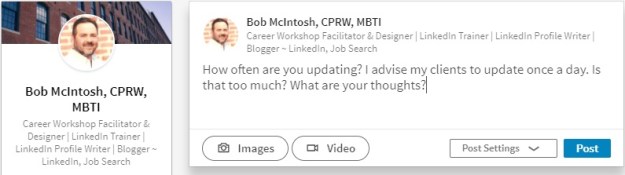
1. An obvious way to be active is to communicate with your connections by posting Updates. How many you post is up to you, but I suggest at least one a day. This is when I get remarks from my attendees about not having time to make one update a week.

To prove this is not a tall order, I show my attendees how I update providing tidbits of job-search advice, asking a question, or sharing an article I find educational. I tell them it’s important to share relevant information with their connections; that’s what good connections do.

2. Another way to be active is to “Like” what your connections update; or, better yet, comment on your connections’ updates. Liking their updates is great, but it takes very little effort to simply click the link. Be more creative and add a comment which can generate discussion, or reply to your connections privately.

3. I’ll visit my connection’s profiles–with full disclosure–many times a day. My connections will visit my profile many times, as well. When they “drop in” and have disclosed themselves (not Anonymous LinkedIn User or Someone from the Entertainment Industry), I’ll show my appreciation by writing, “Thanks for visiting my profile.” This will also lead to a discussion.

4. You’ve probably read many opinions from people on the topic of Endorsements–here we go again. Add me to the list of people who prefer receiving or writing thoughtful recommendations as opposed to simply clicking a button. And I’m not alone.

But, in fairness, Endorsements have a purpose greater than showing appreciation for someone’s Skills and Expertise; they act as a way to touch base. In other words, they’re another way to communicate with your connections.

5. Let us not forget your groups which give you another, significant way to be active. Participating in discussions regularly is a great way to share ideas with established and potential connections. I’ve gained connections because of the interests we shared revealed by discussions.

Did you know you can communicate directly with anyone in your group? That’s right, you don’t have to be a first degree in order to communicate directly with even a third-degree member. Trying to get the ear of someone out of your network? You may want to join a group that person is in.

6. If your connections blog and share their posts on LinkedIn, take the effort to read their blog posts and comment on their thoughts. This is an effective way of creating synergy in the blogging community. Now you can express your thoughts using LinkedIn’s Publishing feature. Take advantage of this if you have the ability to write and enjoy sharing your ideas.

Sharing blog posts on LinkedIn and making thoughtful comments in your groups can promote you as a thought leader in your occupation and industry. Don’t be shy about sharing your expertise. Employed or unemployed, you have important information to share. LinkedIn is not only about connecting; it’s also about information capital.

7. Pulse is one of the best ways to stay abreast of news in your selected industries (or channels), influencers, and publishers. LinkedIn delivers news to your homepage every day. And you choose which news you want to receive. When my workshop attendees wonder what they should update, I tell them sharing articles of common interest is a great way to start.

8. Companies feature. I saved one of the best features for last. Companies epitomizes networking on LinkedIn. It allows you to find people who are in a position to help you. It encourages you to be proactive. In my workshops I show people how to find people who have the authority to hire them by:

  1. Selecting a company for which you’d like to work;
  2. choosing second degree connections;
  3. typing keywords in Advanced Search;
  4. choosing “current” for currently working there;
  5. typing the person’s title, and;
  6. indicating the company’s geographic location.

Once you’ve located the person with whom you’d like to communicate, you can ask for an introduction from one of your first degree connections who is connected to said person.

These are some ways you can be active on LinkedIn. The first step is to create a presence with your profile, followed by connecting with others on LinkedIn, and finally being active. Combining all three will lead to a successful LinkedIn campaign.

The first of 3 steps for a successful LinkedIn campaign: creating a presence

linkedin2Some of my LinkedIn workshop attendees have told me they were encouraged to join LinkedIn because LinkedIn is the answer to their job search. I cringe when I hear this because what they were told is only partly true.

Being on LinkedIn will increase your chance of getting a job, but it isn’t a guarantee, especially if you don’t understand what it takes to be successful on LinkedIn.

I tell my workshop attendees their LinkedIn strategy involves 1) creating a presence, e.g. your profile, 2) connecting with others, and 3) being active. Without all three, your LinkedIn campaign will crash and burn.

Creating a presence. Let me make this easy for jobseekers who are starting their LinkedIn campaign. Leverage what you’ve already created, your professional résumé, by copying and pasting it to your profile. However, don’t stop there. After doing this you need to revise it to reflect a networking document.

Many pundits have written about how to create a powerful profile, so I’ll simply outline the necessary components:

Your Snapshot area is where you capture readers’ attention with your quality photo and branding headline. Don’t waste this area with a poorly done photo and a headline that simply states your title at your previous job. Both your photo and headline can brand you–a photo that shows you’re a professional and a headline that states your strong areas of expertise.

Let’s not forget how your headline can contribute to the keyword count. These are the skills recruiters/hiring managers/HR type into Search. Having the proper keywords and more instances of them will rank you higher and, consequentially, garner more visitors.

Make your Summary worth reading by writing it in first- or third-person point of view; include some Wow statements; and express your passion for what you do. You’re allowed 2,000 characters for your Summary, so use them all. This will allow you to tell your story, as well as give you more space for those ever important keywords. For more on this, read 4 reasons why you need a strong LinkedIn Summary.

Your Experience section can resemble your Work History from your résumé or you can simply highlight the accomplishments. I favor the latter, but some think their profile might be the only document an employer sees, so showing all is the way to go, duties included. One of the areas weighed heavily for keywords is the position’s title. You’re not limited to your title; you can add some areas of strength as well.

Ex. Project Manager | Budget | Lean Six Sigma | Cost Reduction | Leadership

The Media section is where your profile can be really dynamic. I tell my workshop attendees that it’s their online portfolio. There are a number of different media you can include in your Summary, Experience, and Education sections. On mine I share PowerPoint presentations and a link to my blog. Others, like my valued connection Anton Brookes, have YouTube videos and/or documents.

Your Education is more than what you include on your résumé. It allows…or rather encourages you to expound on your degree and/or training. Along with the traditional information–college or university, dates attended (optional), GPA (also optional)–you’re given the option to include Activities and Societies, as well as Description.

Next we’ll look at the second of three components necessary for a successful LinkedIn campaign, connecting with other LinkedIn members.

Don’t disappear from LinkedIn, my valued connections

disappering

How to stay in touch with your LinkedIn connections.

I connected with a childhood friend on LinkedIn about a month ago. It was like a reunion where we caught up on good times, exchanged professional information, and were happy to reconnect. For the last two weeks, though, I haven’t seen hide nor hair of him.

What’s funny is that his profile was respectable; nay strong. He even used the media feature in his Experience section. He put real work into it and wrote to me, “I don’t know why people think building a profile is so difficult. All you have to do is play with it.”

But this post isn’t about the best way to build a profile; there have been many posts on this topic. What I’m constantly wondering is where are the people? The people who seem to be going strong, like my childhood friend, but suddenly disappear as if they’ve gone on an extended vacation.

One of the most important aspects of networking—online or personal—is maintaining a presence. I tell my LinkedIn workshop attendees to update at least once a day. That’s correct, once a day. This is how you communicate with your connections and…stay on their minds.

Of course there have to be viable reasons for updating daily. It’s not like you can write, “I’m off to the beach; let’s meet up,” like you might on Twitter. No there must be intelligent and professional topics on which to update.

Let’s start with the most common:

  • Sharing articles—One of my favorites, especially articles from which people will learn. A good source for articles is Pulse.
  • Writing articles—I know, scary. But if you like writing, LinkedIn makes it possible to share your writing via Long Posts with your connections…and their connections.
  • Posting quotes—Some enjoy doing this. I’m not a big fan.
  • Writing about skills you’re developing—Great for jobseekers to show their value.
  • Letting people know what classes or conferences you’re attending—Perhaps you can meet up with people while you’re in DC.
  • Hosting an event—One of my connections hosts business networking events and uses LinkedIn to announce his events.
  • Provide tips—This demonstrates your expertise.
  • Ask questions—Ask illuminating questions that generate replies.
  • Are you leading workshops—Updating is a great way to promote them, as well as strengthen your brand as a workshop facilitator.
  • A great book you’re reading—Keep it professional. Because LinkedIn eliminated its Reading List feature, you might want to let people know you’re reading Twitter 2.0, for example.

Maybe updating on a regular basis is not your thing. You might simply want to:

  • “Like” what others update.
  • Write a short comment to someone’s post.
  • Thank people for visiting your profile.

The point is to be active and maintain your presence. It’s really not that hard, my valued connections.

I guess what I’m saying is I miss you. You are part of my network, so don’t disappear like a poof of dirt. Are you getting tired of LinkedIn? Are you spreading yourself too thin? Did you feel forced to join? Be persistent because, as you know, success only comes to those who work hard.


Photo: Danielle Nelson, Flickr

11 reasons why we are a community on LinkedIn

communityTwitter has been called a “community.” It’s an appropriate designation for this open-ended platform that asks, “What are you doing and thinking?” Twitter is a place where people go to talk, offer advice, ask questions; but mainly talk–and all within 140 characters, including spaces.

LinkedIn, on the other hand, isn’t heralded as a “community” as much as a professional network, where people connect for business and job search possibilities. But a community?

Although LinkedIn doesn’t promote itself as a community of followers who want to know what you’re doing, LinkedIn is a strong community from which my close connections and I derive many benefits. Here are 11 reasons why LinkedIn is a strong community.

  1. We help each other. Whether its posting an article that points out important information on the job search or answering a question from a connection or providing advice on professional branding or generating sales leads; LinkedIn is about making people better.
  2. We celebrate each others’ successes. Nothing satisfies me more than to see someone land a job or announce a speaking engagement or gain some business. A community celebrates the successes of its members.
  3. We don’t disappear. My reliable connections will rarely drop off the face of the earth, not to be heard from for months. If they take a reprieve, I’ll write, “Great to see you again on LinkedIn” upon their return. Occasionally people need a break.
  4. We join and participate in groups.  At the moment, for example, I’m engaged in a group discussion which has been going for approximately two weeks. There are 40 responses multiple “Likes” to the discussion I started. It’s a nice conversation that’s taken a life of its own. Being a member of groups is truly a feeling of community.
  5. We are professionals. “Fun” is a word associated with Twitter. But LinkedIn?  I love LinkedIn for its professional business approach to online networking which is devoid of conversations you’d find on Twitter. To me, LinkedIn’s approach to professional networking is fun.
  6. NofoulWe enjoy LinkedIn’s reputation. In almost every article you read, LinkedIn is lauded for its use by recruiters and hiring managers to find talent, not to mention its use for relationship-building in business. No foul language or inappropriate conversation allowed.
  7. We display professional photos. The majority of the members in my community understand the importance of a professional photo. I will not accept in invite from LinkedIn users who don’t have a photo; it’s pet peeve of mine.
  8. We keep no secrets. Honesty is my policy when it comes to visiting someone’s profile. In my community most people feel the same. For those who don’t, I ask why? I don’t bite.
  9. We blog. Many members in my LinkedIn community blog and eagerly share our posts with each other. We find this a great way to demonstrate our expertise. I enjoy reading the works of my community and commenting on their opinions.
  10. We update on a regular basis, as well as communicate in other ways, such as “Liking” and commenting on updates. People in my community know I’ll thank them for visiting my profile (related to #7) by simply writing, “Thanks for stopping by.”
  11. We reach out to each other. My connections in my community are bona fide ones, because we reach out to each other via phone, if long distance, or in person. Twitterers converse online without the pretense of networking face-to-face.

These are but 11 reasons why LinkedIn is a community. When I think of it as a community, I think of my connections who appear on my homepage on a regular basis, reminding me of the impact they have on my LinkedIn involvement. Thanks I say to those who contribute to my community.

11 ways to communicate with your LinkedIn connections

A blast from the past, but well worth repeating. I’ve added one more way to communicate with your connections.

Having a strong LinkedIn profile is essential to being found by other LinkedIn members and employers, but you’re job isn’t complete unless you’re communicating with your connections and the LinkedIn community as a whole.

business_communication

I tell my LinkedIn workshop attendees that I spend approximately an hour a day (it’s probably more) on LinkedIn. Their faces register surprise; and I’m sure some of them are thinking, “Does this person have a life.”

Part of the workshop is about explaining the need to communicate with their connections because networking is about communication.

1. The most obvious way to communicate with your connections is to message them directly. Awhile back LinkedIn changed the way we message our connections. Now, our messages are a running stream beginning when we first started a message.

It took a while to get used to, for me, but now it’s nice to have a history of a conversation I have with one of my connections. In addition, the ability to begin a message is available on every page you’re on. This is an obvious sign that LinkedIn wants you to communicate with your connections.

2. Another great way to communicate with your connections is by is posting Updates. How many you post is up to you, but I suggest at least one a day. This is when I get remarks from my attendees about not having time to make an update a week.

Update oftenYou’ll notice that LinkedIn has given its members the ability to create and post videos. Although a nice feature, not many people are using it. This feature is similar to what Facebook has offered for many years.

3. Another way to communicate with your connections is to “Like” their updates. Liking their updates is great, but it takes very little effort to simply click the link. Like, Like, Like. Be more creative and add a comment which can generate discussion, or reply to your connections privately.

4. I’ll visit my connection’s profiles—with full disclosure—many times a day. My connections will visit my profile many times, as well.

When they “drop in” and have disclosed themselves (not Anonymous LinkedIn User or Someone from the Entertainment Industry), I’ll show my appreciation by writing, “Thanks for visiting my profile.” This will also lead to a discussion.

5. You’ve probably read many opinions from people on the topic of Endorsementshere we go again. Add me to the list of people who prefer thoughtful recommendations, both receiving and writing them, as opposed to simply clicking a button.

But, in fairness, Endorsements have a purpose greater than showing appreciation for someone’s Skills and Expertise; they act as a way to touch base. In other words, they’re another way to communicate with your connections.

6. Participating in discussions regularly is a great way to share ideas with established and potential connections. Yes, I’ve gained connections because of the values we shared as revealed by discussions.

Just today I connected with a great resume writer who impressed me with comments she made regarding a question I asked from my homepage.

7. If your connections blog, take the effort to read their posts and comment on their writing. This is an effective way of creating synergy in the blogging community, but blog posts have made their way into the Updating scene, as well.

The majority of my Updates are posts that I’ve read and commented on.

8. I turned 50 yesterday. Not surprisingly I received happy wishes from some of my connections. When your connections have an anniversary (work, that is) or have accepted a new job, you’ll be alerted and be given the opportunity to communicate with them.

A small gesture but nice to recognize your connections and generate some discussion.

Take it a step further

So far I’ve written about how you can communicate with your online connections. You can’t lose sight of the fact that an online relationship will not come to fruition until you’ve reached out and communicated with your connections in a more personal way.

9. A very simple way to extend your communications is by e-mailing them. I know, it doesn’t require a lot of effort, but it’s another step toward developing a more personal relationship.

Because you are connected by first degree, you have access to their e-mail address, access which can come in handy at times. Note: LinkedIn users can disclose their email to anyone on LinkedIn, not just their first degrees.

10. Naturally the second act toward strengthening your relationships is to make that daunting phone call (for some it is a big step), Let your connections know, through e-mail, that you’ll be calling them.

Write the reason for the call, such as explaining who you are and what goals you have in your professional life. Nothing is as awkward as dead air and running out of things to say, because the recipient of the call is caught off guard.

11. Finally comes the face-to-face meeting at a place that is convenient for both of you. If your connection lives in a distant location, you may suggest getting together when you’ll be in their city or town. Plan to meet at a coffee shop or a personal networking event if your connection lives close by.

When you meet in person with a connection, he/she becomes a bona fide connection. This is the ultimate way to communicate with a LinkedIn connection. It may not happen often, particularly if he/she lives a great distance from you, but when it does possibilities may present themselves.


Having a great profile is not enough. It’s a start but only the beginning of communicating with your connections. I’ll write LinkedIn profiles for people, and they might have questions about what to do next. Sometimes it’s your activity on LinkedIn that really makes the difference between standing still and realizing success.

Did you like this post? Please share it if that’s the case.

2 important hints about LinkedIn endorsements

endorsemments2When you endorse your connections’ skills and expertise, do you simply click Endorse next to the skills with the highest number of endorsements? You may not be doing your connections a favor by doing this; but it’s not entirely your fault.

Your valued connections should be guiding you through the process, and you should follow their wishes.

Hint 1: guide your connections

Endorsees, you may be unaware that you can move specific skills and expertise toward the top of your list as a way to highlight their importance. Without doing this, your skills will be listed in highest to lowest number of endorsements. Which works out fine if your highest number of endorsements properly brand you.

But in some cases your skills are not being endorsed in a manner that tells others how you want to build your brand. One of my connections aptly illustrates which skills he wants endorsed to better brand him. He lists Social Selling ( a mere 13 endorsements) listed above LinkedIn (98), LinkedIn Training (74), and so forth. He’s obviously sending a message to his connections.

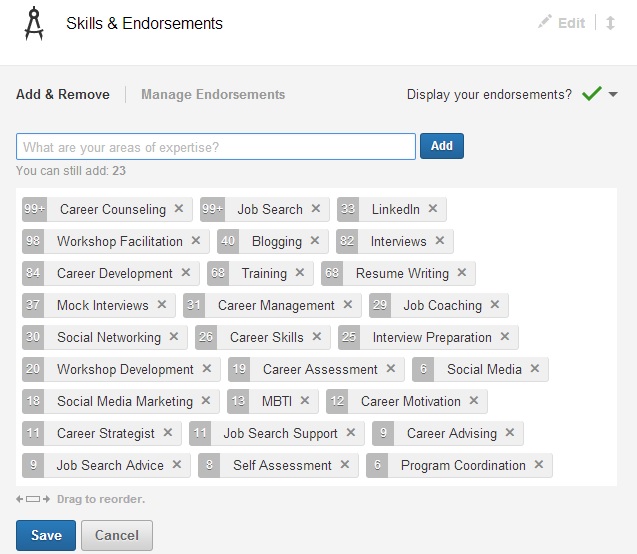
How do you rearrange your skills in the order you desire? In Edit Profile select Edit Skills and Endorsements. You’ll see a field like this:

skills

Now simply move the skills in the order you’d like them to appear. I’ve moved LinkedIn (33 endorsements) ahead of Workshop Facilitation (98+) and Blogging (41) ahead of Interviews (82), as I want these two skills highlighted.

Hint 2: those of you endorsing your connections, take the hint

So if you’re endorsing your connections, take the hint. The skills your savvy connections want endorsed first are the top five to 10, not the bottom 10. Endorse them for those skills first and then endorse them for the others.

People often ask me if I see value in endorsements. I tell them only if the endorsers are aware or have witnessed the endorsees perform the skills for which they’re being endorsed. However, if LinkedIn wants us to endorse our connections–even those we haven’t seen perform–we can only trust their word on their proficient skills.

That said, I feel it’s perfectly fine to ask a connection which skills she wants endorsed–in other words, respect your connections’ order of skills. (Don’t get me wrong, I don’t think eliciting endorsements from others is ethical.)

I asked one of my connections which of his skills he wanted endorsed. His simple response was the top five because those are the skills he is strongest at. I wouldn’t know without asking him because he lives in California, and I’ve never seen him in action. Nonetheless, like Lin Sanity, I was caught up in endorsing people.

Take the hint if you’d like to endorse me by clicking Endorse next to my top five skills, because I’ve arranged them in order of preference. I’m pretty sure I perform those skills very well. I’d do the same for you.

If you liked this post, please share it.

900 ways I got to the top of LinkedIn’s expertise list

Keywords3Over time I’ve enviously watched my LinkedIn connections rise toward the top of LinkedIn in their respective areas of expertise on LinkedIn.

When I’ve entered in Search words like LinkedIn, LinkedIn Strategist, Career Strategist, hoping to find myself, I’m no higher than the second page.

And every so often I check out their profiles to see how they’re using these keywords to get to the top of the list. I wonder if they’re gaming the system.  You know, loading their profiles with the aforementioned words. I’m happy to say I haven’t found one instance of this unethical practice; all my connections have integrity.

But I couldn’t help wonder where I would end up on the list of LinkedIn Strategist (currently I’m 13th on the list*) if I were to dump keywords onto my profile. I’ve seen it done…not by my connections, mind you. I came across one web designer who was so intent on being numero uno on LinkedIn’s ranking that he repeated the words “web design” over and over…like 400 bloody times.

It’s not only a matter of lost pride being on the second page of my fellow LinkedIn Strategists; I also wonder if I’ll go missed by someone who is looking for a person who can help him/her with their LinkedIn strategy and profile, something I’ve been doing for quite awhile now.

I reached out to one of my recruiter connections to see how many LinkedIn pages she goes through before giving up on her search for talent. She said she will read through three or four pages to find the right people to contact. And according to my recruiter friend, the second page–near the top of the second page–is nothing to sneeze at. Nonetheless, I so desperately want to be on at least the first page.

To see what it feels like to be on the first page, I created a company called LinkedIn Strategist, a title called LinkedIn Strategist, and I copied and pasted “LinkedIn Strategist” into the description 900 times. Wouldn’t you know, I shot immediately to the top of the LinkedIn Strategist list, above many of the deserving LinkedIn Strategists. And for a moment I felt pretty damn good. But only for a moment.

__________________________________________________________________________________________

* After writing this post–acting on the advice of a friend–I added a job I’ve been doing for awhile. I call it LinkedIn Strategy and give myself the title LinkedIn Strategist. I’ve also written a description of what services I offer–all legit. Well darn tooting if I’m now ranked on the first page, near the top as a LinkedIn Strategists.

__________________________________________________________________________________________

If you enjoyed this post, please share it.

Online networking; a matter of introversion preference?

If you’re spending all your time networking online instead of getting out there and meeting with fellow jobseekers and business people, you’re doing yourself a disservice. More than 60% of jobs are gained through personal networking, according to the DOL.

There are no statistics on the success rate for obtaining employment using online networking; although, I’m willing to bet it’s much lower than personal networking.

Through deductive reasoning, people who are extremely active on social networking sites, e.g., LinkedIn, Twitter, and Facebook, are most likely less active in their personal networking activities.

Is this a result of one’s personality type, namely introversion. In an article on Career-Intelligence.com, Jennifer B. Kahnweiler, Ph.D., author of The Introverted Leader: Building on Your Quiet Strength, writes about the introverts’ aversion to talking and preference for writing.

“Introverts prefer writing to talking. On the job, they opt for e-mail over the telephone and stop by only when necessary. Averse to excessive conversation, many gravitate toward social networking Web sites such as LinkedIn, Facebook, and Twitter.”

I’ll cite myself as an example. Here I sit typing away when I could be talking on the phone, at a social gathering, or in the next room with my children watching their mind-numbing TV programs. I freely admit that I spend too much time writing blog articles or answering questions and reading responses on LinkedIn.

I’m an introvert, and spending time online suits my personality type more than social interaction, especially after a day of leading workshops to numerous people. It’s my downtime and opportunity to recharge my batteries. More to the point, I thoroughly enjoy writing articles and answering questions and reading answers posted by others on LinkedIn.

Other introverts have told me that they enjoy the non-personal interaction that LinkedIn and the others offer. These happen to be my jobseekers who are hoping to secure jobs through the job boards or LinkedIn. They tell me they’re more comfortable looking for work this way. That said, it’s a mistake to think that doing all your networking online will aid you in your job search.

I’m not implying that all introverts conduct their job search this way, nor do I believe that extraverts avoid online networking sites. Introverts also have the capacity to personally interact with other jobseekers; it just requires more energy to sustain a whole day of being around people.

What is your best way to approach networking? A combination of personal and online networking is a great strategy, because you’ll combine the most effective method to look for work (personal networking) with a growing and proven form of gathering contacts and opportunities to reach out to them (online networking). Read my colleague Wendy Gelberg’s article on online networking to learn more about the importance of online networking; but keep in mind not to neglect personal networking.

5 ways to connect with LinkedIn members; the good, bad, and the ugly

connect on linkedin

I was speaking with someone who asked me how he should connect with people on LinkedIn. Together we looked at what I consider the best way to connect with someone (through someone’s profile), but there are four other ways I showed him how to connect with others on LinkedIn.

So how might one connect, you wonder.

Through someone’s profile–the best way

This is the best way to connect with someone. Why? Because you actually take the time to read the person’s profile to see if you want this person in your network. I happened upon someone who does very similar work and is a career-advice blogger. I had to connect with him.

You find someone’s profile by searching for him/her using LinkedIn’s awesome search engine or selecting that person from “People You May Know,” found at the top right-hand corner of your homepage. You’ll see the box below, where you’ll indicate how you know your potential connection.

LinkedIn asks you how you know this person. Of the seven criteria, David and I are in the same LinkedIn group. Great luck. As I don’t qualify for any of the other criteria. What I dislike is when someone I don’t know tries to connect with me as a “Friend” when they don’t know me. Claiming to be a “Colleague,” “Classmate,” or “We’ve done business together,” Also ruffles my feathers when none of it’s true. But being in the same group/s means we’re like-minded.

Important note: always write a personal note similar to the one you see in the box below. To send the default message is poor laziness.Direct connect

Through an introduction–proper but slow

This is considered proper etiquette when you want to connect with one of your first degree’s connections. You ask your first degree to introduce you to the person with whom you’d like to connect. A LinkedIn purist may believe this is the only way to connect, but I think this policy is a bit extreme, as well as taking a long time to accomplish.

Go to the desired person’s profile and choose Get introduced next to the Send Inmail button. This will bring you to a command that asks you who should make the introduction.

Craft a professional message, understanding that the person making the introduction might send your message straight through, along with a message of his own. If your intention is to ask to connect, your wish may be granted, but this method usually takes longer than it would to simply try to connect.

The person I chose as an example is not in any of my groups; thus I would not feel good about trying to connect directly…unless, of course, I indicate he’s a “Friend” and in the not beg his forgiveness.

get introduced

Who’s visited your profile–getting around the default message

Everyone I know is curious about who’s visited their profile. Aren’t you? You can, with impunity, connect with anyone who visits your profile and discloses their identity.  What I mean by this is you don’t have to state how you are related to said person…and you can still write a personal note.

I’m a bit conflicted with this method of connecting. While I don’t believe one should have to request an introduction every time he/she wants to connect with someone, I do believe there should be some relationship, such as belonging to the same group.

Who's visited your profile

Mass mailing-invite–for beginners

Like a tooth ache, you’re reminded on every page that you can send an invite through your e-mail contact list. Simply click on the icon to the immediate left of your photo to see a command like the one to the right. Select your e-mail provider, follow the prompts, and connect to your heart’s desire.

This is one of the least effective way to connect, as it doesn’t allow you to send a personal note. I’ve complained bitterly about people who just connect willy-nilly.

However, if you’re just starting out, you may want to use this way to connect.

connect 1

From your phone–the ugly

If you’re on the fly, you can connect from your mobile device. The LinkedIn app makes connecting on your phone as easy as clicking a button…literally. This is the epitome of laziness–here I go again–as there is no option to write a personal note.

I tell my LinkedIn workshop attendees to avoid using this method and, rather, wait until they’re sitting at their computer so they can connect using the first or even second method. I also tell them if they want to connect with me, they’ll need to include a personal note, which most of them neglect to do. Oh well.

The good, bad, and the ugly

There you have five ways to connect with people on LinkedIn. You may call me old fashion for choosing the first method, visiting a person’s profile, to connect. Or asking for an introduction. At the very least connecting with people who’ve visited your profile. But to connect with someone through a mass e-mail or by phone is pure blasphemy.

7 easy ways to learn about your LinkedIn connections’ updates

I’ve written numerous times about the importance of sharing an update as a way to communicate with your connections. My LinkedIn workshop attendees will tell you I mention it a bazillion times during the workshop, and they question my suggestion that they update at least once a day.

One of the things I love about LinkedIn is the ability to learn about the connections in my community. By going to my homepage every morning and numerous times during the day, I can see with whom they’re connecting, articles they’re sharing, groups they’ve joined, jobs they’ve landed, and more. This can be time-consuming, so I narrow my search by type (see list below).

If you’re interested, like me, in focusing on certain types of updates, here’s how to do it. Click on “All Updates” just below the “Share an update” box. A drop-down menu will appear giving you many options for various types of updates to look at. For instance, if you’d like to know what changes are made to your connections’ profiles, simply choose “Profiles.” Let’s look at the various types of updates.

  1. HomepageAll Updates. This is the default update setting but preferred by those who like variety…or don’t know about the “All Update” feature. Below are more specific update types.
  2. Shares. If it’s blog posts/photos/videos and more you’re interested in, select this type of update to discover what your connections have been sharing.
  3. Connections. Important for those of you who are interested in who your connections are connecting with. I find this useful if I recognize a second degree with whom I’d like to connect. Now I can get an introduction to my connection’s new contact.
  4. Groups. Who in your network has joined a group? Who’s started or contributed to a discussion? Because groups are so huge, you should stay on top of what your connections are doing in their groups.
  5. Profiles. Your connections might have landed a new job, made updates to their skills and specialties, recommended someone, posted a new photo (big these days), or celebrated a birthday. By they way, you can hide this activity and changes to your profile by going to Privacy & Settings > Turn on/off broadcast activity.
  6. News. This brings me to the channels I’m following and the comments people have made, whether they’re first or third degree connections. Oh, there’s an interesting article on emotional intelligence. I’ll be back, I’m going to read it.
  7. Companies. Curious about which companies your connections are following? This could be good fodder for discussion. “So, what’s the interest in BAE?” This is another activity you can hide if you don’t want certain connections (your boss) to know.

Your Updates. This type of update is not about your connections, but it is one of my favorite features under All Updates, as I’m very forgetful. This allows me to see if or when I’ve shared a post of mine or some of my connections’. Perhaps I’ve made a statement of advice, or listed a quote. I would like to know this lest I share an identical post.

Hidden. This is a category I hope I don’t end up in, but let’s be realistic. With all the updating I do a day, I’m sure plenty of people have hidden me from their homepage. No worries. LinkedIn is kind enough to not notify you if you’ve been hidden. And you can ask yourself, “Is it better to be hidden or removed?”

My final comment on updates is the ability to customize what you want to see when you’re perusing your homepage or using the “All Updates” feature. Perhaps I’m not all that interested in what companies people are following. I can simply eliminate that update type from the list.