Tag Archives: LinkedIn

9 ways to use LinkedIn to shorten your job search

If you’re searching for a job, LinkedIn can shorten your search. You’ve probably been told this, but it’s well worth repeating. Hopefully this article will be the push you need to dust off the profile you started years ago but forgot about it like your mother-in-law’s birthday.
LinkedIn mobile

Will using LinkedIn alone guarantee that you land your next gig? No; LinkedIn is a great supplement to your in-person networking, but you need to engage in both for a strong networking campaign.

So, how can LinkedIn help you land a job? There are at least eight ways LinkedIn can be one of your best friends in the job search.

It’s where hiring authorities hang out

Almost every recruiter I talk with says LinkedIn is the place to find talent. To them it’s like their favorite diner. Estimates of the percentage of recruiters who use LinkedIn to find talent range from 87 to 95 percent. Either way you slice it, these figures are astonishing.

I’m never surprised these days when clients tell me they were introduced to a company from a recruiter who found their profile on LinkedIn. It also doesn’t surprise me when I’m told my clients were contacted by the VP or president of an organization.

To this point, it’s not only recruiters who look for talent on LinkedIn. Human resources departments, hiring managers, even C-level employees will utilize LinkedIn’s search capabilities.


Your profile is similar to your online résumé but offers more

You might have noticed that the sections of your profile are anchored. Further, you might have noticed that your profile is ordered similar to your résumé. This is because recruiters prefer it this way.

Even so, recruiters will only find your LinkedIn profile if it’s complete and keyword optimized—similar to your résumé up against an applicant tracking system. Like your resume, recruiters expect to see the value you’ll bring to their client.

But let’s be clear, your profile is not your résumé. I often run across profiles that are simply a cut and paste of their résumé. While the two are similar, there are some major differences.

One major difference is that your résumé is sent out in response to a job post, whereas your profile draws hiring authorities to you. Think of your résumé as push technology and your profile as pull technology.

Your résumé should be tailored to each job; your profile doesn’t change as often. Therefore, your profile is more inclusive.

Your profile is also written in first-person- or third-person-point of view. It should tell your story through:

  • a relevant background image,
  • quality photo,
  • branding Headline,
  • accomplishment statements with quantitative results throughout, and
  • personable About and Experience sections.

This last point is what makes the LinkedIn profile more enjoyable to read for me. I love a well-told story woven throughout the profile. The résumé comes across as factual and less personable.

Read 8 areas on your LinkedIn profile where you can make your voice heard.


Create a focused network of quality and quantity

Here’s the thing: you can reach out to a bazillion people—LinkedIn’s limit is 30,000—but what good is that if you never interact with a majority of them?

Nonetheless, your LinkedIn network should be focused more on quality, not quantity. What’s a good number of connections I’m asked.

I tell my clients who have started their job search after many years of having to look that 250 connections is respectable. However, they won’t be taken seriously until their network is closer to 500 plus.

The big question is with whom you should connect. The short answer to this is the people who will be of mutual assistance. Your former colleagues are a no-brainer.

Seek out like-minded people next. These are people who do work similar to you, are in the same industry. If you work with recruiters, connect with the ones who serve your industry. They have a pipeline of employers of whom you might not be aware.

I Strongly suggest connecting with people who work in companies for which you want to work. Do this before jobs are advertised at said companies. The idea is to build your foundation before jobs are advertised; penetrate the Hidden Job Market.

Read Ultimate LinkedIn guide, Part 2: How to optimize your LinkedIn network.


Research companies and the people who work there

As I’ve strongly suggested, you should have a list of companies for which you’d like to work. Your list can include 10-15 companies or more. Remember, these are only companies of interest. You can follow companies and research them on their LinkedIn company page.

Of more value is connecting with current and previous employees at these companies. To access these potential connections:

  1. Type in Search the company’s name. I chose IBM.
  2. In the sidebar, click People. I came up with 583,133 employees.
  3. Narrow your search with filters. Here’s my string: IBM, Greater Boston, University of Massachusetts.
  4. My count is now four people who follow that criteria.

With a manageable number of LinkedIn profiles, I can read them with ease. I’m interested in if they currently work there or worked there, their previous experience, their Volunteer Experience, and other information with which we have something in common.

Your next step is to send an invite to people of interest. Do not make the ask in your first invite; rather comment on their posts, send personal messages, and engage with them in other ways. When a job becomes available, contact them to see if they can be of assistance, tell you more about the position or possibly deliver your résumé to the hiring manager.


Engage with your network

Once you’ve developed your network, you need to engage with them. This means sending personal messages, commenting on their posts or articles, creating your own posts, providing information on your occupation or industry, etc.

You will further brand yourself by providing valuable content to your network. I challenge you to write articles using LinkedIn’s Publishing feature. Although you might not get hundreds of likes and comments immediately, it’s a start to demonstrating your though leadership.

It floored me one day when a client of mine told me that because he was out of work, he didn’t feel he had the right to even write a long post. Hogwash. Anyone who has expertise to share, employed or not, has the “right” to share their expertise.

The bottom line: if you don’t engage with your connections, you’re out of sight, out of mind. There are some connections who I miss when I don’t see their comments or shares with their thoughts. Also realize there’s a difference between engagement and activity.

Read 6 ways to engage on LinkedIn, not just active


LinkedIn is the number 3 job board…for now

Polls are as good as a the source that provides the ranking. A more recent poll puts LinkedIn as the number 3 job board out there, with Indeed.com topping the challengers. I also saw a poll which put LinkedIn at the top and Indeed third. Go figure.

Nonetheless here are some notable benefits of using LinkedIn Jobs (its job board).

  1. With the basic feature, you can use Easy Apply, which is…easy to use. The idea behind this feature is that you send your profile directly to employers (another reason why your profile needs to be strong) along with your résumé.
  2. LinkedIn purported in April that there were 20 million jobs advertised on LinkedIn.
  3. The company also claims, “a hire is made every eight seconds on LinkedIn…” I buy that!
  4. LinkedIn Jobs also has some pretty cool features which allow you to choose the date it was posted, people who are in your network for each job, companies that are offering your desired position, experience level, and more.
  5. One feature I enjoy showing my clients is who posted the position. I encourage them to reach out to this person to forward their résumé to them, or to learn a bit more about the position.
  6. The Careers premium account shows you how many people have applied to the position, the skills you have or are lacking, the educational degrees applicants possess.

I’m not a huge fan of job boards—I rather see people use in-person networking coupled with LinkedIn. However, I never discourage my clients from using them. I know plenty of people who landed interviews by using them.


Introverts dig LinkedIn

As an introvert, I can attest to the comfort of communicating through writing. It allows me to compose my thoughts—multiple times if necessary—before releasing them to the world. Read 6 reasons why introverts prefer to write.

This said, I know plenty of great writers who are extraverts. My MBTI champion, Edythe Richards, always reminds me that both dichotomies are capable of demonstrating introverted and extraverted traits. She is an extravert and a great writer, by the way.

My belief is that introverts find it easier networking online than in person. Thus, they favor using LinkedIn over going to networking events. First of all, I get that. Second of all, this is not a way to conduct your Networking campaign.

Your connections aren’t bona fide until you reach out the them in a personal way. This deserves repeating. Even if you aren’t into large networking events, you can get together in smaller groups, affectionately called Buddy Groups.

I’ll contradict myself here: one of my best connections is someone I’ve yet to meet in person. We have spoken on the phone many times and Zoomed on occasion. So I feel like I know him well. Jim, you know I’m talking about you. And, yes, we’ll eventually meet in Maine.


You can take it on the go

Approximately 60% of LinkedIn members use their LinkedIn mobile app, which isn’t a surprise; we bring our phone with us wherever we go. I’m constantly on my phone, checking email, LinkedIn, Facebook, my blog, and WhatsApp. You get it.

Using your LinkedIn app can help you stay in touch with your connections for potential networking opportunities, recruiters and other hiring authorities, as well as being alerted to jobs that might be appropriate for you.

In addition, you can write posts and reply to posts, further contributing to your engagement.

I’m highly encouraged when I ask my workshop attendees if they have the LinkedIn app installed on their phone; most of them do.

The computer UI has increasingly been developing to resemble the mobile app. You’ll notice the look and feel is similar. There are some features the app has which the computer doesn’t, and vice versa. Anyway you look at it, you should be using both platforms to enhance your job search.


Follow up

Now that you’ve done the heavy lifting, it’s time to seal the deal. You’ve build a strong profile, created a focused network, and have engaged with your connections. You’ve even started using the LinkedIn App. Why waste all this effort?

Email, call, meet your valuable connections for coffee. Stay in touch with them. Send them articles of interest. Every once in awhile let them know about your status. Have you interviewed lately. How did your interviews go. And, oh by the way, would you keep your ear to the pavement for me.

No pressure. Keep it friendly and low key. No desperation. Simply stay on your connections’ radar.


These are nine ways you can use LinkedIn to shorten your job search. Keep in mind that in order to benefit from LinkedIn, you have to put effort into it.

The number one area I see lacking in job seekers is engaging with their connections. Let me reiterate, you have the right and reason to engage with your connections. Remember this.

Photo: Flickr, Christine Hueber

8 common excuses for neglecting LinkedIn in your job search

“Are you using LinkedIn in your job search?” That’s one of the first questions I ask my clients when I sit with them. Most of them say they are using it frequently.

no-excuses

Others say they rarely are, and a few admit they aren’t using it at all and give excuses for not being on the greatest online networking application there is.

Here are 8 of the most common excuses I’ve heard from people who neglect LinkedIn.

1. I was told to join LinkedIn when I was working but haven’t used it

This is basically saying you don’t use LinkedIn. I have a Pinterest account but don’t know my user name or password. I didn’t see any reason for using it. How ignorant on my part.

I get this. Your boss or colleague suggested you join but you weren’t encouraged to use it for your benefit or the benefit of the the organization.

Smart organizations, especially those who believe in the power of B2B, will strongly suggest that LinkedIn be part of your routine.

2. My LinkedIn profile is great as is

One day I received a phone call from a gentleman who wanted to skip my LinkedIn Profile workshop so he could attend the more challenging workshop, Using LinkedIn to Find a job.

While he was talking, unbeknownst to him I was looking at his profile which was sparse and only showed 94 connections. His inflated opinion of his profile was definitely faulty. Perhaps he’d been given poor advice.

3. I posted my résumé on LinkedIn, so I’m done

Similar to excuse number 3. Whoever believes this has their head in the sand. Start your profile by copying and pasting the contents of your résumé to your profile. But that’s just a start. From there, you’ll turn it into a networking document.

Your résumé is a document you send out when applying for a job, while your profile is a place people come to learn about you as a person and professional.

Read this popular article on How to optimize your LinkedIn profile.

4. I don’t want to connect with people I don’t know

Here’s the thing, networking—whether it’s in person or online—is about meeting people and developing relationships.

Not everyone will turn out to be a valued connection, but if you don’t extend yourself, you’ll never know the potential networking offers.

Read The ultimate LinkedIn guide how to connect on LinkedIn.

5. I don’t have the time to use LinkedIn

I hear this often in my LinkedIn workshops. This is a huge excuse. I only ask them to spend 20 minutes, four days a week on LinkedIn. I see some of them shift in their seats, their eyes roll, some groans.

Using LinkedIn to find a job is an important tool in your tool chest. It’s worth it to put in the effort to help supplement your overall networking campaign.

Just because I am on LinkedIn approximately 30 minutes a day, seven days a week, 365 days a year doesn’t mean my workshop attendees have to do the same. That would be crazy.

6. I don’t want to brag

Related to the previous excuse, what you’re really saying is you don’t want to promote your value to employers and potential business partners.

You’re not bragging if you state facts and provide proof of your accomplishments. And avoid using superlatives, like “excellent,” “expert,” “outstanding.” They’re empty promises.

Too many people have given me this excuse for not promoting themselves both on their résumé and LinkedIn profile. These are people who have a more difficult time getting to the interview.

7. I don’t know how to post a status update

I get this. You’re not sure how you can provide your connections with relevant information.

You’ve just been laid off and lack the confidence to write words of wisdom. Don’t sweat it. At first share blog posts from your connections or from publications you enjoy reading.

This article provides ways to engage with your connection as opposed to just being active.

8. LinkedIn is too complicated

This must be what my daughter is feeling, as I haven’t seen her on LinkedIn…at all. I’ve also heard this from older job seekers who feel they can’t master the technology.

Granted I use LinkedIn on a regular basis, read articles from my colleagues, and have taught it to thousands of job seekers; you don’t have to be an authority on LinkedIn to use it.

LinkedIn might not be as sex as Instagram, but it’s purposes are to help you land a job and, once you’ve landed that job, use it for business purposes. What’s complicated about this?


Ending thought

One young, smug man told me he’d never have to use LinkedIn; he would always have a job as the assistant to the Mayor. He was attending the workshop I was delivering out of curiosity.

After our discussion, he went on a stint of serving coffee, a far cry from what he was doing. He contacted me and asked if I’d review his LinkedIn profile. At first I was inclined to say no, but I couldn’t hold his ignorance against him.

7 reasons why you should be on LinkedIn

In almost every LinkedIn workshop I deliver someone asks me if it’s necessary to be on LinkedIn. Secretly I think they don’t want to make the effort to create a profile, develop a network, and engage with their connections. I get it. It’s like taking up jogging and wanting immediate results.

linkedin-alone

To go into explaining why these few hesitant people should be on LinkedIn would take hours to explain. Instead, I’ll direct them to this article which gives seven sound reasons why job seekers and business people should be on LinkedIn.

1. Your industry/occupation is well represented

The first thing to consider is if you’re in an industry/occupation that’s well represented on LinkedIn. If so, you definitely should be on LinkedIn. From an article on LinkedIn I found the following table:

INDUSTRYRanking 2019# PeopleRanking 2020# PeopleRanking 2021# People
Information Technology and Services119,197000120,100,000120,400,000
Hospital & Health Care214,504,000215,200,000215,700,000
Construction314,258,000314,900,000315,1000,00
Retail511250000412100000412600000
Education Management411429000512000000511800000
Financial Services610379000611100000611300000
Accounting79463000710200000710400000
Computer Software888450008992000089640000
Higher Education10822700011900000099350000
Automotive9852000099230000109210000
Government Administration128191000128860000118910000
Marketing & Advertising118201000109010000128720000
Banking138051000138790000138580000
Health, Welness & Fitness147265000147950000147770000
Real Estate157190000157850000157600000
Food & Beverages186476000177290000167370000
Telecommunications166643000167640000176950000
Oil & Energy176486000187040000186830000
Hospitality195690000196260000196110000
Mechanical or Industrial Engineering205610000206190000205970000

“While there was some movement among the industries, the top industries remained largely unchanged. The five most popular industries were ‘Information technology and services,’ Hospital Health Care,’ ‘Construction,’ ‘Retail,’ and ‘Education management,'”

5. You want to present yourself well on LinkedIn

First and foremost, you need a Powerful LinkedIn profile. If creating a LinkedIn profile gives you panic attacks, simply copy what you have on your resume and past it to your profile. But….You’ll need to further develop your profile to the point where it resembles personal resume. In other words, you’ll have to include and develop the following:

  1. Background image that reflects your occupation, industry, or interests.
  2. Quality photo that is professional (headshot and shoulders) or theme-based.
  3. Headline that brands you with keywords or a branding statement.
  4. Kick-ass Summary that tells your story. Write this in first person point of view.
  5. Robust Article & Activities section
  6. Experience section laden with accomplishments, also written in first person point of view. Yes, it can be done.
  7. Education section that goes beyond your resume’s. Talk about what happened when you were in school.
  8. Licenses and Certifications. Volunteer experience. Skills to be endorsed. Recommendations. Accomplishments.

These are the sections that constitute your LinkedIn profile. However, too many people make the mistake of stopping here.

Read this popular article on creating a powerful LinkedIn profile.

You want to build your online network. The second piece of the LinkedIn Campaign puzzle is developing a focused, yet large network. Your network should consist of people who are like-minded. My goal is to maintain a network that comprises 80% of people who are in the same occupation and industry.

However, everyone, job seeker or employed, should extend beyond people in their occupation and industry. Below is a pyramid of various types of potential connections. I list the most important people with whom you should connect from the bottom up.

pyramid-of-connections-21

Read this post to learn how to optimize your network: The ultimate LinkedIn guide: how to optimize your network

You want to engage with your network. You’re finally there. Now you need to communicate with your connections to solidify your community, or tribe. There are many ways to to engage with your connections. Here are some examples:

  • Direct messaging your connections.
  • Writing long posts to express your views. Yes, even if you’re unemployed, you should share your expertise.
  • Share articles that will be of value to your connections.
  • Create videos, if you’re daring. This is something that I’ve tried but realize my strength lies more in writing than producing video.
  • Writing your own articles and using LinkedIn as a vehicle, or writing directly on LinkedIn’s Publishing feature.
  • At the very least, reacting to your connections’ posts.
  • If you don’t engage with your connections, you ‘ll be forgotten. Out of sight, out of mind, as they say. As well, you get more views when you engage with your network.

Read this popular article on engaging with your connections.

6. You want to support your strong personal brand

You worked hard to brand yourself by the work you’ve done in the past. Further, you were respected by your colleagues. Now you have to present yourself to the world as someone who will add value to an organization.

In the job search, you will offer insightful information to your audience (network), whether it’s posts you write and comment on, articles you share or write, consistently pinging your connections, etc.

You’ve also refrained from being negative on LinkedIn. And this has benefited you in the long run. Some people don’t realize that employers and other LinkedIn members take note of negativity, whether it’s bashing recruiters, employers, other LinkedIn members, etc.

7. You want to continue using LinkedIn when you’re working

I’ve spoken about using LinkedIn to find a job. Now I want to reinforce the message that you should not stop using LinkedIn once you’ve found a job. All too often I see this happen.

Continue to grow your network. The old saying, “Build your well before you need to drink” is partially true. More accurately would be, “Continue to build your well and engage with your network to strengthen your opportunities for future employment.” If you have to look for another job, you’ll want to have an established network.

You’ll want to be a passive candidate. Sadly, some recruiters wrongfully believe that only passive candidates (those already working) are the best ones. You’ve proven that you’re hireable; now prove that you will be a right fit for a position you desire.

Hint: make sure you have Career Interests on your Dashboard on. Only you can see this.

You’ll need to accumulate endorsements and recommendations. I see my clients lament over having four endorsements for their skills, so I tell them they need to accumulate them when they are working. Listing skills is important. Are endorsements vital? The jury is still out on this.

The same applies to recommendations. As you were asking for recommendations when looking for work, continue to ask for them. Also write recommendations for others, as it shows your leadership responsibilities.

It’s great for business. Did you know that LinkedIn was originally build to generate business opportunities? Most LinkedIn members are using it for business, not the job search. However, job seekers see it as a great way to network online for work. This said, if your job entails B2B networking, using LinkedIn is a no-brainer.


Should you be on LinkedIn? You should if:

  • Your industry or occupation is well represented.
  • Because recruiters and other hiring authorities are looking for you.
  • You might be not considered for a position.
  • LinkedIn is one big party with more than 650 million people on it.
  • You can create a strong profile, develop a focused network, and engage with your connections.
  • You want to support your strong personal brand.
  • You’re committed to using it after you’ve landed your job.

These seven components make you a strong candidate for being on LinkedIn.

*Your search will produce a slightly different number than Jim’s list did, but generally his numbers are accurate.

The (now) 50 most important words on your LinkedIn profile

By now I’m sure you’ve noticed that the new LinkedIn profile Summary has been dramatically altered. You’ve noticed that it no longer has a section header and that it is included in the Snapshot area, where only three lines are displayed—or approximately 50* words. To see your whole Summary, visitors will have to click “See More.”

50

What you might not know is that you must revise your Summary, at least the first 50 words or so. And you should do this quickly. Furthermore, you might want to develop a branding statement that grabs the readers’ attention with those 50 words.

Previously approximately 39 words were visible to your visitors, so this is progress.

The reality is that your Summary is not the one you wrote a year, two years, or three years ago. The folks at LinkedIn have sent a clear message that its new, slimmed down profile has no room for the expanded Summary of old. Too bad.

With the former expanded Summary, your value statement/s could be seen at a quick glance, particularly if they were placed within a HIGHLIGHTS section; or if you set them apart with “THE VALUE I DELIVER.” Your value statements could be placed anywhere in your Summary.

What if busy hiring authorities only read those three revealing lines of 50 words to decide if they’d read the rest of your profile? It’s live or die then. Some hiring authorities have indicated that the profile Summary is something they’ll return to. Why not entice them to click “See more”?

Writing an eye-catching opener

To see what I mean, here are some eye-catching openers from my LinkedIn connections.

Take the direct approach with your call to action. Bobbie Foedisch lets her visitors know how to contact her right off the bat and follows with a branding statement, telling visitors that CCI drives business results.

✉bobbie.raffetto@trinet.com ➡ https://ptdrv.linkedin.com/4wifrr8 ☎(610) 457-2561 ➡https://calendly.com/BobbieRaffetto-Foedisch Life Sciences benefit from an HR solution that supports innovation. TriNet Life Sciences reduces the time you spend on HR issues, so you can focus on achievin

There’s no hiding her contact information; she wants to be contacted and is making it easy to do so. Perhaps job seekers should take the same approach. Another thing I like about her opening are the colorful icons, which say something about her character.


Talk about your industry. A former client of mine, Gerald Schmidt, begins his Summary with a statement of how new technologies are relevant to product development, and that he’s a player in this arena.

New technologies have the power to transform a business, especially when brought to market in the form of new products and services. That is what I enjoy doing. Advanced materials and processes can form the basis for a product portfolio that will generate repeat revenues for years to come – if a compa

Read the rest of his profile to see his major accomplishments. They’ll blow you away.


Show you can help. Sarah Elkins is a storyteller coach who has a strong passion for helping people gain success through telling their stories.

Improve Relationships Through Storytelling <> Experiential Workshops, Keynotes <> No Longer Virtual Creator and Chief Storymaker <> Podcast Host: Your Stories Don’t Define You <> Gallup Certified Strengths Coach When we create an environment that encourages and inspires authentic connection, p

This is a clear statement about the services Sarah provides for helping people tell their stories.


Say it with confidence. Laura Smith-Proulx is an executive resume writer who makes a very strong opening statement.

Executive Resume Writer for C-Suite, Board, & Rising Leaders ● Gain a Powerful, Competitive Edge With a Razor-Sharp Message of ROI. ● As a former recruiter and the #1 US TORI Award-Winning Executive Resume Writer), I work directly with you to get RESULTS, differentiating you in a competitive job market.

Laura’s goes on to tout her achievements. She is one who believes that achievements should be stated up front. I agree.


Use humor. Sell pens to sharks? This is how Donna Serdula explains the difficulty of trying to sell oneself. A little bit of humor can grab a viewer’s attention.

➡ It doesn’t matter who you are or what you do, it’s not easy to write about yourself. You can manage complex projects, sell pens to sharks, or lead exceptional teams… but sell yourself? That’s HARD! Besides,do you even have the time (or desire) to write your LinkedIn profile yourself? You know this: People are

Donna’s statement rings true for many job seekers and salespeople. Her opening makes people want to click “See more.”


Start with your story. Mario M. Martinez is a CEO and founder of Vengreso who had a dream. His dream came true, and he wants to help you succeed.

I had a dream. That dream came true on June 20, 2017, when I announced a merger of the world’s top Digital Selling minds now under one brand. Vengreso is committed to one thing – your sales success! As a former VP of Sales, now a Speaker & Digital Sales Evangelist, I am #SalesObsessed! I’ve spent 82 cons

I like Mario’s message of meeting a goal and dreaming big.


Start with a quote. Brian Ahearn, Chief Influence Officer, let’s Robert B. Cialdini, PhD speak for him. This is a very effective way of demonstrating his value.

“You hit it out of the park! The last time I’ve seen such high marks was when we had Colin Powell as our keynote a few years ago.” – Jim Hackbarth, President & CEO, Assurex Global “When Brian Ahearn speaks, people listen. That’s because he knows his material thoroughly, and he knows how to present it supe..

I tell my clients that others’ words can speak louder than theirs. Brian starts with a bang to draw viewers’ attention to his Summary.


Have a strong branding statement like Michael Spence. There’s a lot of strength behind Michael’s 26-word opening statement.

Exec’s, Boards, and IT departments work with me to improve operational excellence and be known as forward thinking business leaders. We infuse transformative technology into your business so you can achieve more. If you want the benefits of tech and peace of mind of security, with the best TCO…let’s ta

I read the rest of his Summary and was impressed with the statement: “My teaching roots proved to be a great tool, equipping me to train and boost the intellectual capital, skill development, and performance of others. ”


The situation is more dire on your smart phone

The bigger challenge is writing a Summary opener for LinkedIn’s app. First of all, visitors only see approximately 10 words. And secondly, they have to know to tap on these words to open your Summary.

So now LinkedIn users have to ask themselves, is the Summary on their computer adequate for their smart phone app? Give it a spin to find out.


*How I came up with the number 50 words

My Summary opener contains 47 words. I’m sure the ones I included above contain more or less than 47 words.

I empower job seekers to land rewarding careers by ◆ delivering today’s job-search strategies in group and individual settings ◆ training job seekers to strengthen their LinkedIn strategy and profile ◆ writing popular articles that educate job seekers on the job search and LinkedIn. If you’re unemployed, you do

When I wrote my 47-word opener, as soon as LinkedIn truncated the Summary, I thought about my contribution to what I do. Although I couldn’t quantify my results with job placement numbers, I tried to think of the most powerful verb I could, “empower.”

If you want to learn more about LinkedIn, visit this compilation of LinkedIn posts.

No One

I’ve been ripping through Games of Thrones, trying to catch up to season eight. At this point, Arya Stark has manged to get back to Winterfell by concealing her identity at times. She learned how to do this by being trained by Jaqen H’ghar and the Waif.

42558394740_a9d1b21fd6_z

When she’s asked who she is, she declares, “No One.”

For those of you who haven’t watched Game of Thrones or have no inclination to do so, let me get to the reason why I’m writing this post.

I received a belligerent Facebook message from a person who wrote, “Hi Bob…..do you even remember me or know who I am?”

To be honest, I don’t remember her. So what I did was look at her Facebook page to see if there were any photos of her. An image of a woman holding a baseball bat with a Bruins’ logo in the background is her photo.

There were pictures of many people young and old, but nothing clearly indicating her countenance.

Then I looked her up on LinkedIn, and guess what. Right, no photo on her profile.

Don’t remember her.

This account of mine might seem insignificant. And really I’m not rattled by it. However, it goes to show you that if you’re on social media and have no photo of yourself, you’re No One.


Here’s one thing to consider if you’re No One, you will not be trusted, liked, or remembered by LinkedIn members, including recruiters and other hiring authorities.

Photo: Flickr, loganathan kutty

.

College students, 7 steps you need to take to be successful on LinkedIn

I believe that colleges should be teaching courses on LinkedIn and make them mandatory…for every student. Although this might seem extreme, the fact remains that increasingly more employers are using LinkedIn to search for talent.

UMass

Some sources like Jobvite.com estimate as high as 94% of recruiters search for and contact employers by using LinkedIn. To some recruiters, LinkedIn is their main tool for sourcing job candidates.

For two years I’ve been trying to impress upon my college-age daughter that she should take advantage of LinkedIn, especially at her young age when she can get on the bottom floor.

If you’re a college student, you should be building you network before you need it. This will take time, but you’ll realize the advantages your generation has over job seekers who are scrambling to join or strengthen their LinkedIn strategy.

As a college student, you can join the party early, but you’ll have to do the following to be successful:

1. Learn about LinkedIn. Learning about LinkedIn will give you a huge advantage over people already in the workforce. What has taken years for workers of all ages, including myself, you can get a head start on the learning process.

The purpose of LinkedIn is the first topic that should be covered. LinkedIn isn’t only an online Rolodex; it’s the best way to network online, a great source of relevant information, a way to build your brand, and most importantly how hiring authorities can find you.

2. Begin constructing your profile. Now, if you’re thinking you’re too young; keep in mind you need to produce a résumé for when you enter the labor market. This is just a start, but with guidance you can do it correctly.

A former friend of my daughter began constructing his profile after his senior year of high school, and it was pretty good for a graduating high school senior. Granted he didn’t have a lot of accomplishments to tout, but he made the best of what he had.

I wouldn’t expect you to have a profile made for prime time. You have accomplishments to accumulate; recruiters realize your career is in its infancy.

3. Develop a quality network. This network will consist first of peers in your discipline, college professors, colleagues of your parents, and like-minded students at other schools. It’s just the beginning.

My daughter is considering becoming a nurse. I’ve suggested she talk with nurses I know. And while she’s at it, connect with unfamiliar nurses on LinkedIn. “Won’t that be creepy,” she complains. No, this shows initiative.

4. Connect with alumni. This is a treasure trove for college students. Alumni are currently employed and want to pay back the school that played a part in shaping their lives. Yes, alumni are complete strangers, but the goal is to turn strangers into networking contacts.

You and my daughter need to get outside of your comfort zone and reach out to your alumni if you’re really interested in achieving success. It’s that simple. Read this article: Use See Alumni to connect with your alumni with 3 easy steps.

5. Start their research earlier. Astute college students will use LinkedIn’s Companies feature to follow target companies. When they graduate, they’ll have more knowledge of these companies than their classmates.

Further, they can identify top players in their industry. It is highly likely a college student won’t have a first or second degree connection at a company or organization; so an introduction or bold connection request will be required.

6. Start engaging with their connections. This might seem scary for some college students, but they can start slowly and build up their engagement to the point where they’re sharing articles, commenting on the, and even writing their own posts.

College students, like my daughter, have to realize that what they’re learning in school can be of interest and value to their peers, or tribe. The posts they write will impress recruiters if not for the fact that they’re taking to bold step of sharing them.

7. Building their brand early. If the foundation of your brand is your reputation, your years in college is the best time to establish a solid reputation. This is the time for you to repair your reputation.

Keep in mind that branding also means being consistent in presenting your value to future employers. Be all in when you decide to create your LinkedIn profile, build a focused network, and engage with your connections. If your connections aren’t as dedicated as you, weed them out.


You might be thinking making it mandatory for college students to take a course on LinkedIn, regardless of their major. extreme; but consider the advantages of learning about this premier networking application early in their lives. It’s hard to argue against this idea.

Photo: Flickr, Chris.OKeefe

One area on your LinkedIn profile you may not be not aware of

And probably should.

While doing a LinkedIn critique with a client, I asked him if he’s taking advantage of his See contact info area. His reaction was typical. He didn’t know it existed. Sadly, he’s not atypical of most LinkedIn users.

Hiding Place

My reason for this assertion is because when I ask my workshop attendees if they know about their See contact info area is, their reaction is the same as my client’s. They have no clue.

If you aren’t aware of See contact info, you’re missing out on information you can provide for your visitors.

Where is See contact info?

Herein lies the problem; many LinkedIn users don’t know where this area on the LinkedIn profile is. Perhaps this is because of the location, where it’s mixed in with current employment, most recent education, and number of connections. (See below for where it’s located in the Snapshot area.)

See contact info

It’s unfortunate that many LinkedIn users don’t know where See contact info is located, as there is important information that can be discovered in this area, not least of which is a user’s email address. To add value to this area on your profile, read below.

Information you can provide in See contact info?

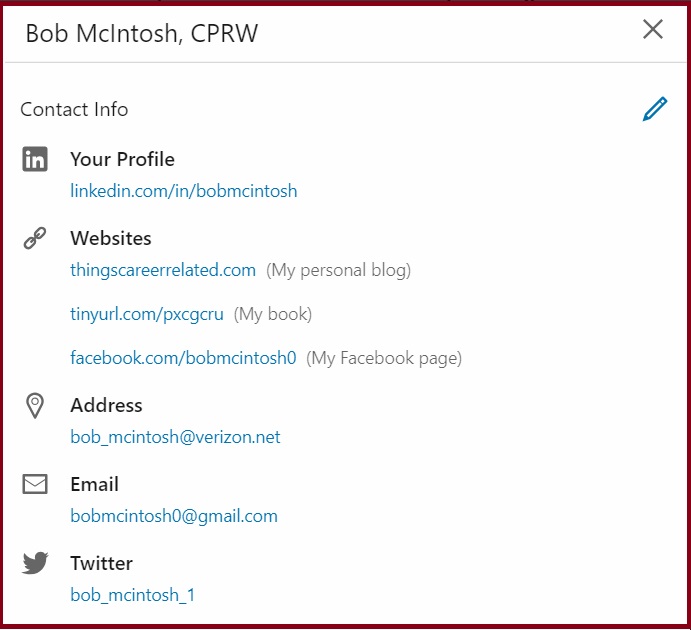
LinkedIn profile URL

At the bare minimum your LinkedIn public profile URL is revealed. Here’s where visitors can see if your URL has been customized (there are no numbers or letters after your name). Make sure it’s customized by going to Edit public profile & URL (top right-hand corner of your profile) select Public URL and type only your name into the field.

When I see a public profile URL that is customized, I know the LinkedIn user understands it makes them look more savvy with LinkedIn. Only when it’s customized should it be included on your resume, personal business cards, professional networking profile, and other job-search documents.

Email address

You have the option of allowing all LinkedIn users to see your email address, first degree connections, first and second degree connections, or only you. If you want recruiters and other hiring authorities to contact you, allow everyone to see your email address.

To set your email view, go to Settings & Privacy and select Who can see your email address.

Websites (three)

I provide websites for my blog; book; and since there’s no designated space for Facebook, my Facebook page. If you have a company website, a website for your job search, or want to draw visitors to a page on your former/ current employer’s site, this is a great place to do it.

Links to websites can go a long way toward branding you, especially if you’re in an artistic industry and want recruiters to see your online portfolio. You can also provide links in your rich media areas, but why not cover all your bases?

See contact info Bob

Phone

Not many job seekers list their telephone number, but the smart ones do because it’s easier for recruiters to call or text them. I tell my clients it’s their prerogative, and secretly think I wouldn’t do it. However, if I were job searching, I’d follow my own advice.

If you own a business or have a side hustle, you should list your phone number. Some people prefer immediate satisfaction. You don’t want to miss that phone call that could be a potential client.

Address

Do not. I repeat, do not list your home address. I don’t know what LinkedIn was thinking when it created this field. I, for one, don’t want people to know where I live, but that’s just me.

This is where you should list a second email address. Perhaps you want only your first degree connections to be privy to your primary email address, but will allow everyone to see a different email address. It could be a business email address, separating pleasure from business.

Twitter

Some of my connections have a larger presence on Twitter. It’s their platform of choice. While others are more present on Facebook, Instagram, etc. If you’re on Twitter, you should include your handle. I’m on Twitter but don’t use it as effectively as I do LinkedIn. I guess I could say, “I don’t get it.”

An important reason for including your Twitter handle would be if you want what you post on LinkedIn to also be tweeted on Twitter. Another reason for including your handle is so visitors to your profile can follow you on Twitter.

You have the ability to include more than one Twitter handle. To set your Twitter accounts, you’ll need to do this in Privacy & Settings.

Not enough

As I say, many LinkedIn members are not aware of the See contact info area. How then do you make sure they see your contact information, or at least some of it? One of my valued colleagues and executive resume writer, Laura Smith-Proulx, says it nicely:

“The See contact Info area does seem neglected by many people who might otherwise welcome a recruiter’s call. I hope your post convinces them to include more information. I also advocate putting at least an email address in the Summary at the end, which is designed to make the recruiter’s job easier and build more Connections.”

Yes, include your call to action in your Summary. I often see my clients fail to do this. Often many of them didn’t think of it, or in some rare instances they don’t want to reveal this personal information. This, according to Laura, makes it more difficult for recruiters to find you. Perhaps they’ll simply give up.


As you can see, there’s a great deal of information in See contact info. At the very least LinkedIn users should include a customized LinkedIn public profile URL and an email address visible to everyone. Going beyond this with websites and a Twitter handle helps in your branding.

Two sources of information I didn’t mention above are Instant messenger (three) and Birthday. The reason for this is IM is not used often, and I’m not a fan of giving out my birthday.

Photo: Flickr, irving robledo

3 reasons to properly endorse someone for the skills on their LinkedIn profile

How do most LinkedIn members endorse others for their skills? They click on the visible top three (like below) and leave it at that. Don’t be that person! Instead, click Show More, which expands a user’s skills list, so you can endorse them for other skills.

Kevins Skills

LinkedIn is trying to make endorsing skills more valid by asking you to choose how strong the the people you’re endorsing are with their skills (seen below). The choices are Good, Very Good, or Highly Skilled. Further, LinkedIn tells you that your choice won’t be made public to who you endorse. How much this will effect LinkedIn users SEO isn’t known for sure.

KevinsEndorsements

Then LinkedIn asks you to select a relationship you and the endorser shared (seen above). You worked directly on the same team or project with the person, managed him, reported directly to him…none of the above. Actually, you don’t have to choose any of these.

Of course there ways to truthfully answer LinkedIn’s inquiries.

You have witnessed the person perform her skills

In this case you can honestly answer the questions LinkedIn asks you in terms of someone’s level of expertise and, of course, your relationship. This is the most valid way to endorse someone for her skills.

For example, I would have no problem endorsing my colleagues for their skills. Not necessarily all skills, but many that I’ve seen them perform. And when I connected with them, the first thing I did was endorse their skills.

Maybe you’ve spoken with her over the phone or met for coffee, and by talking with her you get the impressions she’s the real deal. This isn’t as solid as witnessing her perform, but it comes close, particularly if you’re good at judging character.

His profile clearly demonstrates expertise in his skills

Some profiles are written so well that you feel you know the person as if you met them in person. He promotes himself well in his Summary, demonstrating passion, listing poignant accomplishments, and closes the loop with a call to action.

In his Experience area he hits you over your head with more accomplishments that don’t seem embellished. You dig a little deeper and find that most of his skills have received 99+ endorsements. I know someone in the 99+ club who has almost 900 endorsements for one skill.

Caveat: endorsements can, and often are, tit for tat. I spoke to the person who accumulated 99+ endorsements for each skill–rightfully so–who told me he just has a lot of friends. Which is true, he runs a networking group for business people.

Someone has referred you to the person or spoken very highly of her

Generally people won’t refer you to a person unless they know her well and can vouch for her skills. The risk of doing this is tarnishing their reputation, something no one  wants to do.

Similar to the reason number two, you read the recommendations on her profile and get the sense that those who wrote the recommendations were sincere and truthful. There is no fluff in them and the accomplishments are precise.

Caveat: recommendations can also be tit for tat. In the day when only recommendations existed as a way to award LinkedIn users for their greatness, we often saw someone write a recommendation for someone, which was immediately reciprocated.


In order to give endorsements credence, You should use these three ways of endorsing someone. It is safe to say that endorsing someone who lives across the world, if not the country is contributing to Endorsements’ poor reputation.

Reflect before slapping your LinkedIn profile together

I’m sure you’ve read many articles on writing your LinkedIn profile. And I’m sure you know how important your profile is to your LinkedIn campaign. This is why it’s important to not simply slap our profile together and hope for the best.

linkedin-alone

Your profile is important but it’s not the only piece of the proverbial puzzle. Read the series beginning with The ultimate LinkedIn guide, part 1: how to optimize your LinkedIn profile to learn how to create and effective LinkedIn campaign.

This post focuses on the profile alone, and more specifically how you need to reflect before you begin writing it, or even if you’ve already written it. Here are some important considerations:

How do you want to brand yourself?

The first consideration, how you want to brand yourself, requires a great deal of reflection in itself. First you have to decide if what you’re doing is what you want to continue doing, or if you want to go in a different direction.

If you want to continue on the same path, you’ll have to think about how you can strengthen your message. While it may be strong on your résumé, the LinkedIn profile gives you more leeway for expressing the value you will provide to the employer. Think Headline and Summary as the most obvious places where you can accomplish this.

But also consider other sections on your profile that aren’t typically on your résumé, namely Skills & Endorsements, Volunteer, expanded Experience, and Recommendations.

Some of my clients want to change their career and ask me if they should create two profiles. First of all, I tell them, this violates LinkedIn’s policy. But more to the point, it would be a royal pain in the ass.

My advice is to express their transferable areas of expertise in their Headline, tell their story in the Summary, and prioritize statements throughout their profile.

reflecting

Your LinkedIn profile is not your résumé

I tell my clients that initially they can copy and paste their résumé content to their profile, but then they need to personalize their profile. Make it a personal résumé, an online marketing document. This will take a great deal of reflection.

However, your profile shouldn’t confuse hiring authorities as to what you do. For example, you don’t want to brand yourself—on your résumé—as a marketing specialist, but emphasize to a greater extent—on your profile—your expertise as a web designer. This will definitely confuse hiring authorities.

If you’re in job-search mode, you want the two to be similar, yet not identical. In other words don’t regurgitate what you have on your résumé. However, if you’re gainfully employed and want to convey the message that you are promoting a side hustle, you have more flexibility.

Which parts of your profile will brand you?

The answer is every part of your LinkedIn profile brands you, beginning with your background image and ending with your interests. Yes, even your background image can brand you. Didn’t think about this, did you? Again, this will require reflection.

Here are some of the profile sections that you also need to reflect upon:

  1. Headline
  2. Photo
  3. Summary
  4. Articles/activities
  5. Experience
  6. Education
  7. Volunteer experience
  8. Skills & endorsements

Speaking to your Summary, reflect on how you want to tell your story. Of all the major sections on your profile, this is blatantly different from your résumé. You’ll write it in first-person point of view, talk about your passion or knowledge of your industry, include some accomplishments, and a call to action, e.g., your email address.

Who is your audience?

Your audience is your intended industry. You will deliver a different message if you’re changing careers; but if you want to continue doing what you’ve done, you’re speaking to the same audience. Therefore, you must optimize your profile with industry keywords.

The narrative you use to address your audience will take some reflection. I’ve mentioned your Summary as a great section to speak to your audience, to tell your story. Your job scope in your Experience section is another area where you can express your message. Here’s how I talk to my audience:

I’m more than a workshop facilitator & designer; I’m a career and LinkedIn strategist who constantly thinks of ways to better market my customers in their job search. Through disseminating trending job-search strategies, I increase our customers’ chances of finding jobs.

Knowing your audience takes a great deal of reflection. Obviously, from my example, I’m addressing job seekers in a personal manner.


Reflecting on your LinkedIn profile is no easy task. I see the cogs working in my clients head when I ask them to consider the aforementioned aspect of their LinkedIn profile. Whether you are starting your LinkedIn profile or revising an existing one, it definitely will require reflection.

Photo: Flickr, daysmoveeasy

7 steps to take to find the right person using LinkedIn’s All Filters

Some estimates say there are more than 650 million LinkedIn users. To find and connect with the person or people who can help you land your next job might seem like a daunting task, but don’t fear.

linkedin-alone

Perhaps you’re looking for the hiring manager at one of your target companies, or an alumnus who can provide sage advice, or a corporate recruiter. Finding the person with whom you need to connect requires a focused search.

A great tool to narrow your search is All Filters. To use this tool, you must have a plan of attack. Following are the steps I would take to look for recruiters, using the following criteria:

  1. Must be an employee of the companies below:
    • IBM
    • Kronos
    • Oracle, and
    • seven other companies.
  2. A second degree connection, so I can utilize our common connections. (More on this later.)
  3. Must serve the Boston, MA, area.
  4. Graduated from the University of Massachusetts.

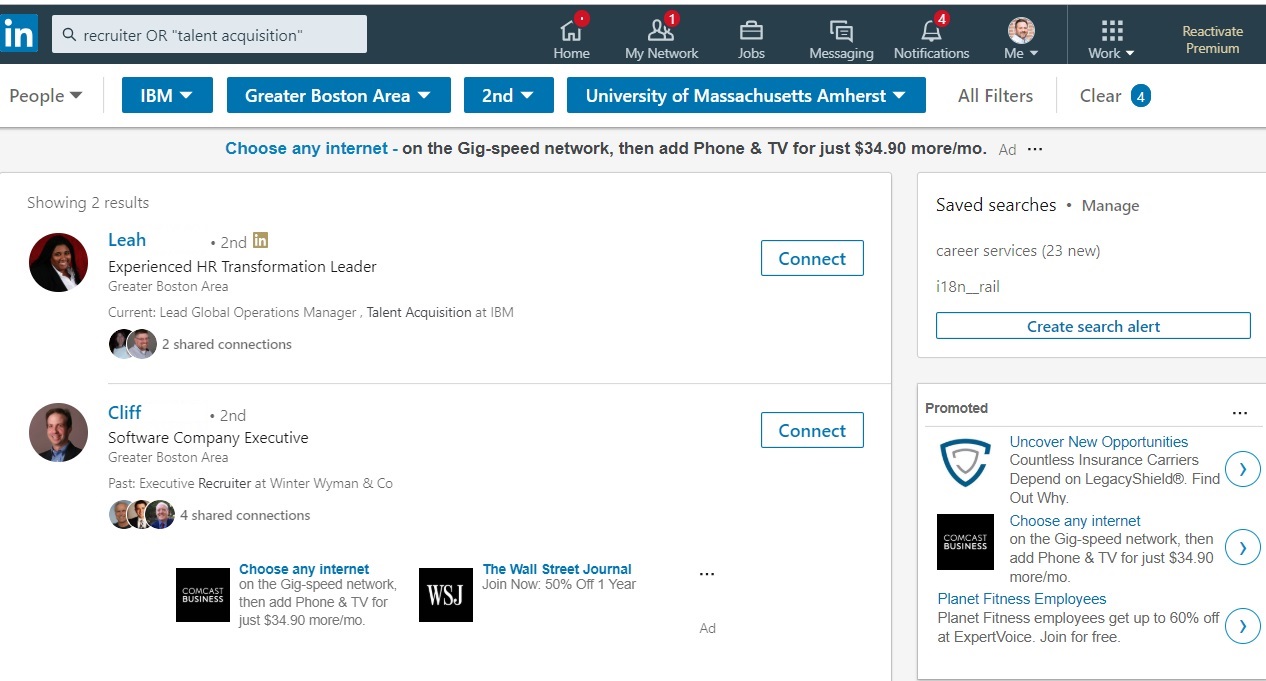
1. I type in Search the words: (recruiter OR “talent acquisition.) The result is approximately 3,200,000 LinkedIn recruiters. Way too many.

Recruiter step 1

2. So I jump right to All Filters; no sense in wasting time. Note: in All Filters, there’s an option to choose Industry. A practical choice would be “Staffing & Recruiting,” but the string I typed in Search gives me more options with which to begin.

3. I Hone in on my first company, IBM, which is one of the companies listed under Current Companies (see diagram below). I have 5,317 2nd and third degree connections at IBM.

4. If I want to connect with a recruiter at IBM, I should narrow the list down to 2nd degrees (see diagram below), as they will have other LinkedIn members who are connected to people in my direct network. This is important because I’ll want to mention our common connections in a personal invite. This brings the number to 348.

All Filters

5. One of my criteria is Location (see diagram above). The Greater Boston Area is one of the choices LinkedIn gives me. Other choices include India, the Greater New York City Area, and the Dallas/Fort Worth Area. I choose Greater Boston Area, which brings the number to 42 recruiters. Note: you might have to type in your desired location.

All Filters2

6. I’m almost there. I have to find recruiters who attended the same college I did. I have to scroll down in All Filters and write in my alma mater, the University of Massachusetts (diagram above.) I am left with only two recruiters that have met all my criteria (below).

Recruiter step 5

7. Finally, I need to choose a common connection who will either introduce me to one of the recruiters or allow me to use their name in an invite I send. I know just the person I would like to ask. He was a former customer of mine and a real stand up guy.

Common Connections


Repeat the process

You now get the idea of how to locate people on LinkedIn by using All Filters. It isn’t difficult as long as you know who you’re looking for. By the way, my search for Oracle and Kronos yield one result and no result respectively. I guess I need to connect with more recruiters.