Tag Archives: LinkedIn profile

6 things to think about before including your LinkedIn profile URL on your job-search documents

I often get this question during a Résumé Advanced workshop, “Should I include my LinkedIn URL on my résumé?” My answer to this is, “Sure, as long as your profile will serve you well.” This is to say, your LinkedIn profile must impress prospective employers, not turn them away.

LinkedIn puzzle

Here are 6 rules to adhere to if you’re going to list your LinkedIn URL on your résumé, personal business cards, or cover letter.

  1. Customize your URL. LinkedIn provides a default address that includes additional numbers and letters behind your name. In Edit Profile, click on Edit next to your default URL and remove all the additional numbers and letters by simply typing your whole name in the field provided. A public profile URL that is clean tells employers you’re LinkedIn savvy, not a babe in the woods.
  2. Your profile must be complete. You’ve probably read many articles about the importance of a complete profile. The bottom line is that a barren profile shows a lack of effort, At the very least your profile must have the following: 1) professional photo; 2) branding headline; 3) creative, story-telling Summary; 4) full Employment section, which includes quantified results; and 5) LinkedIn’s added marketing tools.
  3. Think about your profile as a complement to your résumé. In other words, your profile is not your résumé; it is more dynamic. To make your profile more exciting, you can add additional sections to it, such as Skills and Endorsements, Certificates, Projects, Languages, Media, and more. LinkedIn aficionados can spot when someone simply copy and pastes their résumé to the profile–not impressive.
  4. Make it easy for people to find you. If you’re in the job search and prefer not to list your phone number on your profile, I might accept that as an employer. However, if you also don’t list your e-mail address, I’d be on to the next profile. Don’t play hard to get and make it hard for potential employers to find you.
  5. Participate. Participate in what? you may wonder. Show employers that you update on a regular basis and that your updates are related to the work you’re pursuing, not about how Big Kitty is doing well after his surgery.
  6. Show off. I’m not saying go overboard, but make use of the media section as your online portfolio. You can post PowerPoint presentations, videos, audio clips, your résumé, photos of your architectural work (one of my customers did this), and more. Make your profile truly dynamic by doing this.

If you haven’t followed the above suggestions, sending employers to your profile (via your résumé, business cards, and other written communication) will cause more harm than good.  One more thing, certain elements of your public profile will be absent from your full URL, such as Media, Recommendations, view of Endorsements, and list of connections. This is why you must provide access to your full profile.

If you enjoyed this post, please share it.

4 reasons why your LinkedIn profile needs a strong Media section

recruiters (1)This article marks the third of making your LinkedIn profile stronger. The previous two talked about your Summary and Experience sections.

Before you read any further, I’d like you to take a moment to read one of the most comprehensive articles on LinkedIn’s Media feature. It’s an article written by my colleague and valued LinkedIn connection, Sabrina Woods, in which she describes 18 different ways to use this feature. Eighteen different ways! Boy, did she do her homework.

With at least 18 ways to use LinkedIn’s Media section, this gives you plenty of options to show off your goods. So why not take advantage of it? You can use it in your Summary, each in your Employment section, and in your Education. Here are four major reasons why you should utilize Media on your LinkedIn profile.

It’s your online portfolio. This is what I tell my LinkedIn workshop attendees when I describe Media. Similar to when you bring examples of your work to an interview, you have the opportunity to show the world your best work. As Sabrina writes, there are at least 18 ways to use this feature.

Everyone can find a reason to use it. And they should. For example, I lead workshops where I use PowerPoint presentations—please no heckling from the true presentation purists out there. I use Media to show off three of my PowerPoint presentations.

An engineer may use this feature to illustrate his work on wind turbines by using YouTube. One of my customers who’s a graphic artist highlights her graphics in Media. Neal Schaffer, an expert on social media for business and author of Maximize Your Social, uses YouTube to share with the world his interview by Kooger in London. Check it out.

It fits your communication style. Some people are visual communicators as opposed to written communicators. They have the knack for making people see the value in their graphic design or photos or architecture…but can’t express it as eloquently in words. One of my customers expressed it nicely when she said some people express their thoughts with words, while she expresses her thoughts through images.

The options are numerous. While you’re given the option of adding a link or downloading a file, the number of providers is mind boggling.

  • Image providers: 12, including Twitter and ow.ly
  • Video providers: Approximately 70, including ABC News, CBS News, YouTube
  • Audio providers: 13, including Mixcloud, Spotify
  • Presentation and document providers: 3, including PowerPoint and Prezi
  • Other: 4, including Behance and Kickstarter

Two of the more common documents displayed in Media are Word and PDF documents, which would be ideal for posting your résumé for employers to see, or a whitepaper you’re particularly proud of.

To see some of the media used by LinkedIn members go to Sabrina’s article where there are samples of various types of media. I think you’ll be impressed. I was.

4 reasons why you need a strong LinkedIn Summary

I still remain perplexed that some LinkedIn members put little effort into their Summary section, or don’t have one at all.

LinkedIn Flag

Would you go to an interview or business meeting without shoes? Of course not. So I wonder why people feel that a Summary statement on their LinkedIn profile is unnecessary. Having viewed hundreds profiles, I’ve seen many  that simply begin with the Experience section and have no Summary.

The absence of this section of your profile can greatly hurt your potential of capturing the attention of visitors, e.g., potential employers, networkers, and business associates.

Read: Create a kick-ass LinkedIn Summary

I have three theories why people don’t include a Summary: 1) they don’t have the time or energy to write one; 2) they don’t know what to write; and 3) they follow advice of those who say, “Recruiters don’t read a Summary statement. You don’t need one.”

I can understand the first two reasons, although I don’t condone them, but the third one escapes me. Many pundits, recruiters included, say a Summary is necessary, as long as it adds value to the profile. So if you don’t have a Summary because you lack the energy or don’t know what to include, consider 4 reasons why the Summary is important:

It gives you a voice. You’re given more freedom of expression on LinkedIn than you have with your résumé; so use it! Be creative and make the employer want to read on. Your voice contributes to effective branding. It should be some of your best writing and can be written in first person voice or even third person.

Most pundits lean toward first person, as it expresses a more personal side of you. A Summary written in first person invites others into your life. Not many people pull off the third-person voice well; it can sound stilted. But if done right, it can also make a powerful branding impact. People who are established as leaders in their industry warrant a third-person Summary.

It tells a story. Perhaps you want people who would consider connecting with to know you on a more personal level. You have aspirations or philosophies to share; and it’s not about impressing people with your accomplishments in marketing in the nonprofit sector, for example, as much as the positive impact your work has had on the population you serve. You want people to connect because of a share common bond.

The Summary is also a clear example of how LinkedIn differentiates itself from the résumé. It’s a known fact that the majority of hiring authorities don’t enjoy reading a résumé, which is due, in part, because of its Summary. The Linked profile is more creative because it tells your story, your aspirations, and philosophies.

You can make an immediate impact. Stating accomplishment statements with quantified results are a real attention grabber. If a visitor is going to scan one section of your profile to determine if he’ll read on, make it be your Summary, and leave him with a positive image of you.

Here’s part of a Summary from Doug Caldwell, who calls himself a Facilitator Extraordinaire. (I told you I read a lot of profiles.)

MANUFACTURING COMPANY

✯ Improving unit output by 2,200% over a five-year period.
✯ Reduced manufacturing cycle time by 30%.
✯ Achieved cost saving in excess of $25,000 annually.

Read the rest of his Summary to feel it’s power and excitement.

It’s another place to include keywords. Keywords are the skills employers are looking for, and the more you have the closer you’ll be to the top of the first page. So don’t think “less is better.”  In this case, the more of the 2,000 characters you’re allotted, the more you should use. Please don’t use your Summary as a dumping ground for your keywords, though.

I tell my Advanced LinkedIn workshop attendees that excluding their profile Summary is like neglecting favorite pet. You shouldn’t do it. Find the energy to write one, figure out your story or unique selling proposition, and get to work writing an attention-grabbing Summary. By all means, don’t listen to naysayers who don’t believe in this very important part of your LinkedIn profile.

Next read: 5 reasons why you can’t ignore your Experience section.

12 egregious mistakes you don’t want to make with your LinkedIn profile

linkedin-sumary1

I’ve reviewed many profiles as a workshop facilitator and LinkedIn trainer. Many profiles are well constructed, while others are not indicative of future success.

Is it easy to create a compelling profile that gets noticed in a positive way? Not for all LinkedIn users. It takes hard work  and commitment.

The mistakes I’ve seen on LinkedIn profiles range from a poorly done photo to typos and spelling mistakes. However, when I think about 12 egregious mistakes you don’t want to make, the following ones for jobseekers come to mind.

  1. Posting a poor photo. The advice to post a great photo hasn’t reached enough ears, as there are still those who have inappropriate photos. Think about what a photo of you skiing on the slopes of Killington says about your value as an employee? It says you’re a helluva skier but not much about your brand.
  2. Writing, “Unemployed” in the headline. Even, “Looking for next great opportunity” doesn’t say much about your talent and potential to help future employers. This is prime real estate for branding yourself and including some keywords. (As far as I know, not many employers consider seeking unemployment as a key selling point.)
  3. Bragging in your Summary statement that you’re the solution to every problem will get you nowhere, save for an immediate click on the back arrow. Though you may think bragging is acceptable because you’re supposed to “sell” yourself, it comes across as dishonest. Proof, such as quantified results, goes a lot further than words like, “outstanding,” “excellent,” “awesome”….
  4. Being dishonest. Forbes advises against lying and 9 other mistakes. Don’t be dishonest in your Employment section. Employers can smell a liar like a bloodhound can smell a man on the run. Don’t write that you achieved 100% customer satisfaction because it sounds good. A “near perfect” rating is more acceptable and easier to defend at an interview.
  5. Not elaborating on your experience and accomplishments. Some people will write a stunning Summary but only provide the bare minimum in their Experience section. This is a crime. Visitors, especially employers, want to know about your most relevant duties and accomplishments—the more quantified accomplishments the better. A poll was taken on LinkedIn awhile ago (but it’s still relevant) asking which section people thought was most important. Can you guess what the majority chose?
  6. Copying and pasting your résumé to your profile and leaving it at that. I advise those starting out to make this first step, but then you have to modify it to fit its purpose, which is a vehicle for networking. A professional photo and personal Summary that tells your story are a must for networking. A good thought to keep in mind is that your profile  is an extension of your résumé; employers aren’t expecting to see an exact copy of it.
  7. Neglecting LinkedIn’s tools which are meant to enhance your networking. Use the tools LinkedIn gives you, such as the Skills and Endorsements section, Additional Information, Publish a Post, Media capabilities, Certifications, and Awards are just a few of the tools that can give employers and networkers a sense of your accomplishments.
  8. Not letting people in your network know about significant changes. You should update your connections when you’ve made major changes, e.g., a career change, a new photo, etc. Of course your network doesn’t want to know when you added a comma to your Summary.
  9. Love it and leave it. Although your profile is fairly static—you don’t change it often—revisit it from time to time to make sure all the information is current. The other day I sat with a customer who told me he hadn’t touched his profile in over a year—didn’t even know his password.
  10. Failing to ask for and write Recommendations. Even though I think this feature is growing out of favor—due to the increase in the popularity of Endorsements—Recommendations are a great way to increase your branding by describing you as a great worker (receiving them) and as an authority (writing them).
  11. Not customizing your LinkedIn profile’s URL. This advice comes from Joseph Catrino, who wouldn’t appreciate me plagiarizing him, so I give him credit. Yes, often we see business cards, résumés, and other marketing documents with the default URL listed on them. This shows a lack of savvy; whereas the contrary shows awareness of LinkedIn.
  12. Neglecting to include keywords. To be found on LinkedIn, your profile must include the skills and areas of expertise employers are looking for. If you’re not sure which keywords to include, take a sample of six or so job descriptions and identify the common keywords for your occupation. Hint: use http://www.wordle.net to accumulate them into a word cloud.

Your profile is your online presence. Potential employers might judge you based on what you say and show on your profile. If they like what they see, your chances of success will be greater. If they don’t like what they see, it’s on to the next profile. So be sure not to make the six mistakes listed above.

The most important 120 characters on your LinkedIn profile

We’ve hit a dead end. My customer is over the limit by two characters. “What if we use an ampersand instead of ‘and’?” I suggest. No, she doesn’t like this idea. Doesn’t look aesthetically pleasing. Doesn’t match the flow. She’s exasperated…I’m getting exasperated.

120-characters

We’re running on 10 minutes just trying to figure out how to stay within 120 characters that are so important to her LinkedIn profile, so important to everyone’s LinkedIn profile. I’m talking about the Professional Headline, or what I call the Branding Headline (BH), as it’s an important part of your branding.

My customer and I are limited on time, and I can sense her impatience. “Is this really important?” she asks. Oh yes, extremely.

The Branding Headline can only be 120 characters (including spaces) long. Less characters than a tweet. It’s prime real estate. Basically it’s where you state what you do and how well you do it.

You may choose to go with a branding statement or your title/s and areas of expertise. It’s the first verbiage visitors will see, and it contains keywords that help you get found through a commercial search—it can make the difference of you being on the first of second page.

A poll taken awhile ago on LinkedIn deemed the BH more valuable than the Summary section but less than the Experience section. More valuable than the Summary?! Needless to say, your words must be well chosen.

Visibility: Where does the Branding Headline appear? Part of it appears on your connections’ homepage when you share an update, such as an article or quote or bit of advice. A quick glance at my homepage reveals that the majority of my connections are not posting original content; therefore, they’re not selling their skills in their BH.

Your Branding Headline doesn’t only appear when you 1) respond to an update, 2) “Like” an update 3), connect with someone, 4) start a group discussion, etc. In a commercial search your BH will always appear in its entirety, and the title and skills the person seeks should be highlighted in your BH.

Importance: For me if I don’t know a person who is asking me to join his network, I will make my decision based on 1) if he has a photo and 2) what his BH says. No photo and a weak BH, I won’t accept that person. Like the photo, the BH tells me quickly who the person is. I don’t have time to view every profile to see if the person is worth connecting with. In short, the BH should accomplish:

  • Along with your photo, your BH first brands you; it is a value statement, an attention grabber.
  • It sets the tone for the rest of your profile, a mini Summary statement. Another poll taken awhile back on LinkedIn says the important sections of the profile, in order, are Experience, Branding Headline, and Summary.
  • It contains important keywords that help employers, potential business parties, customers, and visitors in general find you.

Below are LinkedIn members’ Branding Headlines.

Change your Game and Make More Sales. My clients increase sales 30% or more. A mere 76 words, this Branding Headline captures my attention because of its value statement.

This BH is more impactful because of the accomplishment in it: Sales & Leadership Coach & Consultant; Award Winning Sales Consultant & Director; Wine Consultant/ Wine Judge/ Crafter. It uses 118 characters.

My BH consists of my title and areas of strength. I created it to optimize my profile for “LinkedIn” searches. I’ve used 111 characters. LinkedIn and Career Search Strategist | LinkedIn Profiles | Author | Blogger ~ Job Search, LinkedIn, Introverts

Another BH that sells this LinkedIn member: Online Branding Coach ✮ LinkedIn Trainer ✮ Social Media BootCamp Instructor ✮ Career Specialist ✮ INfluential Speaker!

There are other Branding Headlines that impress, but the time the LinkedIn members put into crafting them was probably significant. I’ve lamented over how I can utilize the remaining nine characters in my BH.


My customer eventually settled on the ampersand, but only after 15 minutes of deliberation. We’ve got another 15 minutes left on the clock. When I tell her this, she sighs and laments that we still haven’t gotten to her Summary.

Photo: BethAnn Ragen, Flickr

5 ways (each) to brand yourself with your résumé and LinkedIn profile

Resume2

Now what? You have a personal brand that is great; it clearly shows your value to employers, so now you have to show it to the world. You’ve heard it over and over that you’re a product to be sold to employers, the buyers.

However, if your brand isn’t consistent, you’re not an established product. Consider how you’ll brand yourself with your résumé and LinkedIn profile.

Résumé

Your résumé is most likely the first document the employers will see, so your personal brand must have an immediate impact. If not, your chances of getting an interview are very slim.

Purpose of your résumé. You will send a tailored résumé in response to a specific job. Your résumé employs push technology, as you are reacting to an advertised job. The following components of your résumé will contribute to your personal brand:

  1. A branding headline tells potential employers exactly who you are, as well as what you’re capable of doing. It should consist of approximately 10 words that describe what you do, perhaps the industry/ies in which you work, and some strong areas of expertise.
  2. Performance Profile is a section on a résumé that sometimes gets overlooked in a reviewer’s rush to get to the Work History. However, if you throw in phrases that immediately expresses your value, such as a bolded  accomplishment statement, your Performance Profile will not be overlooked. Example: Operations manager who increases companies’ revenue in excess of 60% annually through shrewd business acumen.
  3. Key skills for the positions you’re pursuing are listed in your Core Competency section. These are skills that are specific to the position for which you’re applying. Don’t highlight skills that are irrelevant for a particular position, e.g., strong written communication skills when verbal communication skills are essential.
  4. Job-specific accomplishments will effectively send a consistent branding message. While a show of your former/current responsibilities might seem impressive, accomplishments speak volumes. Provide quantified results in the form of numbers, dollars, and percentages.
  5. Keywords and phrases common to each position are not only necessary to be located by Applicant Tracking Systems (ATS); they’ll rouse attention from employers in a Core Competency section.

LinkedIn profile

Purpose of you LinkedIn profile. Your profile is NOT focused on a specific job; it is static and more general. It uses push technology, as recruiters and hiring managers will find you by entering your title and areas of expertise.

Your consistent message demonstrated through your résumé carries over to your LinkedIn profile. While your profile and résumé are different, they are similar in how you deliver your branding message.

  1. Like on your résumé, a branding headline will tell potential employers exactly who you are, as well as what you’re capable of doing. However, it is general and includes more areas of expertise. Your branding headline and photo are what visitors to your profile will see first. Together they must make a great first impression.
  2. Your profile Summary will be different from your résumé’s Performance Profile; it is written in first- or third-person, but it must brand you as someone who demonstrates direction and potential greatness. You may use content from your commercial in your Summary. To some this is considered the most important section of your profile. You’re allowed 2,000 characters.
  3. List your outstanding technical and transferable skill in the Skills section. This section on your profile is similar to the Core Competency section on your résumé. The skills you list must show your proficiency, as opposed to your familiarity. You will be endorsed for your skills, which arguably demonstrate your expertise.
  4. Your Employment section will be briefer than your résumé’s, highlighting just the outstanding accomplishments from each job. Accomplishments that are quantified with numbers, dollars, and percentages speak louder than simple duty statements and are the most effective way to brand yourself.
  5. Keywords are just as important to have on your profile as they are on your résumé. Employers will only find you if your profile contains the keywords they enter into Advanced People Search. LinkedIn has a new Skill feature that analyzes your technical and transferable skills, indicating their projections and offering more suggestions, among other cool features.

Some additional components of your LinkedIn profile which will cement your consistent branding are ones not found on your résumé. The most obvious is a highly professional or business casual photo. Another useful area of your profile is Media which allows you to share PowerPoint or Prezi presentations, copies of your résumés, videos, and various other files.

Combining both documents, your brand with be more powerful than if you use a résumé alone. The résumé to respond to job ads and your LinkedIn profile to pull employers to you will be the powerful punch you need in your job search.

Photo: Flickr, Ploymint HQ

2 important hints about LinkedIn endorsements

endorsemments2When you endorse your connections’ skills and expertise, do you simply click Endorse next to the skills with the highest number of endorsements? You may not be doing your connections a favor by doing this; but it’s not entirely your fault.

Your valued connections should be guiding you through the process, and you should follow their wishes.

Hint 1: guide your connections

Endorsees, you may be unaware that you can move specific skills and expertise toward the top of your list as a way to highlight their importance. Without doing this, your skills will be listed in highest to lowest number of endorsements. Which works out fine if your highest number of endorsements properly brand you.

But in some cases your skills are not being endorsed in a manner that tells others how you want to build your brand. One of my connections aptly illustrates which skills he wants endorsed to better brand him. He lists Social Selling ( a mere 13 endorsements) listed above LinkedIn (98), LinkedIn Training (74), and so forth. He’s obviously sending a message to his connections.

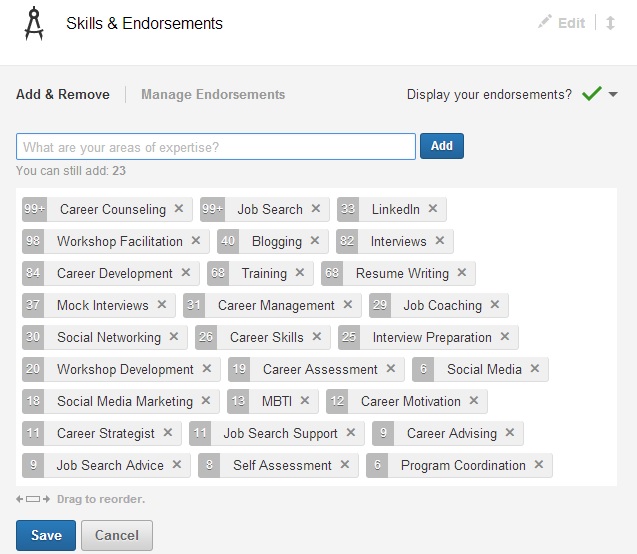
How do you rearrange your skills in the order you desire? In Edit Profile select Edit Skills and Endorsements. You’ll see a field like this:

skills

Now simply move the skills in the order you’d like them to appear. I’ve moved LinkedIn (33 endorsements) ahead of Workshop Facilitation (98+) and Blogging (41) ahead of Interviews (82), as I want these two skills highlighted.

Hint 2: those of you endorsing your connections, take the hint

So if you’re endorsing your connections, take the hint. The skills your savvy connections want endorsed first are the top five to 10, not the bottom 10. Endorse them for those skills first and then endorse them for the others.

People often ask me if I see value in endorsements. I tell them only if the endorsers are aware or have witnessed the endorsees perform the skills for which they’re being endorsed. However, if LinkedIn wants us to endorse our connections–even those we haven’t seen perform–we can only trust their word on their proficient skills.

That said, I feel it’s perfectly fine to ask a connection which skills she wants endorsed–in other words, respect your connections’ order of skills. (Don’t get me wrong, I don’t think eliciting endorsements from others is ethical.)

I asked one of my connections which of his skills he wanted endorsed. His simple response was the top five because those are the skills he is strongest at. I wouldn’t know without asking him because he lives in California, and I’ve never seen him in action. Nonetheless, like Lin Sanity, I was caught up in endorsing people.

Take the hint if you’d like to endorse me by clicking Endorse next to my top five skills, because I’ve arranged them in order of preference. I’m pretty sure I perform those skills very well. I’d do the same for you.

If you liked this post, please share it.

Dear College Students, here are 3 steps to take when connecting with your alumni on LinkedIn

This is a follow-up of a post called Dear College Students, please the following 10 LinkedIn tips.

college student2Dear College Students,

Now that your profile is in tip top shape, it’s time to think about how, as a new college student, to connect with other LinkedIn members. It’s time to develop your online network.

To help you do this, LinkedIn has a neat feature called Find Alumni, which is located in the Connections drop-down menu

Why is it important that you’ve created a profile and must now develop your network? Because the sooner you start your network, the more useful it will be when you graduate and have to look for a job. An old adage is: in the working world, the best time to network is when you’re working. So it stands to reason the best time to network is while you’re in school.

Finding alumni with whom to connect

Assuming you haven’t made any connections with your alumni, which also include those who attended your alma mater before you arrived, you’ll want to connect with them because they’re probably currently working and may know of opportunities or, at least, people with whom you can connect.

First go to How You’re Connected to the far right of the second screen. Most likely you have very few, if any, 1st degree connections. That’s alright. Focus on your second degrees. Select your 2nd degrees by clicking on that bar. You’ll see the other categories shift, the numbers decrease. This narrows your search for potential alumni contacts.

If you’re a communications major, you’ll focus on people who are connected with you under What They Do, e.g., Media and Communication. Look at where they work, what they studied, what they’re skilled at. This will give you a sense of your commonalities, as well as some talking points when you connect with them.

Connecting with your alumni

The largest advantage you have is your common bond with people who are going to school with you or who have attended years before. When you attempt to connect with them through their profile, the option Classmate has already been chosen for you.

This is where, as an aspiring LinkedIn professional, you need to carefully craft your invite messages. Under no circumstances will you send the default LinkedIn invite; that’s plain laziness. Instead, you’ll write a personalized note, which will show the professionalism LinkedIn members expect from each other.

Note: Even though you can hit Connect under the person’s photo, it’s still best to open their profile and choose to connect after reading it thoroughly.

Here’s what you might write after reading your potential connection’s profile:

Dear Mr. Schmidt,

As you’re an alumnus at the University of Virginia and are in the field of Marketing Communications, I’d like to take this time to reach out and invite you to my network. I will contact you to see if we can be of assistance to each other.

Completing the process

Your new invite accepts your personalized invitation because both of you share an interest in Communications and, most importantly are alumni. In your invitation you mentioned being of assistance to Mr. Schmidt. Where many people fall down in the process is not following through.

Be true to your word by contacting him via e-mail when he accepts your invite. Also write down some questions you’d like to ask Mr. Schmidt regarding the line of work he does. Make them intelligent questions; don’t waste his time. Ask him if he might know of anyone who you could also speak with. Finally, tell him you’re at his disposal should he need assistance.

The process of building relationships can be  a long one, but because you’ve just begun your education, you have plenty of time developing long-lasting relationships. These are connections that can be of great help to you once you’ve graduated college.

5 ways to connect with LinkedIn members; the good, bad, and the ugly

connect on linkedin

I was speaking with someone who asked me how he should connect with people on LinkedIn. Together we looked at what I consider the best way to connect with someone (through someone’s profile), but there are four other ways I showed him how to connect with others on LinkedIn.

So how might one connect, you wonder.

Through someone’s profile–the best way

This is the best way to connect with someone. Why? Because you actually take the time to read the person’s profile to see if you want this person in your network. I happened upon someone who does very similar work and is a career-advice blogger. I had to connect with him.

You find someone’s profile by searching for him/her using LinkedIn’s awesome search engine or selecting that person from “People You May Know,” found at the top right-hand corner of your homepage. You’ll see the box below, where you’ll indicate how you know your potential connection.

LinkedIn asks you how you know this person. Of the seven criteria, David and I are in the same LinkedIn group. Great luck. As I don’t qualify for any of the other criteria. What I dislike is when someone I don’t know tries to connect with me as a “Friend” when they don’t know me. Claiming to be a “Colleague,” “Classmate,” or “We’ve done business together,” Also ruffles my feathers when none of it’s true. But being in the same group/s means we’re like-minded.

Important note: always write a personal note similar to the one you see in the box below. To send the default message is poor laziness.Direct connect

Through an introduction–proper but slow

This is considered proper etiquette when you want to connect with one of your first degree’s connections. You ask your first degree to introduce you to the person with whom you’d like to connect. A LinkedIn purist may believe this is the only way to connect, but I think this policy is a bit extreme, as well as taking a long time to accomplish.

Go to the desired person’s profile and choose Get introduced next to the Send Inmail button. This will bring you to a command that asks you who should make the introduction.

Craft a professional message, understanding that the person making the introduction might send your message straight through, along with a message of his own. If your intention is to ask to connect, your wish may be granted, but this method usually takes longer than it would to simply try to connect.

The person I chose as an example is not in any of my groups; thus I would not feel good about trying to connect directly…unless, of course, I indicate he’s a “Friend” and in the not beg his forgiveness.

get introduced

Who’s visited your profile–getting around the default message

Everyone I know is curious about who’s visited their profile. Aren’t you? You can, with impunity, connect with anyone who visits your profile and discloses their identity.  What I mean by this is you don’t have to state how you are related to said person…and you can still write a personal note.

I’m a bit conflicted with this method of connecting. While I don’t believe one should have to request an introduction every time he/she wants to connect with someone, I do believe there should be some relationship, such as belonging to the same group.

Who's visited your profile

Mass mailing-invite–for beginners

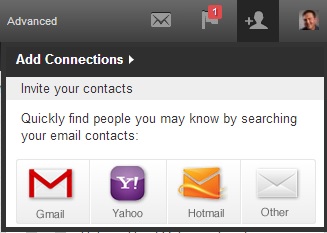
Like a tooth ache, you’re reminded on every page that you can send an invite through your e-mail contact list. Simply click on the icon to the immediate left of your photo to see a command like the one to the right. Select your e-mail provider, follow the prompts, and connect to your heart’s desire.

This is one of the least effective way to connect, as it doesn’t allow you to send a personal note. I’ve complained bitterly about people who just connect willy-nilly.

However, if you’re just starting out, you may want to use this way to connect.

connect 1

From your phone–the ugly

If you’re on the fly, you can connect from your mobile device. The LinkedIn app makes connecting on your phone as easy as clicking a button…literally. This is the epitome of laziness–here I go again–as there is no option to write a personal note.

I tell my LinkedIn workshop attendees to avoid using this method and, rather, wait until they’re sitting at their computer so they can connect using the first or even second method. I also tell them if they want to connect with me, they’ll need to include a personal note, which most of them neglect to do. Oh well.

The good, bad, and the ugly

There you have five ways to connect with people on LinkedIn. You may call me old fashion for choosing the first method, visiting a person’s profile, to connect. Or asking for an introduction. At the very least connecting with people who’ve visited your profile. But to connect with someone through a mass e-mail or by phone is pure blasphemy.

Beginners’ guide to using LinkedIn effectively

linkedinThis is a guest post from Rich Grant, a valued LinkedIn connection and college Career Advisor. He has a great way of explaining how to teach LinkedIn to beginners. 

When I meet with students – two to four each day – in my college’s career center I almost always ask, do you use LinkedIn? Most students say “yes’” but the real question we start exploring is, are you using LinkedIn effectively?

I’m pleased that almost every college junior or senior I meet with has a LinkedIn profile. Very few students, however, have taken full advantage of the networking power of LinkedIn. This is where I come in. I love showing students the nooks and crannies of LinkedIn.

I typically have about 10 – 15 minutes within a 30-minute appointment to provide students with an overview of LinkedIn. That’s just about enough time to cover the basics. So, here is my 10-minute tutorial on using LinkedIn to make connections and as a resource in a job or internship search.

Defining LinkedIn. For students who have not seen LinkedIn, I tell them about the similarities to Facebook (connecting with people, posting a status and / or links, joining groups, etc) and then quickly add, But it’s NOT Facebook! I also explain that social media networking (LinkedIn, Google+, Twitter, Pinterest, and others) does not replace traditional face-to-face networking, but it complements your overall networking efforts.

About the profile. I talk briefly about how to beef up your profile. Don’t set up a bare-bones profile and think you’re done. Change / expand your headline, create a summary, and describe each job with appropriate key words. Add skills and highlight projects. I talk with students about posting a professional profile photo and customizing their URL, both of which are easily found when you’re in “edit profile” mode.

Making connections. With whom should you connect? Initially, I tell new LinkedIn users to connect only with people they know and trust who also know them reasonably well. I explain the concept of 2nd degree and 3rd degree connections, that is, your connections’ connections and so on. If you connect with people who know you well, you will have better success in getting referred to your 2nd degree connections. I tell students to avoid the “LinkedIn Open Networkers” known by their acronym LION (a better description might be “Spread-thin LinkedIn Unselective Trolls”)

Participating in groups. Find your college’s alumni group and seek groups within your professional interests. Don’t just join groups, participate in them. Post discussion topics, comment on discussions. Engage with people within groups… you know, be “social” on “social media.”

Using “advanced” search. Click “advanced” to the right of the search bar. On the left side, you’ll see several fields. You can search on one variable or multiple variables. I usually show students how to search on keywords, company, college (filling in the name of our college), and zip code. You can also search by industry. I run through a couple of searches to show how easy it is to identify relevant 2nd degree connections.

Now what? Once you find a 2nd degree connection that you’d like to contact, you can see who your common connections are. You can get in touch with your connection or connections to facilitate getting through to the person you don’t know. In my job searches, I would typically contact my connections by phone or email. You can also message people on LinkedIn, or from the 2nd degree connection’s profile, click on the down arrow by the “In Mail” button and use the “get introduced” feature. It’s worth repeating a key point: connect only with people you know and who know you. If you identify a 2nd degree connection, it’s no use to you if your common connection is a LION in another country.

Basics of networking. I would be remiss if I just showed the technical aspects of LinkedIn, so I talk with students about proper networking etiquette. As you start reaching out to your 2nddegree connections, you need to follow the same guidelines / protocol as you would if you were meeting someone at a networking event… or meeting someone new on campus. You wouldn’t meet someone for the first time, and say, nice to meet you; let’s rent an apartment together. Don’t come on strong. Build a rapport before you ask for anything. Get to know people first, and don’t put them on the spot.

As you connect with new people on LinkedIn, it’s important to build your relationship with an information-seeking perspective rather than jumping in and asking about job openings. That’s a conversation killer. Most students I meet with truly can benefit from exploring career options by having conversations with people who work in those career fields (aka “informational interviewing”). Most professionals are willing to help college students who are looking into potential career fields. And by using LinkedIn properly and effectively, your connections most likely will be willing and able to help you get in touch with their connections, provided they are also connecting with people whom they know and trust.

This has been my quick tour of LinkedIn that I provide to new users of LinkedIn. I rarely talk about job postings on LinkedIn; to me, LinkedIn is about networking. I have started to show students “University Pages” found under the “Interests” pull-down menu (look for “Education”)

What do you show new LinkedIn users in your overview?

Rich Grant ● http://www.richcareer.net

Photo C. 2013 by Fred Fieldfredfield.comRich Grant has a background in business planning, freelance writing and higher education. Rich was recently the director of career services at a small four-year college in Maine and is currently filling an interim role as a career adviser and internship coordinator at a private college. He serves as the president of two professional associations. Find Rich on LinkedIn and Twitter, and become a regular visitor to his blog where he imparts his words of wisdom once or twice a week.