Tag Archives: LinkedIn profile

Reflect before slapping your LinkedIn profile together

I’m sure you’ve read many articles on writing your LinkedIn profile. And I’m sure you know how important your profile is to your LinkedIn campaign. This is why it’s important to not simply slap our profile together and hope for the best.
linkedin-alone

Your profile is important but it’s not the only piece of the proverbial puzzle. Read the series beginning with The ultimate LinkedIn guide, part 1: how to optimize your LinkedIn profile to learn how to create and effective LinkedIn campaign.

This post focuses on the profile alone, and more specifically how you need to reflect before you begin writing it, or even if you’ve already written it. Here are some important considerations:

How do you want to brand yourself?

The first consideration, how you want to brand yourself, requires a great deal of reflection in itself. First you have to decide if what you’re doing is what you want to continue doing, or if you want to go in a different direction.

If you want to continue on the same path, you’ll have to think about how you can strengthen your message. While it may be strong on your résumé, the LinkedIn profile gives you more leeway for expressing the value you will provide to the employer. Think Headline and Summary as the most obvious places where you can accomplish this.

But also consider other sections on your profile that aren’t typically on your résumé, namely Skills & Endorsements, Volunteer, expanded Experience, and Recommendations.

Some of my clients want to change their career and ask me if they should create two profiles. First of all, I tell them, this violates LinkedIn’s policy. But more to the point, it would be a royal pain in the ass.

My advice is to express their transferable areas of expertise in their Headline, tell their story in the Summary, and prioritize statements throughout their profile.

reflecting

Your LinkedIn profile is not your résumé

I tell my clients that initially they can copy and paste their résumé content to their profile, but then they need to personalize their profile. Make it a personal résumé, an online marketing document. This will take a great deal of reflection.

However, your profile shouldn’t confuse hiring authorities as to what you do. For example, you don’t want to brand yourself—on your résumé—as a marketing specialist, but emphasize to a greater extent—on your profile—your expertise as a web designer. This will definitely confuse hiring authorities.

If you’re in job-search mode, you want the two to be similar, yet not identical. In other words don’t regurgitate what you have on your résumé. However, if you’re gainfully employed and want to convey the message that you are promoting a side hustle, you have more flexibility.

Which parts of your profile will brand you?

The answer is every part of your LinkedIn profile brands you, beginning with your background image and ending with your interests. Yes, even your background image can brand you. Didn’t think about this, did you? Again, this will require reflection.

Here are some of the profile sections that you also need to reflect upon:

  1. Headline
  2. Photo
  3. Summary
  4. Articles/activities
  5. Experience
  6. Education
  7. Volunteer experience
  8. Skills & endorsements

Speaking to your Summary, reflect on how you want to tell your story. Of all the major sections on your profile, this is blatantly different from your résumé. You’ll write it in first-person point of view, talk about your passion or knowledge of your industry, include some accomplishments, and a call to action, e.g., your email address.

Who is your audience?

Your audience is your intended industry. You will deliver a different message if you’re changing careers; but if you want to continue doing what you’ve done, you’re speaking to the same audience. Therefore, you must optimize your profile with industry keywords.

The narrative you use to address your audience will take some reflection. I’ve mentioned your Summary as a great section to speak to your audience, to tell your story. Your job scope in your Experience section is another area where you can express your message. Here’s how I talk to my audience:

I’m more than a workshop facilitator & designer; I’m a career and LinkedIn strategist who constantly thinks of ways to better market my customers in their job search. Through disseminating trending job-search strategies, I increase our customers’ chances of finding jobs.

Knowing your audience takes a great deal of reflection. Obviously, from my example, I’m addressing job seekers in a personal manner.


Reflecting on your LinkedIn profile is no easy task. I see the cogs working in my clients head when I ask them to consider the aforementioned aspect of their LinkedIn profile. Whether you are starting your LinkedIn profile or revising an existing one, it definitely will require reflection.

Photo: Flickr, daysmoveeasy

12 Telltale Signs Your LinkedIn Profile Reveals

There are times when I come across a LinkedIn profile that is strong and doesn’t need much revision. In some cases people had their profile written for them by pros. They have the major sections covered, such as: Background image; Photo; Headline About; Experience; and Education.

linkedin-alone

At times like this, I focus on their overall LinkedIn campaign as revealed by their profile. Because when it comes down to it, their success hinges on more than just the content in their major sections.

Following is a discussion I would have with a client who has a strong LinkedIn profile, but needs help in other areas.

My client logs onto their LinkedIn account on my computer, so I have access to information visitors don’t. This way we’re not violating any LinkedIn rules. We’ll look at the typical profile sections, but I’m more interested in the telltale signs. Following is how a conversation would go.

1. Photo properties

Before our session I noticed that I couldn’t see your photo. It’s an easy fix. On your profile you will click on your photo to enlarge it. Then click on Visibility at the bottom-right.

Earlier you had selected “Your Connections” as the people who could see your photo. You’ll switch it to “the Public,” so even someone who is not on LinkedIn can see your your photo.

This reveals that you’re guarded about your photo. And some people might think you’re hiding something. With your photo, you have nothing to hide.

2. Open to work

I see you’re not using this feature. There are no stats telling us how useful this feature is, but you should take advantage of any edge you can. Here you can indicate to everyone on LinkedIn, (not just people using LinkedIn Recruiter) that you’re open to work by work title, work places, location, start dates, and start date.

Select at least two work titles, e.g, Project Manager, Program Manager; decide whether you want to work on-sight, hybrid, or remote; among job types you can select full-time, part-time, contract, and more.

3. Low connection number

Your number of connections is low. Even someone who’s not signed onto LinkedIn, or a member of LinkedIn, can see public profiles. They can see the information you want to share on your public profile. You show 289 connections. This is not good. You started your LinkedIn campaign three months ago when you got laid off.

A low number of connections reveals that you’re reluctant to connect with others. Visitors will question your ability to connect with other people, especially if your job will require it. It also shows that you don’t understand the purpose of online networking—developing and nurturing relationships.

4. Focused network

Your network should be focused, not comprised of people from multiple industries. By going to My Network and then All Filters, I can see the prevalent industries among your network, as well as the companies where you have the most connections.

This is encouraging, as it reveals a focused network. You need to keep building your focused network by connecting with people at your desired companies. I suggest you devise a personal invite template to keep on track.

5. Contact Info

On to Contact Info. Many people don’t know to look here, but for those who do, give them the information they need. Include your email address at the very least. Go to Privacy and Settings choose whether to make it visible to “Only Me,” 1st degree and 2nd degree connections, or anyone on LinkedIn.

By not making your email address public, reveals that you don’t want to be contacted. Big mistake. I suggest you also list your email address in your Summary at the end or even in the first line.

6. Analytics

Your Analytics section is only visible to you, and it shows you a lot of information. It shows that you only have 289 connections. Don’t be shocked to see only 300 Profile Views in the past 90 days, 10 Post Views on your most recent update, and 2 Search Appearances.

This reveals that, again, you’re not making enough effort to connect with others, and you’re not engaging with your network. Visitors will think you’re waiting for people to come to you.

7. Articles & Activity

This area of your profile is perhaps the most revealing. I don’t expect you to have any published posts; most job seekers don’t publish posts on LinkedIn, which I think is a shame. What’s more shameful is a low engagement. You have “Liked” a number of posts, as well as shared some articles without commenting on them.

This reveals a passive approach to engaging with your network. Commenting shows you’re interested in joining conversations.

8. Education section

Your Education section is strong. Many people fail to make use of the extras they can include in their Education section. Not you. You have all the basics: university, degree, field of study, and honorary designation. This is the information that impresses me:

  • Activities and Societies, Division 1A Swimming and editor of newspaper; and
  • Description: “For four semesters, I worked two jobs, totaling 15 hours, while taking an average of six classes per semester. In the summers between my Sophomore and Junior years, interned at Ernst and Young and Fidelity.”

The extras reveal your willingness to personalize your Education section, which many people don’t.

9. Volunteer experience

You volunteer developing and designing your child’s school’s website. You’re using new skills to do this. You’re using JavaScript, HTML/CSS, Photoshop, and bushing up on SEO. Additionally, you’re dedicating 20 hours a week to your child’s school.

This reveals a good thing. You can add this experience to your Experience section–because you’re working 20 hours a week–which will bring your profile to All Star status.

10. Skills (and endorsements)

You’re allowed to list up to 50 skills, but you’ve only listed 20. When recruiters look at your profile, they want to see you have most of the top 10 skills they’re looking for. Listing only 20 skills reveals a lack of effort in promoting yourself.

As well, at least your top 15 skills should be endorsed. How do you do this? By endorsing others. One more fact, most people will endorse you for your top three skills; they don’t think to “See all 32 skills.” Move the three skills you want endorsed most. It’s easy to do.

11. Recommendations

You have one professional recommendation from each position you held. You have also written recommendations; almost twice as many as you’ve received. Although recommendations used to hold more value, some recruiters will read what your supervisors have written about you. They’ll also read what you’ve written about others.

This reveals that you’re not shy about asking for recommendations. More importantly, you are a giver, as evident by writing recommendations for others.

12. Publications, projects, patents, and more

It’s too bad that these sections are anchored in the basement, because they contain some great information. You’ve made good use of this section by listing your Projects, Publications, Certifications, and Honors & Awards. In your Summary you are wise to direct visitors to this section.

What this reveals is that you’ve completed your profile to the best of your ability. You described three major projects you worked on as the CFO of your previous company. Hopefully visitors will follow your instructions in your Summary to scroll down to this section.


There’s a lot that’s revealed by your profile alone. Even if you had it written by a pro, you need to get to work on developing your network and engaging with your connections.

3 reasons why your Articles & Activity section is important

When reviewing a client’s LinkedIn profile, I look at the typical sections: Summary, Experience, Educations, Skills, Volunteer, etc. I also look at one section of their profile that is very telling. Can you guess?

linkedin-alone

To stop the suspense, I’ll tell you. I look at their Articles & Activity section. I can tell from looking at this section whether they’ve been good or bad. More to the point, whether they’ve been engaging with their network, or simply spending very little time on LinkedIn. Below is an image of a profile of that has no Article & Activities section.

No Activity

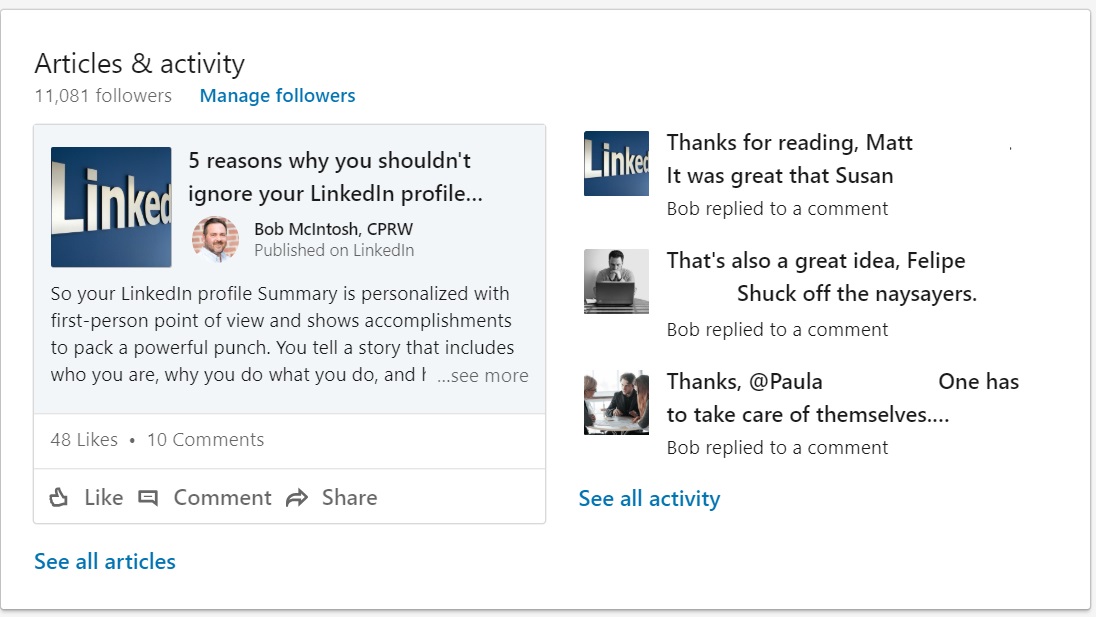
This section lies between the Summary and Experience sections. What you see above tells you that this person has been dormant on LinkedIn. Here is a look at my Articles & Activity section.

Articles and activities

Showing engagement on LinkedIn will 1) encourage potential connections to invite you to their network, 2) impress recruiters with your knowledge and expertise, and 3) show you’re better than the average LinkedIn user.

Keep visitors on your site

I am reluctant to visit and continue to read someone’s profile if I see no pulse. Am I necessarily concerned if the person doesn’t have any of their own articles to share? Not really. I realize some, or most, people don’t want to publish their original ideas.

According to one source, “only 1 million professionals have published post on LinkedIn.”

However, if I don’t at least see engagement, I know the person is not serious about LinkedIn. I’m not the only person who spends attention to my clients’ Articles & Activity section. Hiring authorities are also paying attention.

Impress recruiters with your knowledge

Close to 94% of recruiters use LinkedIn to find talent, so the more time they spend on your profile, the better. True they want to see your titles, employment history, years of employment, and education. This said, recruiters also want to see your activity because it tells them if you:

  • like or comment on articles you find of value to your network;
  • write original thoughts or ask illuminating questions;
  • share a insightful, tasteful quotes;
  • announce certifications you earned;
  • contribute to a growing discussion; or
  • post videos that are relevant to you occupation and industry.

These are merely a few examples of what a potential candidate could show as activities. I go into greater detail in a post on how to optimize your engagement on LinkedIn. I discuss the difference between being active and engaging.

For example, when you comment on someone’s post, it’s not enough to write, “Great post, Sarah. Thanks for sharing.” Instead explain why you enjoyed the post and, perhaps, politely write about what you disagreed with. In other words, put real thought into comments you share.

I strongly suggest that you write articles to share on LinkedIn, as this will show recruiters your expertise in your industry. I tell my clients that they’re still “experts” in their field. Being out of work doesn’t change that.

However, I understand the time, effort, and courage it takes to put yourself out there.

Show you’re better than most LinkedIn users

The source I cited above also claims that “an average user spends 17 minutes monthly on LinkedIn.” That’s pitiful. LinkedIn has the potential to increase your chances of getting a job significantly, but only if you put effort into your LinkedIn campaign.

This means more than optimizing your profile by filling out all selections and employing keywords. You also have to develop a focused network and engage with your connections, which will be apparent by looking at your Articles & Activity section.

You should be using LinkedIn at least four days a week, half an hour a day. Does this sound like a lot of time? Divide your day in two; spend 15 minutes in the morning and 15 minutes at night. But don’t just go to LinkedIn’s Jobs feature and look for jobs; practice some of the ways you can engage mentioned above.


Four days is the minimum amount of time I recommend to my clients. Ideally you should be using LinkedIn daily, maybe taking a day off during the week. What’s important is that your Articles & Activity section shows quality engagement, and hopefully articles that demonstrate your area of expertise.

5 ways on LinkedIn to let employers know you’re unemployed

This post is written in response to a growing discussion on LinkedIn. 

I get the question all the time in my LinkedIn workshops: “What’s the best way to let employers know I’m looking for work?” My answer has been somewhat noncommittal, but some of my clients want potential employer to know their status.

question-mark-jpg3

Here are five options, none of which are entirely optimal.

  • Leave your most recent employer as current for a short period of time.
  • Create your own “company.”
  • End the tenure at your previous employer and address this in your Headline.
  • End the tenure at your previous employer and explain your story in your Summary.
  • List volunteer experience in the experience section.

There are problems with each tactic. After all, being out of work is … being out of work. And some ignorant employers still prefer to hire passive job seekers over job seekers who are actively looking for employment.

No matter how you spin it, employers will know the story. Let’s look at the potential solutions from worse to best:


Leave the employment date or…

5. Leave your previous position open

Of course, indicating you’re still employed when you’ve been laid off, let go, or have quit is dishonest. When job seekers ask me if they should do this, I tell them that, ideally, they should end their employment at a company a day after they lose their job.

That being said, pretending you’re still working for no more than three months is somewhat acceptable. Herein lies the problem: when a recruiter asks if you’re still at the company, you have to make up some story about how you haven’t gotten around to closing out the job. You’ll have to do some fancy dancing, and this may end the conversation immediately.

One could argue that at least you’ll have the opportunity to have a conversation with a recruiter or hiring manager. And that recruiter or manager might buy your tale.

4. Create your own ‘company’

While it is important to maintain All Star status and, thus, get more visits to your profile, you need to do so with style and a value add. I’ve seen profiles with “Unemployed” as the company name. How much value does this add to a person’s profile? None.

My colleague, Laura-Smith Proulx describes a solution in a post she wrote for www.job-hunt.org that let’s employers know you’re unemployed, while also demonstrating your value to employers. As she explains, “no current experience is a competitive disadvantage.”

A company name for Plant Engineer Supervisor would simply be: Plant Engineer Supervisor. This would show as current experience. The job title would be: Plant Engineer Supervisor Pursuing Opportunities in Manufacturing.

The description of said job needs to show your value. Laura provides a great description for the Plant Engineer Supervisor: “I offer a broad operations background, including Lean Six Sigma, team management, production supervision, and plant engineering skills.” You might also include a quote from a supervisor to demonstrate your expertise.


End the employment date

3. Tell employers in your Headline

Obviously, the worst thing you can write in your Headline is only “Unemployed,” “Seeking Next Opportunity,” or “Actively Looking for a Project Manager Position.” Any of these statements alone fail to express your value. Sure, they tell employers about your situation, but that’s about it.

Instead, show your value to the employer right out of the box: I will increase your production flow 85% by utilizing Lean Six Sigma, Manufacturing experience, and proven leadership” 

Keep in mind that space in your Headline is limited.  You’re allowed 120 characters, so make the best use of it. The example above is 119 characters. Whew.

2. Tell your story in your Summary

Whether you want to inform people of your situation immediately, in the middle, or at the end, you need to be positive about your situation. Potential employers won’t be concerned about how you lost your job as much as they will about what you can do for them.

Writing the following sets a positive tone, “After three years of an exciting stint in IT in my previous company, I’m ready to take on new challenges. Read my profile on how I can help your company’s IT needs….” Of course your LinkedIn profile must be strong and support your desired occupation.


Doing actual work: volunteering, that is

1. The best way to cover the employment gap – volunteering in your field

A Forbes article suggests including volunteer work in the Experience section. I tend to agree. I can hear the critics bemoaning this practice—after all, it’s not paid employment! While this is true, volunteer work is exactly that—work. In some cases, you may even work harder than you would in paid employment.

If you are going to include volunteer work in your LinkedIn Experience section, be sure to make a note of it by writing “Volunteer Work” next to the position. Do not mislead potential employers into thinking it is paid employment. (Some pundits don’t believe indicating that it’s volunteer experience is necessary.)

The volunteer work you list should be substantial and relevant. For example, if you’re a web developer, spending 20 hours a week developing a nonprofit’s website is a great way to showcase your existing skills and the new ones you may be learning.

Another thing to note: You can include recommendations with your volunteer experience, but only if you list it in the Experience section of the profile. If you leave your volunteer work in the volunteer section, people will be precluded from sharing recommendations.


Then there’s LinkedIn’s Career Interests feature

For job seekers who are being pursued by recruiters who have access to LinkedIn’s recruiter premium account, this features allows them to see who is currently looking for work, whether employed or unemployed.


So, is it necessary to point out your unemployment status or falsify information on LinkedIn? Probably not. Covering an employment gap with volunteer experience is the best method, in my mind.

Which brings us to the topic of volunteering. I’ll save that for another post.

A version of this post originally appeared in recruiter.com.

Photo: Flickr, Tom Waterhouse

3 reasons for your LinkedIn success: it’s not only about your profile

There’s an old saying that goes something like this, “A great website that is not promoted is like a billboard stored in your basement.” This sentiment reminds me of LinkedIn members who have strong profiles, but they’re invisible. For job seekers to be successful, they must consider what a successful LinkedIn campaign consists of.

linkedin-alone

A successful LinkedIn campaign consist not only of a strong profile; it also includes building a targeted network, and engaging with your connections. Anything less won’t won’t help you get found and, ultimately, won’t help in your job search. Let’s look in greater detail at these three components.

A strong profile is essential

It goes without saying that a strong profile is essential to your LinkedIn campaign. It is, after all, what expresses the value  you will deliver to employers. There are a few basic tenets to follow when constructing a profile.

  1. It must be complete. This means having a background image, head shot photo, summary, detailed experience section, education, your strongest skills, and other sections LinkedIn allows.
  2. It must show employers the value you’ll bring to them through accomplishments relevant to your industry and occupation; similar to your resume.
  3. It’s not your resume. This is a mistake many job seekers make. They simply copy and paste their resume to their profile and leave it at that.
  4. It must be optimized in order to pull visitors, such as recruiters, to it.
  5. It must show your personality. Look at your profile as a networking online document. Write your profile in first-person point of view; perhaps 3rd person if you feel it fits your personality.

So is a targeted network

I recall a client of mine who had a strong profile, but was only connected to 80 people. When I told her she needed to connect with more people, she told me she only wanted to connect with people she knows.

Herein lies the problem: people need to connect with people they don’t know in order to get to know them. If you are one who doesn’t embrace the concept of connecting with targeted people, your LinkedIn campaign will be a bust.

Who do you connect with? Let’s look at some of the people with whom you should connect by tiers.

Connection PyramidRecruiter

Working your way up the pyramid, your first tier will consist of those you previously worked with, as they know your performance and probably will have an invested interest in your success. Many job seekers rely on their former colleagues as referrals to land their next job.

Your second tier should be people who share the same occupation and industry. You’ll have more in common with them than the following tiers. For example, if you’re an accountant in the manufacturing industry, you’ll have more in common with accountants in your industry.

The third tier comprise of people who do what you do but are in different industries. Again, taking the accountant as an example, his ability to switch from manufacturing to medical devices should be nearly seamless.

Your fourth tier can be perhaps the most valuable one. That’s if you’re willing to do your research on companies for which you’d like to work. You will connect with people within those companies before jobs are advertised. This will give you allies in those companies.

Note: this tier might be placed above “People with whom you worked” and include recruiters. The hungry job seekers will reach out to people who work for the companies on their company target list.

Your last tier are your alumni. This is especially important if you are targeting a company and want to reach out to “one of your own.” College-age students can benefit from connecting with people who can help them network.

After you’ve connected with them, you’ll be diligent in completing the next step, keeping your network thriving. You’ve heard of building your well before you need it, right?

Finally, engaging with your network

We’re all familiar with the saying, “Out of sight, out of mind.” Keep this in mind when it comes to engaging with your connections. Your goal is to keep your thriving in order to be top of mind.

To keep your network thriving takes some work that many LinkedIn users are unwilling to do. I ask my clients to dedicate at least 20 minutes a day, four days a week to LinkedIn. If they’re good, every day is what I suggest. Eye rolls. But I’m quick to say it’s not difficult. For example, one can share:

  1. an article that adds value to your network,
  2. an update offering advice or asking a question that elicits great responses,
  3. a photo with a witty caption,
  4. like and comment on your connections’ updates,
  5. write a direct message to your updates,
  6. a shout-out to your connections.

Mark Anthony Dyson, career consultant and creator of the popular podcast The Voice of Job Seekers, sees engagement as something that can’t be taken lightly. “As we consider how important engagement is,” he says, “I think the tone of a user’s messaging (including responses to group posts) matters. People want to be valued and feel safe. Share and offer advice, opinion, or message without making anyone feel under valued.”

One final point I’d like to make; refrain from sharing Facebook content with your connections. The majority of them won’t appreciate it.


Donna Serdula, an authority on LinkedIn profiles and author of LinkedIn Profile Optimization for Dummies, sums up your LinkedIn campaign nicely, “It’s true that success on LinkedIn hinges upon an optimized, strategic profile, but that’s not all! In order to be found on LinkedIn, you need a strong, robust network. In order to be seen, you need to have an engaging feed of posts, comments, shares, and articles. In order to be sought after, you need to add value, inspire others, and have fun.”

This post originally appeared on Jobscan.co

3 features your LinkedIn profile Dashboard provides: part 2

In 3 areas of information your LinkedIn profile Dashboard provides: part 1, I talked about information you can use to gauge your status, such as: Who viewed your profile, Post views, and Search appearances. In part2 of this two part series, I’ll talk about the features you’ll find in your Dashboard.

dashboard2

Again, the Dashboard on your profile is for your eyes only. So only you can see how many people viewed your profile, unless you are leading a workshop and displaying your profile; at which point you’ll have to say, “Look, I’ve been at this a while. So don’t feel insecure.”

Career Advice

For job seekers who need help with their job search, LinkedIn offers a feature for career advice. I thought I’d check it out to get a better understanding about the process of asking for career advice. The first step is to get started by clicking on Career Advice. You’re told you’ll complete the following steps:

  1. “Tell us what kind of advice you want.”
  2. “Review potential matches” Here you’ll see LinkedIn users who are experienced leaders in their field. I wonder what makes them “experienced” and if I’m experienced.
  3. “Get in touch” You’ll have the opportunity to have a 1:1 conversation with the experienced leaders.

After you click “Get Started,” you’re given the option of choosing from someone “In my 1st or 2nd degree network, in my region, from my school, or I don’t have a preference.” Next you click “Continue.”

Now you’ll have a limited list of job function from which to choose. I choose Community & Social Services.You’ll also have to choose an Industry Sector. I went with Nonprofit.

Step 3 of 3 is typing in text explaining what kind of help you need. LinkedIn gives you examples, one of which is: “I’d like advice for career pivot strategies from consulting into a marketing, strategy or business development job in the tech industry. What do you see as the pros and cons? And what are some challenges I might face?”

Finally you choose, “Agree & finish,” which I didn’t click. I didn’t want to be put in the system.

Career Interests

This is a feature I recommend to all of my clients. It allows recruiters to see if you are currently seeking employment and what kind. For instance, you might be interested in full-time, part-time, freelance, etc. LinkedIn explains this feature:

Among the many Recruiter spotlights we provide, the Open to New Opportunities feature allows LinkedIn members to privately share their career interests with Recruiter users who aren’t affiliated with their current or related companies.

Once a candidate opts to privately share their career goals with recruiters, users of LinkedIn’s Recruiter product will be able to see that candidate as “open to new opportunities” when running a search that aligns with their background.

If an open candidate starts a new position, they’ll be prompted to turn off their signal if they’re no longer open to new opportunities. They’ll also receive a reminder to respond to InMail messages from recruiters if they haven’t responded to two consecutive InMail messages.

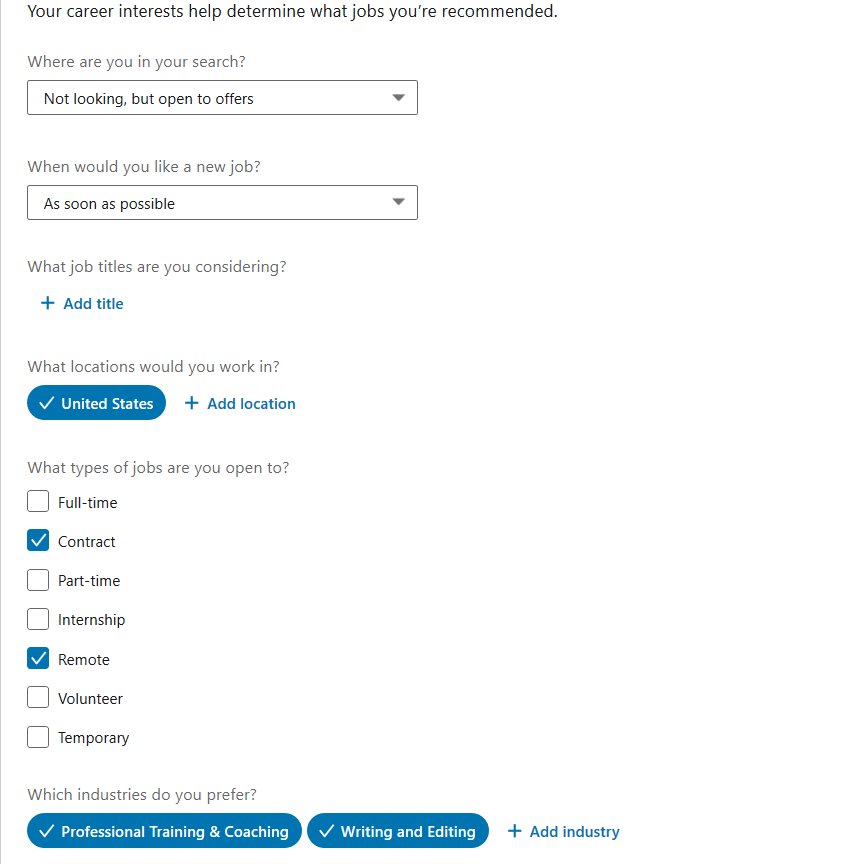
Below is how Career interests looks:

career interests

Note that you don’t have to be looking for full-time work to use this feature. You might only be looking for contract, part-time, internship, etc. One of my former clients benefited from this feature. I’m sure others have, as well.

Salary Insights

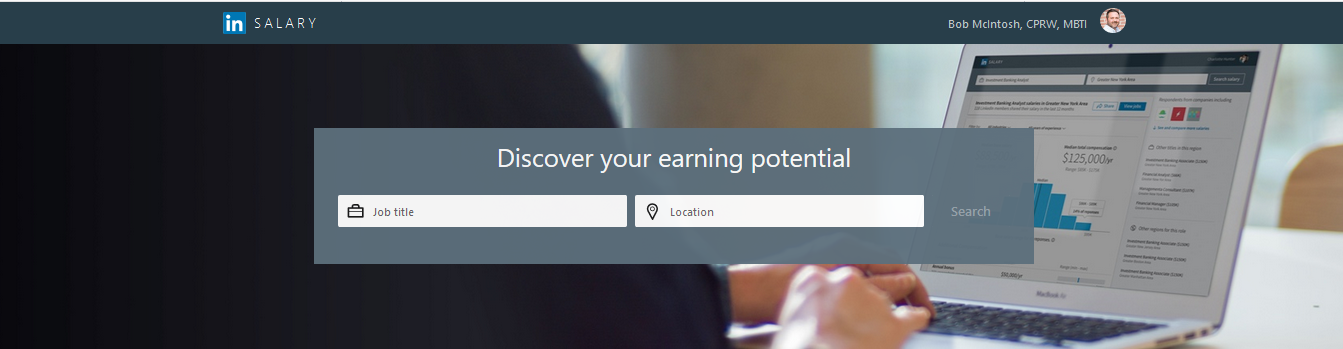
Salary1

This feature is the last one listed on your desktop/laptop. It is available to basic members. It provides information you can probably find on Salary.com, Payscale.com, or Glassdoor.com; nonetheless, it’s interesting information. You’ll discover that LinkedIn sends you to a separate site. And if you click “View Jobs,” it returns you to LinkedIn’s Jobs feature.

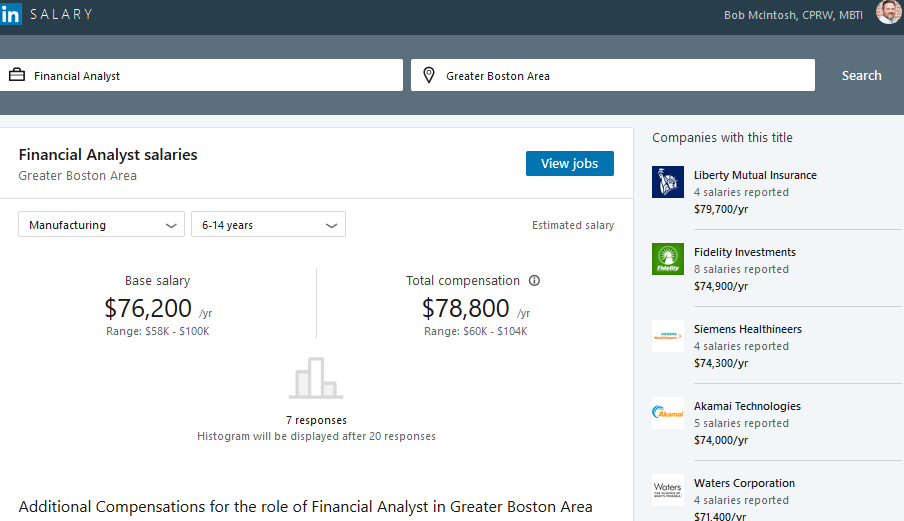
I decided to look up the salary for a Financial Analyst in the Greater Boston area. LinkedIn provides the following information on the position and location I chose:

Median salary ($65,000) and range ($51,000-$88,000), as well as total compensation ($67,000) and range ($53,000-$90,000).

You can get more specific and choose an industry and years of experience. I chose manufacturing with 6-14 years of experience. Below are the results:

Financial Analyst

You’ll notice that only 7 people responded to LinkedIn’s request for salary information. This doesn’t give one confidence in the accuracy of the numbers.

Like Glassdoor.com, you can get the salary range for your criteria for various companies. You can also get more insight based on size of company, industry, educational level, and field of study.

Finally, LinkedIn provides the median base salaries and salary ranges for ten selected cities. At the top for financial analyst in San Fransisco is median salary of $77,500 and salary range of $60,000-$100,000. Rounding out at the bottom is Dallas with $63,000 and $50,000-$84,000 respectively. I guess this is information you’d consider if you’re considering moving from Dallas to San Fransisco.

Bottom line: As I tell my clients, no two companies are the same. This is clearly illustrated when you see the differences between Mutual Liberty Insurance $79,000 and Waters Corporation $71,400.


So there you have the features in the Dashboard of your profile. Is all of it valuable? No. But there are definitely aspects that you should consider in your job search, most notably Career interests.

3 areas of information your LinkedIn profile Dashboard provides: part 1

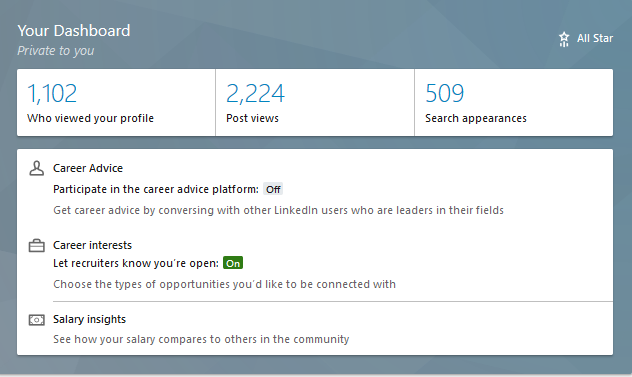
The Dashboard on your LinkedIn profile is a source of information, to which only you are privy. It provides you with information on three main areas: Who viewed your profile, Post views, and Search appearances. When I discuss the LinkedIn profile in my workshop, many people are unaware of the Dashboard. This area of your profile should be visited often.

dashboard2

Below the aforementioned information, you can also benefit from three features: Career Advice, Career Interests, and Salary insights. I will address these features next week.

Who viewed your profile

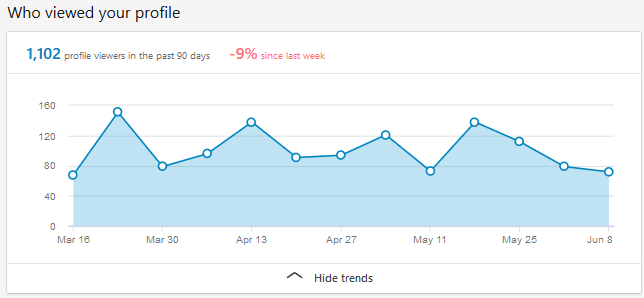
The information you’ll see first when you click on Who viewed your profile is the trend of visits you’ve had in the past 90 days. As you can see, my percentage of visitors has dropped 9 percent in the past week.

You can also see that the number of visits was highest in March and hasn’t reached that number since. I’m also on a disturbing downward slope. Must do something about this.

views2


Below this graphic you’ll see LinkedIn members’ head shot, name, and a partial view of their headline. For basic members, such as myself, you’ll see the most recent five people who’ve visited your profile. (Incidentally, four of mine are named “LinkedIn Members.”)

LinkedIn kindly gives you the option to upgrade to a premium account (of course they do) so you can see beyond the most recent five visitors. You’ll see everyone who viewed your profile in the past 90 days.

Well, this is partly true. You will not be able to discern the identity of visitors who select “private profile characteristics” or “private mode” in their settings to view your and other profiles. If you hoped to break through these two privacy settings, you’re out of luck.

Post views

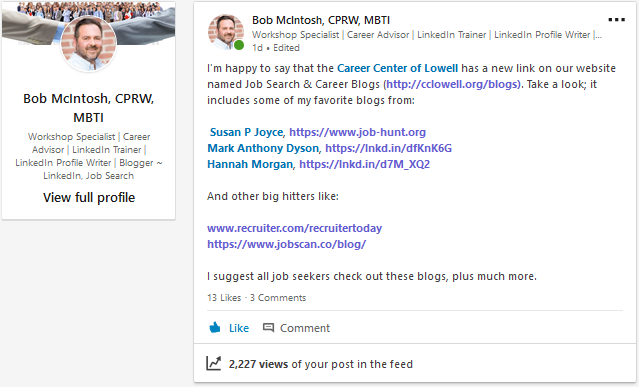
LinkedIn shows you how many people viewed your latest post. This gives you a good sense of how many people are paying attention to what you posted. If the number is high, it’s time to rejoice. On the other hand if it’s low it means that the content is not what your audience is interested in. Below is a screenshot of one of my latest post which was one day ago.


Posts

Posts can include anything from an article you shared; a question you asked; some great advice you gave; a photo with a caption; a video you created for LinkedIn; a quote you appreciated; and, in my case, an announcement of what’s going on in your organization.

Search appearances

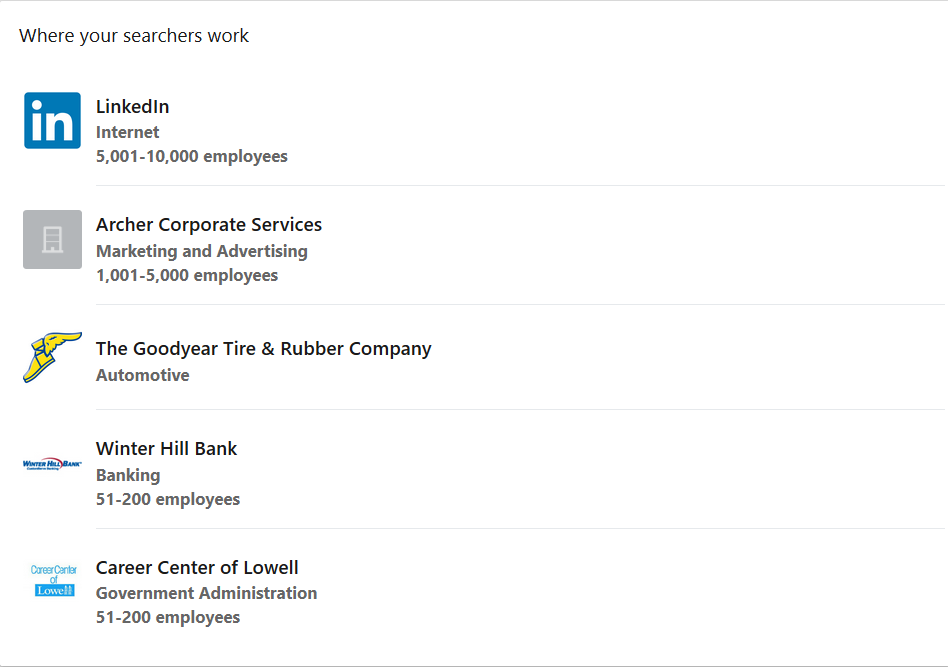
This is the most interesting information, in my opinion. Here is were you’ll see who’s searched for you based on companies, what your searchers do, and the keywords they used to find you.

Where your searchers work

Demographics of Jobboard

I find it intriguing that LinkedIn employees are searching for me. Could it be that I’ve offended them? Might they be looking to hire me? It’s most likely the former. For job seekers this can be exciting news if the companies looking at you are the ones you’ve targeted or have applied to.

Also of interest is that authors and online marketing managers round out the top two occupations interested in me. Again, you will strive for people in your industry and at higher levels. Recruiters might show up as people who viewed your profile, which is a good thing.

In terms of keywords, I get every one of them except for Edit.com. Could someone explain this to me? What’s important is that hiring authorities are searching for words that are in your branding strategy. LinkedIn is obviously a word I want people to use when searching for me.

Lastly, I appreciate LinkedIn’s advice on how to improve my profile, but keywords alone won’t increase your visibility. You must also develop a focused network, as well as engage with your connections on a daily basis.

Improve Your profile

These are three areas of information your dashboard provides. Next week I’ll go over  three features your dashboard provides.


LinkedIn’s Career Interest function worked for one of my clients

Following is an email I received from a client of mine.

Hi Bob,

I Thought I’d share my latest LinkedIn story. I have the experience to be more than entry level, but due to my life situation (single mom) I choose to make my child my priority, not money and work responsibility.

I have been working [part-time] in an entry level position for about [two] years. Ready to go [full-time], the company [for which I work] was not interested in increasing my hours, so I updated my LinkedIn profile and made it available for recruiters [using Career Interests]; that’s all.

A week later I was contacted by a recruiter in Chicago stating they had a position I was perfect for. Reluctantly, I arranged a telephone conversation with the recruiter who sent me the job description and advised that she was hiring for a Cambridge, MA, company.

It was like the description was written from my resume. So I forwarded my resume over thinking, can’t hurt. Two days later the phone rang, the company wanted to bypass the telephone interview and meet me face to face. So I did.

Yesterday I accepted the position of contracts manager for a 30k-person company based in Japan. I will work in Cambridge. After travel and parking expenses I will be making almost three-times my current salary. LinkedIn works well!!! At least for me! And you showed me how.

All my best, Kelly


LinkedIn explains how “Career Interests” works

Among the many Recruiter spotlights we provide, the Open to New Opportunities feature allows LinkedIn members to privately share their career interests with Recruiter users who aren’t affiliated with their current or related companies.

Once a candidate opts to privately share their career goals with recruiters, users of LinkedIn’s Recruiter product will be able to see that candidate as “open to new opportunities” when running a search that aligns with their background.

If an open candidate starts a new position, they’ll be prompted to turn off their signal if they’re no longer open to new opportunities. They’ll also receive a reminder to respond to InMail messages from recruiters if they haven’t responded to two consecutive InMail messages.


I was excited to hear about Kelly’s success, especially given that her new job got her out of a jam. She is making three-times more than she previously made. I would call this a success story.

4 Reasons Why Your LinkedIn Background Image Shouldn’t Be Ignored

The director of the career center for which I work sat in on one of my LinkedIn workshops. In it I talked about how your whole LinkedIn profile should brand you. I thought I did well and afterward asked her for her thoughts.

Lake2b

She told me, that in fact, I did well but forgot to point out that the background image (which sits behind your headshot) is another area that brands you. I should have known this, but honestly it didn’t occur to me until she mentioned it. Boy, did I feel like an idiot.

The background image of the LinkedIn profile seems to get a pass from many LinkedIn members. Instead, they use the light-blue background decorated with dots and lines (below).

Bad background

To take a pass on this area is a mistake, as this is the first image people see when they visit your profile. Therefore it should reflect who you are, what you do, your brand, and that you care about your professional image.

It matters

This is prime real estate on your LinkedIn profile. If done well, your image will be properly sized at 1,584 by 396 pixels. Any image larger than that will be cropped, so you might not be able to include that great portrait photo of you standing before Mt. Kilimanjaro.

So why don’t LinkedIn members put more thought into their background photo, and what does your background image say about you?

Your brand

Shelly background

This is perhaps the best reason to have a background image on your LinkedIn profile. One of my most valued connections, Shelly Elsliger, PPCC, is all about branding. She takes it to a higher level than most people when it comes to developing a unique professional identity and coherent message that sets her apart from others. This is truly reflected in her background image above.

Ask yourself, “What does my background say about me?” If the answer is, “The same ole tired background many LinkedIn members are using, it’s time to think about how you can create a unique identity, as Shelly has. Obviously she has gone through the effort of creating her own personalized background. You might not have ability to go that far.

Who you are

One of my client’s background image is of her hiking in the Appalachian Mountains. It works because she loves hiking and wants her connections to know this. Her photo is also work-related, so it is relevant. Double whammy.

You may have a background image of the New York skyline, a tranquil lake, a field where horses are grazing, or anything else that describes you as a person. I recently asked a facetious question of my LinkedIn connections about including family members and pets in your profile background. The answer was a resounding “NO.”

What you do

Yoga

The photo above is of a woman doing yoga. If you’re a yoga instructor, this might be an appropriate background image for your LinkedIn profile. It sends a clear message about what you do.

As, a surgeon, you might not have a background that shows you in action operating on a patient. But perhaps you can find a photo of a hospital you can use as your background. You may have to get permission to use this photo.

That you care

Lowell Factories

When you use a background image on your LinkedIn profile, it shows you care about how you present yourself. I was critiquing one of my clients’ profile when I noticed, as his background image, a black and white photo of Lowell, MA.

Does it represent what he does as program manager? No. Is it branding him? Not really. But it shows he cares about his professional image. He didn’t want to leave the default image, because doing that would show that he didn’t care about his professional image.


I’m grateful that my director mentioned my faux pas of not mentioning the LinkedIn background image as an important part of the profile. What hurt the most was not realizing how important the background image is to the profile.

If after reading this post, you feel you need to upgrade your background image, no worries. You can get free images from https://stocksnap.io/. I get many of my images from http://www.flickr.com, which allows you to use their photos as long as you credit the photographer. No problem.

Is there anyone I’ve missed? If you know someone (including you) who as a great background image, I’d love to add them to the list. Please tag the @person, as well.

If you want to learn more about LinkedIn, visit this compilation of LinkedIn posts.

Photo of yoga woman is from https://stocksnap.io.
Other photos were provided with permission.

10 ways to improve your job search for the New Year

After reading this post, please read the second post of this series, 6 additional ways to improve your job search for the New Year

The mantra I deliver to my workshop attendees at the beginning of January is, “This is the year you’ll land your job!” And I believe this. That’s if they don’t lose sight of the prize and stay on course. But even as I’m saying it, I know it won’t be an easy journey.

Young job seekers

On the bright side, employers are opening their purses in January and beyond. While December is typically slow, it is a month your networking will pay off when positions need to be filled; this is a huge part of penetrating the Hidden Job Market.

If you didn’t reach out to employers in December, all is not lost. Let’s look at ways to improve your job search in the New Year.

1Know thyself

It’s important to possess self-awareness if you want to conduct your job search effectively. This means thinking about your strengths, weaknesses, opportunities, and threats. What does this spell? SWOT. That’s right, do a SWOT analysis on yourself.

I have my attendees do a partial SWOT analysis in some of my workshops. I tell them to do a complete one on their own. You should write down 10 or more strengths, five weaknesses, three opportunities, and three threats. This will give you a better sense of what you can capitalize on and areas you need to overcome.

2. Take time to think about what you really want to do

All too often job seekers will settle for the next job that comes along. Sometimes it works out, other times it doesn’t. This stage in your life is a great time to reflect on what will make you happy.

If it’s a career change, think about how your transferable skills can make the transition easier, despite not having all the job-related skills. One woman I worked with had previously worked for Hewlett Packard in marketing. She joined our career center as a grant writer. Eventually she became the director of our Workforce Investment Board.

3. Conduct some labor market research (LMR)

Whether you know it or not, you’ve been researching the labor market. For example, you were gathering labor market information (LMI) while working and considering a move to a different company or occupation.

Now, you need to gather LMI on job availability, determining which skills are in high demand, and what salaries employers are offering.  One site that gives you a broad sense of your value in the labor market is Salary.com.

But the best way to gather LMI is by speaking with people in the know, who might include other job seekers or people who will grant you networking meetings, better known as informational interviews.

4. Create a list of companies for which you’d like to work

This is difficult for many people. The sharp job seekers understand the value of keeping a going list of 10 to 15 companies they research. This is also part of your LMR. Your research can tell you which companies are in growth or decline.

You also should identify important players in the companies, hiring managers, directors, VP, CEOs, etc. LinkedIn is ideal for identifying key players in your target companies. Networking is even better, providing you have the right connections.

5. Write your résumé and LinkedIn profile

Now it’s time to write your résumé. When others jump immediately to their résumé and LinkedIn profile, they’re flying blindly. They haven’t self-reflected, thought about what they want to do, and conducted their LMR.

Now you’re ready to address the needs of employers for whom you want to work. You know which accomplishments to highlight. You realize that a one-fits-all résumé won’t do it; it certainly won’t pass the applicant tracking system (ATS).

Your LinkedIn profile will be constructed to cover as many of the skills and experiences employers require. It’s generic, unlike your tailored resumes. However, it must show your value, just as your résumé does. Your LinkedIn profile is more of a online networking document that also shows your personality.

6. Networking is still your best method of looking for work

For those of you who have made connections in the fall at your desired companies, your networking efforts will pay dividends when employers ask for referrals to fill their positions.

Approach connections who work for your target companies or people who know people who work for your target companies. Many job seekers have great success using LinkedIn to make connections at desired companies.

I strongly encourage my clients to attend professional association events, where they can network with people who are currently working. Those who are working might know of opportunities for you, or at the very least provide you with some sage advice. To find an association, Google your industry/occupation and your location. Here’s one I found for marketing.

7. Get used to using LinkedIn’s mobile app

More than 50% of LinkedIn members are using the mobile app. This provides you with the convenience of using LinkedIn for research, communicating with recruiters, or searching for jobs.

The app is limited, but there’s still enough functionality to make it worth investing time into it. I believe the LinkedIn mobile app is where the company is dedicating its resources. Read this post on using LinkedIn’s mobile app.

8. It’s never too late to volunteer

Look, I’m not trying to sell you out. It’s a proven fact that volunteering is an effective way to land a job. Consider these four reasons:

  1. You improve your skills or gain new ones. For example, you’re a webmaster and volunteer to revamp an organization’s website to learn ColdFusion.
  2. It is a great way to network. If you volunteer in the proper organization, you can make connections with vendors, partners, customers, and others in your industry.
  3. You’ll feel more productive. It’s far better than sitting at your computer for six hours a day applying online. As I tell my clients, get out of your house!
  4. It’s a great way to pad your résumé. Volunteerism is work, so why not include it in your Experience section.

9. Be prepared for pre-interview assessments

Employers are getting creative in the ways their vetting talent. The telephone interview is a mainstay for recruiters but not considered particularly efficient. They are employing artificial intelligence (AI) to separate talent by personality and analytical ability.

This makes the hiring process longer than you would like. One of my clients said he was given assessment tools for multiple positions, and these assessments often took up to an hour or more. Read this article to learn more about the tools employers are using to find talent.

10. Don’t take an interview lightly. This means any interview

I can’t tell you how many people tell me they weren’t prepared for the telephone interview. They assumed it would be just a a screening. Guess what, the telephone interview is such an important part of the hiring process—it saves companies time and money—that they be the deciding factor. The face-to-face might be a formality.

There are seven phases of the interview you need to consider. Nailing everyone of these phases is important. Begin by reading part one of this series to help you get mentally prepared for the process.


Now head on over to 6 additional ways to improve your job search in the New Year.

Photo: Flickr, Ken Shoufer