Category Archives: LinkedIn

5 steps to take on LinkedIn to be proactive in your job search

To land a job in 2020, more than ever, you’ll need to be proactive rather than reactive. In other words, stop blasting out job applications 10 per day. If you’ve been doing this for months, by now you know the ROI is very low. In some cases my clients, who are spraying and praying, haven’t heard a peep from employers.
proactive

This act of futility demands different approaches. I’m going to talk about one of them: how to be more proactive in your job search by researching and using LinkedIn. Below are the five steps you should take to do this.

  1. Research to identify companies for which you’d like to work
  2. Identify the people in said companies who can be of assistance
  3. Utilize your shared connections
  4. Get an introduction from your shared connections to the key players
  5. Follow up

Identify companies for which you’d like to work

For some this is a difficult task, but it doesn’t have to be. It’s going to take some work on your part. Let’s say you’re in the digital marketing space and want to work in or around Boston, Massachusetts, for a company that requires someone with your expertise.

You Google, “companies in digital marketing, boston” and arrive at sites that include the types of companies you’re seeking: Digital Agency Boston, Digital Agency‎ | Top Creative Agencies in Boston – 2020 Reviews, Clutch.co | Top Creative Design Companies in Boston, January 2020.

Selecting Top Creative Design Companies in Boston, January 2020, you see it provides information important to you such as the size of the company, it’s location, and the clients it serves. Now your research begins, as you go through each of the agencies’ websites to determine if they will be included on your list.

Note: you can develop your list of companies by talking with people in the industry. In many cases they’ll have a better idea of the culture and management of the companies in question.

Identify key players in your companies using LinkedIn

You’ve completed perhaps the most difficult process of being proactive in your job search. From here on in you’ll be using LinkedIn for your proactive job search. I’ll walk you through the steps of finding people who work in departments for which you’d like to work.

You read the short descriptions of the companies on the website and one company catches your eye immediately because of its size and location. Plus they have a really cool website. They also have a LinkedIn company page which shows that 92 people are on LinkedIn. Now it’s time to use Search and All Filters on LinkedIn.

1. Using Search type in the name of a company. You’ll see an option to choose People, which will give you a list of those who currently work for the company as well as those who used to work for the company. You’ll select from people who currently work there.

2. Go to All Filters (seen below) and select your company in Current Companies. This will give you the people who currently work there. Past Companies can be useful if you want to contact people for the lowdown on your company’s management and culture.

3. Other filters you’ll want to select are Connections (2nd), Locations (Boston), and Industries (Broadcast Media and Marketing & Advertising). This should give you a more manageable list of people from which to choose.
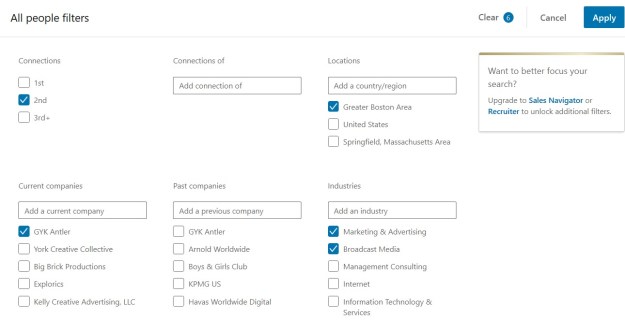
All Filters GYK

Utilize your shared connections

Shared connections can be extremely helpful when asking for an introduction to the people you have identified as key players in the company. This is why it’s important to have a focused network with like-minded people, as they can vouch for you when you want to correspond with said key player/s.

The connections you and your key player share is located under your key player’s name (seen below).  Josh is the one you want to contact and potentially connect with. You’ve identified Meredith (last name) as a shared connection who is trusted by you and your key player.
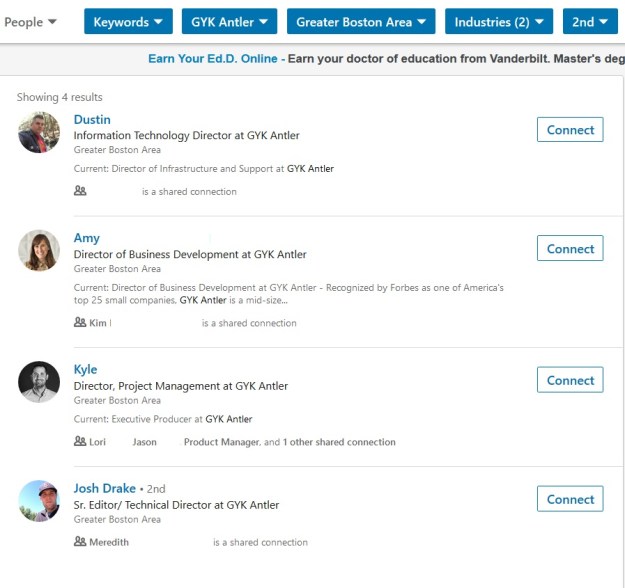
Shared Connections

Get an introduction to your key players

Sending a cold invite to a desired connection is the least of successful of the three methods I’ll mention, especially if you send it with the default LinkedIn message, “I would like to add you to my professional network.”

The second least successful, although much better than the aforementioned, is mentioning a shared connection in it. “Meredith (last name) and I are connected and she strongly suggested I invite you to my network.” This is the gist of the second type of invite.

Your best route to Josh is having Meredith send him an introduction. Of course she will, but out of courtesy you send her an email outlining the purpose of connecting with Josh. As well, you ask her to point out three of your areas of expertise.

Meredith sends Josh an email carbon copying you:

Hi Josh.

I’d like to introduce you to Sherri Jones, a trusted friend of mine. She is a marketing specialist with extensive knowledge in digital marketing. I worked with her two jobs ago in our marketing department.

Sherri has recently been laid off, along with her whole department, due to the company being acquired. She has many accomplishments to tout in data analytics, lead generation, social media marketing. I know the two of you can benefit from connecting and having a discussion.

Sherri,

You’ll find Josh to be a great resource for questions you have about companies similar to his. I hope you and he have the opportunity to connect on LinkedIn and then speak in person. You two will hit it off.

Note: Meredith could send Josh a LinkedIn message but he is more likely to open his email, especially if it’s sent to his work email address.

But you’re not finished

That’s right, you’re going to follow up with Meredith to thank her for the introduction. She did you a solid and you promise to keep her in the loop by pinging her on any progress.

Next you send Josh an invitation to connect with him, referencing Meredith and the email in the invite. Josh naturally agrees to connect because, as I once said to one of my close connections, “When you recommend someone to connect with, I do so without hesitation.”

After thanking him for agreeing to connect, circle back to Meredith and thank her again for the introduction. You tell her that he agreed to connect.

Start building the relationship by sending a message to Josh, further introducing yourself to a greater extent and offering your assistance in any way. You noticed on his profile that he’s from the Greater New York area, so yo ask him, “Yankees or Mets?”

When he returns your message with an answer to your question–it’s the Yankees–you first tell him you’re a Red Sox fan and tell him you won’t hold it against him for rooting for the Yanks. In the next paragraph, you ask if he’ll be willing to give you some advice at his convenience. You’ll be willing to call or set up a Zoom session.

He gladly accepts to Zoom with you and so the relationship begins.


To recap

The year 2020 will be your year if you’re proactive with your research and utilizing LinkedIn. Keep the five tenets in mind:

  1. Research to identify companies for which you’d like to work
  2. Identify the people in said companies who can be of assistance
  3. Utilize your common connections
  4. Get introductions to your key players
  5. Follow up


7 sins you’re committing with your LinkedIn campaign

You’ve heard of the seven deadly sins—Pride, Envy, Gluttony, Lust, Anger, Greed, Sloth. Two years ago I heard a podcast talking about them. Naturally, I thought about how they could relate to the job search, so I wrote an article titled, “7 job-search sins and what to do about them.

job-search-sins

Two years later I’m writing an article focusing on the sins you’re committing with your LinkedIn campaign. They are not the deadly sins discussed in the podcast I listened to, but they can definitely hurt your campaign and, consequently, your job search.

1. Apathy

If you’re put little to no effort in creating a strong profile, developing a network of like-minded people, and engaging with your network; your campaign will hit rock-bottom. At this point you need to determine if you should even be on LinkedIn.

Instead: LinkedIn takes work. Start by attending free workshops to learn how to write a profile that sells your value, develop a network, and engage with your network. You can find free workshops at One-Stop career centers across the US.

Another option is hiring a career coach who can teach you the ropes. Look at paying your coach as an investment for the future. Your coach will teach you how to master your LinkedIn campaign, which you can use if/when you want to leave your next job.

2. Fanaticism

The opposite of apathy, you can hurt your LinkedIn campaign if you’re overdoing the three components of your campaign (profile, network, engagement). An example is trying to optimize your profile by doing a keyword dump in order to be found.

Yet another example is taking engagement too far. I’m sometimes guilty of posting too often on LinkedIn. (Some of you who know me are thinking, “No kidding, Bob.”) When you do this you come across as a fanatic or even desperate.

Instead: Understand that optimizing your profile is important but also important is branding yourself with a profile that is focused, demonstrates value with quantified accomplishments, and shows your personality.

Don’t over engage; pull back on the throttle. One golden rule to follow is to post one time a day, four-five days a week. Here’s the thing, LinkedIn’s algorythm is more interested in quality, not quantity.

3. Anger

This is one of the seven deadly sins and one that comes into play with your LinkedIn campaign. There are LinkedIn members who come across as angry and, as a result, seriously damage their on-line brand and lengthen their job search.

An example of anger is bashing recruiters and hiring managers. Do you think employers aren’t reading what you write on LinkedIn? Don’t be naive; hiring authorities are trolling LinkedIn for talent. If they see your outbursts, you will be passed over.

Instead: When you find your blood pressure rising, resist commenting something like, “All employers practice age discrimination” or “I’m qualified for positions. What more do I have to do?” Remember that hiring authorities hold the cards; keep your angry thoughts to yourself.

4. Selfishness

It is a sin to expect help from others but be unwilling to help others. In fact, helping others first should be your mindset. One of my valued connections, Austin Belcak, writes about giving on LinkedIn as his number one LinkedIn tip for 2020. I agree.

Someone who is selfish will invite a LinkedIn member to their network and immediately ask for a favor. Another example is people who steal thoughts from other LinkedIn members—perhaps profile verbiage— and use them as their own.

Instead: Think of giving before receiving. This sentiment has become somewhat of a cliche, but it’s so true. One example of this is sending an article to one of your new connections that you think they would appreciate. Just this morning a long-time connection sent me an article that I found compelling.

5. Humility

To brag is sinful. To not promote yourself within reason is more sinful. As a career strategist and LinkedIn trainer, I encourage the appropriate amount of self-promotion. Your profile, like your résumé, should express the value you’ll deliver to employers. Avoid using platitudes you can’t back up.

Connecting with only a handful of people because you think other like-minded people don’t want to connect is counter-intuitive; LinkedIn is about developing a network of like-minded people. Similarly, feeling that because you’re unemployed and don’t have the right to write long posts is absurd.*

Instead: Many times I’ll sit with our career center clients to talk about their accomplishments. Without failure they tell me they have no accomplishments. But when I ask probing questions, the accomplishments come pouring out.

You have an obligation to promote yourself in your written and oral communications. Because if you don’t, no one will.

6. Denial

There are two types of denial. The first is denying that you need to be on LinkedIn. I see this with some of my clients who don’t believe in the power of LinkedIn for job-search success; continuous learning; and connecting with others to develop enriching, life-long relationships.

The second is denying that LinkedIn isn’t for you. Contrary to what I say about needing to be on LinkedIn; some people who are on LinkedIn have to come to the realization that the platform isn’t for them. This speaks to sin number one, Apathy.

Instead: There are three considerations. First, determine if LinkedIn is of value to your job search? For many it is, for some it isn’t. Second, if you join LinkedIn, understand it will take work to be successful. Lots of work. Third, it’s a life-long process; your campaign continues throughout your career.

7. Abandonment

I’ve seen people disappear on LinkedIn after a nice run. This is a sin because you’re not finishing what you started. Yes, LinkedIn is a lifelong endeavor. This sounds extreme but let me ask you, “Do you want to abandon networking and learning?”

There are those who are diligent about using LinkedIn while searching for work, but once they land their job they do the disappearing act. This is a huge mistake that I address below.

Instead: I strongly assert that you should not only use LinkedIn to find your next gig; you should also use LinkedIn while working. There are many reasons for this.

  1. The old saying, “Dig your well before you’re thirsty” is real. If I had a dollar for every client who struggled to get up to speed upon being unemployed, I’d be a rich man.
  2. LinkedIn can help you connect with potential business parties after you’ve landed our next gig.
  3. You are the face of the organization. Therefore, you should present a strong profile and show your engagement.

If these three reasons aren’t enough, re-read the second paragraph of sin number 6. In other words, there’s no helping you.


Here we have seven sins, albeit not deadly, you should avoid committing. But if you are committing any of them, pay attention to my recommendations on how to fix them.

*I remember one of my former clients saying, “I have no right to write articles on LinkedIn because I’m unemployed.” No word of a lie. Ironically this person is a director of Marketing and an excellent writer. Repeat after me, “I HAVE A RIGHT TO SHARE MY EXPERTISE EVEN THOUGH I’M UNEMPLOYED.”


The Best Way to Direct Visitors to Your Important LinkedIn Sections

Raise your hand if you visit LinkedIn members’ profiles and get as far as their Additional sections. Don’t feel guilty if you don’t. Rarely do most LinkedIn members travel that far down the LinkedIn profile. I usually don’t.

Accomplishments2
Photo: Flickr, Amit Shetty

Now raise your hand if you list your volunteerism, publications, projects, patents, organizations, and other noteworthy achievements. I think I’m hearing crickets?

Quite honestly I don’t blame you if you didn’t raise your hand to the questions above. After all, these major achievements (classified by LinkedIn as Additional) are buried in the basement of your profile; they can’t be moved. (I wrote about this here.)

I wonder if LinkedIn users even know if these additional achievements exist.

Note: these achievements were once bundled in what was called Accomplishments but are now separate, as they should.

The question now is how do you alert visitors of your LinkedIn profile to your major achievements?

One solution: mention them in your About section

You can write about your outstanding projects and other notables in your Experience section, which is a good policy. However, I suggest making note of them in your About section.

About is most likely the first section visitors will read. Unlike your resume, it is more personal and, in my mind, more enjoyable to read.

Enjoyable in what way, you might wonder? In About you can: provide a creative hook in your first three lines; express your passion for what you do; describe the problems in your industry and how you can solve them. It’s a section where you can tell your story. Read what I wrote about here.

How to point your visitors to your Additional sections

Given that your About section can draw the attention of visitors, doesn’t it make sense to point your audience to your major achievements? Unfortunately, we don’t yet have the ability to post links to them, so words will have to do.

For Projects you can write a brief statement:

“If you would like to read about my outstanding projects in Landscape Architecture, scroll down to Projects.”

Perhaps you Published a book or article. Offhand I can think of three of my close connections who’ve written books, Jim Peacock, Brian Ahearn, and Donna Serdula. The could write in their About:

“Do you know I wrote a book called (name of book)? Well, you can find it in the Publications section at the bottom of my profile.”

Many of my clients have Patents for products that they’ve created in their career. This can’t go unnoticed. If you’ve own patents, draw your visitors’ attention to them:

“I’m proud of the patients I own in the field of medical devices. They’re listed in my Patents section below.”

College students should make use of the Courses they’ve taken and Test Scores they’ve achieved. If you earned outstanding Honors and Awards, use About to point visitors to them.

Other types of accomplishments not obvious unless you point your visitors toward them include: Languages, Test Scores, and Organizations. You now have the idea of how to help your visitors find what can be a bona fide feather in your cap.


Recently I shared a long post titled: YOUR LINKEDIN ABOUT SECTION IS MORE IMPORTANT THAN YOU THINK. This post is relevant because it shows how others feel about the importance of the About section. Thus, it can be a vehicle for directing your visitors to notable achievements.

10 LinkedIn New Year resolutions I know I WILL achieve

Like many people, I dislike New year resolutions, mainly because we rarely achieve them. But this year I’m going to set some resolutions that are attainable. The resolutions I vow to achieve are ones that relate to LinkedIn. These are ones I can do.

2020

I also hope my resolutions will benefit other LinkedIn users, namely job seekers; that they will emulate them. The following are 10 actions I will take in 2020.

1. Reach out to more people in a personal way. Admittedly of the nearly 4,000 connections, I haven’t met, in person, most of them. I plan to meet at least 40 of them. I will be a guest speaker at the Merrimack Valley LinkedInLocal, so this will be a great opportunity. Zoom and Skype count as making a personal connection.

2. Spread the word to people on LinkedIn. There are too many young adults and older adults who are not benefiting from LinkedIn. Sure, they have a LinkedIn account, but they’re not using it as it should be used.

Many people erroneously believe that a profile loaded with keywords will draw the attention of hiring authorities. Read 3 ways job seekers will be found on LinkedIn.

3. Get a newer photo taken. In 2016 I wrote an article entitled 4 ways your LinkedIn photo is an imposter. It feels as though my current photo is now an imposter. I’m thinking that my new one will be more theme-based, maybe one of me talking to a client. I’m not sure yet.

4. Produce even better content. I was awarded one of LinkedIn Top Voices for the content I delivered in 2019. I will continue to write articles, posts, and even videos for the upcoming year, but they will be more focused and relevant. Trending stuff.

5. Be more consistent in posting. Related to number 4, I aim to post at least four articles on a weekly basis. I will also follow my own words and improve how I comment on other’s posts. Sure there will be times when I will only react, but quality comments mean so much more.

6. Become a better curator. There are LinkedIn members who curate other’s content like pure champions. People like Mark Anthony Dyson, Hank Boyer, Sarah Johnston, Hannah Morgan, and Susan Joyce come to mind. Then there are others who only share their content. The ones who only share their content tend not to garner as many viewers.

7. Make my network even more focused. It’s important to create a like-minded network. I’ve done my best to do this, but there are many in my network who are…”dead wood.” They are not like-minded and, therefore, the content we share isn’t relevant.

8. Update my profile. I said earlier I’m going to update my photo but like many, I don’t visit my own profile as often as I should. I need fresh material and to add accomplishments to my Experience section.

9. Follow LinkedIn changes. Admittedly I don’t follow LinkedIn changes as best I can. I’m sure you’re familiar with the feeling of visiting LinkedIn and noticing something has changed, whether it’s small or big. My friend Keven Turner keeps me up to date on these changes.

10. Spend less time on LinkedIn; think quality, not quantity. I estimate that I spend close to an hour, if not more, on LinkedIn per day. I’m also on it every day of the week. The only time I wasn’t on LinkedIn were a few days when I vacationed in Italy. This will be the toughest one.


I’m sure I haven’t covered all I need to improve upon. So I will continue to add to this list of resolutions throughout the year. As a practice, I’m not a fan of New Year resolutions. I haven’t set any for my personal life. Better habits will be developed over time.

I’m curious if you have New Year resolutions for 2020. Feel free to list them in the comment section below or comment on LinkedIn.

Photo: Flickr, cg “Chasing the Light”

9 major areas where your LinkedIn profile brands you

It’s safe to say I’ve critiqued or written hundreds of LinkedIn profiles. What’s most important in a profile is that it brands the LinkedIn member; it sends a clear, consistent message of the value the member will deliver to employers. Does your profile brand you?

linkedin-alone

In this article we’ll look at nine sections of your profile where you should focus on branding yourself. When you accomplish this, you’ll have a profile that will help you land a job.

1. Snapshot Area

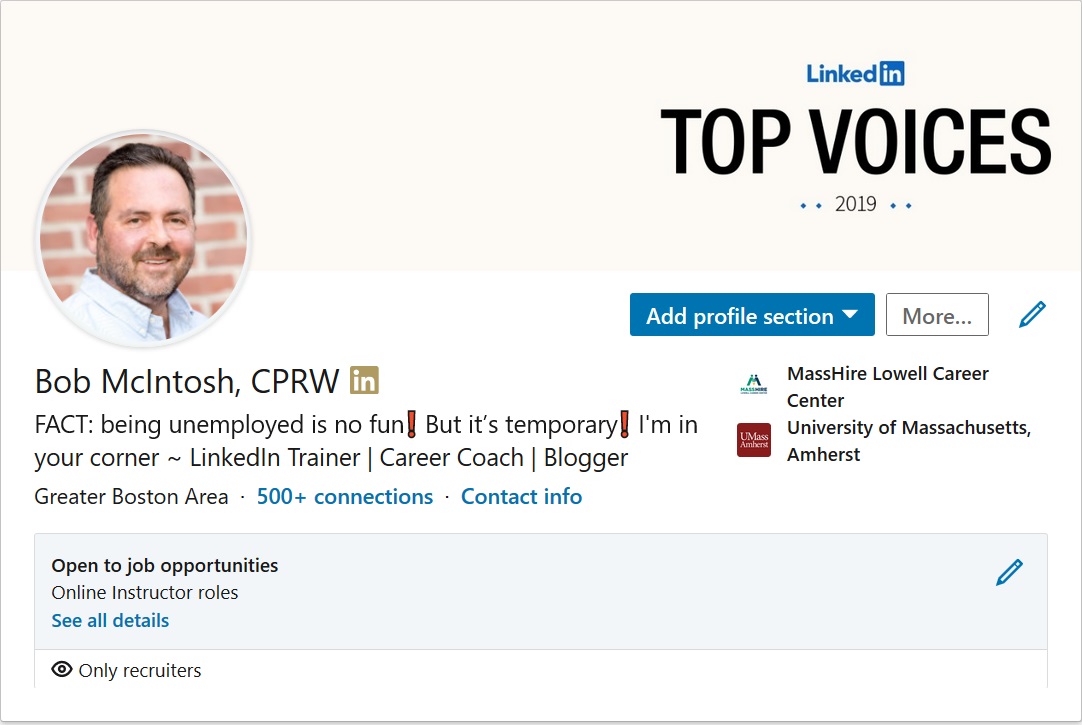
I call this section the Snapshot area because that’s exactly what it is: a snapshot of who you are. This section includes your background image, photo, and headline as the major components which have an immediate effect on your branding.

New Snapshot Bob

Your background image can serve to brand you by letting visitors know the type of work you do. For my background image, I display my LinkedIn Top Voices recognition. Other members might use a background image that speaks more to their personal interests.

If you think a photo is unnecessary, you are sadly mistaken. A profile sans photo gives the impression you can’t be trusted. In addition, people won’t recognize and remember you. LinkedIn says profiles with photos are 21 times more likely to be viewed than those without.

Perhaps most important is your headline. It’s what people first read about you and can determine if they open your profile. It might be enough for someone to accept an invite from you if written well.

Headlines that say things like “Seeking Employment” or “Finance Manager at Company X” are ineffective, as they fail to show value.

Rather, your Headline should brand you like this: “Finance Manager at Company X | Financial Planning and Analysis | Auditing | Saving Organizations Millions.”

2. About Section

This is where you tell your story, which can include the passion you have for your occupation, a statement about your expertise, or even explain how you’re changing your career. Here’s how your profile can brand you.

  1. It allows you to tell a story that can include the, why, what, who, and how. In other words, why are you passionate about what you do, who you do it for, and how you do it. Similar to your résumé’s Summary, you should list accomplishments that immediately speak to your greatness.
  2. Your About section is written in first- or third-person point of view, giving it more of a personal feel than your résumé’s Summary.
  3. It is significantly longer. You’re allowed 2,000 characters to work with, which I suggest you use.
  4. Finally, you can highlight rich media such as video, audio, documents, and PowerPoint presentations.

Read this article that describes how to craft a kick-ass About section.

3. Articles and Activity

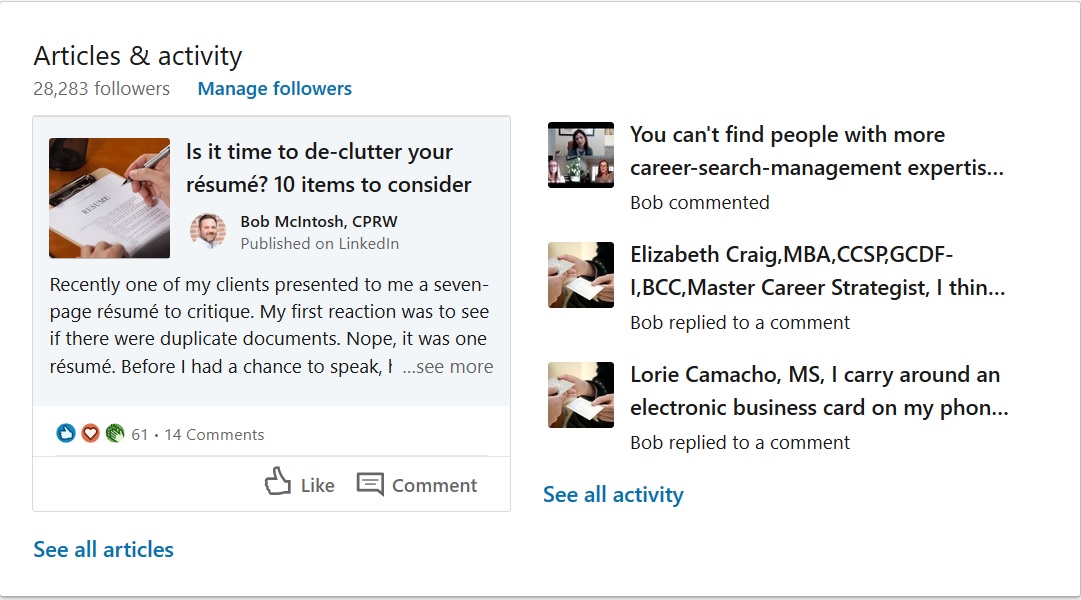
When I review people’s profiles, I pay special attention to this section. It tells me how engaged a person has been on LinkedIn. To brand yourself successfully, you want to show that you’ve engaged with your connections. Do you have to write articles? That would be ideal but not necessary.

Articles and activities

I will click “See all activity” to see how if a person is a player on LinkedIn. If I see the person hasn’t used LinkedIn in months, I will not be impressed; neither will hiring authorities.

4. Experience

Bob Experience

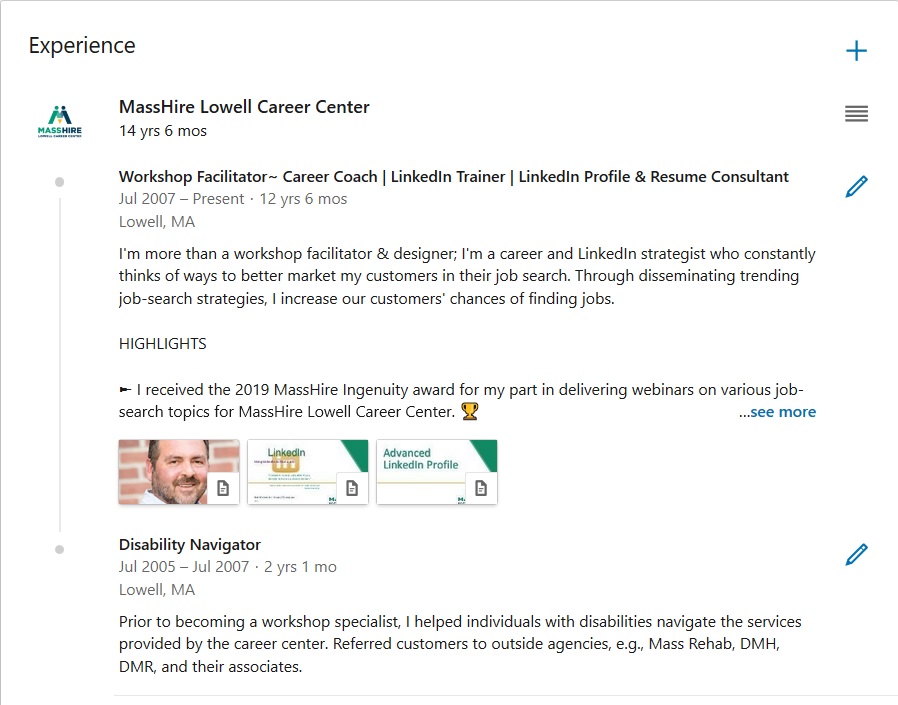
I’m often asked by job seekers how they should address the experience section of their profile. I tell them they have two options: They can either write a section that resembles the work history found on their resume, or they can use their experience section to highlight only their most important accomplishments.

I favor the latter approach, but some think their profile might be the only document an employer sees, so they believe showing all is the way to go. What’s most important in building your brand is listing accomplishments with quantified results.

Good: Increased productivity by implementing a customer relations management (CRM) system.

Better: Initiated and implemented – before the deadline – a customer relations management (CRM) system that increased productivity by 58%.

It’s a good idea to use bullets to highlight your accomplishments. One of my LinkedIn connections, Donna Serdula, has created a handy list of bullets and symbols you can copy and paste for use on your own profile.

5. Education

Many people neglect this section, choosing to simply list the institution they attended, the degree they received, and their date of graduation. This might be the norm for resumes, but LinkedIn gives you the opportunity to further support your brand by telling the story of your education.

Take Mary who completed her bachelor’s degree while working full-time – a major accomplishment in itself. If she wants to show off her work ethic and time management skills, she might write a description like this:

University of Massachusetts, Lowell, MA
Bachelor of Science, Mechanical Engineering, Magna Cum Laude

While working full time at Company A, I attended accelerated classes at night for four years (two years less than typically expected). I also participated as an instructor in an online tutoring program, helping first-year students with their engineering classes. I found this to be extremely rewarding.

6. Volunteer

Build your brand by showing visitors that you are utilizing your skills and developing new ones. It’s fine to volunteer for what I call “a good cause,” but to show people you’re serious about your occupation, you’ll volunteer at a host agency that requires your expertise.

(If you volunteer for a significant amount of time, I feel it’s fine to list this experience in your Experience section, as long as you write “Volunteer Experience” beside your job title.)

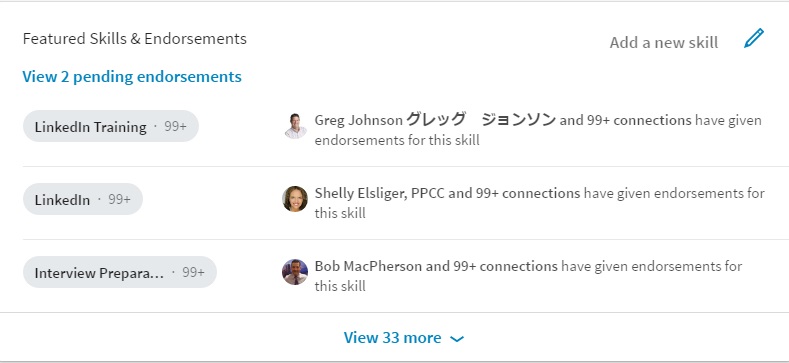
7. Featured Skills and Endorsements

A healthy Skills section consisting of 30-50 skills is another way to strengthen your brand. The skills you decide to list should demonstrate your expertise. Do not list skills you are simply familiar with.

To further enhance your brand, the skills may be endorsed by your first-degree LinkedIn connections. If you’re unsure as to which skills to endorse, here is a previous article of mine that can help you.

endorsements

8. Recommendations

This is a section I talk about in my LinkedIn workshops, and I always stress how valuable it is to receive recommendations from others, as well as write them for others. By receiving recommendations, you show the value you bring to employers. Meanwhile, writing recommendations shows your authority and what you value in workers. Either way, recommendations are a great way to brand you.

9. Accomplishments

Certifications, Organizations, and Projects are listed under Accomplishments. Prior, they had their own real estate, but now they’re buried under this header. And yes, they must be expanded like most sections.

You can still brand yourself by pointing out in your About section a project or two that you completed on time and under budget while managing a team of six.


These are just some sections on your LinkedIn profile that contribute to supporting your strong personal brand. I’m curious to know about other sections that can brand you.

Next read 5 Types of People You Should Connect with on LinkedIn.

This post originally appeared on Social-Hire.com. 

5 tips for busy people using LinkedIn

I’ve often said that my use of LinkedIn can be classified as extreme, almost bordering on a sickness. No lie; I’m on LinkedIn every day of the year for at least half an hour a day. There are other people like me, maybe worse.

busy people

You might be wondering why I use LinkedIn as often as I do. First, I teach hundreds of LinkedIn workshops and individual sessions a year. Second, it’s great advertisement for my side hustle, LinkedIn profiles and training. Third, I enjoy using LinkedIn.

If you think this article is about using LinkedIn as often as I and others do, don’t fret. In fact, I’m going to suggest that you don’t follow my lead. As I tell me clients, “Don’t be like me.”

So let’s talk about you. You are unemployed, underemployed, trying to leave your current job for a better one, or running a business. You don’t see using LinkedIn as often as Facebook, Instagram, or Twitter. LinkedIn’s not your priority. You’re busy.

However, you realize that you have to use LinkedIn to accomplish your goals.

This article is for you busy people. I’m going to make LinkedIn doable for you by offering five tips.

  1. How much time to dedicate to LinkedIn.
  2. How you should create your profile.
  3. How to connect with other LinkedIn members.
  4. How to engage with your network.
  5. What to do after your land your job or have established your business.

But first, why you should use LinkedIn

Perhaps you’ve been told by do-gooders that if you use LinkedIn alone, you will land a job easily and quickly or business will pick up in a snap. That’s bunk. LinkedIn is part of your networking campaign; you’ll also have to network face-to-face. Consider LinkedIn a supplement to your face-to-face networking.

Here are three strong reasons why you should be on LinkedIn. One, anywhere between a 78%-95% of recruiters use LinkedIn to find talent. Two, LinkedIn is a great research tool, which will allow you to locate and follow or connect with pretty much anyone you want to. Three, LinkedIn can be a great professional community.

1. How much time to dedicate to LinkedIn

I’d like to say, “Whatever makes you comfortable,” but some of you might follow the average LinkedIn user who is on LinkedIn a mere 17 minutes a month, according to various sources. You might consider me judgemental when I say those people should leave LinkedIn immediately.

If you fall under the 17-minutes-a-month category, heed what I write next or close your account.

I suggest you use LinkedIn two days a week, 10 minutes a day, at a bare minimum. Better would be four days a week, 15 minutes a day. You’ll make more progress. But I know you’re busy, so do what you can.

2. How you should create your profile

Do yourself a favor by having a professional who won’t break the bank write your profile. This is if you have the resources. Most people don’t have the resources, so I’ll make this short and sweet. Copy your résumé to your profile for the time being.

Some of you LinkedIn profile pundits are groaning, even cursing me for saying this; but I’m not finished. After this—when you have time—revise your profile.

If you are struggling with verbiage, look at other profiles that reflect what you do, but do not plagiarize.

Read this article to learn how to take your profile to the next level.

3. How to connect with other LinkedIn members

Here’s the thing: despite what you’ve been told and what you’ve seen written, connecting with others and networking online strategically, is more important than creating a kick-ass profile. More groans from the pundits in the wing.

Here’s my challenge for you: send connection invites to 10 people a week. This might seem like a lot, but my goal is to get you to 250 LinkedIn connections as quickly as possible. The question now is who to connect with? Connect with the following people:

  1. Your former colleagues, if you haven’t done this already;
  2. like-minded people who do the same type of work you do and are in similar industries;
  3. people at your desired companies, and;
  4. your alumni.

At this point, you’re wondering how you find said people, how you properly invite them to your network, and what you do after you’ve connected with them. To answer how you find them, let me simply say, “Make All Filters your best friend.” Read this now, or come back to it. But do read it.

The key to properly inviting LinkedIn members to your network is by the personalized messages you send. You might want to create templates that fit most connection-types, strictly to save time. The proper way to write invites is to tailor them to each position.

I’ve included some examples at the end of this article of the messages you can send.

The last part of the “invite process” is where most people fall down. Don’t be this person. Of course I’m talking about following up with the people you’ve invited to your network. I believe that the people who fail to do this are afraid of rejection or insulting their new connections.

4. How to engage with your network

You’re busy, so this component will also trumps a kick-ass profile, for now. You’ll have time to create a profile worthy of greatness, one that demonstrates your value through compelling narrative and knock-em-dead accomplishments.

The goal is to be noticed. To be top of mind with your network, you have to be present on LinkedIn. The old saying, “Out of sight, out of mind” is so true when it comes to LinkedIn. People in your network will see in their timeline your photo and Headline.

However, the Notifications feature will alert you to when:

  • you react to or comment on a post your connections have written,
  • your connections have commented or reacted to a post you’ve written,
  • they’ve tagged you in a post or article,
  • they’ve shared something you’ve written,
  • basically anything your network has done concerning you.

You’re busy. I get that. So I’m going to ask you to take a few actions at first. See the little buggers below? When you read a post or article, hit one of them in the response to a post from one of your connections. Gasp from the LinkedIn pundits.reactions

Next you will be writing a comment on something you’ve read or a video you’ve watched. Nothing huge, because you’re busy, but something that shows you’ve read or viewed the content. Contrary to what you might think, you do have the right to write your own content.

Total time to do this, 15 minutes. You can break it up into chunks throughout the day.

Read this article on how to engage on LinkedIn. You can simply react to it or write an insightful comment.

5. What to do after your land your job or have established your business

I know you don’t think I’m going to say, “Put LinkedIn to bed.” To the contrary; use LinkedIn as much as I’ve told you. This especially goes for you business owners but also applies for you former job seekers.

I wrote a post that has had more than 40,000 views about 8 reasons why you should still use LinkedIn after you land. It’s called I HAVE A JOB. WHY DO I NEED TO USE LINKEDIN. Read it to better understand why using LinkedIn is important after you’ve landed your next job.


Three invite examples

The cold invite

Hello Susan,

We met at the Boston Networking event. You delivered an excellent presentation. The way you talked about interviewing resonated with me. As promised, I’m inviting you to my LinkedIn network.

Bob

The reference invite

Hi Dave,

You and I are both connected with Sharon Beane. She and I work for MassHire Lowell Career Center as workshop facilitators. She strongly encouraged me to connect with you and would be willing to talk with you about me. I believe we can be of mutual assistance.

Sincerely,

Bob

The introduction invite (probably best sent via email)

Hi Karen,

I see that you’re connected with Mark L. Brown, the director of finance at ABC Company. I’m currently in transition and am very interested in a senior financial analyst role.

Although there is no advertised position at ABC, I’d like to speak with Mark about the responsibilities of a senior financial analyst role in ABC’s finance department. It is early on in the process, so I’m also scoping out the companies on my bucket list.

I’ve attached my resume for you to distribute to Mark and anyone you know who is looking for a senior financial analyst.

Sincerely,

Bob

PS – It was great seeing our girls duke it out in last weekend’s soccer match. I hope the two teams meet in the finals.


3 challenges to improve your LinkedIn engagement

At work we’re involved in a citywide step challenge. Our organization, MassHire Lowell Career Center, is currently in first place with 10 days to go. One of my team members is in second place, 3,060 steps behind the city leader. I’ve taken it upon myself to coach her to the top. I’m pushing her to walk farther everyday.

challenge3

Now consider me your coach. I’m going to push you to engage on LinkedIn. I’m going to provide guidelines for you. When you read the entirety of this article, you’ll probably be relieved. It will make sense to you. It won’t seem so daunting. My goal is to get you up to speed in a month. That’s right, one month. Here’s what you will do.

You’ll increase your presence on LinkedIn

Of all the criteria, this is an important one. It’s important because you’ll increase your visibility and climb higher on the LinkedIn ladder (algorithm). Just so you know, it’s important to have a kick-ass LinkedIn profile and a focused network; but to really make an impact, you have to be seen.

One source says the average time people spend on LinkedIn is an abysmal 17 minutes a month. My challenge to you is to almost double that…per day. That’s right, I strongly suggest you spend seven days a week, 30 minutes per day, on LinkedIn. This might seem unrealistic, but if you break down your day to morning and night, morning, mid-day, night, or little segments all day, you can do it.

Here is something that will help you; the LinkedIn mobile app. Approximately 60% of LinkedIn members use the app. While the features are limited, you will still be able to perform most of the functions I explain below. Use the app while you’re waiting for the train or your child to get out of school or just hanging out in the park.

You’ll go from reacting to engaging

I’m glad you’re reading to this point, after having read the proceeding section. This means you’re serious about LinkedIn engagement. Let’s look at some ways to be present on LinkedIn.* I’ll start with the least amount of effort followed by the most.

Reacting—least amount of effort

If you’re a beginner, reacting to what people share is a good place to start. This will help you with LinkedIn’s algorithm but not as much as what follows. I have a feeling that after only reacting to what people share, you’ll get bored.

1. Reacting with the five icons. You might want to begin with reacting to what people post or share. Reacting means you can Like their content or more. LinkedIn as recently added other types of reactions. They are Celebrate, Love, Insightful, and Curious. I react with Insightful in most cases. I have used Celebrate when a LinkedIn user has received good news. You’ll never catch me Loving what people share.

2. Reading articles and sharing them. This is another way to react which takes little effort if that’s all you do. My advice is to actually read the articles and then share them; not just share your favorite connections’ articles unread. Clearly by reading the articles, you’ll form an opinion of their content.

3. Give someone Kudos. This is as simple as going to someone’s profile, choosing More, and clicking Give Kudos. Then you can choose why the person deserves Kudos. I rarely use this, but you might want to for people who’ve been helpful in your job search.

4. Endorse your connections’ skills. While you’re on someone’s profile, why not endorse them for their skills. The debate here is that you might not have witnessed the person perform said skills. Read their profile carefully to see if they back up their skills. Maybe you’ve seen them share posts and articles on LinkedIn and have determined that they know what they’re talking about.

Engaging—more effort

Now you’ve reached the point where your presence shows more value to your network. You’ve gone beyond simply reacting to a post or article, given Kudos, and endorsing your connections. This is what I call the breakthrough moment where you’re noticed more by your connections, as well as by LinkedIn’s algorithm. Let’s break this down.

1. Comment on other’s posts. Read someone’s post and instead of just clicking Like, Celebrate, or the like; write a thoughtful comment reflecting on what the author wrote. Try to be as positive as you can; however, it’s okay to disagree with someone. For example, I wrote a post about being sold to on LinkedIn. One of my connections opposed my opinion, which I respected. He wrote:

Bob, in my line of business, I am responsible for buying products and services. Therefore, I appreciate when people approach me on LinkedIn with a sales inquiry. I can say, “no” in a respectful manner and in most cases, the person respects my wishes. I enjoyed your post, nonetheless.

2. Write a comment for someone’s article. After reading someone’s article—either published with LinkedIn’s Publisher or linked to their blog—you have the option to share it with your connections or directly comment on it. Do both. Of course you can react to it, as well. After reading an article titled Five Steps to A Winning CV Structure, I wrote:

Andrew, I agree with so much of your article. I really try to drive home with my clients the importance of keeping the CV structuring their roles for ease of reading. I’m glad you mentioned this because it is important, especially if someone is reading a ton of resumes. Another point you make which resonates with me is keeping it brief. I can’t stand reading paragraphs that at 10-lines long. Three lines, four at most, are my idea of a good paragraph length.

Note: Be sure to tag the author with @Andrew Fennell; he’ll be notified that you commented on his article.

3. Write your own post sharing your expertise. This, for some, is difficult because they feel unsure of their writing or believe they’re not worthy of sharing their thoughts. This second point, I find, applies to job seekers who see their unemployment as a scourge. One of my clients, a director of communications, once told me that because he’s out of work, he doesn’t have the right to share a post. Nonsense.

I don’t care if you’re unemployed; you’re still an expert in your field. You wrote whitepapers, proposals, press releases, web content, etc. up to three months ago. You still have the ability to write relevant content for your network.

4. Create a video. I’ll admit that this is not in my comfort zone. Some people excel at this, while others make it painful to watch. I feel that I fall in the later category. So I’ll leave this up to you. Some believe the LinkedIn algorithm ranks videos higher than other forms of content. If this is true, it’s probably because LinkedIn wants to encourage people to share more video.

On the flip side you might feel more comfortable producing video because you have confidence in your ability to speak versus writing. The easiest way to create video is by using your phone, where the segment will be stored. Then you can upload it directly to LinkedIn. Like Facebook, LinkedIn has a live version of video production; but you better be able to do it right the first time.

You’ll rinse and repeat

As I mentioned earlier in this article, dedication is required if you want to successfully create a presence on LinkedIn. Engaging with your network once a week will not accomplish this. As your coach, I expect you to share a post at least four times a week. If writing articles is your thing, shoot for one a month and gradually increase that number to twice a month. I personally attempt writing a new article once a week, but you don’t have to follow my lead.

Consistency is key. You won’t appear on your connections’ and  hiring authorities’ radar unless you are seen. Are recruiters paying attention? Sure they are. Your posts might not be directly shared with them, but they’ll be notified of likes, comments, and shared from their first degree connections.

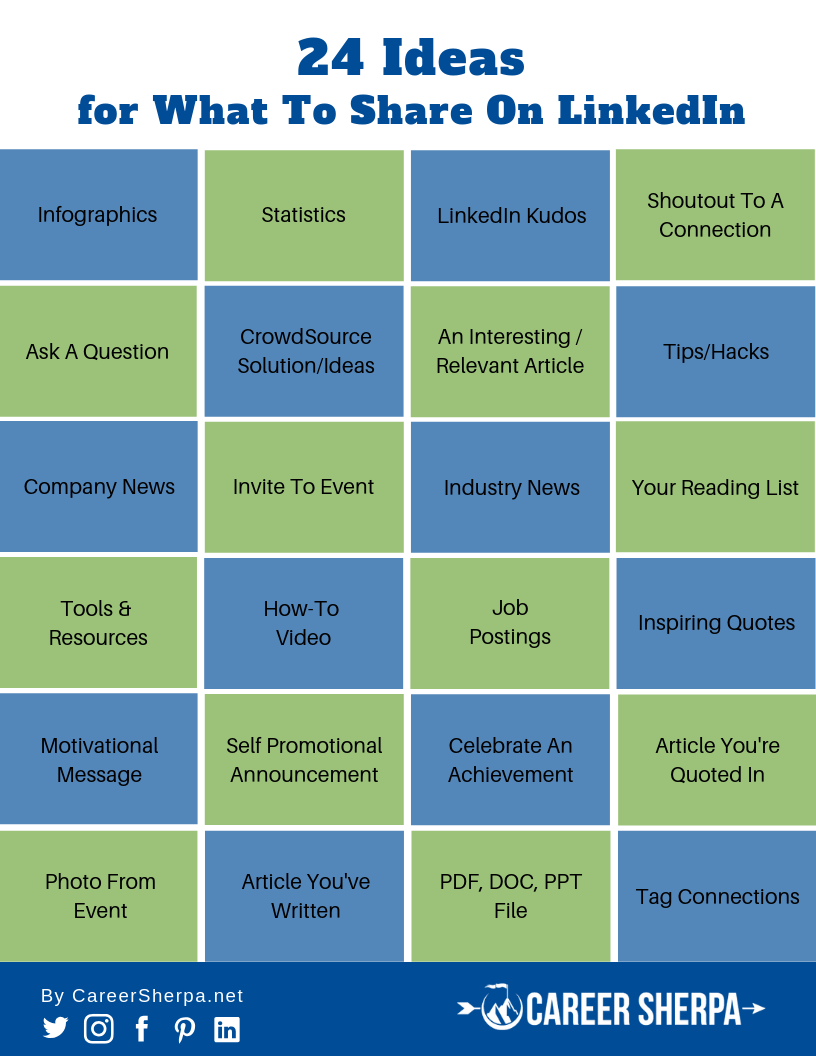
I’ve given you a few ideas on how to react and graduate to engaging on LinkedIn. My colleague, Hannah Morgan, provides 24 ideas of the actions you can take on LinkedIn.* Take a look at her infographic (something else you can share or create for LinkedIn). This will give you some ideas that you might implement in your communications with your network.

24 Ideas Share On LinkedIn

This post originally appeared on Social-Hire.com

Photo: Flickr, Stein Liland

6 types of like-minded people to connect with on LinkedIn

And 3 examples of invites to send.

In a recent LinkedIn Official Blog post, the author suggests you should connect “with people you know and trust.” This seems like sound advice on the surface, but it shouldn’t be followed literally. My suggestion is to take it a step further and connect with like-minded people.

Older job seeker

By connecting with like-minded people, you get outside your comfort zone and create more possibilities for employment. Should you connect with the maximum limit of 30,000? I advise against this, as you never know with whom you’re connecting.

To its credit, the official blog suggests you first follow people to develop a relationship before you invite them to your network (make the ask). When following your desired connections, you should react to their posts and share them. Better yet, comment on their posts as well as share them.

But in order to communicate with LinkedIn members directly (without purchasing Inmails), you’ll have to connect with them.

Who to connect with

Confused? To follow someone on LinkedIn simply means you’ll see in your timeline what they post. Whereas to connect with someone means you’re in their network and can communicate with them directly. Now the question is with whom should you connect.

1. People you worked with

Your colleagues and former bosses are the first tier of your network. Treat them well, as they might be the result of you getting referred to a position—employers accept referrals from people they know and trust. By treating them well, I mean don’t ask them for a favor in your initial invite. (More about the initial invite later in the article.)

Consider the way employers prefer to hire. First, they want to fill a position with their employees, who they know; second, they take referrals from their employees, trusting their employees won’t steer them wrong; third, they ask for referrals from those outside the company; and fourth, they hire recruiters and staffing agencies.

Your job is to become an outside referral. It can be easier if you have a former colleague or boss on your side. It’s important to be able to connect the dots with your former colleagues and who they know in your desired companies. For example, someone you worked with knows the director of engineering at one of your target companies. You could ask for an introduction and a kind word from your former colleague.

2. People you meet

Have you attended networking events or industry conferences and wondered why you didn’t ask for their personal business card? I have. A better move would be asking them if you could connect with them on LinkedIn. Take out your phone, have them do the same, and send the invite immediately. Bingo, you have a connection with someone you’ve already met.

I have connected with people at business networking groups but only when I get a good feeling about them. It feels right. At this time, I would say, “It’s been great talking with you. Would you like to connect with me on LinkedIn.” If they happen to have the LinkedIn app, we can make the transaction on the spot.

You know what comes next. Of course, the follow-up. Make sure you continue the conversation by emailing or calling your new connection and suggesting a coffee date. It might be more convenient for your new connection and you to talk on the phone at a determined time. I prefer talking with new connections when I’m walking, so I’ll suggest a time when I know I’ll be strolling around my neighborhood.

3. People who are outside your personal network

For many people this is an uncomfortable connection to make. I’ve had clients say they don’t want to ask people they don’t know to join their network. My response to this is to tell them they won’t get to know valuable connections until they reach out to them. Think about the potential possibilities you could pass up by NOT connecting with the unknown?

It is important to build your network—to over 500 people—but the people in your network should be approximately 80% like-minded. What I mean by this is they should be in the same or similar occupation and industry, or the same occupation but in a different industry.

For example, an accountant in medical devices would connect with another accountant in medical devices. Not as good a fit—but a fit, nonetheless—would be an accountant in medical devices connecting with an accountant in manufacturing. To further develop their network, they would invite accountant managers and above to your network.

The benefits of creating a network of like-minded people are: first, the content you share or create will resonate with more people in your network. Second, when relationships are strongly molded, you and your connections will provide each other with leads that can result in adding more valuable people to your network or, better yet, possible job leads.

4. People who work at your target companies

You have a list of companies for which you’d like to work, right? If not, I suggest you develop one immediately. Start with 10, build it to 15, and eventually have 20 companies that you’ll research and follow. Hint: follow them on LinkedIn to gain the attention of recruiters.

The idea is not to follow companies that advertised jobs in your occupation. It’s the opposite approach. Follow companies that haven’t advertised positions. Remember, these are companies for which you want to work. By doing this, you’re being proactive in your job search.

Once you have identified your companies, you’ll connect with people at your target companies. Connect with people in departments where you want to land. If you’re a software engineer, try to connect with project managers or even VPs of those companies.

Also, consider connecting with past employees of said companies. The reason for this is obvious; you can reach out to them with questions regarding your target companies. They are more likely to answer your questions honestly.

For more explanation on being proactive using LinkedIn, read this article.

5. Recruiters

I’m often asked by my clients if they should connect with recruiters, to which I say, “Hell, yes.” Recruiters can be a great source of networking; after all, they have a pipeline of employers of which my clients are unaware.

If you are amenable to connecting with recruiters, make sure they serve your industry, particularly if you’re in a niche industry. For example, one of my clients is a linguistic specialist in high tech. She translates technical jargon from engineers to other departments.

Another consideration is a recruiter’s reputation. Do some homework and reach out to common connections of recruiters to ask what they know of a few recruiters with whom you’re interested in connecting. You can also get a sense of a recruiter’s character by reading their LinkedIn profile. Although a word-of-mouth recommendation carries more weight.

6. Your Alumni

Connecting with your alumni isn’t only for students and recent grads, although many college career advisors suggest this as a first alternative. You might be interested in a company where one or two of your alumni went. Connecting with them could give you an in or, at the very least, they could provide you with more information about a position or the company.

People who went to a small college, where they’re more likely to know their alumni, will benefit from this the most. I attended a large university where I know a small fraction of the people who attended before, during, and after I did. Nonetheless, I would reach out to my alumni because we have a common bond.


How to connect with like-minded people

Obviously you first have to find like-minded people. A great LinkedIn tool to use is All Filters. I won’t go through the process of using All Filter. This post goes into detail on how to use this feature.

Now that you know with whom you should connect, let’s look at how you connect with them. The art of connecting with LinkedIn members is in the message you craft. There are essentially three types of invites.

1. Connecting directly: the cold invite

This is the least successful way of the three options to invite someone to your LinkedIn. However, it is better than indiscriminately sending an invite with a default message. One method people use that works on me is flatter such as mentioning a specific article I wrote.

Hello Bob,

I read your article on 10 reasons why you should continue to use LinkedIn after landing a job. I’ve just landed a job and will put into practice what you write. I’d like to connect with you and hopefully alert you to new positions in my new company.

Susan Pride

Note: you only have 300 characters with which to work, so your invite needs to be brief.

2. Using a reference in your invites

If you’re going to connect directly, you’re more likely to see success by mentioning a reference in your invite. This would be a common connection, someone who is connected with you and the LinkedIn member with whom you’d like to connect.

Once you have chosen a person who could be a reference for you, contact the person asking if you could use their name in an invite. Don’t assume your shared connection will allow you to use their name.

Once you have your reference’s permission, your message to a new connection might look like this:

Hi Dave,

You and I are both connected with Sharon Beane. She and I work for the MassHire Career Center as workshop facilitators. She strongly encouraged me to connect with you, indicating we can be of mutual assistance.

Sincerely,

Bob

3. Asking for an introduction

This is the most proper way to connect with new people, albeit slower. This method requires asking a trusted connection to send a message to the person with whom you’d like to connect.

Note: It’s best to ask for an introduction through email because people are more likely to reply to email quicker than LinkedIn messages.

Here is a sample introduction sent via email:

Hi Karen,

I see that you’re connected with Mark L. Brown, the director of finance at ABC Company. I’m currently in transition and am very interested in a senior financial analyst role.

Although there is no advertised position at ABC, I’d like to speak with Mark about the responsibilities of a senior financial analyst role in ABC’s finance department. It is early on in the process, so I’m also scoping out the companies on my bucket list.

I’ve attached my resume for you to distribute to Mark and anyone you know who is looking for a senior financial analyst.

Sincerely,

Bob

PS – It was great seeing our girls duke it out in last weekend’s soccer match. I hope the two teams meet in the finals.

What to do next

You’ve probably heard this multiple times; you must follow up with the people in your network. A disadvantage of having a large network—unless you spend many hours a day on LinkedIn—is the inability to follow up with your connections the proper way. The proper way, you may wonder, is sending individual messages to each person.

The quick ask

Rarely does this work if you need a favor free of charge. Think about how you would feel if you connect with someone and the next message you get from them asks for you to buy their product or, in my case, ask you to review their resume. You might feel like you need to take a shower.

The only scenario I can see this working is if you’re applying for a position which has been posted online such as LinkedIn or Indeed, and you reach out to the recruiter or hiring manager, to see if they’ve received your application. In your message you should state your interest in the position and provide three key reasons why you’re the right person for the job.

Recently this worked for a client of mine who reached out directly to the hiring manager, asking him to connect. Sure enough the hiring manager connected and my client asked if he would take a look at his résumé. My client was asked in for a round of interviews but unfortunately didn’t get the job. Small battles lead to victory.

The slow build

A much better approach is to build relationships one message at a time. I consider it to be akin to courting a person of interest. The first message is to thank the person for accepting your invite and let them know you’re willing to help them in any way you can.

The second message might include a link to an article you thought they might enjoy. In this way you’re showing value to your connections. If you get your connections to respond to your third or fourth message, now would be the time to make the “ask.” Perhaps you would like to learn more about the company at which the person works and meet them for an informational interview.

After the informational interview, be sure to continue building the relationship by again thanking the person for their time and sending a link to another article they would enjoy. You should also inquire about other people who you could add to your focused network.

Next read 3 challenges to improve your LinkedIn engagement


This article originally appeared on Social-Hire.

Photo: Flickr, Susan_Moore_Cool

The LinkedIn quiz: 50 questions

In a recent post, I asked my LinkedIn community to take a quiz consisting of 15 questions. Those who took it were honest about their LinkedIn prowess, or lack thereof. I promised in this post that I would reveal the entire quiz I give my clients.

Jigsaw-Phishing-Quiz_sm

The quiz I give my clients consist of 50 questions. If you decide to take it and don’t score 100%, don’t worry. There is always room for improvement. I’ll be the first to admit, I don’t have a perfect score.

Some of my failures have to do with my inability to perform the “tasks,” some of them are due to caring not to perform the tasks.

We’ll start with the LinkedIn profile. I tell my clients that while it’s important to have a value-based, optimized profile, this is only one-third of the equation. Here we go.

Your Profile

Determined how you want to brand yourself, or deliver your message. Express this on your profile through the following. Answer “yes” or “no” to the following:

  1. My profile is optimized with keywords. ___
  2. I have a background image that is relevant or reflects my personality. ___
  3. My photo is professionally done, or a buddy with a good camera shot it. (No selfies) ___
  4. I have a headline that brands me with keywords or a tagline or both. ___
  5. When you look at my Articles & Activity section, you’ll see I engage on LinkedIn. ___
  6. My Summary, now called About, tells a compelling story that shows value. ___
  7. My Experience section consists of accomplishments, not simply duties. ___
  8. I utilize my Education section to the fullest. For example, I tell readers some of my accomplishments at University. ___
  9. I show my Volunteer experience because employers like people who contribute to the community. ___
  10. I list at least 30 Skills which are endorsed. (Job seekers, you’re given a break on the number of endorsements, but the employed should have at least 50 endorsements per skill.) ___
  11. In my Recommendations section, I have at least 1 recommendation from a supervisor/manager for each position. ___
  12. I’ve written recommendations for my employees, colleagues, vendors, etc. ___
  13. My Accomplishments section has at least one of these: project, publication, patent, language, grades, courses. ___
  14. I have at least media, e.g., audio, video, documents, Slideshare, in either About, Experience, or Education. ___
  15. I post videos on a consistent basis. ___

Total number of yeses ___


Another important part of your LinkedIn campaign is developing your network, which should be large, yet focused. The more homogeneous your network, the more value you’ll add to your connections.

Your network

  1. My goal is to build relationships to land a job or increase sales. ___
  2. I believe that building relationships is about giving. ___
  3. I have 500+ connections. ___
  4. At least 80% of my connections are in my industry. ___
  5. I use All Filters to search for potential connections. ___
  6. I search and connect with people using the Companies feature. ___
  7. I search for people using See Alumni. ___
  8. I know how to use Boolean Search to narrow my search. ___
  9. Before connecting with potential connections, I read their profile in full. Well, mostly. ___
  10. I send cold invites and include a personalized message. ___
  11. I send invites with a personalized message using references. ___
  12. I ask for an introduction from someone in my network to someone with whom I’d like to connect. ___
  13. I thank people for joining my network. ___
  14. I follow up with a message to new connections. ___
  15. I make an effort to call or Zoom/Skype with my new connections. ___

Total number of yeses ___

Your engagement

Here’s where the rubber meets the road; thus, more questions. You’ve created a stellar profile, connected with people in your industry and some verticals; now it’s time to engage with your network and stay top of mind.

  1. I spend at least 30 minutes a day, 4 days a week on LinkedIn. ___
  2. I message my connections on a regular basis. ___
  3. I occasionally use group messaging. ___
  4. My comments are respectful, or I don’t comment at all. ___
  5. I react (Like, Celebrate, Love, Insightful, Curious) to other’s posts. ___
  6. I react (Like, Celebrate, Love, Insightful, Curious)  to other’s posts and write a comment for each one. ___
  7. I write my own long posts. ___
  8. I react and/or share articles written by my connnections’ or online publications, for example, The Muse. ___
  9. I react and/or share and comment on articles written by my connnections’ or online publications. ___
  10. I react to people’s videos. ___
  11. I react and comment on other’s videos. ___
  12. I produce my own videos. ___
  13. I use LinkedIn’s Publisher to write articles. ___
  14. When I share someone’s communications, I @ tag them. ___
  15. I use the appropriate number of  # hashtags. ___
  16. I endorse my connections. ___
  17. I ask for and write recommendations for my connections. ___
  18. I share my connections’ profiles with other LinkedIn members. ___
  19. I give Kudos to my connections. ___
  20. I use the LinkedIn mobile app. ___

OVERALL number of yeses ___


Legend

  • 45 out of 50 correct: Grand Master
  • 40 out of 50 correct: Very Good
  • 35 out of 50 correct: Good
  • 30 out of 50 correct: Fair
  • 25 out of 50 correct: Needs work


Thank you for taking this quiz. If you are new to LinkedIn, don’t worry about your score; it will increase the more you use LinkedIn. If you are a veteran of LinkedIn, your score should be high. Maybe not perfect, but high.

As always, I’m interested in hearing about other questions I should add to this quiz. I’d like to increase the overall number of questions to at least 60.


10 Reasons Why You Should Continue to Use LinkedIn After You’ve Landed a Job

I’ve come across thousands of job seekers who believe in the power LinkedIn provides to help them land a job. I haven’t, however, come across as many people who believe in using LinkedIn after they’ve landed. They feel that once LinkedIn has done its job, it’s time to part ways.

LinkedIn for Business

Why is that? Do people not see the value of LinkedIn in their work?

In a LinkedIn post* I wrote, I asked the question, “I have a job. Do I still need to use LinkedIn?” Following are 10 versions of the reasons I provided for continuing to use LinkedIn after being hired. Some folks from career development and sales have weighed in with great answers.

1. Continue to build your network as insurance, if you need/want to move on

Unless you were born yesterday, you don’t believe that any job is secure, except for Supreme Court Justices. What if you want to move on to another position? Whether you have to move on or want to move on, having an established network of trustworthy people, will be extremely beneficial.

Susan Joyce writes, “So sad when people stop using LinkedIn after landing a new job. Unfortunately, NOT unusual. What will happen the next time they need a job—start over with LinkedIn? That means a much longer job search. Instead, stay active, support the new employer, and remain professionally visible. Much smarter!”

2. Continue to build your brand

Make sure you update your profile with your latest accomplishments. Only connect with the people who provide value, as well as those to whom you can provide value. And, yes, share posts that are relevant to your network. This is all part of branding. Read The Ultimate LinkedIn Profile Guide series to learn more.

Perhaps your interest is gaining more visibility in your new role. Wendy Schoen suggests, “If you are engaging on LinkedIn, it is much easier for others in your field to reach out to you with speaking engagements or panel appearances. These are the ways in which you establish your ‘chops’ in your field!”

3. Be found by recruiters who are cruising for passive candidates

You might have landed your dream job and think you’ll retire from the organization, or you might have landed at an organization that didn’t turn out to be what you thought it would. In either case, there are always recruiters who are looking for good talent. You want to be found.

Cynthia Wright is a recruiter. She uses LinkedIn Recruiter and warns that passive job seekers never know when they’ll be approached: “It’s a great tool, and as a recruiter, 60% of my hires are made from LinkedIn Recruiter. Most are passive candidates (those who aren’t necessarily looking for a job). As a job seeker, you just never know.”

4. Give back: let people know of openings in your organization

The best of the best networkers will continue their efforts of helping others after they’ve landed. Some of my former clients have shared openings at their company, almost the minute they’ve started their job. They were paying it forward, which is the true definition of networking.

Employers are hiring. The questions is who are they looking to hire. The answer is clear; they’re filling positions with people who’ve been referred by those they trust and know. Be that person they trust and know; mention people with whom you’ve networked. Bonus: you might receive a finders fee.

5. Use LinkedIn for professional development

Let’s say you’ve landed at a company where there’s no money in the budget for professional development. You can reach out to other employees in your industry, or you can use information you gather on LinkedIn. One great source for professional development is LinkedIn’s Learning (Lynda.com).

Brian Ahearn, has produced four courses for LinkedIn. He speaks about persuasion in sales, personal relationships, and coaching. I have learned a great deal about the art of persuasion from him. Check out his courses: Persuasive Selling; Advanced Selling: DEALing with Different Personality Styles; Persuasive Coaching; and Building a Culture of Coaching Though Timely Feedback.

6. Research companies and people before meetings for business transactions

Let’s say you applied for a marketing director’s position. You were smart and researched the positions to which you applied and companies who were going to interview you. Did you also research the people who would be interviewing you? You were smart if you did. Now it’s time to research people in your industry or the company for which you work.

Sarah Johnston writes: “LinkedIn can be a great place to learn about your new colleagues. Individual profiles often reveal their, past jobs and non-profit involvement. This information can be helpful during water cooler conversation. One of my favorite things to do to look at the written recommendations that they’ve given to other people. This can provide you with insight into their work relationships and qualities that they value in others.”

7. Share posts and articles of your own, as well as those of others

If you didn’t share articles or comment on other’s posts while job searching, now is the time to do it. Share and comment on articles, write posts expressing your thoughts, attach a whitepaper in Rich Media sections. You want to stay on the radar of your network (related to reason number one).

Hannah Morgan writes, “Your goal in regularly sharing articles on LinkedIn is to stay top of mind among your network. Don’t just re-share the articles, though. Explain why you are sharing them and tag several people, including the author, to make sure they see it. Commenting on posts related to your field—either from people in your network, or those you do not know yet—is a way to expand your network and solidify your relationships with existing connections.”

8. Increase business and/or visibility of your organization

If you’re a salesperson or business developer in a B2B role, using LinkedIn is a no-brainer. Even if you’re not directly involved in selling products or services, LinkedIn is instrumental in building relationships. Any employee in a company can be the face of the organization.

In support of this reason, Bruce Bixler makes an excellent point: “ONLY 20% of LinkedIn is used for job search the OTHER 80% is for business enterprise, sales, networking, lead generation, entrepreneurs, business development, and even small business.” By the way, he might not be far off with this figure.

9. Use LinkedIn to find talent

You’re on the other side of the table now as a hiring manager, recruiter, or HR: you are now searching for candidates. The company for which you work doesn’t have the budget for a Recruiter account or even Recruiter Lite. Your only tool for finding talent is using LinkedIn’s Search.

No problem; you used Search to find people who were hiring. You became proficient at LinkedIn’s All Filters, which allowed you to search for people by title; current and previous company; industry, location; school; and language, if you’re looking for someone who’s bilingual.

10. LinkedIn is fun to use and teach

This is my personal reason for using LinkedIn. I enjoy the platform, more so than Facebook or Twitter. Some of my colleagues tease me for my devotion to LinkedIn (one said I need an intervention), but I shuck it off. I enjoy it for disseminating information and gathering information. This isn’t to say it frustrates me at times.

I also teach job seekers to use it in their job search; having led thousands of workshops on LinkedIn strategy and building your profile. As well, I also help clients one-on-one. Using LinkedIn is my most enjoyable part of the job search to teach. Where some might not see its value, I do.


In my LinkedIn workshops I encourage my attendees to continue to use LinkedIn after they’ve landed their next job. Many nod their head in agreement, but I’ve yet to see most of them to do it. Hopefully if they read this article, they’ll see the value of using LinkedIn after they’ve landed their next job.

Here’s to hoping.

*Here is the post I reference in this article.