Category Archives: LinkedIn

Beginners’ guide to using LinkedIn effectively

linkedinThis is a guest post from Rich Grant, a valued LinkedIn connection and college Career Advisor. He has a great way of explaining how to teach LinkedIn to beginners. 

When I meet with students – two to four each day – in my college’s career center I almost always ask, do you use LinkedIn? Most students say “yes’” but the real question we start exploring is, are you using LinkedIn effectively?

I’m pleased that almost every college junior or senior I meet with has a LinkedIn profile. Very few students, however, have taken full advantage of the networking power of LinkedIn. This is where I come in. I love showing students the nooks and crannies of LinkedIn.

I typically have about 10 – 15 minutes within a 30-minute appointment to provide students with an overview of LinkedIn. That’s just about enough time to cover the basics. So, here is my 10-minute tutorial on using LinkedIn to make connections and as a resource in a job or internship search.

Defining LinkedIn. For students who have not seen LinkedIn, I tell them about the similarities to Facebook (connecting with people, posting a status and / or links, joining groups, etc) and then quickly add, But it’s NOT Facebook! I also explain that social media networking (LinkedIn, Google+, Twitter, Pinterest, and others) does not replace traditional face-to-face networking, but it complements your overall networking efforts.

About the profile. I talk briefly about how to beef up your profile. Don’t set up a bare-bones profile and think you’re done. Change / expand your headline, create a summary, and describe each job with appropriate key words. Add skills and highlight projects. I talk with students about posting a professional profile photo and customizing their URL, both of which are easily found when you’re in “edit profile” mode.

Making connections. With whom should you connect? Initially, I tell new LinkedIn users to connect only with people they know and trust who also know them reasonably well. I explain the concept of 2nd degree and 3rd degree connections, that is, your connections’ connections and so on. If you connect with people who know you well, you will have better success in getting referred to your 2nd degree connections. I tell students to avoid the “LinkedIn Open Networkers” known by their acronym LION (a better description might be “Spread-thin LinkedIn Unselective Trolls”)

Participating in groups. Find your college’s alumni group and seek groups within your professional interests. Don’t just join groups, participate in them. Post discussion topics, comment on discussions. Engage with people within groups… you know, be “social” on “social media.”

Using “advanced” search. Click “advanced” to the right of the search bar. On the left side, you’ll see several fields. You can search on one variable or multiple variables. I usually show students how to search on keywords, company, college (filling in the name of our college), and zip code. You can also search by industry. I run through a couple of searches to show how easy it is to identify relevant 2nd degree connections.

Now what? Once you find a 2nd degree connection that you’d like to contact, you can see who your common connections are. You can get in touch with your connection or connections to facilitate getting through to the person you don’t know. In my job searches, I would typically contact my connections by phone or email. You can also message people on LinkedIn, or from the 2nd degree connection’s profile, click on the down arrow by the “In Mail” button and use the “get introduced” feature. It’s worth repeating a key point: connect only with people you know and who know you. If you identify a 2nd degree connection, it’s no use to you if your common connection is a LION in another country.

Basics of networking. I would be remiss if I just showed the technical aspects of LinkedIn, so I talk with students about proper networking etiquette. As you start reaching out to your 2nddegree connections, you need to follow the same guidelines / protocol as you would if you were meeting someone at a networking event… or meeting someone new on campus. You wouldn’t meet someone for the first time, and say, nice to meet you; let’s rent an apartment together. Don’t come on strong. Build a rapport before you ask for anything. Get to know people first, and don’t put them on the spot.

As you connect with new people on LinkedIn, it’s important to build your relationship with an information-seeking perspective rather than jumping in and asking about job openings. That’s a conversation killer. Most students I meet with truly can benefit from exploring career options by having conversations with people who work in those career fields (aka “informational interviewing”). Most professionals are willing to help college students who are looking into potential career fields. And by using LinkedIn properly and effectively, your connections most likely will be willing and able to help you get in touch with their connections, provided they are also connecting with people whom they know and trust.

This has been my quick tour of LinkedIn that I provide to new users of LinkedIn. I rarely talk about job postings on LinkedIn; to me, LinkedIn is about networking. I have started to show students “University Pages” found under the “Interests” pull-down menu (look for “Education”)

What do you show new LinkedIn users in your overview?

Rich Grant ● http://www.richcareer.net

Photo C. 2013 by Fred Fieldfredfield.comRich Grant has a background in business planning, freelance writing and higher education. Rich was recently the director of career services at a small four-year college in Maine and is currently filling an interim role as a career adviser and internship coordinator at a private college. He serves as the president of two professional associations. Find Rich on LinkedIn and Twitter, and become a regular visitor to his blog where he imparts his words of wisdom once or twice a week.

LinkedIn Endorsements: Reliable or BS?

endorsementGuest post by Brian Ahearn, CPCU, CTM, CMCT

If you’re on LinkedIn then no doubt you’re familiar with the relatively new feature where you can endorse someone for his or her skills and expertise. This feature is akin to Facebook’s “Like” option.

Not too long ago I connected with someone on LinkedIn who I’d previously had no interaction with whatsoever. The person reached out to me because we shared a common interest. Within hours of connecting he endorsed me for the following skills: management, training, marketing, leadership, and business planning. Read more


Lost Touch no longer exists, making it harder to re-connect with your long forgotten connections

Well don’t I feel foolish. LinkedIn has done it to me again; it has changed its functionality and removed a feature I thought was so outstanding that I wrote a post on it. The feature to which I refer was called Lost Touch.  Lost touch allowed you to traverse immediately to the connections with whom you communicated long ago. So if I hadn’t sent messages to people four years ago, I would know exactly who they are and can renew our relationships.

I could see the removal of this feature as a kick in the gut, or I could take it as an opportunity to reach out to all of you by writing another post on what one has to do in order to contact connections who they haven’t seen in oh…two years or more. So I’m opting for the latter. But there is bad news and good news; I’m going to give you the bad news followed by the good.

The bad news is that it’s not as easy to access your long forgotten connections. Don’t follow the instructions I provided in my last post on this subject, which was written a whopping four days ago. Can you imagine something becoming obsolete in just four days?

lost touch newTo get to your connections with whom you spoke eons ago, simply click on Network and select Contacts.

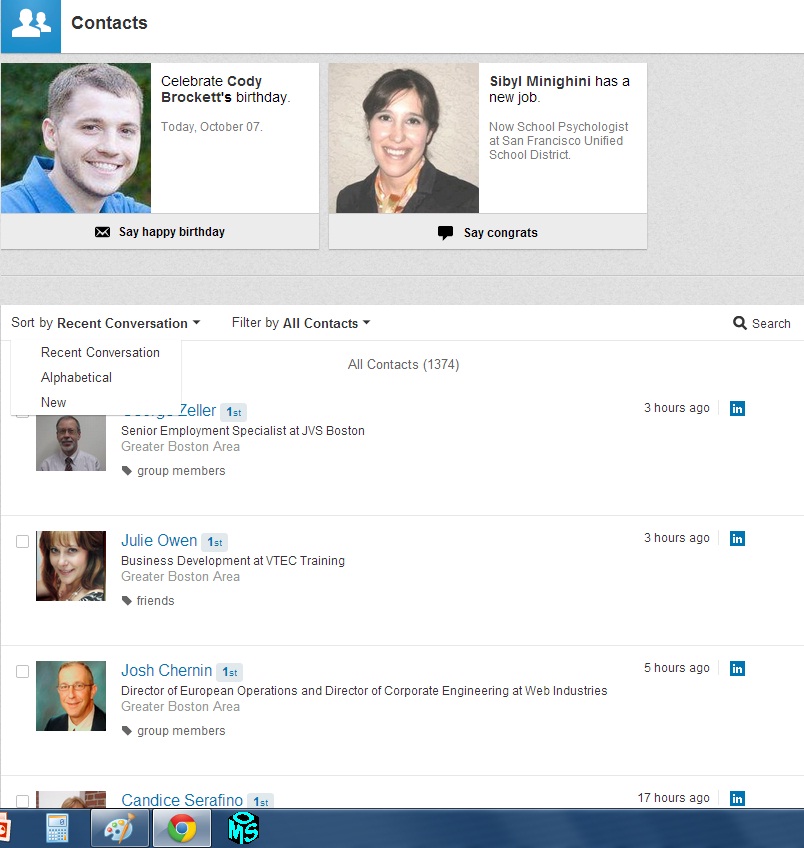
You will see a screen that looks similar to mine.

Select the drop-menu Sort by Recent Conversation. Next select New (circled in the diagram).

This is where the maddening work begins. Scroll down the screen to the point where you want to make contact with your connections.

For some of you Super Connectors, this process might take days.

I wish there were an easier way to do this, but I’ve searched near and far for my beloved “Last Touch” with no success.

(I’ve sent a request to LinkedIn asking, “Where is Lost Touch?” No response.)

Once you’ve selected the connections with whom you’d like to reconnect, select (you got it) the envelop that appears at the top of your connections list beside the word Message.

You are on your way to sending a mass message to your long forgotten connections.

My message, by the way reads: Wow. According to LinkedIn, we haven’t communicated in at least two years. What’s been happening in your live? I’d love to re-connect.

The good news. Many of my long forgotten connections have written back and thank me for re-connecting. They’ve let me know how things are going for them. Some who read my previous article were confused by my instructions, desperately wanting to know how to access Lost Touch. Now I need to deliver the ultimate bad news; it no longer exists.

Anonymous LinkedIn Member, who art thou?

I’ll tell you. You’re one notch below “Someone in the Architectural  & Planning industry” in my “Who’s Viewed Your Profile”  area. That’s akin to being nobody. Why would you want to be “nobody?”

I’m not alone in decrying your secrecy. Firebrand Marketing Director Carolyn Hyams wrote an article called 13 things that really annoy people on LinkedIn , in which she writes, “And whilst I’m on this subject, don’t change your privacy settings to “anonymous” when you’re looking at other people’s profile. It makes them feel like someone is stalking them.” The article is quite good.

To be accused of stalking someone is strong language, but I agree. At least have the decency to tell me what company or industry you’re from. I tell my LinkedIn workshop attendees that not declaring who you are is like spying on people…don’t do it.

Help me figure out why you are secretive. Is it 1) because you think I’m an employer who is about to interview you 2) you don’t want me to read your profile for privacy reasons 3) you’re just naturally distrustful? Here’s the thing: I’m not an employer who is going to interview you. If you’re concerned about privacy, you shouldn’t be on LinkedIn, let alone the Internet. And networking is all about trust and building relationships.

One other thing: I’m delighted when someone looks at my profile. I’m thankful when they declare who they are.

So, who art thou? I’d be happy to meet you via reading your profile, and I might even want to connect with you…if you’ll let me. Until then, please declare your complete name and let me see your photo. I bet you’re a pretty decent person.


The word “innovative”; is it a crime to have it on your résumé?

Innovation

Innovation (Photo credit: masondan)

Did you know the word “innovative” is a cliché? According to some job search pundits it is. It made some notorious list that circulated on the blogosphere. TheFreeDictionary.com defines a cliché as “a trite or overused expression or idea.” If “innovative” has become overused, than it is by definition a cliché, but could it be called trite?

I have to admit that I’ve been telling my jobseekers to keep “innovative” and other adjectives off their résumé and out of their vocabulary, as they are subjective–it’s better to show than tell how you’re innovative. In fact, I wrote an article bemoaning the use of words that are considered clichés, some good words at that. So it appears I’m contradicting myself, but this wouldn’t be a first.

But I had an epiphany when I was talking on the phone with a customer whose résumé I’m writing. As I was going over her résumé pointing out some of her accomplishments, I told her she is innovative, at which she agreed with great delight that, yes, she is. To get her to realize this made the word “innovative” special, not a cliché.

I once described myself as innovative but when I read that it was one of the 10 clichés to avoid on your LinkedIn profile, I stopped writing and saying that I’m innovative. After all, it’s a cliché, right? This was like the time my brother said Miso soup tastes like low tide. His expert opinion ruined the soup forever for me.

I just sent my customer her résumé with the adjective “innovative” included in the professional profile, and I didn’t feel the least bit guilty–considering she had initiated social media at her current company, implemented a preventative care program at yet another company, and more accomplishments that clearly show her as innovative.

In fact, my customer also demonstrated that she’s “creative” and “dynamic,” which are also considered taboo by the cliché police. With all of what I’ve expressed, I’m beginning to question the validity of experts who trash some great words just because they’re considered overused.

What if there are a lot of jobseekers and workers who are “innovative,” “creative,” and “dynamic,” and these are the best words to use to describe them? Should we use words that don’t mean quite the same, or should we use words from a different language? No, we need to show rather than tell, right?

“Designed a (an innovative) social media curriculum for students at risk that taught them how to market the school’s English Language Art’s program, earning Department of the Year.

I suppose this secondary teacher’s accomplishment statement shows innovation, but what’s wrong with using “innovation” in the sentence to give it more flavor. Further, when a job description calls for someone who’s “innovative,” and you’re trying to meet as many of the keywords to pass the Applicant Tracking System’s test, do you exclude this word? Just a thought.

I’m now beginning to think a little too much emphasis is being placed on finding ways to reinvent ways to describe jobseekers and workers. To hell with worrying about what the pundits consider to be clichés. They’re ruining the pleasure I get when writing a résumé or advising jobseekers on how to describe themselves, just as my brother had ruined my appetite for Miso soup.

2 ways to ensure you receive a timely, quality LinkedIn recommendation

RecommendationMany jobseekers and employers think LinkedIn recommendations are worth gold. Recommendations espouse jobseekers’ performance, describing valuable skills and accomplishments, and are visible on their LinkedIn profile for potential employers to see. What a great LinkedIn feature.*

However, as valuable they are, requesting a recommendation can be frustrating for two reasons, timeliness or the quality of a recommendation…or both.

So after waiting for months and receiving something that doesn’t describe you the way you’d like, what do you do? Do you send the recommendation back to your reference, or do you post it on your profile as is? You send it back and you risk waiting even longer for a revised recommendation.

Let me suggest two ways to ensure a shorter wait, as well receiving a recommendation with which you’ll be happy.

1) First, offer some guidance to the person who’s writing your recommendation in terms of the types of skills, accomplishments, and experience you’d like to be included in the recommendation. Having written recommendations for others, I know how difficult it is to determine what to write about the recipient.

So eliminate any guesswork and tell your reference you’d like her to hit upon your leadership, customer service, team-building, technical expertise, or other strong skills. Also remind her about any accomplishments, e.g., you increased productivity 55% by taking the initiative to develop a better process to track and store electronic parts; just in case she has forgotten.

2) The second alternative is one that will require more work on your part; writing your own recommendation. This is a last-ditch effort but one your reference will greatly appreciate. You may remember doing this where you worked, when your manager told you to write your own for her to sign. Same idea.

This takes considerable work on your part because it takes stepping outside yourself to evaluate your performance. In other words, how would the person writing your recommendation see your current or past performance? You’ll be promoting yourself, which is not always the easiest thing to do. But this is not hard to do as long as you are as objective as possible. Refrain from using adjective like “excellent,” “outstanding,” “perfect,” etc. Stick to the facts. Also expect your professional reference to edit what you write, perhaps revise it significantly.

Recommendations are still valued by employers who visit your profile. It gives them an idea of your talents and promise for the future; so why drive yourself crazy waiting for them to arrive, and why guess what you’ll receive from the well-intentioned reference.

*Recommendations have been replaced by Endorsements as one requirement to reach 100% completion for a profile. This implies endorsements hold real value, which many LinkedIn members dispute. These naysayers think it’s a lot easier to click on someone’s skill/s than it is to write a thoughtful recommendation. I agree.

How Twitter Twesumes can help you find a job

twitterIf, like me, your writing is verbose and you struggle expressing yourself in 140 characters; forty-thousand characters would suit you more. (That was 140 characters, by the way.)

But as I gradually accept certain technology, Twitter now seems to be a pretty good idea. It keeps words to a minimum, forcing me to be brief. The idea that shorter is better starts to sink in.

Newsflash: there’s a very real possibility that the job search is heading, in part, in the direction of Twitter. In a world of busy recruiters, hiring managers, and HR professionals, where shorter is better, Twitter provides a great vehicle for sourcing talent.

But how can jobseekers present their experience, valuable skills, and accomplishments in 140 characters? Obviously they can’t. They can, however, use Twitter as a vehicle to achieve this in the form of a Twesume. The Twesume is not a new concept; I read about it in December, 2011, in a Mashable.com post, How a 140-Character Twitter Resume Could Land Your Next Job.

I have to admit I question the success of the Twesume, but I’m open-minded and willing to consider any advantage jobseekers can use to get themselves in front of employers. The Twesume usually comprises of two important components; a compelling value proposition and a link to either a LinkedIn profile or online résumé.

Here is an example of a value proposition (mine) with a link to a LinkedIn profile (mine).

Delivering trending job-search advice for your job-search success/LinkedIn training for business’ advantage. http://tinyurl.com/7gd4kqu #twesume. (137 characters.)

In order for your Twesume to work, you must be engaged in ongoing discussions on Twitter, follow potential employers, and let people know you’re looking for work.

To make companies aware that you’re looking for work, send your well-crafted Twesume to companies via a tweet to @company, or through a DM. Send your Twesume to companies who announce their positions on Twitter, or who will potentially be hiring in the future.

How real is the need for you to create a Twesume?  A CNN article writes, “Earlier this year, the chief marketing officer of U.S. technology company Enterasys, Vala Afshar, announced that he would only consider Twitter applications for a senior social media strategist position with a six-figure salary.”

As I think about the Twesume, I wonder if it will actually take hold and perhaps replace the résumé in some industries. A busy world of hiring authorities says it will.

An example of my Twesume:

sample twesume

Why are jobseekers and recruiters/employers disconnected?

disconnectedI have been accused of being disconnected from my family. For example, with Easter approaching, I should’ve known that it’s a gift-giving holiday, when the girls will receive $100 Sperrys and my son a massive amount of candy, which will amount to a large dentist bill. How could I have forgotten?

This is a trivial matter compared to how disconnected jobseekers and recruiters/employers are when it comes to LinkedIn’s role in the hiring process. It makes me wonder if jobseekers are aware of how recruiters/employers value LinkedIn as a tool to find talent. The two parties aren’t on the same page.

An infographic published on The Undercover Recruiter paints a pretty telling picture of the importance recruiters et  al place on LinkedIn in finding candidates, while it also shows that  jobseekers seemingly place little importance on using LinkedIn.

Facts from the infographic show

Recruiters

Jobseekers

  • 48% of recruiters post jobs on LinkedIn and nowhere else on social media
  • 73% of recruiters filled a position using social media in 2012, a 15% increase from 2011


  • 50.5%: The percentage of LinkedIn users who have complete profiles


  • 89% of recruiters have filled a position using LinkedIn at some point in time


  • 0-2 hours: The amount of time per week most users spend on LinkedIn


  • 97% of all HR and staffing professionals use LinkedIn in their recruiting efforts

The reasons vary as to why jobseekers fail to utilize the very tool that recruiters/employers are increasingly relying on to find them. It may be that LinkedIn is difficult for some to master. Only 50.5% of LinkedIn users have a complete profile. Some of my customers complain about basic things like downloading a photo, remembering their password, how to connect with other members or the Jobs feature, etc.

Some may find it impinges on the numerous hours they spend on the job boards. Sadly, the average time spent using LinkedIn is a mere two hours a week. Good gosh, I spend two hours a day on LinkedIn. Can they give up half an hour a day? Fifteen minutes?

Others may wonder if LinkedIn actually works. There have been no cold facts on the success rate jobseekers have had at finding work directly or indirectly by using LinkedIn. We have heard that personal networking garners anywhere from 60-80% success if used as the primary job method, but some people will only believe it when they see it.

There are jobseekers I consider to be experimenters–they join LinkedIn because they’ve heard how it will help them get a job, only to abandon the application after a day or two of looking for immediate gratification. To these folks, I tell them to kindly close their account and not muck up the work for the rest of us.

Whatever reasons there are for recruiters and jobseekers being so disconnected, it is obviously clear that the two entities are fishing at different lakes. Recruiters will never reveal where the fish are; and I fear I will never understand that Easter is a gift-giving holiday.

10 excellent reasons to read other people’s LinkedIn profiles

businesswomanPeople often ask me how they should write their LinkedIn profile. Among other things, I tell them to cruise around LinkedIn and look at tons of profiles to see which ones they like best. And then, without copying, emulate them. As the saying goes, “Imitation is the best form of flattery.”

  1. Notice their photos. Are they tie-and-jacket professional or casual professional?
  2. What about their title? Do they have a branding title–you know the ones that make you say, “WOW”? Or does it make you yawn?
  3. See what keywords they’re using for SEO (search engine optimization). Are their keywords strong enough to catapult them to the top?
  4. What kind of story do they tell in their Summary?
  5. What accomplishments do they tout in their Experience section?

My colleague Laura Smith-Proulx writes about 5 Reasons You Should Research Your Job-Seeking Competition on LinkedIn, in which she advises her clients to study their competition, not only to get an idea of how to begin and craft their profile. Her message is that you must become a student of examining your competition in order to really succeed in the job hunt.

In her article she asks you to look at five points as part of their strategy.

  1. Gaining insights applicable to your own career path.
  2. Forming new networking or career advisory relationships.
  3. Discovering which companies hire experts in your field.
  4. Learning how your skills stack up in the job market.
  5. Getting a close-up view of how to tune your Profile for internal SEO.

Laura goes beyond perusing others’ profiles to gather ideas for content. To build a powerful LinkedIn profile and then use it as Laura suggests, you’ll need to spend time and energy, which is what all the pundits say. Read Laura’s article.

My thoughts on the death of LinkedIn Answers

answersBy now you probably know LinkedIn’s Question/Answer feature (Simply called Answers) is deceased, extinct, departed, an afterthought, gonzo. (See related article that offers alternatives.)

This means millions of LinkedIn members have no opportunity to ask questions—which I’ve done quite often—and answer questions, which I’ve done more than I’d like to admit.

I’m not the only one who’s disappointed with LinkedIn’s choice, Jason Alba, author of greatly regarded I’m on LinkedIn–Now What???, commented on the imminent removal of LinkedIn Answers:

“Answers was, for years, the only tool to help me accomplish my three purposes (share my brand, grow my network, nurture individual relationships).”

I caught the Answer bug back in March of 2009, three years after I joined LinkedIn. Those were hours of obsessively searching for questions to answer about professional networking, résumés, job search, career, using LinkedIn, staffing, and many more categories. Eventually I settled on Job Search as my category of choice.

To the chagrin of my family, I spent hours in my large chair typing away, always making sure I provided sincere and thoughtful answers. Come to think of it, I stopped criticizing their stupid television shows, so I guess my family didn’t mind.

Did I mention I eventually became the leader of “Best Answers” in the Job Search category? I don’t talk about it a lot, mainly because I don’t want to come across as a braggart and also because I’m not sure what value “Best Answers” hold. But, yeah, I was kicking ass in that category.

Answering questions not only gave me hours of mental stimulation; it drew the attention of jobseekers who commented that they appreciated my advice. I also connected with other career pundits who saw my answers and agreed with them. Thinking back to those times, I would agree that my network took form and began to blossom.

There were many times when I had an urgent question and knew I’d have 10 answers from the LinkedIn hawks within the hour. They were always scanning Answers. I received a ton of great answers  One question I remember asking about how to reword my profile’s title garnered a stellar answer. I took the advice from the person who received “Best Answer” from me and ran with it.

Did I always get quality answers? Not always. Some answers, in fact, were useless and driven by individuals’ agendas. These answers left me thinking, “Is this person answering a different question?” What always killed me was when a person would answer a question with one sentence or even one word.

The one-sentence answers were usually from people who tried to earn”This Week’s Top Experts” (TWTE) record by giving the most answers for the week. I estimate the average TWTE shamefully answered 600 questions a week–that’s 200 shy of what penned since I began answering questions. Do these people work?

Some LinkedIn members complained about the quality of answers saying that you weren’t necessarily an expert because you earned “Best Answer” status. I could see their point. Some answers didn’t warrant a “Best Answer.”

In all, Answers was a nice feature that will be missed by me and others. One of my connections, Darrel DiZoglio, said Answers generated business for him because his answers prompted people to contact him for his résumé services. (He was the leader of the Résumé category and there was a snowball’s chance in hell of catching him. He’s also one of the best at his trade.)

You are right if you guessed I posted a question about how people would feel when Answers goes away. The question garnered 14 answers and although it was hard to award a “Best Answer,” I gave it to someone who answered sincerely and thoughtfully.