Category Archives: Career Search

Avoid résumé obsession by following these 6 rules

I’ve been helping a client with his résumé. Originally it was a sound résumé but weak in certain areas. He lacked a branding headline, so I suggested he use a headline similar to what he uses on his LinkedIn profile but stressed it needed to be tailored to each job.

obsessed-with-your-resume

He also needed to tighten up his writing, pay attention to typos, and avoiding being verbose. I also suggested he quantify his results. Mission accomplished.

Shortly after our meeting, he told me he would send me his “next” revision in a few days. In addition to the changes I suggested, he said he prettied it up a bit. They were aesthetic changes that probably wouldn’t play a big role in garnering him an interview.

I sent comments back to him, ending it with, “Ready to go.” He sent me two more updates, each containing minor changes; not much had changed. There was not much I could add.

He was suffering from résumé obsession.

While aesthetics are nice, your résumé needs to be much more impactful than pretty font, interesting layout, unique bullet points, etc. Here are six general rules about putting your résumé to best use.

1. Yes, a powerful résumé is necessary. A résumé should lead with a strong branding headline to capture the employers’ attention, tell them who you are and what you’re capable of doing for them. This is where you first introduce the job-related keywords.

Follow your branding headline with a concise, yet grabbing Performance Profile. All too often I see profiles with lofty adjectives that have no meaning. Your profile is the roadmap to your work history; whatever you assert in it, you have to prove in the experience section.

The work experience must demonstrate accomplishments that are quantified. Employers are looking for numbers, percentages, and dollar signs. Having accomplished this, along with an education section, your résumé is ready to go.

2. It’s only one part of your written communications. Let’s not forget a well-written cover letters that grab the employers’ attention with the first sentence. Forget the tired, “I was excited to read on Monster.com of the project manager position at (company). Please find below my accomplishments and history that make me a great fit for this job.”

You have to show the employer you’re the right person for the job. This includes highlighting job-related skills and mentioning a couple of accomplishments. Like your résumé, the cover letter is tailored to each job.

3. Send your résumé to the hiring manager. Some of my customers are shocked when I tell them that they need to send their information to human resources and the hiring manager. The reason for doing this is because the hiring manager may see something in you that HR doesn’t.

Another reason for sending your résumé to the hiring manager is because she may overlook the fact that you don’t have a certain requirement, such as education, whereas HR must reject you for this deficiency. One of my job seekers, a former hiring manager, confirmed this assertion, adding “experience trumps education any day.”

4. How you distribute it. It doesn’t end with hitting “Submit.” You can’t sit back and wait for recruiters and HR to call you for a telephone interview. Some believe that sending out five résumés a day is a personal accomplishment; yet they fail to follow up in a timely manner.

Worse yet, they don’t send their résumé and cover letter to targeted companies. This involves networking face-to-face or via LinkedIn to determine who the right contact is at the company. Distribute your résumé to the people who count when you can; rather than applying online and taking your chances with the Applicant Tracking System (ATS).

Note: one product I swear by to determine the effectiveness of keywords on your resume is Jobscan.

5. LinkedIn is part of it. Whether you like it or not, it’s time to get on board with LinkedIn. Countless success stories of job seekers getting jobs are proof that employers are leaning more toward LinkedIn than the job boards.

They’re enabling the Hidden Job Market (HJM) by not advertising their jobs; rather they reach out to you to have you come in for discussions first..

Your LinkedIn profile should mirror your résumé (branding headline, summary, work history, education) to a point. Each section on it will differ, plus there are sections and recommendations you can display on your profile that you might not on your résumé. There must be a harmonious marriage between the two.

6. Just get it out. I know this sounds odd coming from a person who writes and reviews résumés. “Are you suggesting I send out an imperfect product?” you’re wondering. Well, yes if it’s holding you back from getting a job that’s available.

All to often I see clients in the career center for which I work spend too much time trying to make their resume perfect. Days, weeks, months go by before they’re “ready to send it out.” Don’t sweat the small stuff, as they say. Because while you’re doing this, opportunities are disappearing.


Fruitless pursuit. Trying to perfect your résumé and neglecting the aforementioned steps needed to make it work is similar to cleaning every snowflake from your steps and neglecting your entire walkway. A great résumé is what you aspire to create; a perfect résumé is not possible. To aspire to perfection will most likey prevent you to send out your résumé all together, just like my former client.

Photo: Flickr, Jordan

2 recent LinkedIn changes: one good, the other MEH

I consider myself to be a fair guy. When LinkedIn does right, I complement them. When they do wrong, I criticize them.

linkedin-alone

This time LinkedIn made a smart move by joining multiple job titles to fit under one company icon (see below). But in the same fell swoop, LinkedIn truncating each position. More on this later.

New experience2

Good move: joining positions

GOOD WORLDWIDE LLC LOGO

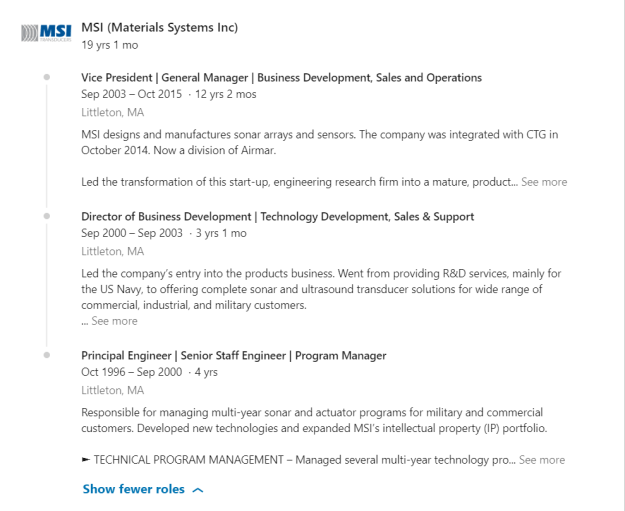
Previously, if you wanted to list all your positions at one company, you  entered a “new position” and your company’s icon appeared for each position. This got confusing, because at quick glance it appeared as if you worked at two, three, four, or more companies.

Note: the process is still the same in terms of entering your titles, but LinkedIn shows the line joining the positions, displaying the company icon only once.

My solution to the multiple-icon fiasco for one company was to write another positions within the original entry and separate them with a line. Unfortunately, it limited how many characters I could use for each entry.

Another problem with showing multiple positions under one entry was diminishing SEO. (Titles are weighed among the heaviest of the areas on your profile.) So it was to one’s benefit to enter as many job titles for each company. Still, it looked confusing and and disorganized.

MEH: truncating positions…again

MEH3

Remember when LinkedIn showed a person’s first position and truncated the rest of them? I do, and I thought it was a terrible move. Here’s what it looked like below the full first job description:

truncated-experience

Well this brilliant move more than a year ago must have disappointed LinkedIn members, because LinkedIn went back to expanding all but a few positions, which I loved. I just couldn’t look at a profile which only displayed titles, companies, and tenure of employment.

When LinkedIn reversed its decision, I wrote this in a post:

The good news is that LinkedIn has reversed it’s decision of showing only the first position in its entirety and truncating the previous ones. On May 26th, 2017, I noticed that LinkedIn corrected this faux pas. Now we can see most of the positions expanded.

LinkedIn meets its users halfway

Currently LinkedIn has decided to truncate people’s positions to a point (approximately 60 words). This includes your first position, as well. Visitors to your profile can still see the rich media areas, but there’s still that thing about clicking to “See more” that leaves me sour.

Note: these 60 words have to be grabbers. I suggest they’re written in first person point of view, contain a value statement, and are kept to three lines at most. Three lines at most because you should show a bulleted accomplishment. An excerpt of my first job description reads:

I’m more than a workshop facilitator & designer; I’m a career and LinkedIn strategist who constantly thinks of ways to better market my customers in their job search. Through disseminating trending job-search strategies, I increase our customers’ chances of finding jobs.

HIGHLIGHTS

► To meet the needs of my customers, I have developed more advanced workshops that have garnered high praise

I get it. LinkedIn wants a streamlined profile that doesn’t take up too much space. And the nice move it made by joining positions might not look as appealing if the position are expanded. I guess I’m a traditionalist who likes to see a profile that resembles a resume outline.


What do you think about these two changes? I’d love to hear your opinions, even if you disagree with me. Especially if you disagree with me.

The Ultimate LinkedIn Guide, Part 2: How to Optimize Your Network

In Part 1, we looked at a checklist you can use to optimize your LinkedIn profile. This post will address optimizing your LinkedIn network; how to connect, with whom to connect, and connecting etiquette.

linkedin-alone

As we address the three stages of optimizing your network, check off the ones you feel you are succeeding at.

Why Connecting with LinkedIn Members is Important

It’s not evident to enough people that the foundation LinkedIn is built on is making connections and nurturing relationships. Yes, creating a strong profile is important, as is engaging with others (which we’ll address in part 3); but building your LinkedIn network is essential.

There are approximately 560 million LinkedIn users worldwide. You are allowed to connect with 30,000 LinkedIn members. Am I suggesting that you build you network to 30,000 people? No. What I am suggesting is that you reach out to an amount of people you’re comfortable with. Most important is that you reach out to the right people.

1. How NOT to Connect

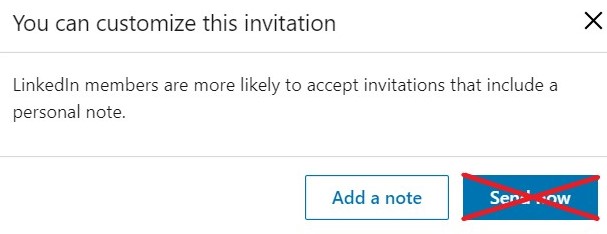
The number one rule when connecting with LinkedIn members is to send a personalized invitation. There is no deviating from this rule. To click “Send now” lacks creativity and is lazy. Instead, always choose “Add a note.”

Invite box

We’ll get into writing the proper invitation note later in the post. Let’s first look at the improper ways of connecting with LinkedIn members.

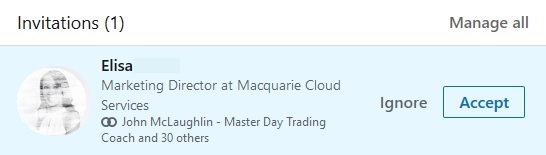
The following ways to connect will not give you the opportunity to send a personalized invitation; rather it will simply state your name and give the recipient of your invitation the option to Ignore or Accept (see below). When I receive invites like these, I click “Ignore” with no remorse.

Invite without message

Number one on the list of connecting improperly is through the feature, “Your contact import is ready” and then choosing to send mass invites to your email contacts. You’ll find this option under “My Network” on the top navigation bar.

Connecting through email

Second on the list is, “People you may know.” This option is also under “My network.” When you click Connect, your invite goes straight through to the recipient. No chance to write a personal invitation.

People you may know

Finally is connecting with someone on your mobile app by simply hitting the connect button. This, like the aforementioned ways to connect will send along the default message.

2. The Correct Ways to Connect

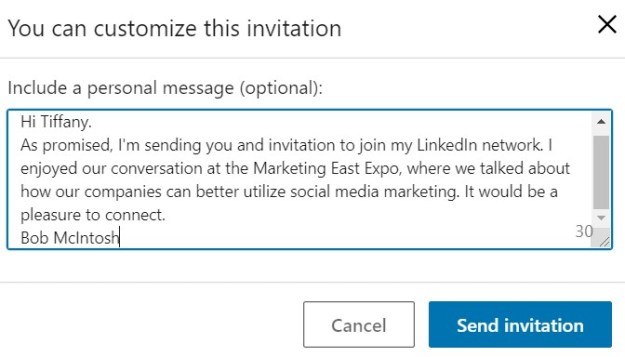
Connecting correctly means taking the time to read a potential connection’s LinkedIn profile, and then writing a personalized invitation. Following is an example of a personalized invite.

Personalized invite

You can connect with second and third degree contacts. For third degree contacts, LinkedIn hides the connect request under the three horizontal boxes beside the message box. (See below.)

Connecting with 3rd degrees

Contrary to what many believe, you can connect with the LinkedIn mobile app and still send a personalized invite. It’s tempting to simply click “Connect,” but open the person’s profile first and then select the drop-down box (seen below).

phone-invite

3. With Whom to Connect

Your LinkedIn network is your life blood. Without a strong network of people, you will not be successful on LinkedIn. If you are weary of reaching out to people you don’t know, you’ll have to get over it. I tell my clients that the only way they’ll get to know people is by inviting them to their network, or vise versa.

How Many is Enough?

LinkedIn members have opinions on how many people should be in one’s network. Some believe a smaller, more focused network is better; whereas others believe the more the better. How many people you have in your network is your prerogative.

Note: If you have less than 400 connections, you might not be taken seriously by some recruiters.

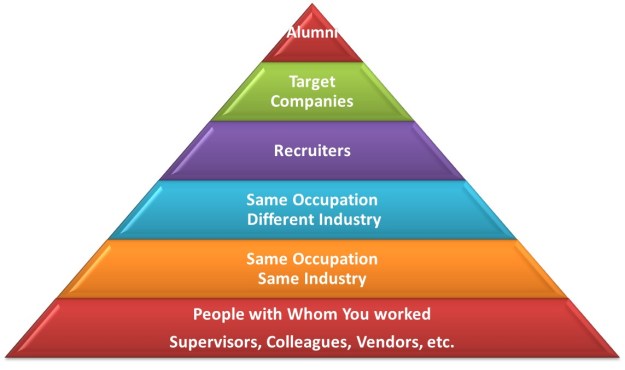
Regardless of how many people you would like to connect with, there are tiers of people you will want to approach. In the pyramid below the more important or relevant people ascend from the bottom to the top.

pyramid of connections 2

1st tier: Your former colleagues and supervisors, as well as vendors, partners, etc. Connecting with these people first makes the most sense, as they know your work and can vouch for you.

2nd tier: Same occupation, same industry. As an example, you’re an accountant in the manufacturing industry. You will search for other accountants in your industry.

3rd tier: Same occupation but different industry. They have less in common with you, but can also be of assistance. An accountant in the information technology industry may know accountants in manufacturing, and therefore can introduce you to them.

4th tier: Recruiters are an important group of people for many job seekers. I always suggest to my clients that they reach out to recruiters, as they have a pipeline of employers job seekers are unaware of.

5th tier: Target companies. People at your target companies are your quickest way to get to know important employees who work for companies for which you’d like to work. Try to connect with people at your level or a someone who might supervise you.

6th tier: Your alumni can be beneficial to you because of the bond you share. This tier of people is particularly helpful to post grads entering the workforce who need connections to certain companies.

4. Finding Potential Connections

LinkedIn is a powerful database of professionals throughout the world. Finding people will not be difficult if you know how to use LinkedIn’s features. The most obvious way to look for someone by occupation is to use “Search.” A search for Program Manager garners 1,974,989 people. (See below.)


People search, program manager

However, to conduct a more focused search, you’ll use “All Filters.

All Filters

From the diagram below, you can see I’ve searched for program managers using the following filters:

  • Title: Program Manager
  • Degree of Connection: 2nd
  • Location: Greater Boston Area
  • Company: IBM

search for program manager

This garnered 37 results to match the criteria. This is a manageable amount of people to consider connecting with.

5. How to Write Proper Invite Messages

The art of connecting with LinkedIn members is in the message you craft. There are essentially three types of messages:

The cold message: This is the most difficult to write successfully. In your message you need to provide a reason why your desired connection should join your network.

Using a reference: This message should garner success as long as the person you reference is well known and trusted by your desired connection. It’s important that your reference agrees to being mentioned in your invite message.

Asking for an introduction. A separate message, or email, from a trusted reference must be sent to the intended person. The person making the introduction must be a first degree connection with you and the recipient.

For the full article on how to send connection invites, read 3 Proper Ways for Job Seekers to Send Invites to Potential LinkedIn Connections

Read part 3 of this series.


The ultimate LinkedIn guide: part 1, optimizing your profile

This article is the first part of a three-part series that will guide you through LinkedIn.

In today’s article, we’ll look at how to optimize every section of your profile. Next, we’ll examine connecting with LinkedIn members. In the third and final part will cover ways to engage with your network connections. No one part will guarantee success in your LinkedIn campaign.

linkedin-alone

Consider this article a checklist that can help you stay on track when crafting a great LinkedIn profile. This article contains all the same checklist items I use when guiding my own clients through the process.

Brand or Message

This is more important than many people realize. If you don’t create your profile with a clear brand or message in mind, you’ll have an unfocused profile. Consider the following components of your branding strategy:

Optimizing your profile

Although keywords are not enough to raise your profile to the top of a recruiter’s search results, they are still important. Keep in mind that some areas of your profile are weighted more heavily than others when it comes to keywords — specifically, your headline and job titles.

Major profile sections

As we go through each section below, check off the ones you feel are strong. If you can’t check off some of the sections, read about how to make them stronger.

1. Background image

Your background image is your first chance to brand yourself on your profile. It is important to use a photo that is relevant to your work or what you enjoy doing. Your image should be sized at 1,584 by 396 pixels for the best results.

2. Profile photo

If you think a photo is unnecessary, you are sadly mistaken. A profile sans photo gives the impression you can’t be trusted. In addition, people won’t recognize and remember you. LinkedIn says profiles with photos are 21 times more likely to be viewed than those without.

Your photo is a huge part of your brand. You don’t have to necessarily dress to the nines for it. Just look professional and presentable.

3. Headline

Perhaps the most critical component of your branding, your headline tells readers your title and areas of expertise. Don’t scrimp on this one — it carries a lot of weight when optimizing your profile. You have 120 characters to use — make them count.

4. Hyperlinked information

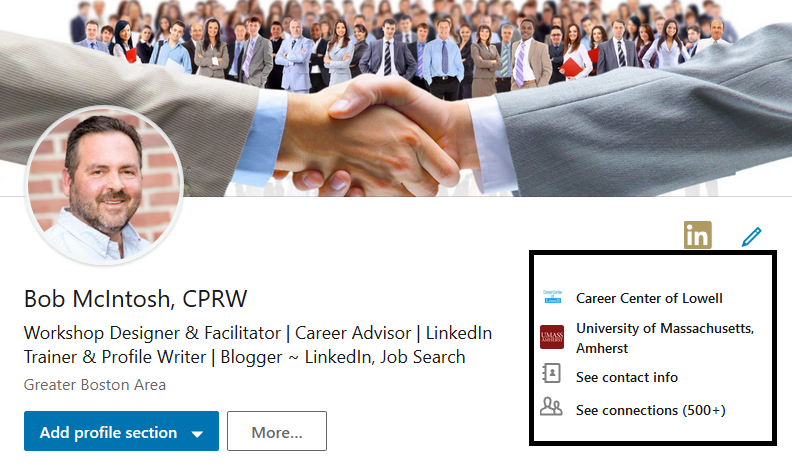
Fairly new on the scene, this is a welcome change. (See boxed section of photo below.) When they click on the information in this box, readers are brought to your place of employment, education, contact info, and/or your connections.

Hyperlink area

5. Summary

Much has been written about LinkedIn summaries, so I’m going to spare you the verbiage and simply say your summary must tell your story. It needs to articulate your passion for what you do, how well you do it, and a call to action (how you can be reached). You have 2,000 characters, so I would use as many as you can.

6. Dashboard

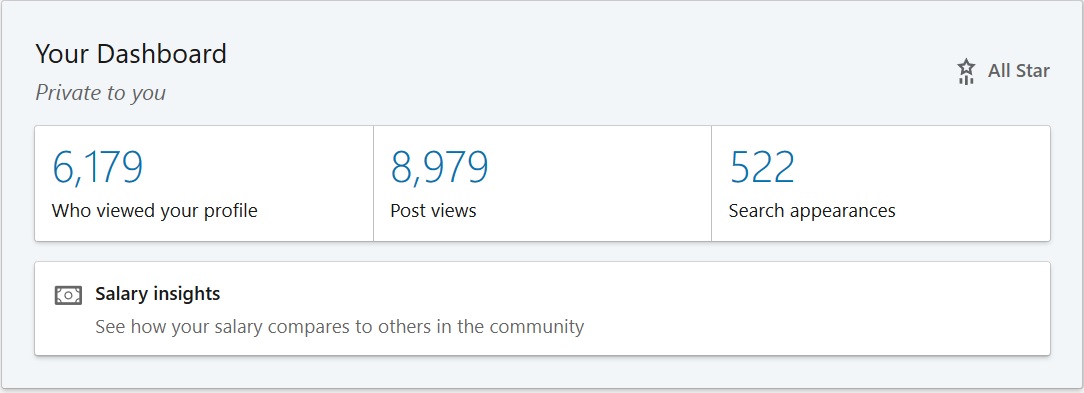
The dashboard area contains a lot of handy information: views of your profile, views of your latest post, and the number of searches you’ve appeared in. In addition, you can ask for career advice, turn on “career interests,” and check out the salary range for your position.

7. Articles and activities

This area below your dashboard is visible to everyone who visits your profile. Visitors will see how many articles you’ve written and the number of posts you’ve shared. When I see very little info in the activities section, that means the person hasn’t made an effort to engage with their network. (More on this in the third part of this series.)

8. Experience

Too often, people skimp on the details in their experience section. This is particularly the case with C-level job seekers. You don’t need to include everything, but your major accomplishments are required. Note: Your job titles carry significant weight in terms of keywords.

9. Education

Don’t be afraid to add a little more character here than you would on your résumé. Were you a D1 athlete? Mention that under “Activities and Societies.” Did you complete your degree while working full-time? Mention that in the “Description” area.

10. Volunteer experience

Don’t neglect this area. Employers appreciate people who give to their communities. This is also a section where you can showcase your personality. Your volunteerism doesn’t have to be job-related. But if it is and is extensive, list it in your experience section.

11. Skills and endorsements

You can list a total of 50 skills, and others can endorse you for those skills. Take advantage of this section, as recruiters pay attention to the number and types of skills you have. When you apply for a job through LinkedIn’s “Easy Apply” feature, the number of skills you have for the job are counted.

New Skills and Recommendations Section

12. Recommendations

Once considered one of the top features, recommendations have been relegated to the basement of your profile. Should you continue to ask for and write recommendations in light of this change? In my opinion, yes. Recruiters will continue to read them.

13. Accomplishments

One of the major blunders LinkedIn has committed is anchoring this section in the basement of the profile. I say this because important information lies within, including lists of projects, organizations, publications, and patents.

14. Interests

This section shows visitors your interests in influencers, companies, groups, and schools. Recruiters might glean some information about you, based on the groups you’ve joined and the companies and schools you follow.

Profile Extras

15. Rich media areas

Rich media areas reside in your summary (shown below), experience, and education sections. Here, you can post videos, audio files, documents, and PowerPoint presentations. See this as your online portfolio.

Media Area

16. LinkedIn publishing

LinkedIn gives you the opportunity to blog on topics of interest and share the posts with your connections. If you’re consistent in blogging, you’ll develop a following. Promoting your blog is entirely up to you. In the past, whenever you published, your connections would receive notification of your posts. Not so anymore.

17. Video

Video is becoming more important to stand out on social media. A good video must contain content that is relevant to your network. Small technical things like smiling, proper lighting and sound, and a steady camera are important.


If you are diligent about completing the sections of your profile covered here, you will be a third of the way toward a great LinkedIn campaign. Next read part 2 of this series!

This post originally appeared on recruiter.com.

2 areas where self-promotion is important for introverts

As my wife and I were driving our daughter home from a summer camp in Maine, where she was employed as a counselor, my daughter brought up a topic that is familiar with those who prefer introversion. The topic was self-promotion, which many introverts struggle with.

work

She began be telling us that she worked harder than some of the counselors, but didn’t get recognized for it. In fact, those very counselors who weren’t as effective were given praise in moments when she should have. I asked her why, and she told me that they were constantly in the ear of the supervisors, being their friend and talking about the great things they did.

I couldn’t resist the temptation to put on my Myers-Briggs Type Indicator hat and give her some advice. I told her that in the future she’ll need to promote herself better. That self-promotion comes harder to introverts because they’re not as outspoken about it.

It’s not that introverts don’t want to be recognized, it’s just that they find it awkward doing what my daughter had described about the other counselors who were getting the recognition. I emphasized to my daughter that she has to be more proactive about promoting herself in the two most important areas in her life, the job search and then work.

So how can she and other introverts promote themselves in important areas of their lives?

Job search

Writing is something with which introverts are comfortable. It allows them to process their thoughts and speak (through writing) intelligently. Therefore, their written communications will in all likelihood outshine extraverts, who are more prone to talking. Introverts are stronger when it comes to writing resumes, cover letters, and their LinkedIn profiles.

Although introverts are not as comfortable with networking as extraverts, they possess the strength of listening and asking relevant questions. Introverts also prefer smaller groups, so a buddy group might be more to their liking. When it comes to conversation, introverts would rather talk in depth than have longer more shallow conversations. It’s not that extraverts are better networkers; they don’t get overwhelmed by people as much as introverts do.

In interviews introverts tend not to be as animated and spontaneous as their counterpart. They don’t display the bravado extraverts do. However, what they lack in display of enthusiasm, they bring more preparation to the table. I recently conducted a mock interview with a client who rates 20 out of 21 points as an introvert. She defied everything I’ve just written. She came across as confident, at sometimes animated, smiled and laughed on key. Through her answers I got the sense she had researched the company and position and, as a result, was well prepared. This can be a strength of introverts.

At work

As I state in my story about my daughter, introverts need to be more “friendly” with their direct supervisors. I’m not suggesting they appear in their supervisor’s office three times a day. It’s only natural for supervisors and managers to feel well liked, so visiting them or catching them in the hallway just to talk is a good thing. The seldom encounter is not kissing up to the supervisor; it’s building and nurturing a relationship.

As mentioned earlier, introverts’ strengths lie mostly in writing. In my opinion if extraverts are going to promote themselves through oral communications, why shouldn’t introverts promote themselves through written communications. I’m speaking of email. When I accomplish something at work, I send an email about my accomplishment to my manager. Sometimes I’ll cc the director of the organization.

If introverts take this approach, they must be sure to include anyone who helped them with a project, solved a problem, provided excellent customer service. In other words, not come across as self-serving.

The direct approach is sometimes best. Introverts must also be willing to knock on their manager’s door and talk about the accomplishment they’ve achieved. They shouldn’t come across as boastful, but they should show pride in their accomplishment.

The other day I went to my manager and told her I needed more clients to counsel (showing initiative). Before she could ask why, I told her that many of my clients were landing jobs. This made me feel somewhat awkward, but I knew it was a time when I had to point out my accomplishments…in a “by-the-way manner.” It was well taken by my manager.

One bit of advice I have for introverts, as well as exraverts, is not to use meetings as a way to blatantly tout their successes. If the timing is right, introverts should mention their accomplishments, while also acknowledging a team effort. Anyone who talks in “I” terms only comes across as self-centered. Eyes will start to roll when this happens.


Perhaps it’s the awkwardness of self-promotion that prevents introverts from getting promoted more often than extraverts. Introverts make excellent workers, as my daughter illustrates; but they don’t get the recognition, again as my daughter illustrates. I hope in the future she learns how to be more forthcoming with her accomplishments.

Photo: recruiter.com


Should Candidates Send a LinkedIn Invite to Recruiters after the First Interview?

A client of mine recently asked if she should send an invitation to a recruiter to join her LinkedIn network. After the first interview. I thought for a moment and said, “Why don’t you wait until the process is complete. If you get the job, send an invite. If you don’t get the job, still send an invite.”

laptop

To confirm the advice I gave my client was sound, I thought of asking recruiters what they thought. So I turned to the Facebook group, Recruiters Online. What I expected was a firm “nay” on candidates sending a LinkedIn invite after the first interview.

What I got was the exact opposite. In fact, approximately 98% of the recruiters were in favor of candidates sending them a LinkedIn invite after the first interview. One recruiter wrote, “What’s the problem?” As if saying, “This is a dumb question.” Dumb as it may be, I was a bit taken aback.

These recruiters reminded me that what’s important in any situation is building one’s LinkedIn network. Here are just a few of the answers I received from approximately 70 recruiters who weighed in.

Kendra Saddler,I usually sign off a promising screening call with, ‘Hey good talk, whatever happens, let’s keep in touch, I’d be honored to accept your Linked invitation.”

Michele Vincent, “If I was interviewing candidates other than skilled trades workers, I would expect [a candidate sending me an invite] and appreciate this — especially if I was interviewing for a marketing or sales position.”

Wendy Donohue Mazurk, “Obviously [I appreciate an invite] as I am interested in them or we wouldn’t be speaking. I also would send them one. Isn’t that the point of LinkedIn?”

Glenn Gutmacher, “If I’m interested in a candidate and we’ve gotten to the interview stage, that candidate wants as much insight as possible into 1) my company (e.g., see which relevant hiring managers I know) and 2) in case it doesn’t work out, [I can refer them to] outside companies who may have similar roles.

“Conversely, I’m appreciative because that candidate’s network should be chock-full of relevant talent for similar roles, and I’ll get a lot more potential candidates by perusing their network.”

Scott Axel, “Yes, and I find it professional and a good sign to indicate actual interest in the role.”

Nick Livingston,I consider it the modern ‘Thank you, our conversation was worth the time and regardless of what transpires in the short term, you’re someone worth keeping in touch with’.”

Julie Lynn, “I definitely connect with people that are interviewing with my clients whether or not they get the job.”

A Leigh Johnson, “They can invite but I probably won’t accept it until our business concludes, positive or negative.”
Jennifer Sherrard,I would expect it if I haven’t already connected with them.”

Steve LowiszAccepting a LinkedIn invite from a candidate you interview shows you are actually interested in people and not just going through the motions. If the candidate gives you the time to interview the least you can do is show some level of gratitude and accept their invitation—even if the are not the right fit. It’s a small world and people know other people.”


These are just some of the comments I received from my innocuous question, so I thought. Some of the respondents were polite in their answers, while others considered the question “crazy,” as one person wrote.

From now on when my clients ask me if they should send a LinkedIn invite to a recruiter after the first interview, I’ll confidently tell them that more than 70 recruiters I polled said to do it. What more proof do I need?

Photo: recruiter.com

Use “Alumni” to connect with your alumni with 3 steps

Every year, I have the honor of critiquing my fellow alumni’s LinkedIn profiles. The event takes place on the 32nd floor of a building that overlooks Boston, where the alumni and current students of my alma mater come dressed to the nines and ready to get their profiles critiqued.

caps

One thing that immediately grabs my attention is the size of a person’s LinkedIn network. In many cases, the number is quite low. When I ask the participants why, most say it’s because they have just started using LinkedIn. They ask with whom they should connect and how.

In a previous post, I explained the who and the how of connecting on LinkedIn, in which I stated your fellow alumni were at the top of the pyramid of connections — meaning this was the lowest tier of potential connections. But for current students or recent grads, the alumni network can actually be the key to building a successful network on LinkedIn.

To help you connect with other alumni from your school, LinkedIn has a neat feature called “See Alumni” (formerly “Find Alumni”) which is located on your alma mater’s page.

Here is the process of getting to this feature when you need it:

  1. Type your school’s name into LinkedIn’s search field.
  2. Select your school.
  3. Click “See Alumni.”

1. Using the ‘See Alumni’ Feature

Assuming you haven’t made any connections with alumni from your school, you’ll want to change that right away. Your fellow alumni are probably currently employed, and they may know of opportunities — or at least people with whom you can connect. Don’t ignore older alumni who may have attended your alma mater before you!

First let’s find it. Go to your school’s LinkedIn page by typing it in in the Search field. And choose Alumni at the far left.

UMass Page

Now, look at the section titled “How you are connected” on the right-hand side of the screen. You will most likely see that you have few, if any, first-degree connections. That’s alright — we’re going to focus on your second-degree connections.

Select your second degrees by clicking on the appropriate bar. The screen will shift to only show you information about your second-degree connections.

You can narrow down the results even further by using the other categories — “What they are skilled at,” “What they studied,” “Where they work,” etc. (See above screenshots.) For example, I have 7,774 alumni in my second-degree connections, but I can narrow my results down to a much more manageable five people if I set each category to the following:

– What they are skilled at: Social media
– What they studied: Marketing
– What they do: Media and communications
– Where they work: Boston Ballet
– Where they live: Greater Boston Area

2. Connecting With Fellow Alumni

One of the advantages you have when connecting with fellow alumni is the common bond you share through going to the same school. You’ll want to mention this when you personalize your invitation.

Under no circumstances should you send the default LinkedIn invite; that’s plain laziness. Instead, you should write the kind of personalized, professional note LinkedIn members expect from each other. To write a truly personalized note, be sure to read through a person’s profile before sending off your invitation!

Here’s an example invitation:

Dear Mr. Schmidt,

As you’re an alumnus at the University of Virginia and are in the field of marketing communications, I’d like to take this time to reach out and invite you to my network. Feel free to contact me if I can be of any assistance.

3. Completing the Process

Your new invite accepts your personalized invitation because both of you share an interest in social media and, most importantly, are alumni of the same school.

Where many people fall down in the process is not following through. In your message, you offered assistance, so stay true to your word by contacting Mr. Schmidt via email when he accepts your invite.

Prepare a list of questions you’d like to ask Mr. Schmidt regarding the line of work he does. Make them intelligent questions — don’t waste his time. Ask him if he might know of anyone with whom you could also speak.


As I explain to the alumni and current students of my alma mater, the process of building relationships can be a long one, but developing long-lasting relationships is the key to their future success. Your fellow alumni can definitely be a secret weapon for networking on LinkedIn, so be sure to utilize the “See Alumni” feature!

This post originally appeared on recruiter.com

Photo: recruiter.com

3 ways job seekers will be found on LinkedIn

I’m often asked by my clients how they can be found by recruiters on LinkedIn. That’s a great question, and contrary to what my job seekers think, optimizing your profile with keywords is not enough. Sure, having a profile that contains the proper keywords is important, but being found by recruiters takes more commitment than that.

Found


What we’re talking about is your ranking on LinkedIn — that is, how high up you appear in search results when recruiters look for people like you. The higher you rank, the more likely it is that recruiters will contact you.

The recruiters with whom I have spoken about this say they rarely look beyond the fourth page of results. At 10 profiles per page, that means recruiters will only look at the first 40 profiles. If you’re below No. 40, you’re probably not getting a call.

So, how do you improve your rank? There are three factors at play.

1. Keywords matter, but they’re not everything

You do need to include the right keywords throughout your profile, but according to LinkedIn, the balance of keywords matters more than abundance. In other words: Don’t stuff your profile with repeated words, as this is considered spamming.

According to LinkedIn itself:

More keywords aren’t always better. Our advice would be to avoid overfilling your profile with keywords and only include the keywords that best reflect your expertise and experience. If you integrate an extended list of keywords into your profile, it’s likely that your profile will be filtered out by our spam detection algorithms, which will negatively impact your appearance in search results.

Where do keywords matter most? Every keyword is important throughout your profile, but the areas weighed heavier than others are the Headline and titles of your positions in the Experience section.

So, yes, keywords are important, but take LinkedIn’s advice and don’t overdo it.

2. Maintain an extensive network…with the proper people

You are deemed more relevant to a search — and thus ranked higher in the results — if you are connected to the searcher. Here’s how LinkedIn explains it:

The more connections you have, the more likely you will have a connection to the searcher. Closer connections, such as a 2nd-degree connection compared to a 3rd-degree connection, improve the likelihood your profile may appear in searches.

The more people you have in your LinkedIn network, the more connections you have. The more connections you have, the more likely it is that you will have some connection to a searcher who is looking for someone like you.

Keep in mind we’re talking about connecting with the proper people — people who will actually be meaningful members of your network. You don’t have to accept every invite you receive just to build a network.

You can see how many searches you’ve recently appeared in by visiting your profile’s dashboard. When you click on the number, you’ll see where the searchers work, which occupations they hold, and the keywords they searched.

dashboard

This last bit of information can be valuable, as you’ll get a sense of whether you’re using the proper keywords to brand yourself.

It’s also important to note the number of people who visit your profile, as this will give you an idea of your LinkedIn presence. You can find this number on your homepage under your headshot, as well as in your profile’s dashboard.

3. Engage with your connections

LinkedIn is a professional networking site. As such, LinkedIn wants you to network with like-minded people. A safe number of interactions on LinkedIn is twice a day, four times a week.

I suggest to my LinkedIn workshop attendees that they engage with their connections daily. This suggestion is, in part, to set the bar high but also because the more often you’re seen, the better chance you have of getting contacted by hiring authorities.

Participate in discussions, create your own discussions, share articles, write articles, ask questions, and provide tips about your industry. The most obvious way to engage with your connections is by writing direct messages. You can include as many as 50 people in a group message; although one-on-one messages are more intimate.

Read: 6 ways to be engaged on LinkedIn, not just active.

This aspect of your LinkedIn campaign is often overlooked. Many people believe that “set it and forget it” is the approach to take — that a great profile alone will draw people to them. Or to amass a ton of connections will do the trick. Both are important, but more engagement on LinkedIn is also essential to improving your search results.


In the end, note that LinkedIn’s algorithm for search appearances isn’t an exact science. LinkedIn writes:

Unlike standard search engines, we generate relevance uniquely for each member. The order of a search result is determined in part by the profile, activity [engagement], and connections of the person who is searching.

If you want to be found on LinkedIn, you must create a complete profile containing the proper keywords, develop a strong network to engage with, and stay active on the platform. If you do this, you’ll appear higher when recruiters search for someone with your experience and talents.

This post originally appeared on recruiter.com.

6 ways to be engaged on LinkedIn, not just active

For many years I’ve been telling job seekers that engaging with their LinkedIn network is one of the three important pieces required to be successful using this professional online networking platform. I explain that simply being active is not as effective as engaging; there are differences.

Being Polite

An analogy comes to mind: you’re being active if you’re simply showing up for a party you were encouraged to attend. You nod hello to the people there and have superficial conversations. You know the feeling; you don’t really want to be there.

Carrying the analogy further; you arrive at a party, immediately greet everyone with enthusiasm, make some small talk with five or six people, then join a group of people who are deep into conversation about a current event. You add your input when appropriate. The conversation stirs some emotion in you. You are engaged.

Being active vs. being engaged

It’s possible to be active on LinkedIn, while not being engaged. We’ll look at certain activities that illustrate this. The first two examples are reacting to what others post.

1. Liking what others write

Active—Many have complained that just Liking an update and not commenting on it is not enough. I’m guilty of doing this on occasion, leaving me with a feeling of being lazy. It’s so easy to press that Like icon and not giving the post another thought. This is the ultimate example of simply being active, not engaged.

Engaged—To be engaged, you must read the post, interpret it’s message, and then Comment on said post. Do this first and then Like it. The poster will appreciate that you took the time to read their post. This can lead to further communications between you and the poster.

2. Writing comments

Active—You Liked an update and wrote a comment, but your comment just didn’t have the oomph the “author” deserved. Here’s an example: “Great post, Susan. Thanks.” This shows very little engagement and makes the poster wonder what you really thought about the post.

Engaged—When you’re engaged, you elaborate further and demonstrate that you read the post, processed it, and respond to it in detail. For example:

“Great post, Susan. Your statement about a company lacking a social media campaign being akin to living in the dark ages really resonated with me. Facebook, Twitter, LinkedIn, Instagram, and other platforms can create that ‘like, know, and trust’ relationship between the company and its’ customers. You’re also correct in stating that all platforms should be connected, as well as linked to and from the company’s website.”

Note: always remember to tag a person with @name so they will be notified in LinkedIn’s Notifications. I was scolded once for not doing this.


The next examples of engagement are being proactive, rather than reacting to what others share.

3. Sharing posts

Active—Sharing posts for the sake of sharing posts is being active. Your connections will see what you’ve shared, but if the content is shallow and provides no value, your posts will not leave an impression on your connections. You won’t get the Likes you so desire.

Engaged—To stay top of mind, your shared posts must show engagement. LinkedIn encourages you to share an article, video, photo, or idea. Take the opportunity to engage with your network by providing valuable content to them; content that elicits responses. A sign that you’ve succeeded would be the number of Likes and, more importantly, Comments you receive.

One type of update I find successful is asking an illuminating question. If you’re going to do this, be diligent in replying to your connections’ and followers’ responses. Failing to reply to your connections who answer your question does not demonstrate engagement. I am impressed with people who take the time to answer every reply they receive. I try to reply to all the feedback but, alas, I am only human.

Now would be a good time to mention hashtags (#) which are used to categorize certain topics, such as #LinkedIn, #OperationsManagement, #Wellness, #Marketing, #SocialMedia, etc. Read this article to understand hashtags better.

4. Sharing articles

Active—Sharing articles without explaining why you’re sharing it is an example of being active on LinkedIn. Some people will share an article and leave it at that. I’ve been guilty of doing this and feel lazy when I do it. For the most part, I go a step further.

Engaged—Going a step further means you share others’ articles with a short synopsis on the message it delivers, showing engagement. This says, “I’ve taken the time to read the article, understand its meaning, and will elaborate on it for the benefit of the readers.”

5. Writing and sharing your articles

Active—Using LinkedIn’s Write an article, feature is a great way to demonstrate your expertise. However, using this feature to advertise an event or for promotional purposes is being active. You’re not thinking about the value, or lack thereof, your article holds.

Engaged—Writing an article with unique and fresh content takes engagement; it shows you’ve considered what your audience would benefit from. My primary audience is job seekers and career coaches, so I write articles focusing on the job search and using LinkedIn in the job search. I know I’ve been successful when people react to what I’ve written.

Note: refrain from only sharing your own articles. This gives off the sense of superiority.

I include creating and sharing videos under being engage. This is a fairly new concept—probably a year old by now—but it’s catching hold among LinkedIn members. If you are going to share videos, make sure you’re consistent and produce videos your network will appreciate.

6. Sending direct messages

Active—The “One and done” message is the ultimate example of being active. Sure, you’re going through the process of writing to your new connection, but there’s no intent to develop the relationship. An example is, “Hi Claudia. It’s great being connected. Perhaps we can be of mutual assistance.” That’s it; there’s no interaction beyond this. Sound familiar?

Engaged—On the other hand, if you send the initial message and reply back to the recipient. Or if you continue to send messages but the other person doesn’t respond, there are two thoughts. First, you are trying to engage with your connection. Second, take the hint and stop sending messages.


Going beyond

Engaged—I’m brought back to the party analogy, where the person simply shows up and makes no effort to engage. I’m talking about going beyond the conversations you have with your LinkedIn connections. Yes, they constitute engagement; but there’s no effort to solidify the relationship.

Truly engaged—To truly show engagement, you must follow up with your connections. I have developed many relationships by reaching out to them via telephone, if they live a distance away, or meeting them, if they don’t live that far away. One of my connections and I had been exchanging discussions via LinkedIn. Yesterday we had our first phone conversation. Although we will not do business together, it was great finally “meeting” her on the phone.

Photo, Flickr, www.flickr.com/photos/jfravel

5 pre-interview tools employers use to screen candidates

You’re probably aware of the order in which employers attempt to fill a position. First, they consider their own employees; second, ask for referrals from their employees; third, seek referrals from trusted people outside the company; fourth, hire recruiters; and lastly, advertising the position. Or they use a combination of all of these.

pre-employment test

There are many reasons why employers prefer not advertising an open position, including the cost to advertise, having to deal with a deluge of résumés, and interviewing people they don’t know.

In many cases advertising their position/s is unavoidable because all other methods of filling them have failed. Thus, they resort to tools to make sure they get the most qualified people entering their doors. You need to be aware of these tools.

Applicant tracking systems (ATS)

This is the beginning of the hiring process from the candidates’ experience. The ATS eliminates approximately 75 percent of the applicants for a single job. It is a godsend for recruiters and HR, who are overburdened with résumés to read.

To be among the 25 percent that pass the ATS, you’ll have to write a résumé that is keyword rich. Unfortunately many candidates don’t know about the ATS and don’t optimize their résumés. I’m astounded by the number of people who come through our career center unaware of the ATS.

Your best bet is to write keyword-rich résumés that are tailored to each job. Instead of using the spray-and-pray approach, be more focused on positions that are a fit and dissect job descriptions to identify the most important skills and experience required.

Jon Shields of www.jobscan.co explains the ATS in great detail in this post.

Pre-employment aptitude and personality tests

Employers have come to rely on aptitude and personality tests that can determine the candidates who’ll advance in the hiring process. Some employers will swear by them, believing that the software can do a better job of screening individuals than their own HR and recruiter.

Employers use pre-employment tests because they are objective and fair across the board—each candidate answers the same questions—and they’re a good indicator of job-related skills. These tests also measure character traits like integrity, cognitive abilities, emotional intelligence, etc.

Where these tests fail is measuring candidates’ motivation to learn job-related skills. This means if you aren’t completely proficient in a certain CRM software, for example, your ability to learn quickly isn’t factored in.

These tests can also encourage dishonesty. For example, you might get the sense that the test encourages outgoing, extraverted types; but you’re preference is for an individualistic work setting. Ergo, your answers won’t truly reflect your personality.

This article talks about the most common types of pre-employment tests.

Telephone Interviews

Hardly new, the telephone interview is typically the first type of interview you will encounter to get to the face-to-face interview. The interviewer has two main objectives: getting your salary requirement and determining if you have the job-related skills to do the job.

However, you need to expect not only the aforementioned questions, but more difficult questions, such as situational and behavioral-based. Telephone interviews have also become more numerous. It’s not uncommon for someone to participate in three or more telephone interviews.

LinkedIn’s report, Global Recruiting Trends 2018, states that telephone interviews are considered the least favorable out of the structured interview. This is probably due to the fact that phone interviews are conducted by agency recruiters who may know little about the job requirements and desired fit; thus producing less qualified candidates.

Skype interviews

Skype interviews are common these days. Employers use them to save time and, ultimately, money. As well, interviewers get to see your facial expressions and body language. They are akin to face-to-face interviews, save for the fact that candidates aren’t invited to the company. This means candidates must nail the following areas:

  1. Stellar content and demonstrated enthusiasm through your answers and body language.
  2. Professional attire. Dress as though you’re going to a face-to-face interview.
  3. All the mechanics are in check, such as lighting, sound, and background.
  4. Look at the webcam, not at the interviewer/s. Looking at them will make it seem like you’re not making eye contact.

Skype interviews may, in fact, be the final interview, which makes it even more dire for job candidates to be prepared for them. This is particularly true if interviewers are situated all over the world.

Don’t be surprised if an employer wants to conduct a Skype interview with you. One of the areas I didn’t mention is learning how to set up a Skype account. My efforts in setting up mine was frustrating, as I had a hard time figuring out how to access the free version.

Video interviews

Skype interviews can not only be challenging for candidates, they can also be time consuming for the employer, as it requires them to participate. Video interviews, on the other hand, don’t require employer participation, until the interviews are watched and graded.

Job candidates are given a number of questions to answer and are timed during the session. At no point do they see the interviewer/s, unlike a Skype interview. My clients who have participated in video interviews say it’s like talking to a wall.

This might be a bit unnerving, but don’t let it rattle you. Have you ever answered interview questions while looking in the mirror? Think of it this way and you’ll be fine. One more thing, look at your computer’s webcam while answering the questions, just as you would for a Skype interview.

Matthew Kosinski from www.recruiter.com. rates the top five video interview platforms in this post.


There you have it: 5 tools employers use to determine who to invite for a face-to-face interview. No method of hiring the right person is flawless, but employers feel like they’re making strives to accomplish landing the best candidate. It is up to you to do well in every aspect of the process.